
Neon Startup Credits: $500 in credits
Serverless PostgreSQL with autoscaling, branching, and a generous free tier. The modern database for startups.
Premium deal
Already have an account? Log in
Deal Highlights
Our Neon listing: $500 in credits
Offer: $500 in credits. Our listing's requirement is "Early-stage startup building on PostgreSQL". There is no promo code. The listing links to Neon's own startup page at neon.com/startups, so you apply with Neon directly.
We checked these plans and prices against Neon's official pricing and help pages in November 2026.
Neon is serverless Postgres. Compute suspends when nobody is querying and resumes on the next query, and a database can be cloned as a copy-on-write branch. This page covers the plans, the per-unit rates, the startup program and some worked math on how long $500 lasts.
Neon's own program can give more. Neon's startup page describes a "Databricks Startup Program". Self-funded startups with under $1M raised can get "up to $1,000 in Neon credits". Venture-backed startups with $1M or more raised, or accepted into a recognized accelerator such as Y Combinator, can get "up to $200K in Neon and Databricks credits". Neon says the exact amount depends on stage and funding. Our listing says $500. Treat that as our listing's term and confirm the number in your acceptance email. If Neon offers you more directly, take the larger one.
Neon is now tied to Databricks
Neon announced on May 14, 2025 that it would join Databricks. Databricks' press release of the same date says it "announced its intent to acquire Neon", subject to customary closing conditions. Neon's post says "Neon isn't going anywhere" and that the team will keep building. Neon's startup page now carries the Databricks name, and its footer says Neon is part of the Databricks Platform.
Free is permanent, with a 100 CU-hour cap per project
Neon's pricing page says the Free plan costs $0 a month, is permanent rather than a trial, and needs no credit card. The limits per project:
- 100 CU-hours of compute per project
- 1 GB of storage per project, with a 20 GB total across the account
- 100 projects
- 10 branches per project
- Autoscaling up to 2 CU (8 GB of RAM)
- Scale to zero after 5 minutes, which cannot be turned off
- 5 GB of public network transfer per project
- A 6-hour history window for restores, limited to 1 GB of change history
- Community support
A CU is a compute unit. Neon's docs say each one allocates approximately 4 GB of RAM plus associated CPU and local SSD. A 1 CU compute that stays awake for one hour uses 1 CU-hour, so 100 CU-hours is about 100 hours of a 1 CU compute.
Neon's plans doc says that when you run out of CU-hours or public network transfer, your compute is suspended "until the next billing period or until you upgrade". Data is not deleted. Operations that increase storage fail once you reach 1 GB per project or 20 GB total, and branch creation fails at 10 branches.
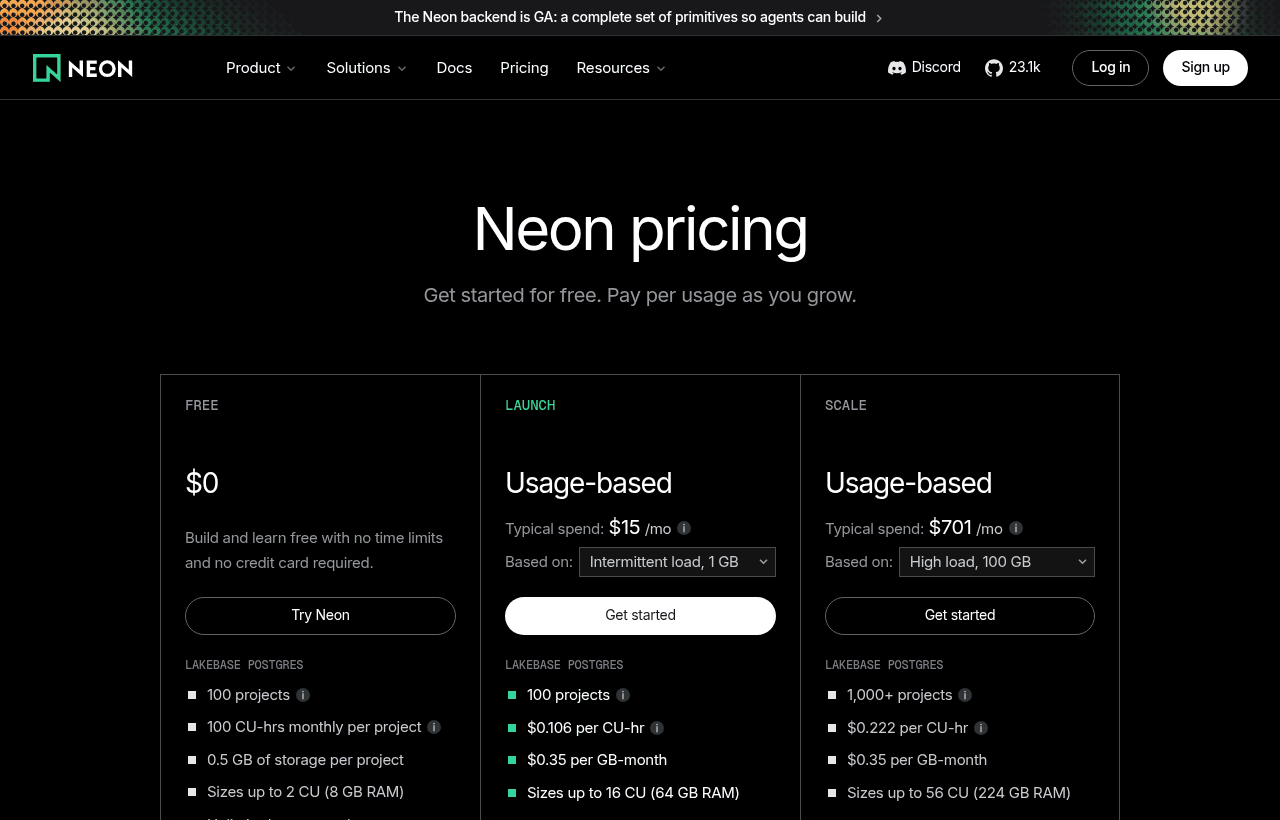
Launch and Scale have no monthly fee, only meters
Neon's paid plans are pay-as-you-go. They are metered hourly and billed at the end of the month. The pricing page says "no monthly minimum" and no per-project fee. Invoices under $0.50 are not collected. Plans apply per organization. The page shows no separate yearly price.
| Item | Free | Launch | Scale |
|---|---|---|---|
| Compute | 100 CU-hours per project included | $0.106 per CU-hour | $0.222 per CU-hour |
| Storage | 1 GB per project (20 GB total) | $0.35 per GB-month | $0.35 per GB-month |
| Projects | 100 | 100 | 1,000, can be raised on request |
| Branches per project | 10 | 10, extra $1.50 per branch-month | 25, extra $1.50 per branch-month |
| Autoscaling | Up to 2 CU | Up to 16 CU (64 GB RAM) | Up to 16 CU, or fixed up to 56 CU (224 GB RAM) |
| Scale to zero | 5 min, fixed | 5 min, can be disabled | 1 minute to always on |
| History window | 6 hours | Up to 7 days | Up to 30 days |
| Instant restore | Not available | $0.20 per GB-month | $0.20 per GB-month |
| Public egress | 5 GB per project | 500 GB per project, then $0.10 per GB | 500 GB per project, then $0.10 per GB |
| Support | Community | Billing support | Standard, Business or Production |
| Uptime SLA | No | No | Yes |
Neon's own estimates, for Postgres compute and storage only, are $15 a month on Launch for an intermittent load of 140 CU-hours and 1 GB, and $353 a month on Launch for 3,000 CU-hours and 100 GB. The same loads come to $31 and $701 on Scale.
What Free leaves out
- Compute beyond 100 CU-hours per project, and autoscaling above 2 CU
- Instant restore and scheduled snapshots
- More than 10 branches per project
- A history window longer than 6 hours
- Egress beyond 5 GB per project
- Spending notifications, protected branches, and metrics and logs export
- The option to turn off scale to zero, IP Allow rules and Private Networking
- HIPAA, SOC 2 and the uptime SLA, which the plan table lists for Scale
- Paid support, since Free is community only
One inconsistency on the pricing page: it says all plans are "SOC 2 audited", while the plan table shows SOC 2 as "Available" only on Scale. If a customer questionnaire asks for a SOC 2 report, ask Neon which plan includes it.
Scale to zero and the cold start
Neon's docs say compute "automatically scales to zero after 5 minutes" of inactivity and resumes "within a few hundred milliseconds" on the next query. You pay only for active time. On Free the 5-minute setting is fixed. On Launch you can disable it, and on Scale you can set anything from 1 minute to always on. Only computes up to 16 CU are eligible. Larger ones stay awake. Logical replication out of Neon also keeps the compute active while subscribers are connected.
The docs we read do not say what happens to the cache or session state on suspend, so test your app's first request after idle before launch.
Branches are copy-on-write clones
Neon's branching doc describes a branch as "a copy-on-write clone of your data" that can be created from a current or past state. Writes are stored as deltas, a branch is isolated from its parent, and creating one does not add load to the parent. Each project starts with a root branch named main.
The docs list several branch types:
- Standard data branches, which carry the parent's data up to the branch point
- Schema-only branches, meant for sensitive data
- Expiring branches, created with a time to live and deleted automatically, aimed at CI/CD and automated tests
- Restore branches, created from a past state for recovery or analysis
You can also reset a branch from its parent, run instant restore to roll a branch back inside the history window, and run Time Travel queries against a past state. Neon Auth data, Object Storage, Functions and AI Gateway branch along with the data. Launch and Scale projects can hold up to 5,000 branches, but only 10 or 25 are included. Extra ones cost $1.50 per branch-month.
The history window is set under Settings, then Postgres. The default is 6 hours on Free and 1 day on paid plans, with a maximum of 7 days on Launch and 30 days on Scale. Longer windows raise storage cost.
How far $500 goes: three worked examples
These use Neon's published Launch rates. We treat the $500 as our listing's term, so read "if it applies" before each result. Neon's own program may give more.
A small app that sleeps most of the day
Take Neon's own intermittent profile: 140 CU-hours and 1 GB of storage in a month.
- Compute: 140 x $0.106 = $14.84
- Storage: 1 x $0.35 = $0.35
- Total: $15.19 a month
If the $500 applies and covers the whole bill, that is 500 / 15.19 = 32.9 months of cover. In practice Neon's credit is valid for 12 months from acceptance, so you would use about $182 (12 x $15.19 = $182.28) and the rest would lapse. On Free this same app would cost $0 as long as it stays under 100 CU-hours, so credits only matter once you pass the Free caps.
A busy production database
Use Neon's heavy profile: 3,000 CU-hours and 100 GB.
- Compute: 3,000 x $0.106 = $318
- Storage: 100 x $0.35 = $35
- Total: $353 a month on Launch
If the $500 applies, it covers 500 / 353 = 1.4 months. The same load on Scale is 3,000 x $0.222 = $666 plus $35 = $701, so the credit lasts 0.7 months. At this size the credit is a nice head start and nothing more.
A team with many preview branches
Say one Launch project has 30 branches, 5 GB of history for instant restore, 600 GB of egress, 200 CU-hours and 10 GB of storage.
- Compute: 200 x $0.106 = $21.20
- Storage: 10 x $0.35 = $3.50
- Extra branches: 20 x $1.50 = $30 (full month assumed)
- Instant restore: 5 x $0.20 = $1
- Egress: 100 GB over the 500 GB included x $0.10 = $10
- Total: $65.70 a month
Over 12 months that is $788.40. If the $500 applies, it covers about 7.6 months of this setup (500 / 65.70). Branch fees are the item to watch. Expiring branches with a short time to live keep that line small.
Neon next to Supabase, PlanetScale and Xata
All four sell Postgres or Postgres-compatible databases, but their pricing models differ. Figures come from each vendor's own pages as we read them in November 2026.
| Neon | Supabase | PlanetScale | Xata | |
|---|---|---|---|---|
| Free plan | Yes, 100 CU-hours and 1 GB per project | Yes, 500 MB, 2 active projects | No | Free trial only |
| Entry paid price | Usage based, no monthly minimum | Pro from $25 a month | Postgres from $5 a month | Usage based, $0.012 per hour micro instance |
| Storage rate | $0.35 per GB-month | Disk $0.125 per GB | Varies by cluster | $0.28 per GB-month |
| Idle behavior | Scales to zero | Free projects pause after a week of low activity | Not covered here | Not covered here |
Supabase bundles auth, storage, edge functions and realtime next to Postgres. Its Free plan pauses projects after a week of inactivity, which is not the same as Neon's minute-scale suspend. PlanetScale has no free plan and sells fixed clusters. Xata has no free tier on its managed cloud and bills storage by the minute.
Pick Neon when branching and idle-time savings matter most. Pick Supabase when you want one vendor for the backend.
Who this fits
- A solo founder or two-person team on Postgres who wants a database that costs $0 while the product has no users
- Teams that give each pull request its own database copy, since branching is the core feature
- Apps with long idle periods, such as internal tools or side projects, where scale to zero cuts the compute bill
- AI agent products that create many short-lived databases. Databricks said in its release that over 80 percent of the databases provisioned on Neon were created automatically by AI agents rather than humans
Who Neon is not for
- Teams that need a full backend with auth and file storage from one vendor, where Supabase is a closer fit
- Products that cannot accept a few hundred milliseconds on the first query after idle, unless you pay for Launch or Scale and disable scale to zero
- Teams that need SOC 2 or HIPAA on Launch. Neon's plan table lists both for Scale only
- A startup whose plan is to stay on Free forever. You do not need credits for that
Neon setup tips
- Start on Free, and move to Launch only when you hit 100 CU-hours, 1 GB or 10 branches
- Set the autoscaling minimum low and the maximum to what your busiest hour needs. Neon's docs cap the autoscaling range at a difference of 8 CU between minimum and maximum
- Use expiring branches for CI so test branches clean themselves up
- Watch egress. Free includes 5 GB per project, and paid plans include 500 GB per project before $0.10 per GB
Claiming the Neon offer, step by step
- Go to neon.com/startups, the page our listing points to.
- Select "Apply Now" and agree to the Terms of Use and Privacy Notice.
- Choose the self-funded route if you raised under $1M, or the venture-backed route if you raised $1M or more or are in a recognized accelerator.
- Wait for the review. Neon says it typically replies within a few business days.
- If you already have a Neon or Databricks account, Neon says approved credits go to your current account.
- Note the 12-month validity from the date of acceptance and plan your usage inside it. After the credits run out, your account continues on your plan with normal billing, and there is no commitment to stay.
Both startup tiers include onboarding support from the Neon product team and early access to new features. Venture-backed startups also get speaking and co-marketing opportunities.
Who Is This Deal For?
Early-Stage Startups
Seed and pre-seed companies looking to move fast without overspending on tools.
Growing SaaS Teams
Series A+ companies scaling their stack and optimizing software costs.
Solo Founders
Indie hackers and bootstrapped founders who need enterprise tools at startup prices.
Get $500 in credits off Neon
Premium deal. Upgrade once, unlock everything.
!Eligibility Requirements
Early-stage startup building on PostgreSQL
How to get the Neon deal
- The offer: $500 in credits, for early-stage startup building on PostgreSQL.
- Create a free SaaSOffers account, then upgrade to Premium ($79 a year, or $250 once for lifetime access). Premium unlocks every Premium deal on the site.
- Open the Neon claim page from this deal. It shows the partner link, any promo code and the exact steps Neon asks for.
- Apply or sign up through that link before you pay Neon directly, since most startup offers only apply to new accounts.
Frequently Asked Questions
Everything you need to know about this startup deal.
Get the weekly deals digest
New verified startup deals every week. No spam, ever. Unsubscribe anytime.
Related Offers

Retool
Used by 1,559 members
1 year free, up to $60K
Build internal tools 10x faster with the low-code platform used by companies like Amazon, DoorDash, and Mercedes-Benz.
View offer
Replicate
Used by 1,772 members
$500 in credits
Run open-source ML models in the cloud, deploy Llama, Stable Diffusion, and custom models via API without GPU management.
View offer
ZoomInfo
Used by 2,014 members
Free Trial
B2B data platform for sales and marketing intelligence with contact databases.
View offer
Chore
15% off your first month
Chore runs your startup's back office for you: payroll, HR, bookkeeping, compliance and equity, inside the tools you already use. 15% off your first month through SaaSOffers.
View offerDeal Summary
Looking for more startup deals?
Browse all offers