
Xero Promo Code: 3 months free
Get 3 months of Xero free. The cloud accounting software that makes bookkeeping, invoicing, and payroll easy for growing startups.
Free · Opens in new tab
Already have an account? Log in
Deal Highlights
What Is Xero?
Xero is the world's leading cloud-based accounting software for small businesses, used by over 3.5 million subscribers globally. Founded in New Zealand in 2006, Xero provides double-entry accounting, invoicing, bank reconciliation, expense management, payroll (in supported countries), and financial reporting. In a modern, browser-based interface that non-accountants can actually navigate.
In 2026, Xero is the accounting platform of choice for startups and small businesses in the UK, Australia, New Zealand, and increasingly the US and Canada, particularly those who want real-time financial visibility, clean data for accountants and investors, and integrations with the other software their business uses.

Xero, one of the tools included in this startup deal.
Why This Deal Is Critical for Startups
Accounting is not optional, it's the legal and operational foundation of a business. But doing accounting in spreadsheets creates serious problems: no real-time financial picture, no audit trail, errors that compound, and an accountant who spends 3x as long cleaning up data instead of providing strategic advice.
Xero gives early-stage startups professional accounting infrastructure from day one. The same platform their accountant is likely familiar with, producing clean books that prepare them for investor due diligence, tax obligations, and financial decisions made from real numbers rather than estimates.
What's Included in the Xero Startup Deal
Through SaaSOffers, qualifying startups receive:
- 50–75% off Xero plans for 6 months: Early Mover plan at ~$7.25/month (normally $29)
- Bank feeds: Automatic transaction import from connected bank accounts
- Invoicing: Unlimited branded invoices with payment link integration (Stripe, PayPal)
- Expense management: Receipt capture and claim submission
- Bank reconciliation: Match bank transactions to accounting entries
- Financial reports: Profit & Loss, Balance Sheet, Cash Flow statement
- Payroll: Available in Australia, UK, New Zealand, and US
- 200+ integrations: Stripe, Shopify, HubSpot, Gusto, Airwallex, and more
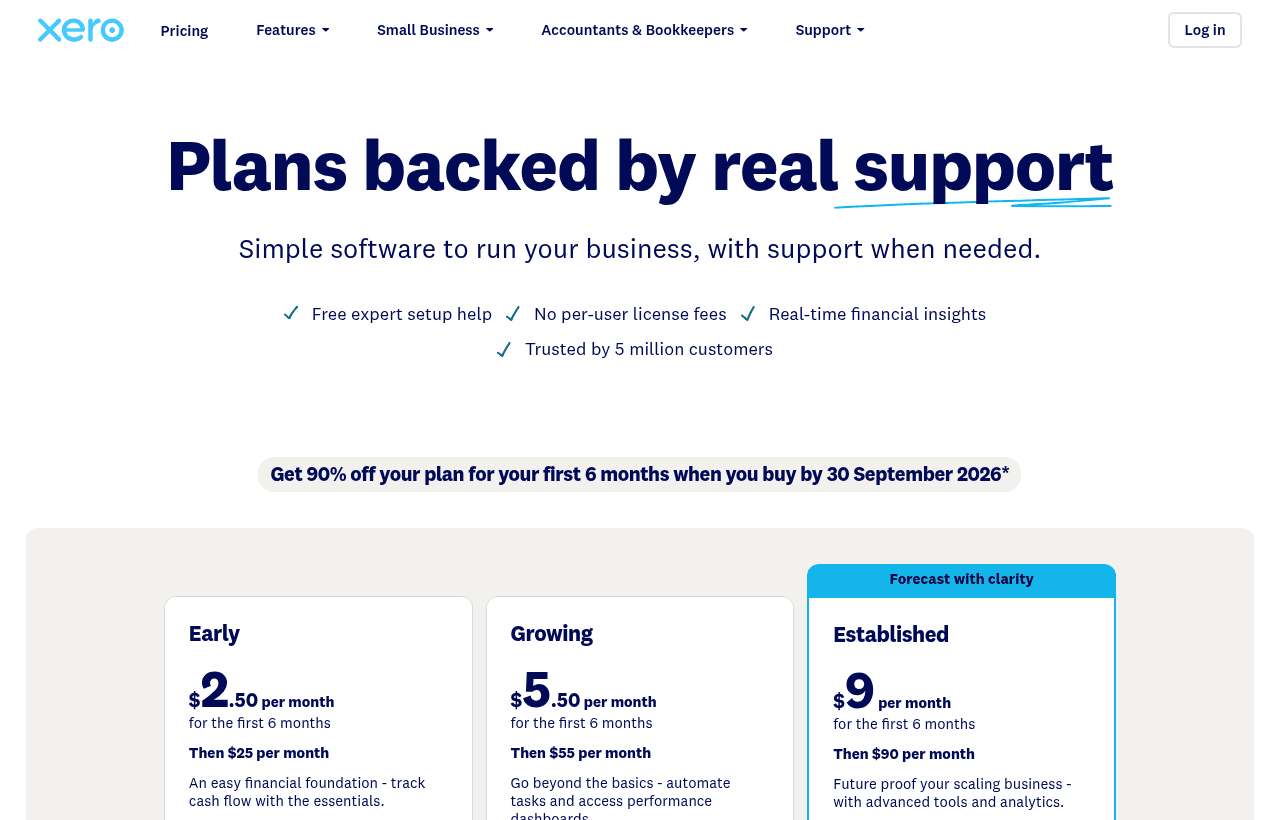
A look at Xero before the discount, so you can see what the deal saves you.
Eligibility Requirements
Xero startup deals:
- New Xero subscriber (not a current paying customer)
- Early-stage startup or small business
- Primarily available in Xero's core markets (UK, AU, NZ, US, Canada)
- No specific funding stage requirement
Apply through SaaSOffers for the current promotional discount and verified deal link.
How to Claim This Xero Deal. Step by Step
Step 1: Create a free account on SaaSOffers at saasoffers.tech and access the verified Xero deal.
Step 2: Click "Get Deal" on the Xero offer page and follow the link to Xero's signup with the startup discount applied.
Step 3: Create your Xero account and complete the initial setup wizard: enter your business name, trading currency, and financial year start date. These settings affect all reporting, choose carefully.
Step 4: Connect your business bank accounts using Xero's bank feed feature. Xero connects directly to most UK, Australian, and US banks and imports transactions automatically. This eliminates the manual statement import that makes accounting painful.
Step 5: Set up your chart of accounts. Xero provides a default chart of accounts for your region. Work with your accountant to customize the categories to match your business model (SaaS revenue, subscription revenue, etc.) before posting any transactions.
Step 6: Send your first invoice. In Xero, create an invoice with your logo, payment terms, and line items. Connect Stripe or PayPal as a payment method so clients can pay directly from the invoice link. Xero automatically marks invoices as paid when payment is received.
Step 7: Reconcile your bank transactions weekly. Xero matches imported bank transactions to invoices, bills, and expense entries automatically for recognized patterns. Unmatched transactions need one click to categorize. Weekly reconciliation keeps your books current and makes month-end close a 30-minute task.
Key Features That Make Xero Work for Startups
Real-Time Bank Feeds. Always Current Books
Xero's bank feed connects directly to your business bank account and imports transactions automatically, typically within 1 business day. Instead of manually importing CSV statements, your Xero books update continuously, giving you real-time visibility into cash position, outstanding invoices, and expenses without any data entry.
Professional Invoicing with Payment Links
Xero invoices are professionally branded with your logo, include payment terms, and can include a payment link (via Stripe, PayPal, or GoCardless) that lets clients pay directly from the invoice email. Paid invoices are automatically marked as paid and reconciled in Xero. For startups sending 10+ invoices per month, this payment automation significantly reduces time-to-cash and eliminates the "did they pay?" follow-up cycle.
One-Click Bank Reconciliation
Xero's reconciliation interface matches bank transactions to accounting entries in one click for recognized matches. For an active startup account, weekly reconciliation takes 15–30 minutes, compared to hours of manual statement matching in a spreadsheet. At month-end, reconciled books require no additional work from your accountant.
Reporting. Real Financial Picture
Xero generates real-time Profit & Loss, Balance Sheet, and Cash Flow statements from your accounting data. These reports reflect your actual financial position. Not a lagged spreadsheet estimate. For startups heading into fundraising, these reports form the basis of the financial model that investors review. For startups managing cash closely, the cash position and burn rate are visible in real time.
200+ Integrations. Connect Your Stack
Xero integrates with Stripe (automatic reconciliation of payment processor transactions), Shopify (e-commerce revenue sync), Gusto and Rippling (payroll), HubSpot (customer invoice tracking), Dext/Receipt Bank (receipt capture), and 200+ other tools. The Stripe integration alone, automatically importing and reconciling Stripe payouts, eliminates the manual reconciliation that plagues SaaS startups using both tools independently.
Xero vs. QuickBooks vs. FreshBooks
| Platform | Best For | Bank Feeds | Payroll | Inventory | Price |
|---|---|---|---|---|---|
| Xero | UK/AU/NZ startups, SaaS | Excellent | Yes (select countries) | Good | $29–$62/mo |
| QuickBooks | US-focused businesses | Excellent | Yes (US) | Excellent | $30–$200/mo |
| FreshBooks | Freelancers, service businesses | Good | Via integration | Limited | $17–$55/mo |
| Wave | Micro-businesses, budget | Good | Yes (US, CA) | No | Free (paid payroll) |
| Sage | UK businesses, manufacturing | Good | Yes (UK) | Excellent | £12–£33/mo |
Xero wins for UK, Australian, and New Zealand startups and for SaaS businesses with strong Stripe or Shopify integration needs. QuickBooks is the stronger choice for US-based businesses with complex payroll. FreshBooks is better for service businesses that primarily need invoicing. Wave is free but lacks Xero's reconciliation quality and integration breadth.
Who Is the Xero Startup Deal For?
UK and Australian startups: Xero is the dominant accounting platform in these markets. Your accountant almost certainly uses Xero, your bank likely has a Xero bank feed, and the platform is optimized for local tax (VAT in UK, GST in Australia) and payroll requirements. Using Xero is the path of least resistance for UK and AU startups.
SaaS and subscription businesses: Xero's Stripe integration automatically imports, categorizes, and reconciles Stripe payouts. A significant time saving for any subscription business processing revenue through Stripe. The subscription revenue reporting in Xero, combined with Stripe data, provides the MRR and ARR visibility investors expect.
Startups preparing for their first audit or due diligence: Clean, reconciled books in Xero produce the financial statements that investors, auditors, and acquirers request. Startups heading into Series A due diligence with 12+ months of clean Xero books move through the financial review phase significantly faster than those reconstructing transactions from bank statements.
Real Startup Use Cases
APIServices (B2B SaaS, £180K ARR): APIServices connected their Tide business account and Stripe account to Xero. Bank transactions imported automatically; Stripe payouts reconciled automatically via the Stripe integration. Their monthly bookkeeping went from 3 hours of manual work to 30 minutes of reconciliation review. Their accountant received clean, reconciled data for quarterly VAT returns without any data cleaning.
GrowthShop (e-commerce startup, Shopify): GrowthShop connected their Shopify store to Xero. Every sale, refund, and Stripe payout was automatically imported and categorized in Xero. The Shopify integration broke revenue down by product line, giving the founders real-time gross margin visibility by product category without any manual reporting work.
TechFounders (bootstrapped SaaS, 2 founders): TechFounders used Xero to track company finances from incorporation, sending invoices to clients and reconciling bank transactions weekly. When they began conversations with a strategic acquirer 18 months later, they provided 18 months of clean, audited-ready Xero books. The acquirer's finance team completed financial due diligence in 3 weeks, citing the clean accounting records as a significant time saver.
Tips to Maximize Your Xero Deal
- Connect bank feeds before posting any transactions. Set up your bank feed in the first session. The reconciliation workflow is significantly more valuable when transactions import automatically. Starting with manual CSV uploads creates a habit that is harder to change later.
- Work with your accountant on the chart of accounts. Xero's default chart of accounts is generic. A 30-minute session with your accountant to customize account categories for your business model prevents months of reclassification work later. This setup investment pays back every time you run a P&L report.
- Reconcile every week, not every month. Monthly reconciliation catches errors that have compounded for 30 days and creates a stressful end-of-month crunch. Weekly reconciliation takes 15 minutes and ensures your books are always accurate. Set a recurring 30-minute calendar slot every Friday morning.
- Use Xero's invoice reminders. Xero's automatic invoice reminders send email nudges to clients when invoices are overdue. This automated follow-up consistently reduces average payment time by 5–10 days without any manual chase from your team. Enable invoice reminders in Xero's settings immediately.
- Set up expense claim workflows for the team. If team members make business purchases on personal cards, use Xero's expense claims (or connect Dext/Receipt Bank) to capture receipts and categorize expenses as they happen. Retroactive expense cleanup at year-end is one of the most time-consuming accounting tasks, prevent it with real-time expense tracking.
Xero Alternatives
Looking for Xero alternatives? While Xero is a strong choice for finance & legal, it is not always the right fit for every team. Compare Xero against the top alternatives in our category. Each with verified startup deals and credits. See all Xero alternatives →
Many startups end up using a combination of tools, and there are no restrictions on claiming multiple deals through SaaSOffers. Whether you need a cheaper option, different features, or a better startup deal, there is an alternative worth considering.
Why Cloud Accounting Matters Early
Xero is cloud accounting software, and the case for adopting proper accounting early is stronger than founders often realize, because the alternative, tracking finances in spreadsheets or not at all, creates problems that compound and become expensive to unwind. Clean, current books are not just for tax time; they are how you actually understand the financial state of the business, and they are what investors examine in any fundraising diligence, so building the discipline early sets up both operational clarity and future credibility.
The practical value of cloud accounting is that it connects to your bank and other financial tools, so transactions flow in and much of the bookkeeping happens automatically rather than through manual entry, and everything is current and accessible rather than living in a spreadsheet someone updates occasionally. For a startup, that automation and accessibility turn accounting from a dreaded periodic scramble into an ongoing, low-effort process, which is the difference between books you trust and books you avoid looking at.
Getting the Foundations Right
The discipline that makes accounting software valuable is setting it up correctly from the start, connecting your bank feeds, establishing a sensible chart of accounts, and keeping the reconciliation current, because accounting is only useful if the data in it is accurate and up to date. Books that are current and correct give you real-time insight into cash flow, spending, and financial health, which a growing company needs and often lacks when finances are handled ad hoc.
For many startups the right setup pairs the accounting software with a bookkeeper or an accountant who works in it, since good software makes their work more efficient and their oversight keeps the books accurate, which is a sensible division well before a company needs a finance team. The free period lowers the cost of establishing that foundation during the stage when getting the financial basics right is most valuable, and the payoff is a business whose finances are clear, current, and ready whenever tax authorities or investors ask to see how the company manages its money, rather than a scramble to reconstruct records that should have been maintained all along.
Who Is This Deal For?
Early-Stage Startups
Seed and pre-seed companies looking to move fast without overspending on tools.
Growing SaaS Teams
Series A+ companies scaling their stack and optimizing software costs.
Solo Founders
Indie hackers and bootstrapped founders who need enterprise tools at startup prices.
Get 3 months free off Xero
Premium deal. Upgrade once, unlock everything.
Frequently Asked Questions
Everything you need to know about this startup deal.
Yes — Xero is the most widely recommended accounting platform for early-stage startups in the UK, Australia, and New Zealand, and is increasingly popular in the US. It provides professional double-entry accounting with real-time bank feeds, invoicing, and 200+ integrations (including Stripe, Shopify, Gusto) in an interface accessible to non-accountants. Most startup-focused accountants are familiar with Xero and prefer it for client accounts.
Get the weekly deals digest
New verified startup deals every week. No spam, ever. Unsubscribe anytime.
Related Offers

Stripe Atlas
Used by 6,540 members
$500 off incorporation
Get $500 off Stripe Atlas and incorporate your startup as a US Delaware C-Corp in minutes. The legal foundation every investor expects.
View offer
TinCheck
Used by 75 members
First real-time check free
Real-time IRS TIN and name verification from Sovos. Catch a wrong contractor or vendor TIN before it becomes a stacked IRS penalty and a backup-withholding headache.
View offer
Navan
Used by 1,799 members
3 months free
Get 3 months of Navan free. The all-in-one travel and expense management platform that replaces your corporate card, expense reports, and travel booking.
View offer
Ramp
Used by 877 members
$500 cashback bonus
Corporate card and spend management for startups, 1.5% cashback, real-time expense tracking, and automated accounting.
View offer
doola
Used by 480 members
30% off first purchase
Get 30% off your first purchase, the all-in-one platform to form a US LLC or C-Corp, get an EIN, open a US bank account, and stay tax-compliant from anywhere in the world.
View offer
Expensify
Used by 2,178 members
3 months free Collect
Expense management and corporate cards, receipt scanning, approval workflows, and reimbursement automation.
View offerDeal Summary
Looking for more startup deals?
Browse all offers