
GitHub Coupon: Free Team plan (1 year)
Get GitHub Team free for your startup. The world's leading code hosting platform used by 100M+ developers and 90% of Fortune 100 companies.
Free · Opens in new tab
Already have an account? Log in
Deal Highlights
What Is GitHub?
GitHub is the world's largest software development platform, hosting over 420 million repositories and used by over 100 million developers globally. Owned by Microsoft since 2018, GitHub is the de facto standard for version control, code collaboration, CI/CD, code review, project management, and software supply chain security. Every serious software team in 2026 uses GitHub or a direct competitor and GitHub retains dominant market share across startups, enterprises, and open-source projects.
In 2026, GitHub has expanded well beyond code hosting into a full DevSecOps platform: GitHub Actions for CI/CD automation, GitHub Copilot for AI-assisted coding, GitHub Advanced Security for vulnerability scanning, GitHub Packages for artifact registry, and GitHub Projects for engineering team management, all integrated into a single workflow.

GitHub, one of the tools included in this startup deal.
Why This Deal Is Essential for Every Technical Startup
GitHub is infrastructure. It's not a "nice to have", it's the foundation every engineering team builds on. The question for startups isn't whether to use GitHub but which plan gives you the security, automation, and collaboration features your team needs without overpaying during the critical early stage.
GitHub for Startups provides qualifying teams with GitHub Team. The plan that adds CI/CD minutes, required reviews, code owners, protected branches, and advanced audit logging, at no cost. In 2026, teams without protected branches and required code reviews ship bugs at a measurably higher rate. The GitHub startup deal makes enterprise-grade engineering practices accessible from day one.
What's Included in the GitHub Startup Deal
Through SaaSOffers, qualifying startups receive:
- GitHub Team plan free for 12 months (value: $252–$1,200+ depending on team size)
- $4/user/month equivalent waived: For teams up to 25 members
- 50 CI/CD minutes/month per user (Actions): For automated testing and deployment pipelines
- 3,000 GitHub Actions minutes/month (shared pool): Free for all repositories
- Protected branches: Require PR reviews before merging to main
- Code owners: Automatically request reviews from the right team members
- Required status checks: Block merges until CI tests pass
- Advanced audit logging: Full activity logs for security compliance
- GitHub Copilot: AI pair programmer (separate activation, may require individual plan)
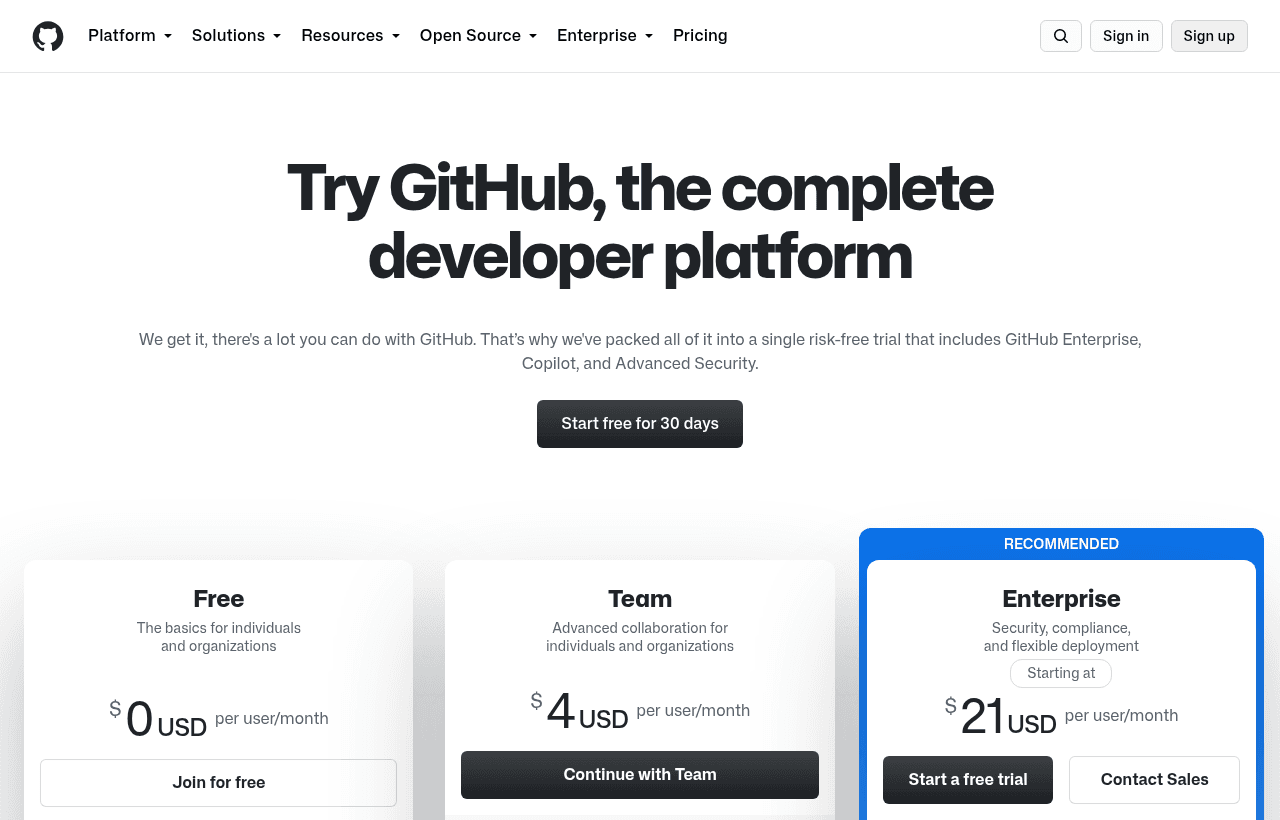
A look at GitHub before the discount, so you can see what the deal saves you.
Eligibility Requirements
GitHub for Startups requires:
- Not currently on a paid GitHub plan
- Early-stage startup (typically pre-Series A, some programs extend to Series B)
- Association with a qualifying accelerator, VC firm, or incubator in GitHub's partner network
Apply through SaaSOffers to check current eligibility and access the partner referral path.
How to Claim This GitHub Deal. Step by Step
Step 1: Create a free account on SaaSOffers at saasoffers.tech to access the GitHub startup deal referral.
Step 2: Click "Get Deal" on the GitHub offer page and follow the link to the GitHub for Startups application.
Step 3: Create or log in to your GitHub organization account. The startup deal applies at the organization level (not individual accounts).
Step 4: Apply the deal to your organization. Once approved, the Team plan is activated on your organization and all members inherit Team plan features.
Step 5: Set up branch protection rules on your main branch: require 1 or 2 PR approvals, require status checks to pass, and dismiss stale review approvals when new commits are pushed. This single configuration prevents the majority of production incidents caused by unreviewed code.
Step 6: Create your first GitHub Actions workflow for CI. Start with a simple workflow: checkout code → install dependencies → run tests → report status. This becomes the required status check that blocks merges when tests fail.
Step 7: Configure GitHub Projects for engineering sprint tracking. Create a board with columns (Backlog, In Progress, In Review, Done) and link it to your issues and PRs for end-to-end visibility from idea to deployment.
Key Features That Make GitHub Team Worth Having
Branch Protection and Required Reviews
Protected branches are the most impactful engineering workflow feature GitHub provides. With branch protection enabled, no one. Not even the repository owner, can push directly to main. Every change requires a pull request. PR reviews can be required from 1–2 reviewers. CI checks must pass. This one feature has prevented thousands of production incidents for teams that adopt it.
GitHub Actions. CI/CD Automation
GitHub Actions is a powerful, flexible CI/CD platform integrated directly with your repositories. Workflows are defined in YAML and triggered on push, PR, schedule, or manual dispatch. Common automation: run tests on every PR, deploy to staging on merge to develop, deploy to production on release tag. GitHub Actions' marketplace has 20,000+ pre-built action components.
Code Review Workflow
GitHub's pull request UI is the industry standard for code review. Inline comments, suggestion blocks (reviewers can suggest exact code changes), review threads, and the PR diff viewer are familiar to every developer. The structured review workflow, draft PR → request review → address feedback → approve → merge, creates a natural quality gate for every code change.
GitHub Copilot. AI Pair Programming
GitHub Copilot is an AI coding assistant (powered by OpenAI Codex) that autocompletes code, suggests entire functions, and answers questions about your codebase in the editor. In 2026, Copilot Business (included in GitHub Enterprise or available as an add-on) is used by over 1.8 million developers and measurably increases developer productivity in controlled studies.
Security Scanning and Dependabot
GitHub Advanced Security (available on Team for public repos, Enterprise for private repos) includes CodeQL static analysis for vulnerabilities, Dependabot for automated dependency updates, and secret scanning to detect accidentally committed credentials. For startups, Dependabot alone, automatically creating PRs to update vulnerable dependencies, materially improves security posture with zero effort.
GitHub vs. GitLab vs. Bitbucket
| Platform | CI/CD | Code Review | DevSecOps | Self-Host | Market Position |
|---|---|---|---|---|---|
| GitHub | GitHub Actions | Industry standard | Advanced Security | GitHub Enterprise | #1 developer platform |
| GitLab | GitLab CI (excellent) | Good | Full DevSecOps built-in | Yes (free) | #2, enterprise-focused |
| Bitbucket | Bitbucket Pipelines | Good | Limited | Yes | Atlassian ecosystem |
| Azure DevOps | Azure Pipelines | Good | Integrated | Yes | Microsoft enterprise |
GitHub leads for startups due to developer familiarity, ecosystem size, Actions marketplace, and Copilot. GitLab is a strong alternative for teams that want more DevSecOps features built-in or need self-hosted deployment.
Who Is the GitHub Startup Deal For?
Every technical startup with a software product: GitHub is foundational infrastructure for software teams. The Team plan deal specifically benefits teams of 3–25 engineers who need protected branches, required reviews, and CI/CD minutes, features that prevent production incidents and support code quality at a stage when engineering credibility matters most.
Startups approaching their first security audit: Investors, enterprise customers, and SOC 2 auditors ask about your code review process. "We require PR reviews and CI checks before merging" is the correct answer and GitHub Team's branch protection makes this trivial to enforce and document.
Open-source startups: GitHub's free plan already supports unlimited public repositories. The startup deal adds private repository team features and expanded Actions minutes, useful for startups with a hybrid model of open-source projects and a commercial product built on top.
Real Startup Use Cases
DataMesh (data engineering SaaS, 8 engineers): DataMesh enabled branch protection with 2 required reviews and required CI checks after a production incident caused by a junior engineer's untested change. In the 6 months after enabling protection, they had zero production incidents traceable to unreviewed code, compared to 4 incidents in the 6 months before.
ApiFirst (developer tools startup, Series A): ApiFirst's 15-person engineering team used GitHub Actions to build a complete CI/CD pipeline from commit to production. Every PR ran their 1,200-test suite automatically. Deployment to production happened on every merge to main via a GitHub Actions workflow with zero manual steps. Deployment frequency went from weekly to daily.
SecureVault (security SaaS): SecureVault used GitHub's Dependabot and secret scanning features to maintain a clean dependency security posture. Dependabot automatically created PRs for 47 dependency vulnerabilities in their first quarter, patches that would have remained undiscovered without automated scanning. No manually committed secrets made it to production.
Tips to Maximize Your GitHub Deal
- Enable branch protection before your team grows. Adding branch protection rules retroactively is harder than establishing them from the start. Set them up when your codebase is small and team habits are still forming. Protected branches become a culture feature, not just a technical one.
- Write your CI workflow on day one, not day 30. The best time to add automated tests and a CI pipeline is before your codebase gets complex. A simple "install → test → lint" workflow takes an hour to set up and pays back immediately in caught bugs and reviewer confidence.
- Use CODEOWNERS for automatic review assignment. Create a CODEOWNERS file in your repository that maps file paths to GitHub usernames. When a PR modifies a file, GitHub automatically requests a review from the designated owner. This eliminates "who should review this?" confusion as teams grow.
- Pin your GitHub Actions to commit hashes, not tags. Using
uses: actions/checkout@v4means your CI uses whatever the tag currently points to, which can change. Pin to a commit hash for reproducible, secure CI workflows. - Use GitHub Environments for deployment gates. GitHub Environments allow you to define required reviewers who must approve a deployment before it runs. Create a Production environment with required approval from an engineering lead. This adds a human gate on production deployments without removing the automation.
GitHub Alternatives
Looking for GitHub alternatives? While GitHub is a strong choice for developer tools, it is not always the right fit for every team. Compare GitHub against the top alternatives in our category. Each with verified startup deals and credits. See all GitHub alternatives →
Many startups end up using a combination of tools, and there are no restrictions on claiming multiple deals through SaaSOffers. Whether you need a cheaper option, different features, or a better startup deal, there is an alternative worth considering.
The Center of Modern Software Development
GitHub is the leading platform for hosting code and collaborating on software, and for most engineering teams it is less a choice than the default center of how software gets built, where the code lives, where changes are reviewed, and increasingly where automation, security, and project tracking connect. For a startup, being on the platform the industry standardizes on has real practical value: the tooling, the integrations, and the talent all assume it, which reduces friction across the board.
The core value is collaborative version control done well: the code hosted reliably, changes proposed and reviewed through pull requests, history preserved, and many developers working on the same codebase without stepping on each other. Around that core, GitHub has grown into automation through its actions, security features, and project management, so a team can run much of its development lifecycle in one place, which is the same integration benefit that makes a unified platform valuable.
Practices That Matter More Than the Platform
The honest point is that the platform enables good engineering practices but does not create them, and the value a team gets depends on the discipline it brings. Meaningful code review through pull requests, automated testing that runs on every change, and a clean, well-maintained history are practices that make a codebase healthier and a team more productive, and they are habits to establish rather than features to switch on. A team that reviews changes seriously, tests automatically, and keeps its repository organized builds better software than one that uses the same platform without those practices.
The practical guidance is to use the platform to establish those habits early, review, automated testing in the pipeline, sensible branching, while the codebase and team are small enough that building the discipline is easy, because engineering practices are far harder to retrofit onto a large team than to establish from the start. The startup offer lowers the cost of using the platform's fuller capabilities during that formative stage, and a team that pairs the industry-standard platform with genuine engineering discipline sets up a development process that scales cleanly, which is exactly the foundation a growing engineering organization needs and the thing that is most painful to fix later if neglected.
Who Is This Deal For?
Early-Stage Startups
Seed and pre-seed companies looking to move fast without overspending on tools.
Growing SaaS Teams
Series A+ companies scaling their stack and optimizing software costs.
Solo Founders
Indie hackers and bootstrapped founders who need enterprise tools at startup prices.
Get Free Team plan (1 year) off GitHub
Premium deal. Upgrade once, unlock everything.
Frequently Asked Questions
Everything you need to know about this startup deal.
GitHub's free plan is free forever for unlimited public repositories and up to 3 collaborators on private repositories. The GitHub for Startups deal provides the Team plan free for 12 months, adding protected branches, required code reviews, 3,000 CI/CD minutes/month, advanced audit logging, and unlimited collaborators — features critical for growing engineering teams.
Get the weekly deals digest
New verified startup deals every week. No spam, ever. Unsubscribe anytime.
Related Offers

Toggl Track
Used by 1,100 members
Free Plan
Simple and intuitive time tracking for teams with reporting and integrations.
View offer
Auth0
Used by 994 members
1 year of B2B Professional free
Get 1 year of the Auth0 B2B Professional plan free, with up to 100,000 monthly active users, SSO, enterprise MFA and SCIM.
View offer
Bugsnag
Used by 471 members
Free Plan
Error monitoring and stability management for web and mobile applications.
View offer
Turborepo
Used by 1,880 members
Free & Open Source
High-performance build system for JavaScript and TypeScript monorepos by Vercel.
View offer
Windmill
Used by 1,501 members
Free Plan
Open-source developer platform for building internal tools, workflows, and scripts.
View offer
Height
Used by 1,442 members
Free Plan
AI-powered project management tool with autonomous task management and workflows.
View offerDeal Summary
Looking for more startup deals?
Browse all offers