Bun: Free and Open Source JavaScript Runtime
Ultra-fast JavaScript runtime, bundler, test runner, and package manager.
Free. No credit card required
Free · No account required.
Deal Highlights
The SaaSOffers Bun listing
Offer: Free & Open Source.
Who qualifies: anyone. There is no signup, no account and no promo code. You install Bun and use it.
We checked these plans and prices against Bun's official site, docs and GitHub repository in November 2026.
Bun is a JavaScript and TypeScript toolkit that ships as a single executable called bun. That one binary is a runtime, a package manager, a bundler and a test runner. Bun's docs describe the runtime as "a fast JavaScript runtime designed as a drop-in replacement for Node.js." It runs on Apple's JavaScriptCore engine, and the GitHub repository now lists Rust as its main language.
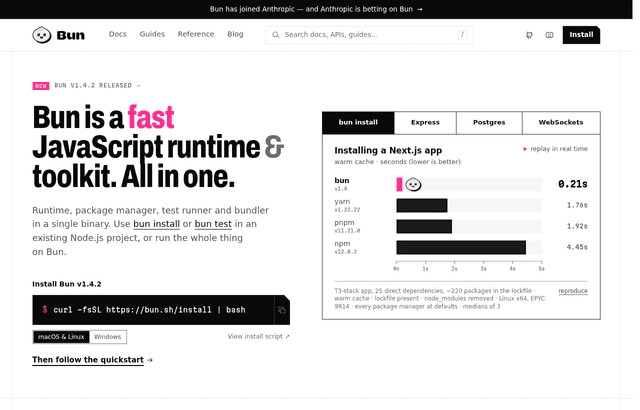
Ownership change: Anthropic acquired Bun on December 2, 2025. Bun's announcement says Bun stays open source under the MIT license, is still built in public on GitHub, and keeps the same team. The Bun homepage now says "now part of Anthropic" and carries a 2026 Anthropic, PBC copyright. The product was not renamed or shut down. The announcement also says Bun made $0 in revenue at the time, so there is no paid tier to buy.
Because Bun is free for everyone, this listing gives you nothing you could not get by going to bun.com yourself. We list it because it is a common choice for startup teams, and this page covers what it costs to run, what it replaces and when Node.js or Deno is the better pick.
What Bun costs
| Plan | Price billed yearly | Billed monthly | Key limits |
|---|---|---|---|
| Bun (MIT license) | $0 | $0 | No seat, usage or commercial limits from Bun itself |
| Bun hosting or cloud | Not offered | Not offered | Bun has no paid hosting product |
| Support contract | Not offered | Not offered | Support is through GitHub issues and the community |
Bun itself is MIT-licensed. One licensing detail matters if you ship Bun inside your product. Bun statically links JavaScriptCore and WebKit, which are LGPL-2 licensed. Bun's licensing page quotes the LGPL-2 rule: if you statically link an LGPL library, you must also provide your application in an object format so a user can modify the library and relink. Bun publishes its patched WebKit at github.com/oven-sh/webkit and documents the 3 commands to rebuild Bun with changes. For most teams running Bun on a server, this changes nothing. Teams that ship bun build --compile executables to customers should have someone read the licensing page.
The costs you do pay are the ones around Bun: your CI minutes, your hosting and your engineers' time. The worked examples below put numbers on CI.

What you get in the free download
Bun's current version is v1.4.4, released on October 22, 2026. Everything below is in the same binary.
Runtime
The runtime executes JavaScript and TypeScript, including .ts imports that TypeScript itself does not allow by default. Install @types/bun with bun add -d @types/bun for type definitions of Bun's own APIs. Running bun init creates a tsconfig with "moduleResolution": "bundler" and "allowImportingTsExtensions": true.
Built-in APIs listed in Bun's docs include an HTTP server (Bun.serve, with routing, cookies, TLS and metrics), SQL, SQLite, S3, Redis, file I/O, streams, a shell, process spawning, cron, hashing, glob, semver, YAML and TOML parsing. That means many projects need fewer npm packages for common work.
Package manager
bun install works in existing Node.js projects and reads package.json. Bun's docs call it "a dramatically faster replacement for npm, yarn, and pnpm" and claim installs "up to 25x faster" than npm install.
- Lockfile:
bun.lock, a text file. Before Bun 1.2 it was the binarybun.lockb. - Migration: if
pnpm-lock.yamlor a Yarn v1 or Berryyarn.lockexists andbun.lockdoes not, Bun converts it during install and leaves the original file unchanged. - Workspaces: supported, with
--filterto install a subset. - Linkers:
hoisted(flatnode_modules) orisolated(pnpm-style, which blocks phantom dependencies). New workspaces default to isolated. - Security: Bun does not run lifecycle scripts of installed dependencies unless you list them in
trustedDependencies. - Cache: packages are cached in
~/.bun/install/cache, and registry metadata for 5 minutes. - Compatibility: npm
overridesand Yarnresolutionsare supported.
Test runner
bun test is Jest-compatible, though Bun's docs say "not everything is implemented." It supports snapshots (--update-snapshots), mocks through mock or jest.fn(), coverage with text or lcov reports, watch mode, and DOM testing with HappyDOM, DOM Testing Library or React Testing Library. The default per-test timeout is 5,000 ms. Tests in a file run one after another by default. With --concurrent, up to 20 run at once (change it with --max-concurrency). JUnit XML output works for CI dashboards.
Bundler
bun build targets browser (default), bun or node, and outputs esm (default), with cjs and iife marked experimental. It handles TypeScript, JSX, CSS, HTML, JSON, TOML, YAML and text files, and supports minification, code splitting, 4 sourcemap modes and plugins shared with the runtime. bun build --compile turns your app into a single-file executable that contains a copy of the Bun binary.
What the free download doesn't include
- No paid support or SLA. Bun sells no support plan.
- No hosting. You run Bun on your own servers or on a platform that supports it.
- Partial Node.js API coverage. Bun's compatibility page lists modules that are only partly implemented, including
async_hooks(wherecreateHookis a stub),worker_threads,inspector,node:test,httpsandtls(SNI and OCSP stapling are missing),crypto(some algorithms absent because BoringSSL lacks them) andcluster(HTTP load balancing works only on Linux).node:seais not implemented, and Bun points you tobun build --compileinstead. - Not full Jest parity. Some Jest features are still tracked as missing.
The list of fully implemented modules is longer. Bun's compatibility page marks these as complete: assert, buffer, console, dgram, dns, events, fs, http, http2, os, path, punycode, querystring, readline, stream, string_decoder, timers, tty, url, zlib, net, util, vm, sqlite, trace_events and quic. A typical web API that reads files, serves HTTP and talks to a database uses mostly modules from this list. Bun runs thousands of tests from the Node.js test suite before each release.
A few partial gaps are worth checking before a migration:
domaincatches only synchronous errors.perf_hooks.eventLoopUtilization()returns zeros, so event loop dashboards built on it will read flat.child_processcannot send HTTP server sockets over IPC, and advanced serialization works only between Bun processes.worker_threadsignoresresourceLimits.
Bun's stated policy is that "If a package works in Node.js but doesn't work in Bun, we consider it a bug in Bun." The compatibility page tracks Node.js v26.
Bun's published benchmarks
These numbers come from Bun's own homepage. They are vendor benchmarks, so test your own workload.
| Benchmark | Bun | Comparison |
|---|---|---|
| Install a Next.js app, warm cache | 0.21 s | npm 4.45 s, pnpm 1.92 s, yarn 1.76 s |
| Express over HTTPS, requests per second | 48,243 | Node.js v26.7.0 25,181, Deno v2.9.5 19,243 |
| Postgres queries per second | 20,243 | Deno 10,406, Node.js 10,000 |
| WebSocket chat, messages per second | 4,170,027 (publish) | Deno 124,088, ws on Node.js 123,486 |
What switching saves: two worked examples
Bun and Node.js both cost $0, so the license saving is $0. The money saved is in CI minutes. GitHub Actions bills a standard Linux 2-core runner at $0.006 per minute and a Windows 2-core runner at $0.010 per minute. GitHub rounds each job up to the nearest whole minute.
That rounding matters. Bun's install benchmark saves 4.24 seconds per install (4.45 minus 0.21). On a job that already takes 3 minutes and 20 seconds, the bill stays at 4 minutes. You only save money when the total job time crosses a minute boundary. The examples below assume you measured the saving on your own pipeline.
Example 1: a 5-person team
- 1,500 CI jobs per month on Linux runners
- Measured saving after switching installs and tests to Bun: 1 billed minute per job
- 1,500 minutes x $0.006 = $9 per month, or $108 per year
Example 2: a 10-person team with Windows builds
- 4,000 CI jobs per month, 2 billed minutes saved per job
- 8,000 minutes on Linux x $0.006 = $48 per month, or $576 per year
- The same 8,000 minutes on Windows x $0.010 = $80 per month, or $960 per year
The bigger saving is faster local installs and tests, which no invoice shows.
Teams that fit Bun
- Teams starting a new TypeScript backend. You get a runtime, test runner and bundler without wiring up separate tools.
- Teams with slow installs in CI. Monorepos with many workspaces gain the most from a faster package manager.
- Developers shipping a CLI.
bun build --compileproduces one executable. Anthropic ships Claude Code as a Bun single-file executable, according to Bun's homepage. - Real-time apps. Bun's homepage says Midjourney uses Bun's WebSocket server for image notifications.
- Serverless platforms. Bun's homepage says Railway runs its Functions on Bun.
When Bun is the wrong pick
- Apps that depend on partly implemented Node APIs. If you rely on
async_hooks.createHook, the fullinspectorAPI ornode:sea, stay on Node.js for now. - Teams that need a vendor support contract. Bun sells no support plan or SLA.
- Old Linux or older Macs. Bun requires macOS 13.0 or later, Windows 10 version 1809 or later, glibc 2.17 or newer, and an x64 CPU with SSE4.2 (Intel Nehalem or AMD Bulldozer or newer). Bun recommends Linux kernel 5.6 or higher.
- Teams that want a sandbox by default. Deno blocks file, network and environment access unless you grant it. Bun's docs we checked do not describe a default permissions sandbox.
Bun vs alternatives
| Tool | Price | License | Built-in tools | Notes |
|---|---|---|---|---|
| Bun | $0 | MIT (JavaScriptCore is LGPL-2) | Runtime, package manager, bundler, test runner | v1.4.4, owned by Anthropic |
| Node.js | $0 | MIT-style permissive | Runtime, node:test | v26.13.0 is the current LTS line |
| Deno | $0 | MIT | Package manager, test runner, formatter, linter, type checker, compiler and more | v2.9.8, file, network and env access denied by default |
Node.js is the default. Its latest LTS release is v26.13.0 (codename Lithium), released on October 28, 2026. Pick it when you need the widest package compatibility or long-term support releases.
Deno is also written in Rust and is MIT-licensed. Its homepage lists a formatter, linter, type checker, coverage tool, benchmarker, doc generator and Jupyter kernel in the box. Deno blocks file system, network and environment access by default and turns postinstall scripts off. Deno's homepage says Deno is joining Cloudflare. Pick Deno if a secure-by-default runtime matters more than raw speed on Bun's benchmarks.
Tips for your first weeks on Bun
- Install. On macOS or Linux run
curl -fsSL https://bun.com/install | bash. On Windows usepowershell -c "irm bun.sh/install.ps1|iex". You can also usenpm install -g bun, Homebrew (brew install oven-sh/bun/bun), Scoop or theoven/bunDocker image. - Start with the package manager. Run
bun installin an existing Node.js project first. It converts pnpm and Yarn lockfiles and leaves the originals in place, so you can roll back. - Review lifecycle scripts. Packages that need postinstall steps must be added to
trustedDependencies. - Move tests next. Run
bun testagainst your Jest suite and fix what fails before you switch the runtime. - Use Docker variants. The
oven/bunimage comes in debian, slim, distroless and alpine variants. - Upgrade with
bun upgrade. Homebrew and Scoop users should upgrade through those tools to avoid conflicts.
How to get Bun
- Go to bun.com. There is no SaaSOffers link or code for Bun.
- Run the install command for your operating system from the setup tips above.
- Run
bun --versionto confirm v1.4.4 or later. - In your project folder, run
bun install, thenbun test. - Run your app with
bun runand compare it with your current Node.js setup before you switch production.
Who Is This Deal For?
Early-Stage Startups
Seed and pre-seed companies looking to move fast without overspending on tools.
Growing SaaS Teams
Series A+ companies scaling their stack and optimizing software costs.
Solo Founders
Indie hackers and bootstrapped founders who need enterprise tools at startup prices.
Get Free & Open Source off Bun
Free for all startups. Claim instantly.
Frequently Asked Questions
Everything you need to know about this startup deal.
Get the weekly deals digest
New verified startup deals every week. No spam, ever. Unsubscribe anytime.
Related Offers

Retool
Used by 1,559 members
1 year free, up to $60K
Build internal tools 10x faster with the low-code platform used by companies like Amazon, DoorDash, and Mercedes-Benz.
View offer
Replicate
Used by 1,772 members
$500 in credits
Run open-source ML models in the cloud, deploy Llama, Stable Diffusion, and custom models via API without GPU management.
View offer
ZoomInfo
Used by 2,014 members
Free Trial
B2B data platform for sales and marketing intelligence with contact databases.
View offer
Chore
15% off your first month
Chore runs your startup's back office for you: payroll, HR, bookkeeping, compliance and equity, inside the tools you already use. 15% off your first month through SaaSOffers.
View offerDeal Summary
Looking for more startup deals?
Browse all offers