
ClickUp Promo Code: 6 months free Business
Get 6 months free on ClickUp Business, the all-in-one productivity platform that consolidates tasks, docs, goals, whiteboards, chat, and time tracking into a single workspace.
Free · Opens in new tab
Free · No account required. Sign up to track your deals.
Deal Highlights
ClickUp is the all-in-one productivity platform that bundles project management, docs, goals, whiteboards, time tracking, and team chat into a single workspace. Where most competitors specialize in one area, Asana for tasks, Notion for docs, Linear for engineering, Monday for ops, Slack for chat, ClickUp's bet is that consolidating all of these into one tool eliminates the per-tool subscription cost, the constant context-switching, and the data fragmentation that comes from running 5-7 separate productivity SaaS products.
The 6 months free on the Business plan unlocks ClickUp's full capability, unlimited storage, advanced automations, AI features, time tracking, custom dashboards, and goal tracking across the whole organization. For a typical 10-person startup currently paying for Asana + Notion + Slack + a time tracker + a whiteboard tool, the consolidation alone can save $200-$500/month, and the 6-month free window equates to ~$700-$1,800 in saved subscription fees during the trial period.
What You Get
- 6 months free on the ClickUp Business plan
- Unlimited tasks, lists, folders, and spaces (the workspace hierarchy is unlimited at every level)
- Multiple task views: List, Board (Kanban), Calendar, Gantt, Timeline, Workload, Mind Map, Activity, Table, Embed
- ClickUp Docs: collaborative document editor with real-time editing, nested pages, and task linking
- ClickUp Whiteboards: visual brainstorming with sticky notes, shapes, and live collaboration
- ClickUp Goals: track measurable goals with KPI rollups across teams
- ClickUp Chat: team chat threaded inside tasks and projects
- ClickUp Brain: AI assistant for task summaries, status updates, document writing, and meeting notes
- Time tracking, time estimates, and timesheet reporting (built-in, no add-on tool needed)
- Custom fields, custom statuses, custom task types per workspace
- Automations (no-code rules: when X, do Y) with 100+ pre-built recipes
- Forms for capturing structured data into tasks
- Dashboards for live reporting on velocity, workload, and goal progress
- Native integrations with 1,000+ apps (Slack, Google Workspace, GitHub, Figma, Loom, Zoom, etc.)
- Native mobile apps (iOS, Android) and desktop apps (Mac, Windows, Linux)
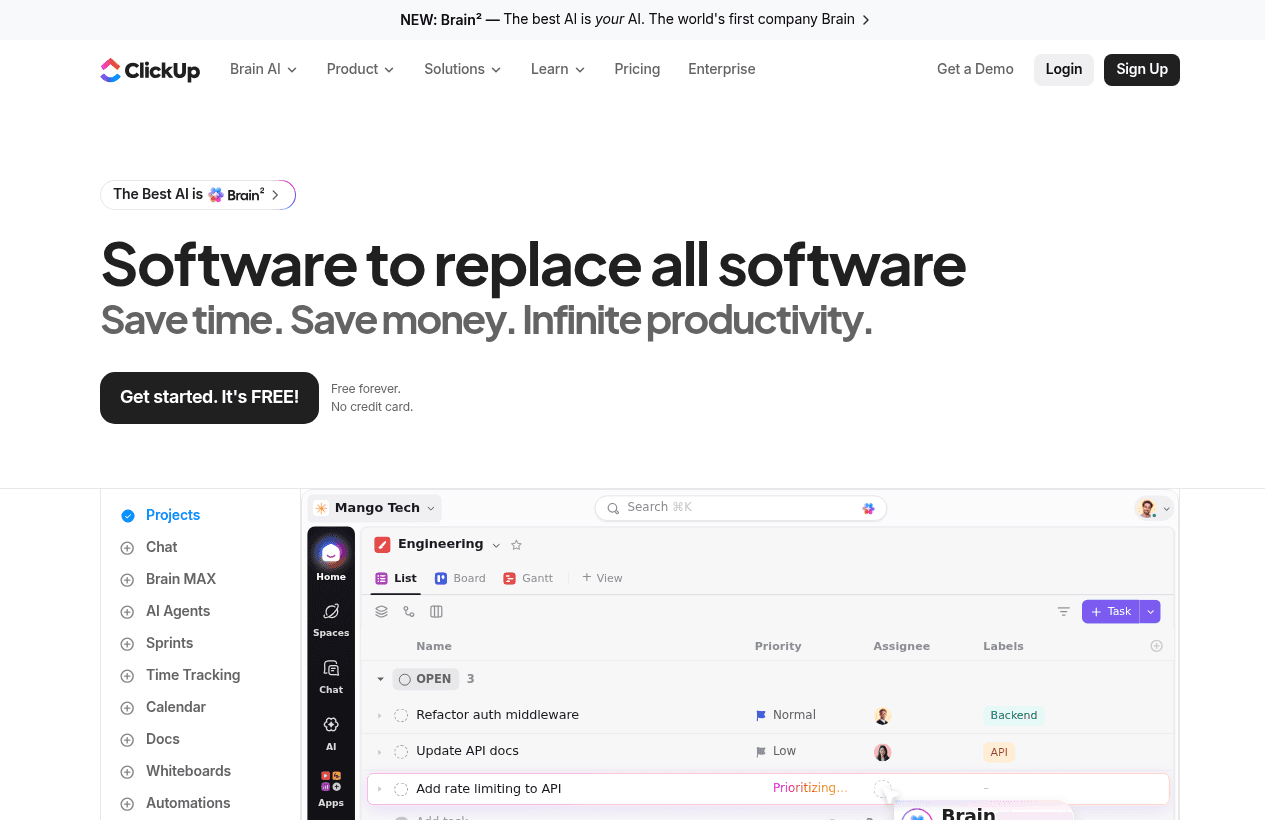
ClickUp, one of the tools included in this startup deal.
Why ClickUp for Modern Teams
The "productivity SaaS sprawl" problem has compounded over the last five years. A typical 20-person startup runs:
- A task tracker (Asana, Linear, Jira, Monday)
- A docs tool (Notion, Confluence, Coda)
- A whiteboard tool (Miro, FigJam, Lucidchart)
- A time tracker (Harvest, Toggl, Clockify)
- A chat tool (Slack, Microsoft Teams)
- A goal tracker (Lattice, 15Five, Quantive)
- A form/survey tool (Typeform, Google Forms)
That's 7 subscriptions, 7 different login sessions, 7 different notification streams, and 7 sources of truth that need to be reconciled. Each tool charges $5-$15/user/month, totaling $1,400-$3,500/month for 20 people just on productivity tooling.
ClickUp's structural bet is that one tool can replace most or all of these. The trade-off is that any consolidated tool will be slightly less specialized than the best-in-class point solution, ClickUp Docs is not as polished as Notion, ClickUp Whiteboards are not as deep as Miro, ClickUp Chat is not as feature-rich as Slack. But the consolidation gains (cost savings, single source of truth, unified search, no app-switching) outweigh the per-tool feature gaps for most teams below the 200-person threshold.
Three patterns where ClickUp particularly shines:
- Cross-functional projects that span engineering, design, marketing, and ops, instead of forking the project across Linear (eng), Asana (marketing), Figma (design), the entire project lives in one ClickUp space with role-appropriate views
- Agencies and consulting firms managing 10-50 client projects, ClickUp's space/folder/list hierarchy is purpose-built for multi-client structure with per-client permissions
- Startups consolidating tooling, moving from Asana + Notion + Toggl to a single ClickUp workspace cuts 60%+ of productivity SaaS spend in year one
Pricing Structure
ClickUp operates on a per-user-tiered model:
- Free Forever: 100MB storage, unlimited tasks, unlimited members, all view types, basic features. Surprisingly generous free tier, many small teams stay here indefinitely.
- Unlimited: Unlimited storage, unlimited integrations, unlimited dashboards, basic automations, agile features. Entry paid tier.
- Business: Google SSO, advanced automations, advanced time tracking, workload management, advanced reporting, ClickUp AI access. The plan covered by this 6-months-free deal.
- Business Plus: Team sharing, custom roles, custom permissions, increased automation limits.
- Enterprise: Custom roles, advanced security (SAML SSO, HIPAA-eligible), dedicated CSM, white-label options.
The Business tier is the sweet spot for active growing teams, enough capability for advanced automations, ClickUp AI, time tracking, and dashboards without enterprise pricing. The 6-month free trial covers the period where most teams either fully adopt or abandon a productivity platform, making it a particularly well-targeted promo.
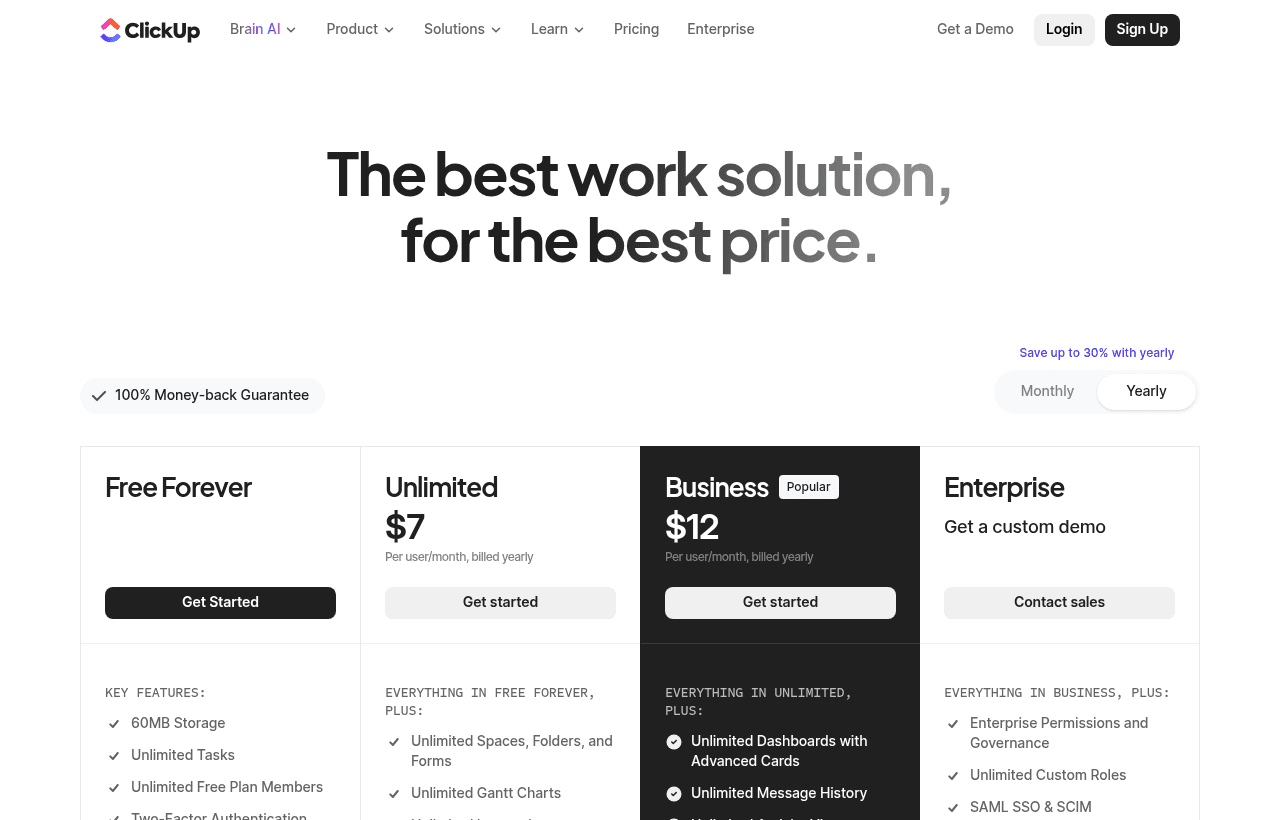
A look at ClickUp before the discount, so you can see what the deal saves you.
Side-by-Side: ClickUp vs the Main Alternatives
| Dimension | ClickUp | Asana | Monday.com | Notion | Linear | Trello | Jira |
|---|---|---|---|---|---|---|---|
| Task management depth | Excellent (most features) | Excellent | Strong | Decent | Excellent (engineering-specific) | Basic | Excellent (engineering) |
| Docs / wiki | Built-in (decent) | Limited | Limited | Best-in-class | Limited | Limited | Limited |
| Whiteboards | Built-in | Limited | Limited | Limited | Limited | Limited | Limited |
| Time tracking | Built-in | Add-on | Add-on | None | Limited | None | Native (paid tier) |
| Goals / OKRs | Built-in | Add-on | Add-on | DIY | Limited | None | Limited |
| AI features | ClickUp Brain | Limited | Limited | Notion AI | Limited | Limited | Atlassian Intelligence |
| Customization | Very high | High | Very high | High | Lower (opinionated) | Lower (Kanban-first) | Very high |
| Learning curve | Steep (because it does so much) | Moderate | Moderate | Moderate | Easy (focused) | Easy | Steep |
| Best fit | Teams consolidating tooling | General task management | Operations + visual workflows | Docs-first knowledge work | Engineering teams | Simple Kanban | Enterprise engineering |
ClickUp is the right choice when (1) you're explicitly consolidating multiple tools to reduce SaaS sprawl, (2) you need flexibility to handle very different team workflows in one platform, and (3) you're willing to invest in onboarding time given ClickUp's depth. Asana and Monday are sharper if task management is your only need. Linear is dramatically better for engineering-only teams. Notion is the right call when docs/knowledge are your primary use case. Jira is the default for enterprise engineering with deep DevOps integration. most cross-functional teams under 100 people are well-served by ClickUp; specialist teams over 100 people often diverge to specialist tools.
Common Use Cases
- Cross-functional product teams managing engineering, design, and product workstreams in one place
- Marketing teams running content calendars, campaigns, and asset production
- Agencies and consultancies with 10-50 active client projects requiring per-client permissions
- Operations and admin teams managing process workflows, SOPs, and recurring tasks
- HR and people-ops running hiring pipelines, onboarding workflows, and employee programs
- Startups consolidating productivity tooling to reduce SaaS spend
- Creative teams managing campaigns from brief through production with whiteboard ideation
- Sales operations when CRM is overkill but pipeline tracking is needed
How to Claim
- Click "Get Deal", opens the ClickUp signup with the SaaSOffers referral
- Create your ClickUp account and set up your workspace (think of it as your company's productivity hub)
- The 6-months-free Business plan applies during signup or upgrade
- Set up Spaces for your major teams (Engineering, Marketing, Operations, etc.)
- Build out your first projects in Lists with appropriate views (Board for visual, List for granular, Gantt for timelines)
- Connect integrations (Slack, GitHub, Google Workspace, Figma) to bring data in from existing tools
- After 6 months, decide whether to continue on Business or downgrade
Best For
- Teams of 10-100 people running cross-functional projects
- Agencies managing 10-50 active client engagements
- Startups consolidating from 5-7 productivity tools to one
- Mid-market companies standardizing tooling across departments
- Operations leaders building company-wide workflow visibility
- Product teams unifying engineering tasks, design specs, and roadmap planning
When ClickUp Wins
- You're consciously consolidating from multiple tools to reduce SaaS spend
- You have cross-functional teams that need different views of the same data
- You want time tracking, goals, and dashboards built in (not as add-ons)
- You value high customization (custom fields, custom statuses, custom views)
- You want unlimited workspace structure with no caps on lists, folders, spaces
When an Alternative Is Stronger
- You're an engineering-only team → Linear is sharper, faster, and more opinionated
- Docs and knowledge management are your primary use case → Notion is more polished
- You need a no-frills Kanban tool → Trello is simpler and free at meaningful scale
- You're a large enterprise on Atlassian → Jira + Confluence with native integration is the path of least resistance
- Your team is non-technical and overwhelmed by tool depth → Monday.com or Asana have gentler learning curves
- You want best-in-class chat → Slack is dramatically better than ClickUp Chat
Real-World Workflow Example
Imagine you run a 25-person Series A startup currently spending $1,200/month across Asana, Notion, Toggl, Miro, and Lattice. ClickUp path:
- Sign up for ClickUp Business (6 months free with this deal)
- Set up Spaces: Engineering, Product, Marketing, Sales, Operations, People
- Migrate from Asana: ClickUp imports Asana projects via the official import tool (typically 1-2 hours for full migration)
- Migrate from Notion: bring docs into ClickUp Docs (or keep Notion if docs are deeply embedded, ClickUp Docs is decent but not Notion-grade)
- Replace Toggl with ClickUp's native time tracking (zero migration effort, just enable the feature)
- Replace Miro with ClickUp Whiteboards for new sessions (keep Miro for historical work)
- Replace Lattice goals with ClickUp Goals tied to projects
- Train the team in 1-2 hours over a single Tuesday afternoon
End-to-end: 1-2 weeks of structured migration. Ongoing: $1,200/month in eliminated SaaS spend, plus reduced cognitive overhead from tool switching. The 6-month free window covers the entire migration and adoption period.
When ClickUp Becomes Too Much
ClickUp's selling point is that it does everything. That is also the most common reason teams abandon it.
The configuration surface is enormous. Spaces, folders, lists, custom fields, multiple view types, custom statuses per list, automations, docs, goals, and dashboards all exist on day one. A team that starts by exploring every feature builds a structure nobody else understands, and adoption dies quietly as people revert to messaging each other.
Performance degrades with complexity. Workspaces with very large lists, many custom fields, and heavy automations load noticeably slower. If your team waits several seconds for a board to render, the tool has become friction rather than leverage.
The practical answer is to start deliberately small. One space, a handful of lists, three or four statuses, and no automations for the first month. Add structure only when a specific problem demands it, and delete anything nobody used after thirty days. Simplicity is a decision you have to keep making in ClickUp, because the product will not make it for you.
Consider a narrower tool when the answer is obvious. Engineering teams that want speed and opinionated defaults are usually happier in a dedicated issue tracker. Teams whose real need is a shared document space are better served by a docs-first tool. ClickUp wins when several different functions genuinely need to work in one system and you are willing to invest in configuring it well.
Real Cost Comparison Math
- Asana Business: roughly $25/user/month
- Notion Plus: roughly $10/user/month
- Toggl: roughly $9-$18/user/month
- Miro: roughly $8-$16/user/month
- Lattice: roughly $11-$24/user/month
- Combined for 25 people: roughly $1,500-$2,200/month
- ClickUp Business with 6 months free: $0 for the first 6 months, then a single subscription
The structural insight: ClickUp's value isn't that it's the cheapest individual tool, it's that consolidating into one tool eliminates 60-80% of total productivity SaaS spend while reducing tool-switching overhead. The 6 months free trial removes the migration risk by giving you enough time to fully adopt before paying.
Who Is This Deal For?
Early-Stage Startups
Seed and pre-seed companies looking to move fast without overspending on tools.
Growing SaaS Teams
Series A+ companies scaling their stack and optimizing software costs.
Solo Founders
Indie hackers and bootstrapped founders who need enterprise tools at startup prices.
Get 6 months free Business off ClickUp
Free for all startups. Claim instantly.
!Eligibility Requirements
Early-stage startup team
Frequently Asked Questions
Everything you need to know about this startup deal.
Both are general-purpose task management platforms, but ClickUp is significantly broader in scope. Asana focuses on task management with strong polish; ClickUp adds docs, whiteboards, chat, time tracking, goals, and AI as built-in features rather than add-ons. The trade-off: Asana is easier to learn and lighter-weight; ClickUp has a steeper learning curve but covers more use cases in a single tool. For teams using only task management, Asana is often a better fit. For teams running 3-5 different productivity tools, ClickUp's consolidation tends to win on total cost and reduced context-switching.
Get the weekly deals digest
New verified startup deals every week. No spam, ever. Unsubscribe anytime.
Related Offers

Slack
Used by 4,760 members
25% off first year
Get 25% off Slack Pro for your first year. The messaging platform that has replaced email for 750,000+ organizations worldwide.
View offer
Zapier
Used by 2,122 members
$500 in credits
Connect 6,000+ apps and automate workflows without code. The glue that holds your SaaS stack together.
View offer
Monday.com
Used by 3,110 members
6 months free Pro
Get 6 months free on Monday.com Pro, the visual Work OS that powers project management, CRM, dev sprints, and operations workflows for over 225,000 customers worldwide.
View offer
Make
Used by 990 members
10,000 ops free
Get 10,000 free operations on Make. The visual automation platform that connects 1,500+ apps to automate workflows without code.
View offer
Grammarly
Used by 1,637 members
6 months free Business
AI-powered writing assistant for your entire team, catch errors, improve clarity, and maintain brand voice across all communications.
View offer
Loom
Used by 848 members
6 months free Business
Record and share video messages to replace meetings, free Business plan for startup teams.
View offerDeal Summary
Looking for more startup deals?
Browse all offers