
Slack Discount Code: 25% off first year
Get 25% off Slack Pro for your first year. The messaging platform that has replaced email for 750,000+ organizations worldwide.
Premium: $79/year for unlimited deals
Already have an account? Log in
Deal Highlights
What Is Slack?
Slack is the leading team communication platform, used by over 200,000 organizations globally for real-time messaging, file sharing, video calls, workflow automation, and app integrations. Originally launched in 2013 and acquired by Salesforce in 2021, Slack has become the default communication layer for startup teams, replacing internal email for day-to-day team coordination.
In 2026, Slack has expanded beyond messaging into a platform for work orchestration: Slack AI provides conversation summaries and intelligent search, Workflow Builder automates routine processes without code, and 2,600+ app integrations connect Slack to virtually every tool a startup uses. For remote and hybrid teams, Slack is the digital office where work actually happens.
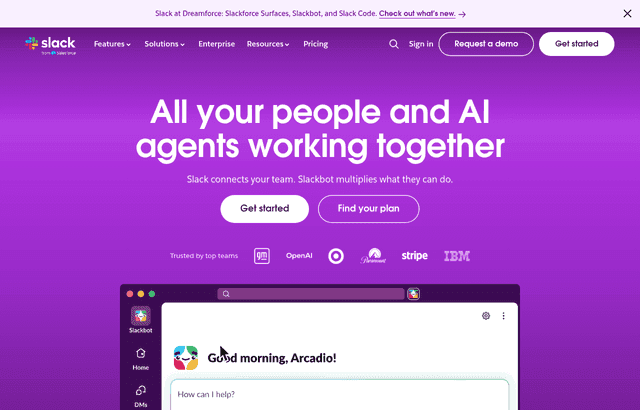
Slack, one of the tools included in this startup deal.
Why This Deal Matters for Startup Teams
Email is broken for internal team communication, it's slow, unorganized, creates siloed threads, and makes it nearly impossible to find past decisions and context. Slack solves this with organized channels, threaded conversations, powerful search, and real-time communication that matches the pace of startup work.
Slack Pro. The paid plan that unlocks unlimited message history, unlimited app integrations, and guest access, is the version most growing startups need. The Slack startup deal removes the cost barrier to professional team communication infrastructure during the stage when your team is growing fastest.
What's Included in the Slack Startup Deal
Through SaaSOffers, qualifying startups receive:
- Slack Pro free for up to 12 months (value: $87.75+/user depending on team size)
- Unlimited message history: No 90-day message cutoff from the free plan
- Unlimited app integrations: Connect GitHub, Jira, PagerDuty, and all other tools
- Guest access: Invite external partners, customers, or contractors to specific channels
- Group video calls: Up to 15 participants in a single call
- Workflow Builder: Automate routine notifications and requests without code
- Priority support: Faster response times on the Pro plan
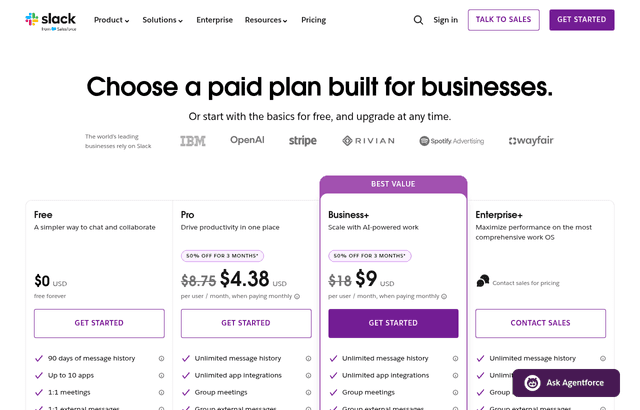
A look at Slack before the discount, so you can see what the deal saves you.
Eligibility Requirements
Slack for Startups program:
- Startup with fewer than 200 employees
- Pre-Series B or qualifying early-stage funding stage
- Not a current Slack paid customer
- Associated with a qualifying accelerator, VC, or startup ecosystem partner
Apply through SaaSOffers for the current program terms and verified deal link.
How to Claim This Slack Deal. Step by Step
Step 1: Create a free account on SaaSOffers at saasoffers.tech to access the verified Slack startup deal.
Step 2: Click "Get Deal" on the Slack offer page and follow the link to Slack's startup program application.
Step 3: Create or upgrade your Slack workspace. If you have an existing free Slack workspace, the deal can typically be applied to upgrade it.
Step 4: Structure your channels. Create a clear channel taxonomy from the start: #general, #engineering, #product, #design, #sales, #marketing, #finance, #ops, and project-specific channels. Good channel structure prevents conversation chaos as your team grows.
Step 5: Connect your core tools. Install the GitHub, Jira/Linear, PagerDuty/Datadog, Google Drive, Notion, and calendar integrations that your team uses daily. Centralizing tool notifications in Slack channels reduces context switching significantly.
Step 6: Set up Workflow Builder automations for recurring processes: daily standup prompts, weekly retrospective reminders, new hire welcome workflows, and incident reporting templates. These automate the repetitive coordination overhead that eats time at every startup.
Step 7: Configure notification settings for your team. The most common Slack problem is notification overload. Establish a team norm: use @channel sparingly, use threads for extended conversations, and mute non-critical channels during focused work hours.
Key Features That Make Slack Essential for Startup Teams
Organized Channel-Based Communication
Slack's channel structure creates organized conversation threads by topic, project, or team. Instead of a single all-hands Slack, you have #engineering, #product, #sales, #marketing, and project-specific channels. Every conversation has a home and finding past decisions is a search query away, not an email thread excavation.
Unlimited App Integrations
Slack Pro connects to 2,600+ apps, virtually every tool your startup uses. GitHub sends PR notifications to #engineering. PagerDuty sends incident alerts to #incidents. Stripe sends new subscription notifications to #revenue. Notion documents link previews in channels. Centralizing tool activity in Slack means your team stays informed without checking 10 dashboards.
Workflow Builder. No-Code Process Automation
Slack's Workflow Builder lets you create automated workflows without code: when a new message is posted in #incidents, send a structured form to collect incident details and notify the on-call person; when a team member types /standup, send prompts and collect responses into a channel; when a new hire joins #general, automatically send them an onboarding checklist. These automations eliminate repetitive coordination overhead.
Threads. Organized Replies Without Channel Clutter
Slack threads let you reply to a specific message without flooding the main channel. All replies appear in a dedicated thread view. This keeps #engineering readable (main channel messages are highlights; detailed discussion happens in threads) and makes it possible to have multiple parallel conversations in one channel without confusion.
Slack AI. Conversation Intelligence
In 2026, Slack AI provides AI-powered features that compress the information overhead of busy Slack channels: channel summaries (catch up on what happened while you were away), thread summaries (understand a long thread in 3 bullet points), intelligent search (find information using natural language rather than exact keyword matching), and writing assistance (draft and refine messages). These features reduce the time cost of staying current across active team channels.
Slack Pricing: What You Pay Without This Deal
Slack charges per active user per month, with a meaningful discount for annual billing.
| Plan | Billed annually | Billed monthly | The practical limit |
|---|---|---|---|
| Free | $0 | $0 | 90 days of message history, 10 integrations, 1:1 huddles only |
| Pro | $7.25/user/mo | $8.75/user/mo | Unlimited history and integrations |
| Business+ | $15/user/mo | $18/user/mo | Adds SAML SSO, compliance exports, uptime SLA |
| Enterprise+ | Custom | Custom | Enterprise governance and support |
Annual billing saves roughly 17% against monthly across every paid tier, so commit annually if you are confident in headcount.
The 90-day history limit is what forces the upgrade. On Free, messages and files older than 90 days become inaccessible. For a startup, that means your architecture debates, hiring decisions, and customer context quietly disappear on a rolling basis. Teams usually discover this the first time they search for a decision made four months ago and find nothing. Institutional memory is the actual product you are buying on Pro.
What 25% off the first year is worth. On Pro billed annually, a ten-person team pays $7.25 × 10 × 12, or $870 a year. A 25% discount saves about $218. At twenty people the annual bill is $1,740 and the saving is roughly $435. The discount scales with headcount, so claim it before a hiring push rather than after.
One billing detail works in your favor: Slack's fair billing policy charges only for active members. If someone leaves or goes inactive, you are credited for the unused portion rather than paying for a dormant seat all year. You do not need to manually reconcile seats the way you do with most per-seat tools, though deactivating departed members promptly is still good hygiene.
Slack vs. Microsoft Teams vs. Discord
| Platform | Best For | Message History | Apps | Video | AI Features |
|---|---|---|---|---|---|
| Slack | Startup teams, SaaS companies | Unlimited (Pro+) | 2,600+ | Yes | Slack AI |
| Microsoft Teams | Microsoft 365 enterprises | Unlimited | Microsoft-first | Excellent | Copilot |
| Discord | Communities, gaming, informal | Unlimited (free) | 130+ | Yes | Limited |
| Google Chat | Google Workspace teams | Unlimited | Google-native | Via Meet | Limited |
Slack wins for startup teams on app integration breadth, search quality, and the culture of async communication that Slack channels enable. Teams is better for organizations deep in the Microsoft ecosystem. Discord is better for community building and informal team communication.
Who Is the Slack Startup Deal For?
Every startup with a team of 3+ people: Slack is the primary team communication infrastructure for the vast majority of technology startups. If your team is still communicating primarily via email threads and ad hoc text messages, switching to Slack is a foundational operational improvement that pays back immediately.
Remote and distributed teams: For teams spread across time zones, Slack is the asynchronous communication layer that replaces the office. Channels preserve context for team members in different time zones; threads allow conversations to progress without requiring simultaneous availability; search makes past decisions findable without asking teammates to repeat themselves.
Teams integrating a technical stack of SaaS tools: The more tools your team uses, the more valuable Slack's integration ecosystem becomes. When 12 tools all send notifications to relevant Slack channels rather than siloed inboxes, your team maintains situational awareness across the entire stack from one place.
Real Startup Use Cases
APIFirst (developer tools, 18 people): APIFirst used Slack's GitHub integration to route PR notifications to #engineering-prs, deployment notifications to #deployments, and error alerts to #incidents. Engineers had full visibility into the team's development activity without checking GitHub. The channel structure reduced "what's the status of X?" questions by an estimated 70%.
GrowthOS (B2B SaaS, 22 people, remote-first): GrowthOS used Workflow Builder to automate their weekly Friday retrospective: at 4pm every Friday, Workflow Builder prompted each team member in Slack to share their wins, blockers, and priorities for next week. Responses were collected into #weekly-retro. The async format meant global team members across 5 time zones could participate without scheduling a call.
HealthBridge (healthcare startup): HealthBridge used Slack for their on-call incident management workflow. PagerDuty integrated with Slack to create an #incidents channel with automatic severity classification, on-call notification, and incident timeline tracking. The structured incident response workflow reduced mean time to resolution (MTTR) by 35% compared to their previous ad hoc email-based process.
Tips to Maximize Your Slack Deal
- Create a clear channel taxonomy before your team joins. Confusion about which channel to use for which conversation is the most common early-stage Slack problem. Create and document your channel structure before inviting your team. A good rule: create channels for teams (#engineering, #product), projects (#project-x), and cross-cutting concerns (#incidents, #wins, #help). Every channel should have a clear topic in its description.
- Establish thread norms explicitly. Tell your team: "reply in threads for extended conversations; use the main channel only for announcements or short questions." Without this norm, channels fill with reply messages that make them unreadable. Enforcing thread discipline is the #1 thing that keeps Slack channels functional at scale.
- Use channel descriptions and pinned messages. Every channel should have a description explaining its purpose. Pin important reference documents (runbooks, decision logs, onboarding guides) so new team members can find them without asking. Channels with good documentation feel organized; channels without feel chaotic.
- Set up #wins as a public celebration channel. Create a #wins channel where anyone can share customer wins, shipping milestones, and positive feedback. Public recognition in Slack creates a culture signal that compounds over time. This is one of the highest-ROI 5-minute setups available in a Slack workspace.
- Turn off notifications for low-priority channels. Notification overload is the #1 Slack complaint. Encourage your team to use the "Mute" and notification preferences on channels they don't need real-time alerts from. A good default: only notifications from direct messages, @mentions, and 2–3 highest-priority channels. Everything else is "check when you have time."
Channel Hygiene That Keeps Slack Usable
Slack degrades predictably as teams grow, and the failure is organizational rather than technical. A workspace with 200 channels and no naming convention costs more in lost attention than the subscription does in cash.
Adopt a channel prefix convention early, while it is still cheap to enforce. Common patterns use #team-, #proj-, #alert-, and #social-, so a channel's purpose is legible from its name alone. Retrofitting this at forty channels is a bad afternoon; doing it at two hundred is a project nobody volunteers for.
Default to public channels. The instinct to DM or open a private channel is what destroys the searchable archive you are paying Pro to keep. A decision made in a DM is invisible to the person who joins next month and has to ask again.
Route noisy integrations to dedicated alert channels rather than the channels where humans talk. Deploy notifications, error alerts, and analytics digests belong somewhere people opt into deliberately.
Archive aggressively. Archived channels stay searchable but leave the sidebar, which is exactly the behavior you want for a finished project.
Slack Alternatives
Looking for Slack alternatives? While Slack is a strong choice for productivity, it is not always the right fit for every team. Compare Slack against the top alternatives in our category. Each with verified startup deals and credits. See all Slack alternatives →
Many startups end up using a combination of tools, and there are no restrictions on claiming multiple deals through SaaSOffers. Whether you need a cheaper option, different features, or a better startup deal, there is an alternative worth considering.
Who Is This Deal For?
Early-Stage Startups
Seed and pre-seed companies looking to move fast without overspending on tools.
Growing SaaS Teams
Series A+ companies scaling their stack and optimizing software costs.
Solo Founders
Indie hackers and bootstrapped founders who need enterprise tools at startup prices.
Get 25% off first year off Slack
Premium deal. Upgrade once, unlock everything.
Frequently Asked Questions
Everything you need to know about this startup deal.
Slack has a free plan that supports unlimited users, unlimited direct messages, and 90 days of message history (the most recent 10,000 messages). The startup deal provides Slack Pro free for up to 12 months, unlocking unlimited message history, unlimited app integrations, group video calls, and guest access — the features that growing startup teams need most.
Get the weekly deals digest
New verified startup deals every week. No spam, ever. Unsubscribe anytime.
Related Offers

Zapier
Used by 2,122 members
$500 in credits
Connect 6,000+ apps and automate workflows without code. The glue that holds your SaaS stack together.
View offer
Monday.com
Used by 3,110 members
6 months free Pro
Get 6 months free on Monday.com Pro, the visual Work OS that powers project management, CRM, dev sprints, and operations workflows for over 225,000 customers worldwide.
View offer
Make
Used by 990 members
10,000 ops free
Get 10,000 free operations on Make. The visual automation platform that connects 1,500+ apps to automate workflows without code.
View offer
Grammarly
Used by 1,637 members
6 months free Business
AI-powered writing assistant for your entire team, catch errors, improve clarity, and maintain brand voice across all communications.
View offer
Loom
Used by 848 members
6 months free Business
Record and share video messages to replace meetings, free Business plan for startup teams.
View offerWebex
Used by 521 members
6 months free Business
Enterprise video conferencing and collaboration from Cisco, meetings, messaging, and calling in one platform.
View offerDeal Summary
Looking for more startup deals?
Browse all offers