
Grammarly Promo Code: 6 months free Business
AI-powered writing assistant for your entire team, catch errors, improve clarity, and maintain brand voice across all communications.
Premium: $79/year for unlimited deals
Already have an account? Log in
Deal Highlights
What Grammarly Gives a Startup
Grammarly is an AI-powered writing assistant for an entire team, built to catch errors, improve clarity, and maintain a consistent brand voice across every kind of communication. The deal is six months free on the Business plan, which gives a startup half a year of Grammarly's team-level writing support at no cost. The requirement is a startup with under 50 employees, which fits a small, growing team well. For those six months, everyone on the team gets a writing assistant working across their emails, documents, messages, and anything else they write, helping the whole company communicate more clearly and consistently.
The value is easy to underrate because writing feels like something everyone already does. But for a startup, the quality of its written communication has real consequences. Every customer email, every sales message, every piece of marketing, every support reply, and every internal document represents the company. Errors, unclear phrasing, and inconsistent tone quietly undermine credibility and cause misunderstandings. Grammarly works in the background across the team's writing to catch those problems before they go out, which raises the baseline quality of everything the company says. The Business plan does this at the team level, with the consistency and controls that matter when many people are writing on behalf of one company.
Six months free is enough time for a startup to make Grammarly part of how the team writes and to see the effect. It is not a quick demo, it is half a year of the whole team writing with assistance, which is long enough for the habit to form and for the improvement in communication to become visible. For a small team where writing quality directly affects how customers and prospects perceive the company, that is a meaningful window to establish a better standard.
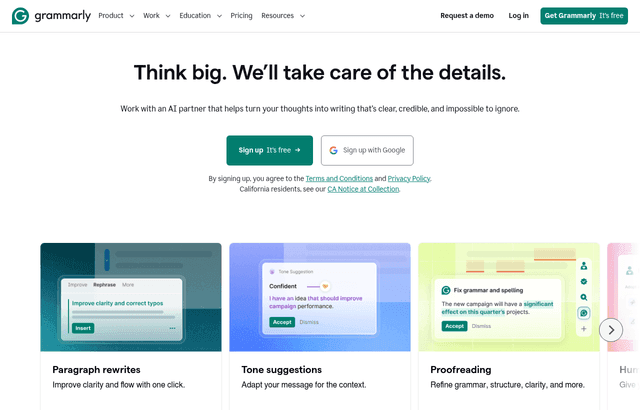
Grammarly, one of the tools included in this startup deal.
Catching Errors Before They Reach Customers
The most immediate value Grammarly provides is catching mistakes. Typos, grammatical errors, and awkward phrasing slip into writing constantly, especially when people are moving fast, which in a startup is always. Most of these mistakes are small, but they add up to an impression, and that impression matters most in exactly the communications a startup cares about: messages to customers and prospects. An email to a potential customer with obvious errors signals carelessness, and that signal works against you at the worst possible moment.
Grammarly catches these errors as people write, across the places where they write. That means the customer email, the sales message, the marketing copy, and the support reply all get a check before they go out, without anyone having to remember to proofread carefully. For a startup where the same small team writes a high volume of important communications, that automatic safety net is valuable. It raises the floor on quality so that even quick, under-pressure writing goes out clean, which protects the credibility the company is working to build.
This matters more for a startup than for an established company because a startup has less credibility banked. A big, known brand can absorb the occasional typo because its reputation is already established. A young company is still proving it is serious and competent, and sloppy communication cuts against that proof. Grammarly helps a small team present itself as polished and professional even when it is moving fast and stretched thin, which is precisely the impression a startup needs to make on the customers and partners deciding whether to trust it.
Clarity That Makes Communication Actually Work
Beyond catching errors, Grammarly helps with clarity, which is arguably the more valuable function. Writing that is technically correct can still be confusing, wordy, or hard to follow, and unclear communication has real costs. A confusing customer email generates back-and-forth that wastes time. An unclear sales message fails to land its point. A muddy internal document leaves the team misaligned. Grammarly suggests improvements that make writing clearer and more direct, which makes all of that communication work better.
For a startup, clear communication is a competitive advantage. When your emails are easy to understand, customers get what they need faster and support load drops. When your sales messages are clear and direct, prospects understand your value more quickly. When your internal writing is clear, the team stays aligned with less friction. Grammarly nudges everyone's writing toward clarity, which compounds across all the communication a company does. The cumulative effect of consistently clearer writing is a company that is easier to deal with and easier to understand, which helps in nearly every interaction.
Clarity also saves the writer time and mental effort. Good writing is hard, and many people on a startup team are not primarily writers. They are engineers, operators, and founders who write a lot but do not think of themselves as writers. Grammarly gives them assistance that makes their writing better without requiring them to become expert writers. That help lets people communicate effectively without spending excessive time laboring over every message, which for a busy small team is a practical benefit on top of the quality improvement.
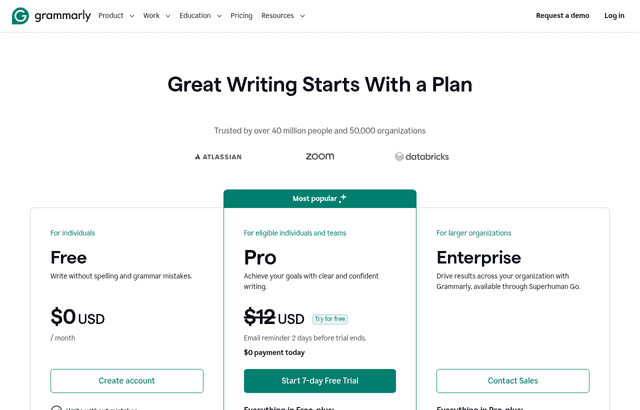
A look at Grammarly before the discount, so you can see what the deal saves you.
Brand Voice and Consistency Across the Team
The Business plan adds something the individual experience does not: consistency across the whole team and the ability to maintain a brand voice. This is where the team-level offering earns its place for a startup. When many people write on behalf of one company, their writing can vary wildly in tone and style, so a customer's experience of the company depends on which team member happened to reply. That inconsistency makes a company feel less coherent and less professional. Grammarly's team features help everyone's writing align to a consistent standard and voice.
For a startup building its brand, this consistency matters. The brand is not just the logo and the marketing, it is how the company sounds in every interaction. When the support reply, the sales email, and the marketing copy all share a consistent voice, the company feels coherent and intentional. When they clash, the company feels disorganized. Grammarly's Business plan helps a small team present a unified voice across all its communication, which makes the whole company feel more put-together than a scattered set of individual writing styles would.
This is especially valuable because a startup's team is growing and changing. New people join and start writing on behalf of the company immediately, often before they have absorbed how the company communicates. Team-level writing support helps new team members write in line with the company's standard from the start, rather than each person developing their own style. That keeps the company's communication consistent even as the team grows, which is a quiet but real benefit of the Business plan over individual tools. The whole team writes to one standard, and that standard travels with the tool rather than living only in the heads of the founders.
Why Communication Quality Is Strategic for a Startup
It is tempting to treat writing quality as a nice-to-have, something that matters less than product and sales. That view underrates how much of a startup's success runs through communication. Sales is communication. Marketing is communication. Customer support is communication. Fundraising is communication. Internal coordination is communication. A company that communicates clearly and professionally has an edge in all of these, and a company that communicates poorly is fighting itself in all of them.
Consider the customer's experience. From the outside, a customer knows your company almost entirely through communication: your marketing, your emails, your support. If that communication is clear, professional, and consistent, the customer trusts you more and has a better experience. If it is error-prone, confusing, or inconsistent, the customer's confidence erodes even if the product is good. Grammarly improves the quality of that entire surface, which improves how customers perceive and experience the company. For a startup competing partly on trust, that surface quality is strategic, not cosmetic.
Consider the internal cost of poor communication. When writing is unclear, people misunderstand each other, work gets redone, and time gets wasted resolving confusion that clearer writing would have prevented. A startup cannot afford that drag. Better writing across the team reduces the friction of working together, which lets a small team operate more smoothly. The value of clear communication shows up not just externally with customers but internally in how efficiently the team functions, and Grammarly touches both.
Grammarly Compared to Manual Proofreading and Individual Tools
Against relying on people to proofread and self-edit, Grammarly is more consistent and less demanding. Manual proofreading depends on people having the time, attention, and skill to catch their own errors and improve their own clarity, which is unreliable especially under the time pressure of a startup. People miss their own typos, and not everyone knows how to make their writing clearer. Grammarly provides consistent assistance that does not depend on each individual's proofreading discipline, so the whole team gets a reliable check rather than a variable one.
Against individual writing tools used piecemeal, the Business plan offers the team-level consistency and voice management that individual use cannot. A team where everyone uses writing tools separately still ends up with inconsistent communication, because there is nothing coordinating their styles. The Business plan adds the layer that keeps the team aligned to a shared standard, which is the thing that matters when many people represent one company. For a startup building a coherent brand, that coordination is the reason to use the team offering rather than leaving people to their own tools.
The consideration with any writing assistant is using its suggestions with judgment rather than accepting everything blindly. The tool assists, but the writer still owns the message and should apply the suggestions that fit the intent. Used that way, as a smart assistant rather than an autopilot, Grammarly improves a team's writing substantially while keeping each person in control of what they say. For the six months of the free Business plan, a startup can build exactly that habit across the team and see the effect on how the company communicates.
Making the Six Months Free Count
The way to get value from six months of free Business is to roll it out to the whole team and make it part of how everyone writes from the start. The benefit is team-wide, so get everyone using it across the tools where they write, rather than leaving it as something a few people try. The more of the team's communication that flows through Grammarly, the more consistent and polished the company's overall communication becomes. A partial rollout gets partial value, so aim for full adoption early in the free period.
Use the team and brand-voice features deliberately, since that is what the Business plan adds over individual use. Set up the shared standards and voice guidance so the team's writing aligns rather than each person going their own way. This is the piece that turns Grammarly from a personal spell-checker into a tool that keeps the company's communication coherent. A startup that configures this thoughtfully gets the consistency benefit that makes the Business plan worthwhile, not just the error-catching that any writing tool provides.
Treat the six months as time to build a lasting habit and standard. The goal is not just to use Grammarly for half a year but to raise the team's communication quality in a way that sticks. By the end of the free period, writing with assistance should be normal, the team's communication should be measurably cleaner and more consistent, and the company should have a clearer sense of its own voice. That improvement carries forward regardless of what you decide about continuing, because the habits and standards you build during the free months become part of how the team works.
Finally, use the free period to judge the value honestly. By the end of six months, you should be able to see the effect: cleaner customer communication, more consistent brand voice, less friction from unclear writing, and a team that communicates more professionally. If those improvements are real and worth continuing to pay for, you will know precisely why. If they are not, you spent nothing to find out. The free Business plan is a low-risk way for a startup to test whether team-level writing support meaningfully improves how the company communicates.
Who Should Claim This Deal
This deal fits a startup under 50 employees where a small team writes a high volume of important communication and wants it to be clean, clear, and consistent. If your team sends a lot of customer emails, sales messages, marketing copy, and support replies, and you care about presenting the company as professional and coherent, Grammarly's six months free on Business is worth claiming. It gives the whole team writing assistance across everything they write, plus the team-level consistency and brand voice management that matters when many people represent one company.
It suits customer-facing teams especially, where the quality of written communication directly affects how customers perceive and trust the company. Cleaner, clearer, more consistent communication makes a small company look more established and easier to deal with, which helps in sales, support, and marketing alike. It also suits growing teams that want new members to write in line with the company's standard from day one, since the team features keep communication consistent as people join.
It is a less pressing fit for a tiny team of strong writers who are already consistent and rarely make errors, though even they may benefit from the clarity suggestions and the safety net under fast writing. For the many startups whose small teams write constantly, move fast, and want their communication to reflect well on the company, the six months free on Business is a strong opportunity. Roll it out to the whole team, set up the shared voice, build the habit, and let the improvement in how your company communicates show through over the free period.
Who Is This Deal For?
Early-Stage Startups
Seed and pre-seed companies looking to move fast without overspending on tools.
Growing SaaS Teams
Series A+ companies scaling their stack and optimizing software costs.
Solo Founders
Indie hackers and bootstrapped founders who need enterprise tools at startup prices.
Get 6 months free Business off Grammarly
Premium deal. Upgrade once, unlock everything.
!Eligibility Requirements
Startup with under 50 employees
Frequently Asked Questions
Everything you need to know about this startup deal.
Grammarly has a free plan with basic grammar and spelling checks. Business ($15/user/month) adds tone detection, brand guides, team analytics, and full AI rewrites. The 6-month deal saves $450 for a 5-person team.
Get the weekly deals digest
New verified startup deals every week. No spam, ever. Unsubscribe anytime.
Related Offers

Slack
Used by 4,760 members
25% off first year
Get 25% off Slack Pro for your first year. The messaging platform that has replaced email for 750,000+ organizations worldwide.
View offer
Zapier
Used by 2,122 members
$500 in credits
Connect 6,000+ apps and automate workflows without code. The glue that holds your SaaS stack together.
View offer
Monday.com
Used by 3,110 members
6 months free Pro
Get 6 months free on Monday.com Pro, the visual Work OS that powers project management, CRM, dev sprints, and operations workflows for over 225,000 customers worldwide.
View offer
Make
Used by 990 members
10,000 ops free
Get 10,000 free operations on Make. The visual automation platform that connects 1,500+ apps to automate workflows without code.
View offer
Loom
Used by 848 members
6 months free Business
Record and share video messages to replace meetings, free Business plan for startup teams.
View offerWebex
Used by 521 members
6 months free Business
Enterprise video conferencing and collaboration from Cisco, meetings, messaging, and calling in one platform.
View offerDeal Summary
Looking for more startup deals?
Browse all offers