Every CRM starts out clean. Then people change titles and companies, accounts grow, and new leads arrive with nothing but an email address. Fixing that by hand is slow work nobody wants, so it rarely happens. Routing, scoring and outreach end up running on records that are half empty or out of date.
Amplemarket's CRM Enrichment is built for that problem. It fills in and updates your CRM records with Amplemarket data, on a schedule you set, without anyone touching the records by hand. To see it on your own CRM, book a demo or start a free trial of Amplemarket.
We built this guide from Amplemarket's product page, its CRM enrichment guide, its FAQ and the product demo. We have not run it on our own CRM, so it is a setup guide, not a review.
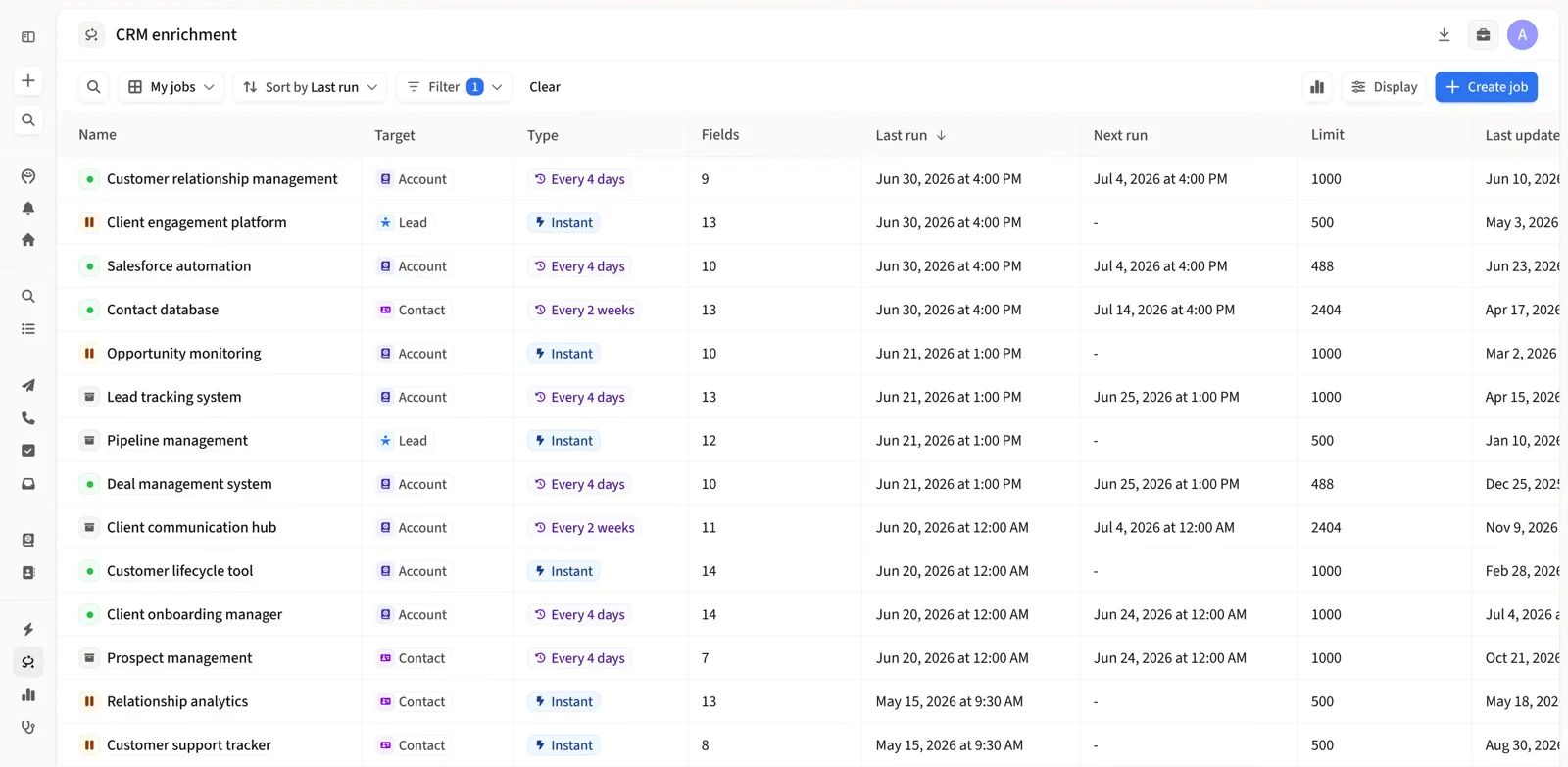
What CRM enrichment is, and why it decays
Amplemarket's guide defines CRM enrichment as adding missing data to the records in your CRM and updating data that has gone out of date. Each contact, lead or account is matched to an outside data source, and fields such as job title, email, phone number, industry and company size are filled in.
It is not the same as data cleansing. Cleansing fixes errors and duplicates in the data you already have. Enrichment fills the gaps cleanup cannot. Most teams clean first, then enrich.
The reason it matters is that your CRM is not a static list. Lead routing, lead scoring, segmentation and territory planning all read from these fields. When a title is two jobs old or a company size is empty, the lead goes to the wrong rep, the score is wrong and the campaign misses the people it was built for. A one-time cleanup fixes today. It does not fix next quarter.
One-time, scheduled or instant
Amplemarket's guide describes three ways to run enrichment, and they solve different problems.
| Type | How it works | Best for | Trade-off |
|---|---|---|---|
| One-time | Enriches a list or the whole CRM in a single pass | A cleanup before a campaign, a migration or a territory change | Records start going stale again after the run |
| Scheduled | Refreshes a set of records every few days, weeks or months | Keeping existing contacts, leads and accounts current | Changes between runs wait for the next one |
| Instant | Enriches new records within minutes of being created | Inbound leads, form fills, imports | Covers new records only |
Most teams need two of them: Instant for new records and a schedule for everything already in the CRM. In Amplemarket, those are the only two settings. A one-time cleanup is a scheduled job you pause after its first run.
Setting up a job, step by step
Amplemarket's demo walks through a job from an empty form to a live schedule. The panel has four tabs: Type, Audience, Fields and Cap.
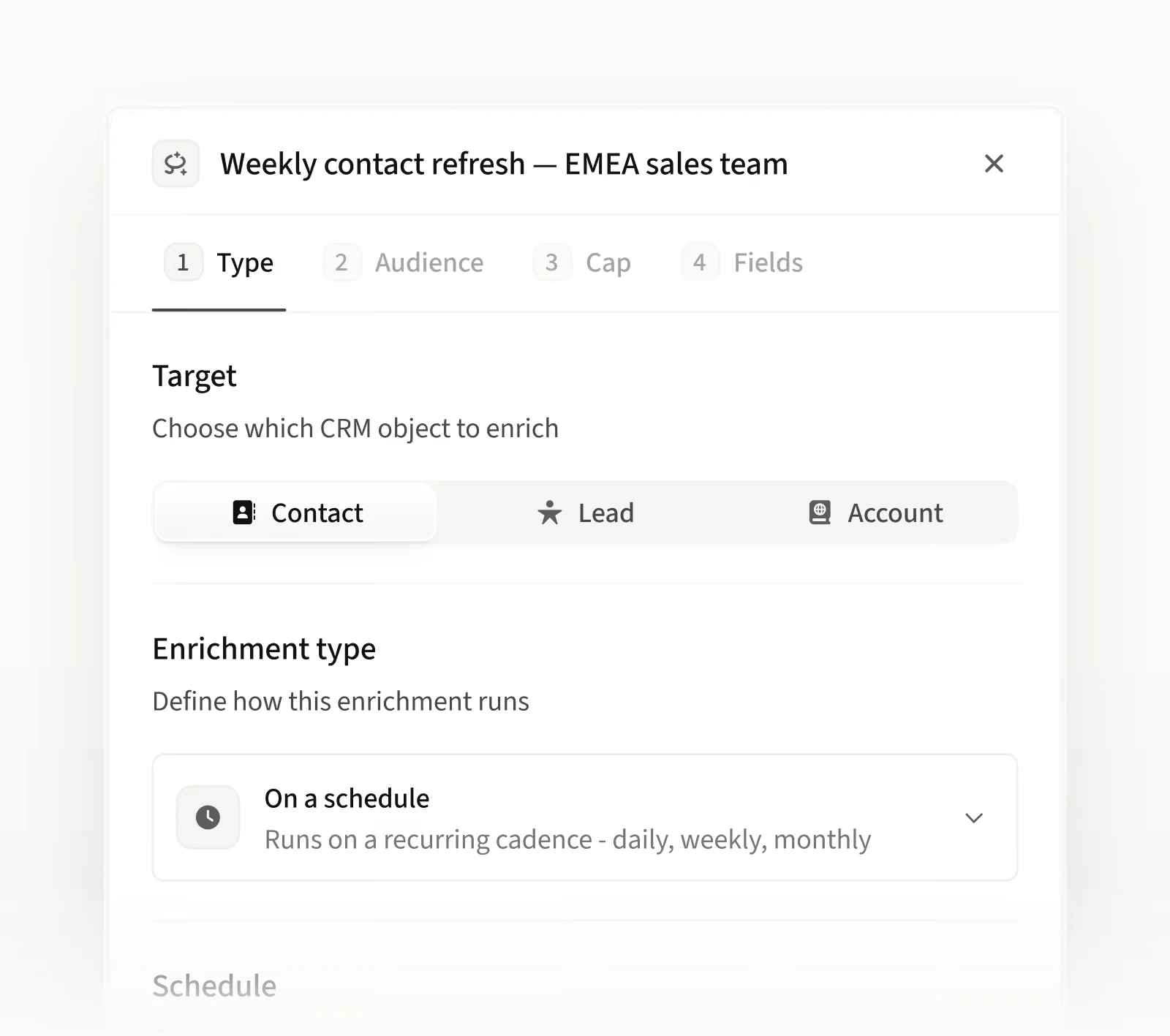
Type. Pick the CRM object (contact, lead or account) and how the job runs: On a schedule, with a cadence such as every week, or Instant for incoming records. In the demo, the panel notes that the first run starts 15 minutes after activation and then repeats on the schedule.
Audience. Enrich all records or set custom criteria. The demo's tip for "All contacts" is that it suits CRM hygiene, and that records already up to date are skipped automatically, so a broad audience does not mean paying for everything. For narrower jobs, you combine Amplemarket filters, such as industry or company size, with filters on your own CRM fields, such as mailing city. When both are set, a record must match both.
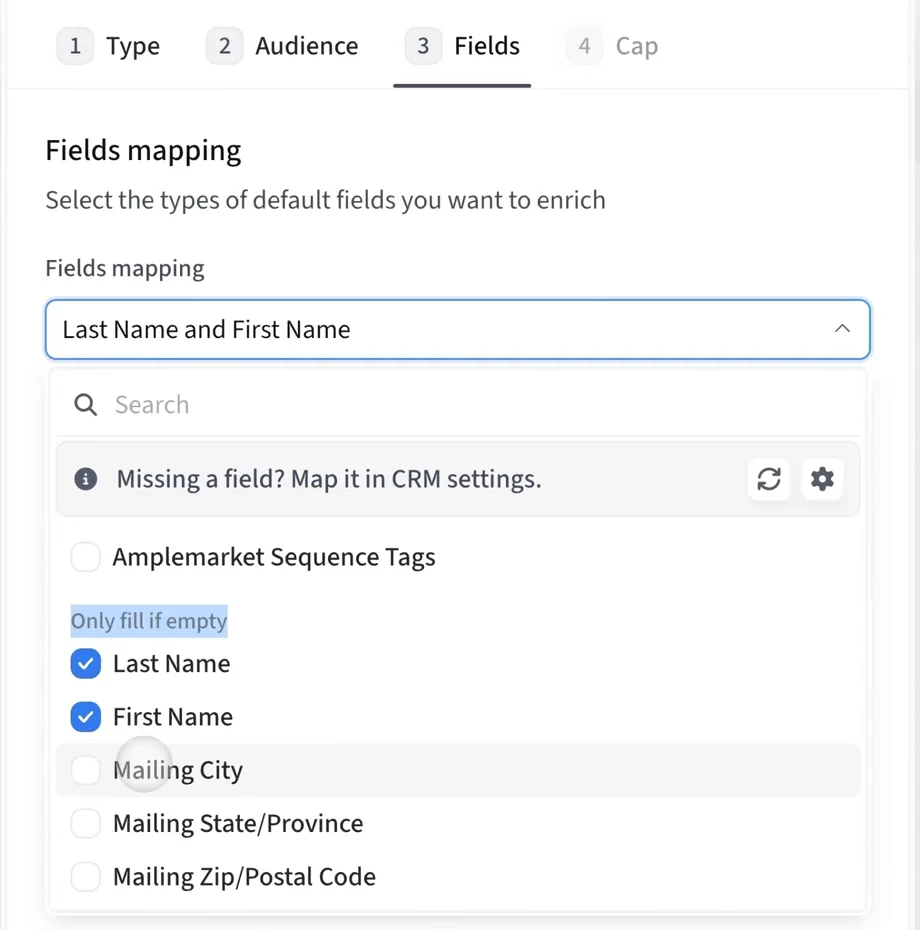
Fields. You choose which mapped fields the job may touch. The demo's field list groups them under two rules: override the existing value, or only fill if empty. In the screen below, First Name and Last Name are set to only fill if empty, so names your team typed by hand are never replaced. If a field is missing from the list, you map it in your CRM settings first.
Cap. Before launch, you see what the job will cost. This is the most useful screen in the flow.
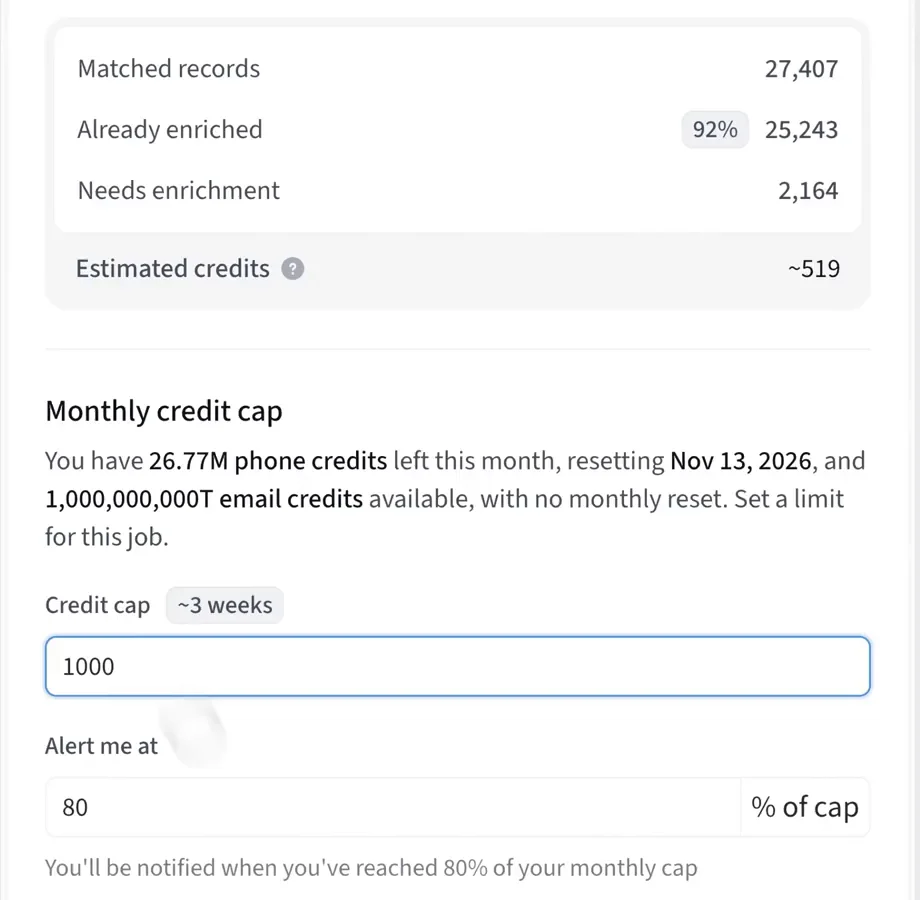
In the demo, the job matched 27,407 contacts. 92% of them, 25,243, were already enriched, so only 2,164 needed work, for an estimate of about 519 credits. The rep set a monthly cap of 1,000 credits, which the screen estimated would last about three weeks, and an alert at 80% of the cap. The point of the numbers: a big audience does not mean a big bill, because you only pay for the records that actually need something.
How credits work
Amplemarket's guide is specific:
- Company data uses no credits, however many account records you update.
- Contact and lead enrichment uses credits only when an email address or a phone number is revealed, from the same balance you use for prospecting.
- Re-checking an email or phone number you already revealed costs nothing.
- A record that cannot be matched is not charged, and credits for a record that fails to update are returned.
So the cheapest useful job is an account job: it keeps industry and company size current for free.
What you see after each run
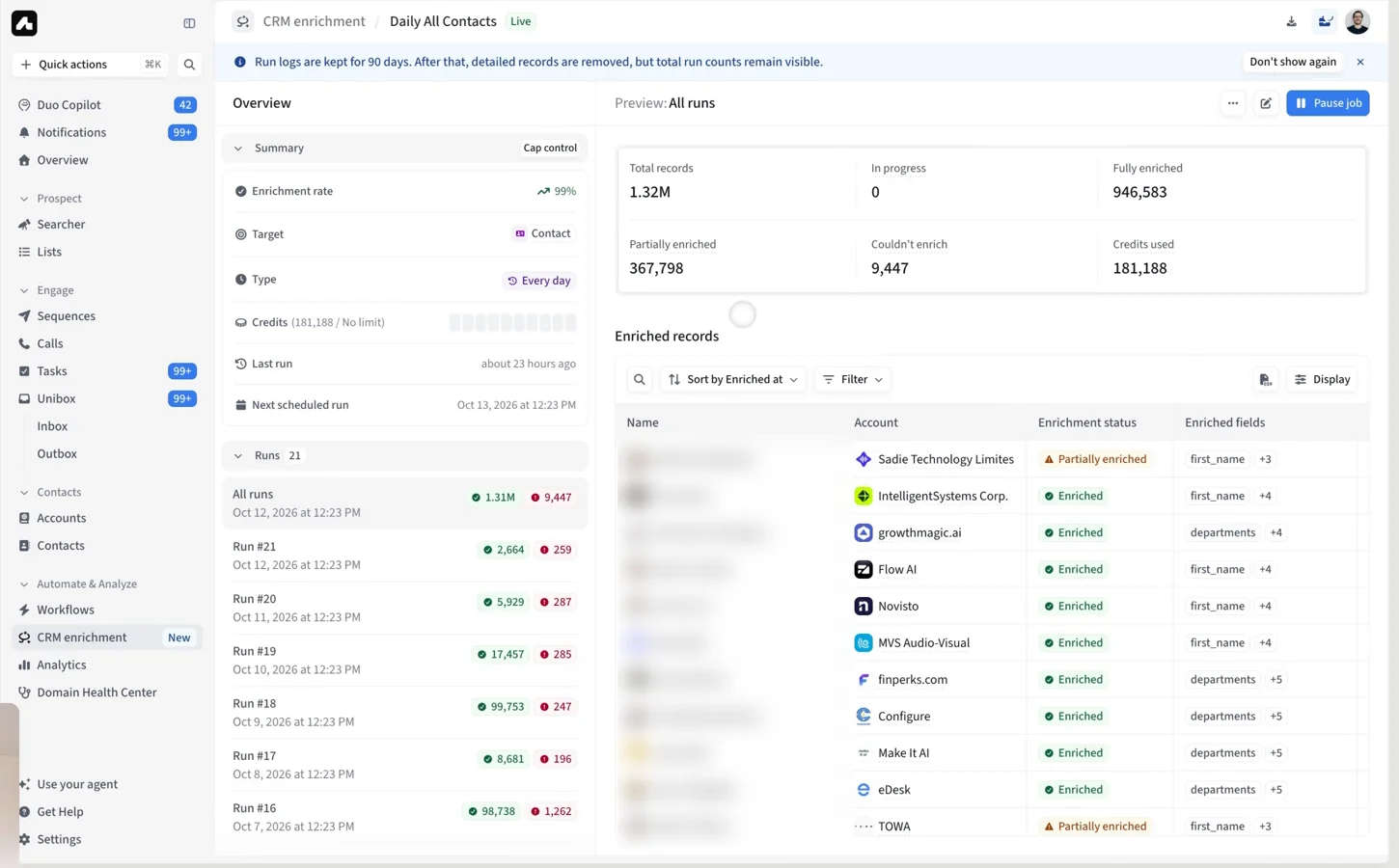
The demo's run history shows a daily contact job after 21 runs: 1.32 million records processed, 946,583 fully enriched, 367,798 partially enriched and 9,447 that could not be enriched. Each record lists its account, its status and the fields that changed, and the table exports to CSV. Detailed run logs are kept for 90 days, and the run totals after that.
Records that could not be enriched are tried again on the next run if they still match the filters, and you are not charged for them.
The controls that protect your data
The real fear with enrichment is that it overwrites what your team researched by hand. Amplemarket's answer has four parts:
- Field-level rules. Each field either stays current or is only filled when empty, following your CRM field mapping.
- No new records. The job works only on records already in your CRM.
- Permissions respected. If Amplemarket is not allowed to update a field in Salesforce, the field is skipped.
- Undo. You can revert a run once, and records go back to how they were. Fields edited since that run keep their newer value. Credits used by the run are not returned.
On Salesforce specifically, CRM Enrichment uses your existing Amplemarket Salesforce integration and sends updates through Salesforce's bulk API rather than one record at a time, so large runs stay light on your API limits.
How we would set it up for a small team
This plan is ours, built only from settings Amplemarket documents. The example company is made up: "Northpine", a B2B tool for finance teams at 50 to 500 person companies.
| Job | Type | Audience | Fields | Why this job |
|---|---|---|---|---|
| ICP accounts | Account, weekly | Amplemarket filters for your industry and company size | Industry, company size: keep current | Company data is free, so this one costs nothing. Start here |
| Inbound leads | Lead, Instant | All new leads | Company size, industry, title: only fill if empty | Every form fill arrives ready to route, within minutes |
| Customer contacts | Contact, every 2 weeks | CRM filter on customer accounts | Title and company: keep current | Tells you when a champion changes jobs |
| Campaign cleanup | Contact, scheduled, paused after one run | The campaign audience only | Email and phone: only fill if empty | Fixes gaps before a campaign without touching researched contacts |
And the field rules we would start with:
| Field | Rule | Reason |
|---|---|---|
| Job title, company | Keep current | People change roles. Outreach should reach the right person |
| Industry, company size | Keep current | Routing and scoring read from them |
| First and last name | Only fill if empty | Your team may have corrected spellings by hand |
| Email, phone | Only fill if empty | Protects details reps found themselves |
After the first run of any new job, spend five minutes on the run history. Read the totals, open five records and check the fields, and look at what was skipped. A field skipped on every record usually means it is not mapped as a default field. Only then widen the audience or raise the cap.
Before your first run
- Salesforce is connected to Amplemarket, and every field you want is mapped as a default field. CRM Enrichment can only update default mapped fields.
- Whoever sets up jobs has the CRM Enrichment permission. Admins have it by default and can turn it on for other roles.
- The first job is narrow, with a credit cap and an alert.
- One-time cleanup jobs are paused or archived after their run, since a job cannot be set to stop after a number of runs.
Who it fits, and who should wait
Good fit: teams that already prospect in Amplemarket and use Salesforce. The same data your reps see when they prospect ends up in the CRM, with no second data vendor or credit balance to manage.
Good fit: startups whose inbound leads arrive with only an email address and need routing the same day.
Wait: teams whose CRM is not Salesforce. The documented integration is Salesforce, so check with Amplemarket first.
Wait: teams with no clean field mapping yet. Fix the mapping first, because CRM Enrichment follows it.
Get started with CRM Enrichment
Map your default fields, create one free account job and read its run history before adding contact jobs. To add CRM Enrichment to your account or see it on your own data, book a demo or start a free trial.
FAQ

Software engineer and product builder with 13+ years of experience across software engineering, product development, and startup operations. Built SaaSOffers to make every startup deal discoverable and verified for founders worldwide.
Ready to unlock these deals?
Free account. No credit card required.