
Airtable Startup Credits: $1,000 in credits
Build custom apps and workflows with the relational database platform, free credits for startup teams.
Free · Opens in new tab
Already have an account? Log in
Deal Highlights
What Is Airtable?
Airtable is the relational database platform with a spreadsheet interface, combining the familiarity of Excel with the power of a real database. Used by over 500,000 organizations in 2026, Airtable enables non-technical teams to build custom applications, manage structured data, and automate workflows without writing code. Think of it as a database that marketing, sales, and operations teams can actually use.
For startups, Airtable fills the gap between "we need a spreadsheet" and "we need a custom application." Content calendars, CRM alternatives, project trackers, inventory management, applicant tracking, and hundreds of other structured data workflows run on Airtable with relational linking between tables, multiple views (grid, kanban, calendar, Gantt), and automations that trigger actions when data changes.
Airtable, one of the tools included in this startup deal.
Why This Deal Matters for Startups
Every startup has workflows that live in spreadsheets: the content calendar in Google Sheets, the lead tracker in Excel, the vendor list in a shared document. These spreadsheets break at 500 rows, they become slow, relationships between data become impossible to maintain, and multiple team members editing simultaneously creates conflicts.
Airtable replaces these broken spreadsheets with a proper relational database that non-technical team members can use on day one. The $1,000 startup credit covers 10 months of the Pro plan for a 5-person team, enough to migrate your critical workflows and evaluate whether Airtable justifies its cost long-term.
What's Included in the Airtable Startup Deal
Through SaaSOffers, qualifying startups receive:
- $1,000 in Airtable credits
- Pro plan access: 50,000 records per base, 20GB attachments, automations
- Relational databases: Link records across tables with lookups and rollups
- 7 view types: Grid, kanban, calendar, gallery, Gantt, timeline, form
- Interfaces: Custom dashboards combining data from multiple tables
- Automations: Trigger-based workflows (when record created → send email → update field)
- API and integrations: REST API, Zapier, Make, and 100+ native integrations
- Sync: Two-way sync between bases and external data sources
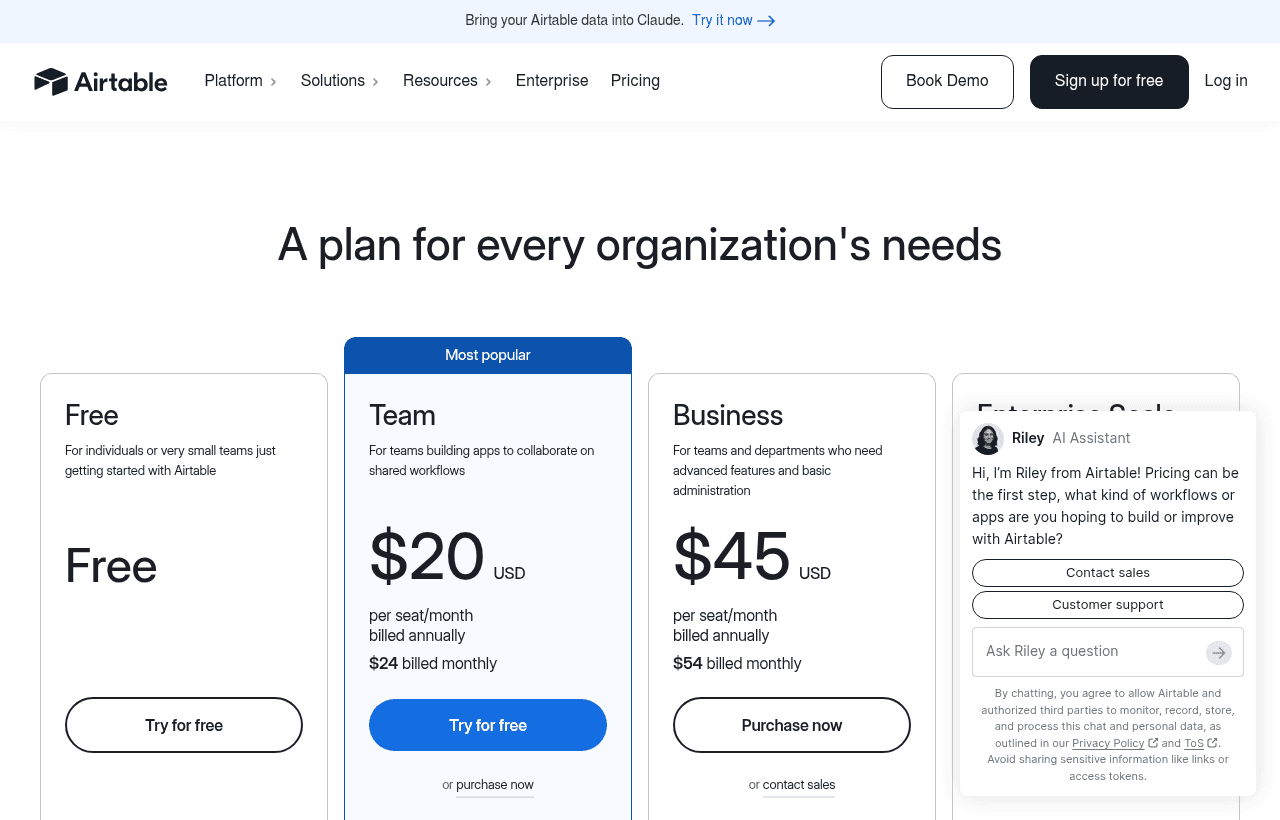
A look at Airtable before the discount, so you can see what the deal saves you.
Eligibility Requirements
- Early-stage startup, new Airtable workspace or existing free account
- Building workflows that require structured data management
- Applied through a qualifying startup platform
How to Claim This Airtable Deal. Step by Step
Step 1: Create a free account on SaaSOffers at saasoffers.tech and access the Airtable startup deal.
Step 2: Click "Get Deal" and follow the link to Airtable's startup program.
Step 3: Create your Airtable account and start a new base. Choose from a template (content calendar, project tracker, CRM) or start from scratch with a blank base.
Step 4: Design your table structure. Define tables (Contacts, Companies, Projects), fields (name, status, date, linked record), and relationships between tables. Think in terms of entities and relationships. Each table is an entity, linked record fields create relationships.
Step 5: Create views for different team members. The same data displayed as a grid for the operations team, a kanban board for the product team, a calendar for the marketing team, and a Gantt chart for the project manager. Each view filters and arranges the same underlying data differently.
Step 6: Build automations for repetitive tasks. When a deal status changes to "Won" → create a record in the Onboarding table → send a Slack notification → assign the account manager. Automations replace manual steps that are forgotten under pressure.
Step 7: Create Interfaces (dashboards) for stakeholders who need to see data but not edit tables. Interfaces combine charts, summaries, and filtered lists from multiple tables into a single read-friendly page.
Key Features of Airtable for Startups
Relational Data Model
Airtable tables link to each other through linked record fields, creating the same relationships a SQL database uses. A Projects table links to a Tasks table links to a Team Members table. Lookups pull data from linked records; rollups aggregate it. A project's dashboard automatically shows all associated tasks, assigned team members, and total hours logged, computed from relationships, not manual entry.
Multiple Views. Same Data, Different Perspectives
Every table supports 7 view types. The sales team sees the kanban view (deals by stage). The finance team sees the grid view (all deals with revenue columns). The CEO sees the calendar view (expected close dates). Each view filters, sorts, and groups the same data differently. No duplication, no sync issues.
Automations. No-Code Workflows
Airtable automations trigger on record events (created, updated, enters view) and execute actions (send email, create record, update field, post to Slack, call webhook). Common startup automations: when a lead is marked "qualified" → create a deal record → notify sales in Slack → schedule a follow-up task.
Interfaces. Custom Dashboards
Airtable Interfaces combine data from multiple tables into custom layouts, charts, summaries, record lists, and buttons. Build a client-facing project dashboard, a sales pipeline overview, or an operations KPI board without any code. Interfaces make Airtable data presentable to stakeholders who should not interact with the raw tables.
API and Integrations
Airtable's REST API exposes every base, table, and record programmatically. Build custom integrations, sync data with external systems, or use Airtable as a lightweight backend for internal tools. The API is clean, well-documented, and widely supported by Zapier, Make, n8n, and Retool.
Airtable Pricing: What You Pay Without This Deal
Airtable bills per editor per month, and that one detail drives almost the entire cost.
| Plan | Billed annually | Billed monthly | Records per base |
|---|---|---|---|
| Free | $0 (up to 5 editors) | $0 | 1,000 |
| Team | $20/editor/mo | $24/editor/mo | 50,000 |
| Business | $45/editor/mo | $54/editor/mo | 125,000 |
| Enterprise Scale | Custom | Custom | 500,000+ |
The distinction that saves the most money: read-only viewers are free on every plan. Only editors count as billable seats, and anyone who edits a record even occasionally becomes a paid seat. Teams routinely give everyone edit access by reflex and pay for a dozen seats when four people actually build and the rest only read dashboards. Auditing seat roles once a quarter is the highest-return cost exercise in Airtable.
The record ceilings matter as much as the seat price. Free caps at 1,000 records per base, reduced from 1,200 in February 2026, which is small enough that any real dataset breaks it quickly. Team's jump to 50,000 records is the reason most startups upgrade, not the feature set.
What the $1,000 credit covers. On Team billed annually at $20 per editor, the credit is worth 50 editor-months. For a five-person team that is roughly ten months of Airtable at no cost. On Business at $45 per editor it is closer to 22 editor-months, or about four months for the same five people. If your use case fits Team, the credit stretches more than twice as far, so resist upgrading to Business until you hit a specific limit that blocks you.
Two costs catch teams by surprise. Attachments count against per-base storage rather than being unlimited, so image-heavy bases hit limits sooner than record counts suggest. And automation runs are capped per plan, so a base that fires automations on every record change can exhaust its monthly allowance well before the month ends.
Airtable vs Notion vs Google Sheets
| Factor | Airtable | Notion | Google Sheets |
|---|---|---|---|
| Primary strength | Relational data | Documents + wiki | Spreadsheet formulas |
| Record limit | 50,000 per base (Pro) | ~5,000 before slowdown | Unlimited (slow at 100K+) |
| Relations between tables | Excellent (lookups, rollups) | Basic (linked databases) | Manual (VLOOKUP) |
| Views | 7 types | 6 types | 1 (grid only) |
| Automations | Built-in | Basic | Via Apps Script |
| Non-technical usability | Excellent | Good | Excellent |
| API | Excellent | Good | Good |
| Documentation/wiki | Poor | Excellent | Poor |
| Startup credits | $1,000 | 6 months free Plus | Free (via Workspace) |
Airtable wins for structured data management at scale, content calendars with 5,000 entries, CRM alternatives with 10,000 contacts, inventory tracking with relational product/warehouse data. Notion wins for documentation and team wikis. Google Sheets wins for financial models and ad-hoc calculations.
Who Is the Airtable Deal For?
Marketing and content teams managing campaigns: Content calendars, social media scheduling, campaign trackers, and editorial workflows with 100+ entries are Airtable's sweet spot. The calendar and kanban views provide the visibility that marketing teams need without building a custom tool.
Operations teams tracking structured data: Vendor management, inventory tracking, applicant tracking, event planning, and any workflow with structured records that need relational linking. If your spreadsheet has VLOOKUP formulas connecting multiple sheets, Airtable is the upgrade.
Startups building lightweight internal tools: A simple CRM, a customer feedback tracker, a bug report database, or a partner directory. Airtable replaces the custom internal tools that would otherwise require a developer to build and maintain.
Real Startup Use Cases
ContentScale (content agency, 12 people): ContentScale manages 3,000+ content pieces for 30 clients in a single Airtable base. Each piece links to a client record, an author record, a publication channel, and a status workflow. Automations notify writers when editors approve drafts and notify clients when pieces are published. Weekly reporting interfaces show each client their content pipeline status.
HireRight (recruiting startup): HireRight built their applicant tracking system on Airtable, candidates linked to job openings linked to interview stages linked to hiring managers. The kanban view shows candidates by stage (Applied → Screen → Interview → Offer → Hired). Automations send rejection emails when candidates are moved to "Declined" and schedule follow-ups when offers are extended.
EventHub (event management): EventHub tracks 200+ events per year in Airtable. Each linked to venues, speakers, sponsors, and attendees. The calendar view shows the event schedule. The gallery view displays event photos and descriptions for the marketing team. Interfaces provide sponsors with a dashboard showing their events, audience numbers, and ROI metrics.
When Airtable Stops Being the Right Tool
Airtable is excellent until your data outgrows the assumptions a spreadsheet-database hybrid makes. Knowing the exit signals saves you from an expensive migration under pressure.
The record ceiling is the clearest signal. If a single base is approaching 50,000 records on Team or 125,000 on Business, and the growth is structural rather than a one-time import, you are heading toward a real database. Airtable's per-base caps are hard limits, not soft warnings.
Performance is the second signal. Bases with heavy formula fields, many linked-record relationships, and large views get noticeably slower well before hitting record limits. If your team waits for views to load, the tool has become friction rather than leverage.
The third signal is when Airtable becomes your production backend. Using it to store internal operational data is a strength. Using it to serve application data to customers, through the API, on every page load, will eventually hit rate limits and latency you cannot tune around. At that point teams typically move core data to Postgres and keep Airtable for the internal workflows it is genuinely good at.
None of this argues against starting on Airtable. Starting fast matters more than starting perfectly, and most startups never hit these ceilings. Just recognize them as engineering signals rather than reasons to buy a bigger plan.
Tips to Maximize Your Airtable Credits
- Design your table structure before entering data. Restructuring tables after 1,000 records are entered is painful. Spend 30 minutes planning which tables you need, what fields each table has, and how tables relate to each other before creating any records.
- Use linked records instead of duplicating data. If client names appear in both your Projects table and your Invoices table, link both tables to a single Clients table. Changes to a client's name update everywhere automatically. Duplicated data drifts out of sync within weeks.
- Create views for every use case, not new tables. When the marketing team wants to see "only active campaigns," create a filtered view. Not a separate table. Views are free; duplicate tables create data sync nightmares.
- Use automations for every repetitive manual step. If you manually send a Slack message every time a deal closes, automate it. If you manually copy data from one table to another, automate it. Each automation saves 2–5 minutes per occurrence, compounding to hours per week.
- Build Interfaces for stakeholders. Clients, investors, and executives should see Interfaces (clean dashboards), not raw tables. Interfaces present the right data in a readable format without exposing the complexity of your underlying table structure.
Who Is This Deal For?
Early-Stage Startups
Seed and pre-seed companies looking to move fast without overspending on tools.
Growing SaaS Teams
Series A+ companies scaling their stack and optimizing software costs.
Solo Founders
Indie hackers and bootstrapped founders who need enterprise tools at startup prices.
Get $1,000 in credits off Airtable
Premium deal. Upgrade once, unlock everything.
Frequently Asked Questions
Everything you need to know about this startup deal.
Airtable has a free plan with 1,000 records per base and limited features. The startup credit program provides $1,000 in credits for the Pro plan (50,000 records per base, automations, Interfaces, API access). The credits cover approximately 10 months of Pro for a 5-person team.
Get the weekly deals digest
New verified startup deals every week. No spam, ever. Unsubscribe anytime.
Related Offers

Slack
Used by 4,760 members
25% off first year
Get 25% off Slack Pro for your first year. The messaging platform that has replaced email for 750,000+ organizations worldwide.
View offer
Zapier
Used by 2,122 members
$500 in credits
Connect 6,000+ apps and automate workflows without code. The glue that holds your SaaS stack together.
View offer
Monday.com
Used by 3,110 members
6 months free Pro
Get 6 months free on Monday.com Pro, the visual Work OS that powers project management, CRM, dev sprints, and operations workflows for over 225,000 customers worldwide.
View offer
Make
Used by 990 members
10,000 ops free
Get 10,000 free operations on Make. The visual automation platform that connects 1,500+ apps to automate workflows without code.
View offer
Grammarly
Used by 1,637 members
6 months free Business
AI-powered writing assistant for your entire team, catch errors, improve clarity, and maintain brand voice across all communications.
View offer
Loom
Used by 848 members
6 months free Business
Record and share video messages to replace meetings, free Business plan for startup teams.
View offerDeal Summary
Looking for more startup deals?
Browse all offers