Most founders already do half their sales work in Claude or ChatGPT. They research a company before a call, rewrite a cold email, look for an angle on a hard account. Then they need real data, a name, a title, who already talked to this person, and the assistant cannot help. So they open Amplemarket in another tab, search, copy the result and paste it back into the chat.
Amplemarket MCP removes that round trip. Your assistant connects to your Amplemarket account and can search, research, enrich, build lists and add leads to sequences from inside the conversation. To try it on your own account, book a demo or start a free trial of Amplemarket.
We built this guide from Amplemarket's product page, launch post, FAQ and demo video. We have not run it on our own account, so it is a setup guide, not a review.
What Amplemarket MCP is
MCP stands for Model Context Protocol, an open standard that lets AI assistants use outside tools and data. Amplemarket MCP is Amplemarket's server built on it. Amplemarket says it exposes more than 50 tools: people and company search, enrichment, accounts, contacts, exclusions, lead lists, sequences, workflows, personas, tasks, inbox management, Duo recommendations and analytics.
The difference with copy and paste is where the answer comes from. Every answer is read from your live account, so it reflects the reply that came in an hour ago, not a CSV you exported last week.
Connecting it
Amplemarket offers guided setup for Claude, ChatGPT, Cursor and Grok Bot from Settings → Integrations. You pick your assistant and sign in with your Amplemarket account. The connection uses OAuth, so there is no API key to copy, store or leak. Amplemarket says it takes under a minute.
Any other tool that supports remote MCP servers, including agent platforms, can connect with the custom connector URL from Amplemarket's setup guide. One limit to know for Claude: adding a custom connector currently needs a Pro, Max, Team or Enterprise plan.
What happens when you ask
Here is Amplemarket's 30-second demo of Amplemarket MCP in Claude:
The demo shows one request from start to finish. It is worth walking through, because it shows how the assistant and Amplemarket split the work.
The rep asks Claude for US sales leaders who studied at Stanford and work at SaaS companies that raised a Series A in the last 12 months. Claude restates the search, then stops and asks for permission before it touches Amplemarket.
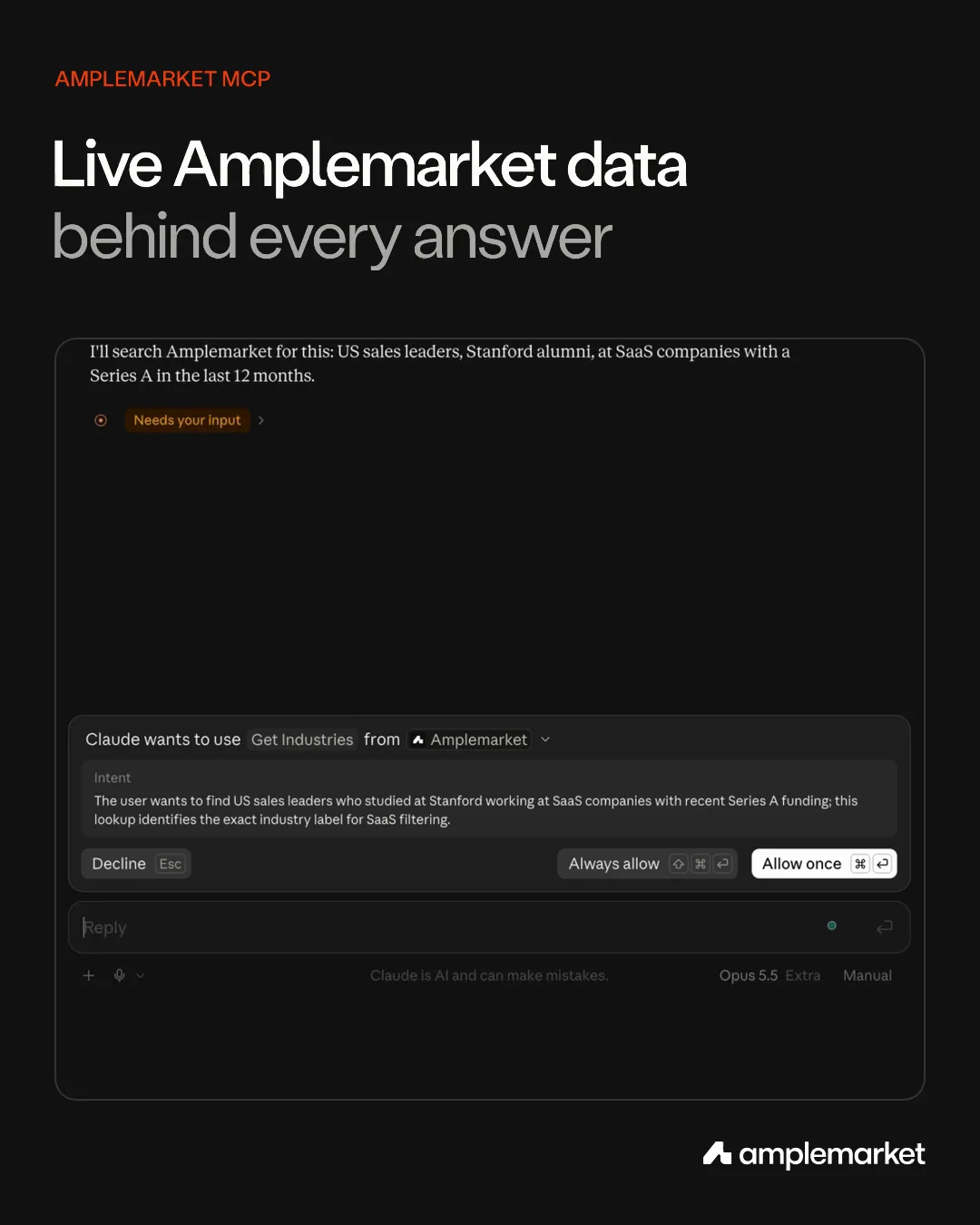
Three details in that screen matter:
- It names the exact tool. Here it is Get Industries, used to find the exact industry label Amplemarket uses for SaaS before running the search. The assistant looks up Amplemarket's own vocabulary instead of guessing filter values.
- It states its intent in plain words, so you can check the request makes sense before it runs.
- You choose the scope: Decline, Allow once or Always allow. A cautious team can approve each call at first and loosen it later.
Then the answer comes back as a table: person, company, title and location. Claude adds a short note on how it chose, in this case leaning toward people who own sales directly rather than broader partnership titles, and offers two next steps: enrich these five for emails and phone numbers, or find five more in a narrower region.
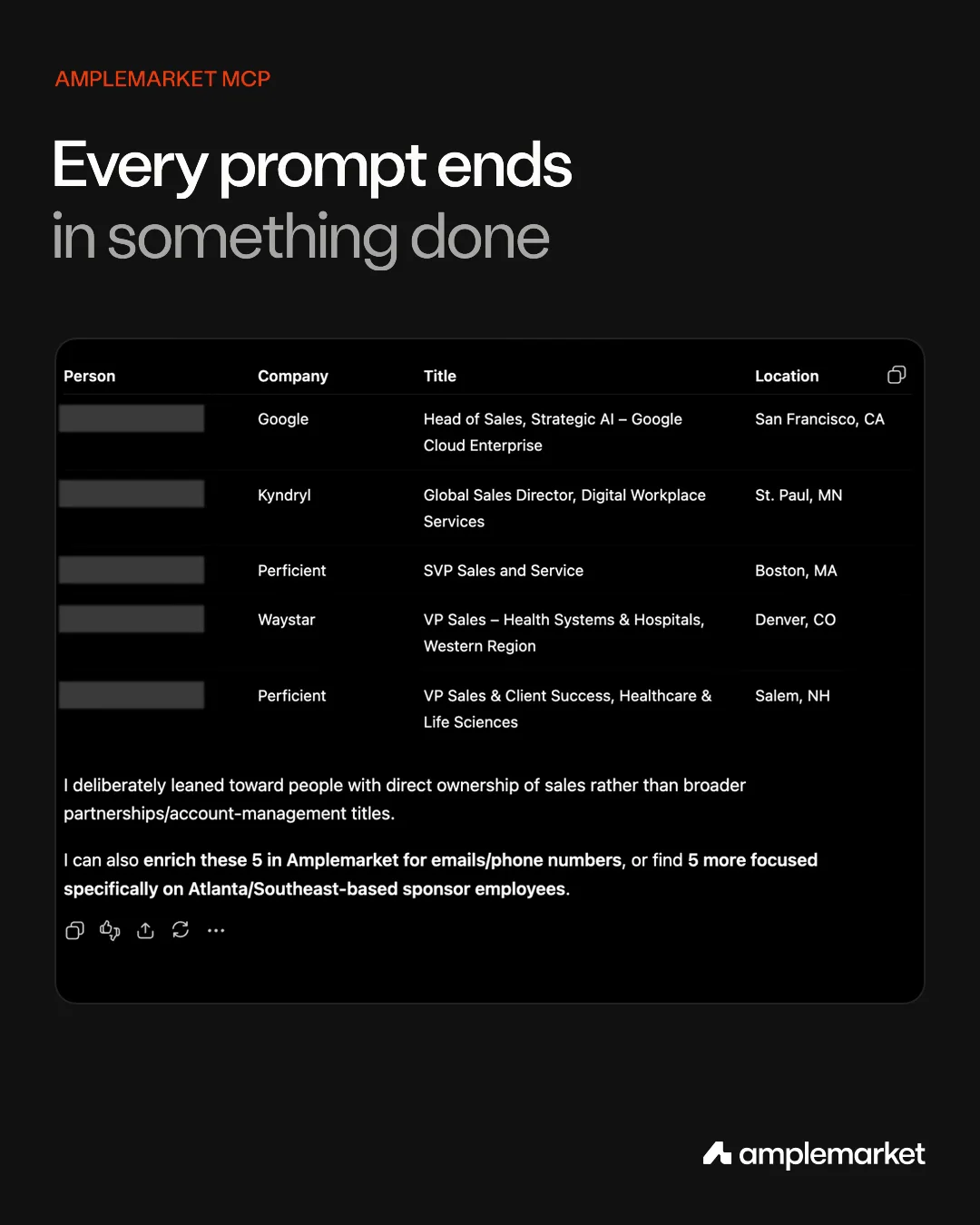
That last step is the pattern Amplemarket pushes on its product page: every prompt should end in something done. A search alone is half a job. The useful prompt ends with a list built, an account mapped, a reply surfaced or a question answered.
The prompts that earn their place
Amplemarket's product page lists example prompts by job. Most teams will not need all of them. Here is which ones matter most for a small team, and why.
| Job | Amplemarket's example prompt | Why it is worth saving |
|---|---|---|
| Unanswered replies | Show every reply marked interested in the last 7 days where the last message is still theirs | Finds prospects who said yes and are waiting on you. The most expensive thing to miss |
| Account mapping | Find everyone in revenue leadership at Deel and add them to the account list | Turns one target account into a list of people in one step |
| Hiring signals | Find US SaaS companies with 200 to 1,000 employees that are hiring SDRs right now | A company hiring for a role is often buying the tools around it |
| Warm paths | Find VPs of Sales who are connected to someone on our team on LinkedIn | Starts from an intro instead of a cold email |
| Sequence performance | Compare reply rates across active sequences for the last 30 days | Tells you which message to keep, without building a report |
| Battlecards | Pull our battlecard for [competitor] and give me three objection handlers | Useful right before a call where a competitor will come up |
Two habits make these work better, both visible in the demo. Be specific about filters (role, location, company size, funding stage), because the assistant passes them to Amplemarket's search. And end every prompt with the action you want: "add them to a list", "enroll them", "pause the weakest".
Skills
Amplemarket also publishes skills: saved instructions that tell Claude and ChatGPT how to handle a sales task with Amplemarket data, added from a library in one click. The library covers account research, prospecting, signal monitoring, outreach, pipeline reviews, coaching, deliverability, Duo Copilot tuning, workspace setup and workflows.
For a small team, a skill is a cheap way to make everyone research an account the same way, instead of each rep writing their own long prompt.
The controls
Giving an assistant access to your sales system is a fair thing to worry about. Beyond the permission prompt shown above, Amplemarket's product page describes four controls.
Every action under the rep's own login. Each person signs in with their own Amplemarket account. The assistant sees and does only what that person can. There are no shared keys.
Live data, nothing exported. Searches, contact history, sequences, inbox and analytics come straight from the account.
One process for every rep. Reps reuse the personas, saved searches and lists the team already approved, and sequences follow your Duo messaging settings, whoever is prompting.
No single AI vendor. The same setup works in Claude, ChatGPT, Cursor or any MCP client, so changing assistants later does not change your process.
On cost, Amplemarket's FAQ says enrichment through Amplemarket MCP uses credits at the same rate as in the app.
Rolling it out to a team
Amplemarket's FAQ gives a clear order: start with something read-only, write down who may do what, and test each role before opening write actions. Here is that order as a plan for a team of three to ten.
| Week | What to allow | Who |
|---|---|---|
| 1 | Prospect search, account research, contact history (read-only, nothing to undo) | Everyone |
| 2 | Nothing new. Write one page: who may enrich, change shared lists, enroll leads, act on inbox items | Founder or sales lead |
| 3 | Building lists and enriching from the chat. Compare credit use with the app | People named in the page |
| 4 | Enrolling leads in sequences and triaging the inbox | Each rep, on their own leads and threads |
The reason for the order is simple. Search and research cannot break anything. Enrollment and inbox actions reach real prospects, so they come last, after the rules exist.
A founder's day with Amplemarket MCP
This is our example of how the pieces fit together for a founder who sells around product work. The company is made up: "Northpine", a B2B tool that helps finance teams close the books faster. The prompts use only features Amplemarket documents.
Before the first meeting. Run the unanswered replies prompt from the table above, and answer those before anything else.
Before each call. "Tell me about [prospect email] and show my previous touchpoints with them." You walk in knowing what was already said, including by a teammate.
Once a week, building pipeline. "Find controllers and VPs of Finance at US software companies with 50 to 500 employees and add the best 25 to a list called Northpine finance leaders." Then: "Enrich this list for emails" when you are ready to reach out.
Friday. "Compare reply rates across my active sequences for the last 30 days. Which one should I pause?"
Four prompts a week, each ending in something done, and no tab switching.
Who it fits, and who should wait
Good fit: founders and small sales teams who already work in Claude or ChatGPT every day and keep switching tabs to look things up.
Good fit: sales ops and RevOps people who build reports. A sales operations specialist quoted on Amplemarket's page says she asks Claude to generate reports for leadership and sends them through Slack.
Wait: teams that have not set up their ICP, personas or saved searches. The assistant reuses what your team already approved, so set that up first.
Wait: teams that do not use an AI assistant today. Start with the Amplemarket app itself.
Get started with Amplemarket MCP
Connect your assistant from Settings → Integrations and run one read-only prompt before your next call. To see it on your own data, book a demo or start a free trial.
FAQ

Software engineer and product builder with 13+ years of experience across software engineering, product development, and startup operations. Built SaaSOffers to make every startup deal discoverable and verified for founders worldwide.
Ready to unlock these deals?
Free account. No credit card required.