
Chatwoot Coupon: Free Self-Hosted
Open-source customer engagement platform with live chat, email, and social media inbox.
Premium: $79/year for unlimited deals
Already have an account? Log in
Deal Highlights
Chatwoot on SaaSOffers
Our listing: Free Self-Hosted. There are no extra requirements and no promo code. You reach Chatwoot from the link on this SaaSOffers page.
We checked these plans and prices against Chatwoot's official pricing and help pages in November 2026.
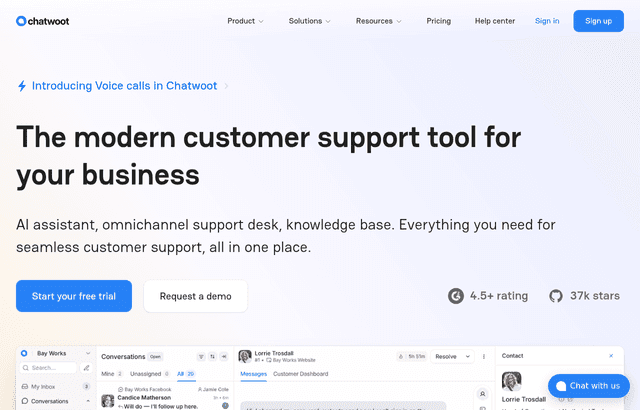
Be clear on what that means. Chatwoot publishes its Community Edition free to everyone, under the MIT License, and its self-hosted pricing page calls it "Free forever." Our listing adds nothing on top of that. What you get here is a plain account of what the free edition covers, what it leaves out, and what running it really costs once you add a server.
Free software, paid server
Chatwoot is an open-source customer support desk. It puts website live chat, email and social messages into one shared inbox for your agents. You can use it in two ways: rent it on Chatwoot Cloud, or install it on your own server.
The self-hosted Community Edition charges $0 per agent. You still pay for the machine it runs on, the database, file storage, backups and the time to keep it updated. Chatwoot's pricing FAQ says you need a Linux server with PostgreSQL and Redis, plus S3 or any S3-compatible storage for file uploads.
The developer docs give two sizes:
- Minimum: 2 CPU cores, 4 GB RAM, 20 GB SSD, Ubuntu 20.04 or a compatible Linux distribution.
- Recommended for production: 4 or more cores, 8 GB RAM or more, 50 GB SSD or more, PostgreSQL 12+, Redis 6+, and Nginx or a similar reverse proxy.
The pricing FAQ is a little looser, suggesting at least 4 GB RAM and 2 cores for production. We would follow the docs.
Deployment options include an automated install script for Linux virtual machines, Docker, Kubernetes, and one-click deploys on DigitalOcean and Heroku.
Self-hosted editions and Cloud plans
Self-hosted
| Edition | Price billed yearly | Price billed monthly | Key limits |
|---|---|---|---|
| Community Edition | $0 | $0 | Host on your own infrastructure; no Captain AI, voice calls, custom branding, agent capacity, roles and permissions, SSO/SAML, SLA policies or priority support |
| Premium Support | Not published | $19 per agent | Adds Captain AI, voice calls, custom branding, agent capacity, roles and permissions, priority email support |
| Enterprise Edition | Not published | $99 per agent | Adds SSO/SAML and SLA policies, phone support and engineering office hours |
Community Edition support runs through Discord and GitHub. Premium Support plans are refundable based on the time left; Enterprise Edition plans are not, because they include dedicated setup and onboarding. You can start on Community and upgrade later, and Chatwoot says your data and settings carry over.
The paid self-hosted features sit in a proprietary Enterprise Edition that lives in the same repository as the MIT-licensed code and is enabled by a license.
Chatwoot Cloud
| Plan | Price billed yearly | Price billed monthly | Key limits |
|---|---|---|---|
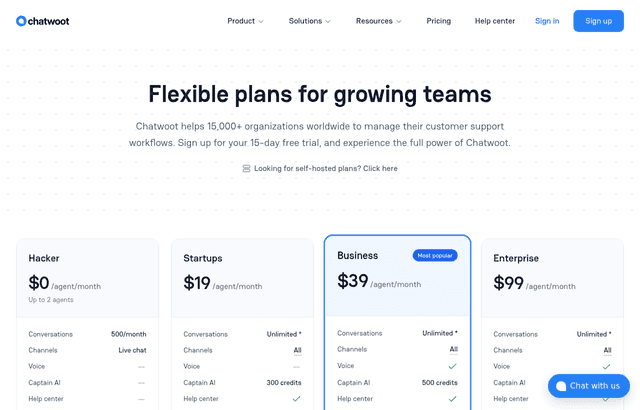
| Hacker | $0 | $0 | Up to 2 agents, 500 conversations a month, live chat only, 30-day data retention |
| Startups | Not published | $19 per agent | Unlimited conversations (fair use), all channels, help center, 300 Captain AI credits, 1-year retention |
| Business | Not published | $39 per agent | Adds voice, teams, automation rules, 500 credits, 2-year retention |
| Enterprise | Not published | $99 per agent | Adds SSO/SAML, audit logs, 800 credits, 3-year retention |
The free Hacker plan has no help center, teams, automation rules, voice, Captain AI, SSO or audit logs. Chatwoot's pricing pages do not show an annual price for any plan. Cloud plans come with a 15-day free trial and refunds based on unused time. Extra Captain AI credits cost $20 per 1,000, and Captain credits themselves are non-refundable. Chatwoot Cloud runs on AWS with servers in the United States.
What the free self-hosted edition leaves out
Community Edition is a full shared inbox. These are the gaps:
- Captain AI. No AI assistant, copilot, reply suggestions or summaries.
- Voice calls. Phone support needs Premium Support or higher.
- Custom branding. You cannot white-label the product on Community.
- Roles and permissions, and agent capacity. Fine-grained access control and per-agent conversation caps are paid.
- SSO/SAML and SLA policies. Enterprise Edition only.
- Priority support. You rely on Discord and GitHub.
- Managed upgrades and backups. You do these yourself, on your server.
Channels and integrations
Chatwoot's GitHub README lists the channels its inbox supports: website live chat, email, Facebook, Instagram, Twitter, WhatsApp, Telegram, Line and SMS. The same README lists integrations with Slack, Dialogflow for chatbots, Shopify order lookups, Google Translate for real-time message translation and Linear ticket creation. Dashboard Apps let you embed internal tools inside the conversation view.
Captain AI on self-hosted plans connects to OpenAI's GPT models for reply suggestions, summaries and the AI assistant. On Cloud, credits cover reply suggestions, message summarization, auto-translation and knowledge base answers.
You can export conversations, contacts and other data through the API at any time.
What Captain AI does once you pay
Captain is the AI layer that Community Edition lacks. Chatwoot's pricing page lists nine parts:
- Assistant: a chatbot that answers customer questions around the clock.
- Copilot: suggests what to say while an agent is in a conversation.
- Memories: auto-generated notes about each customer from past chats.
- Reply suggestions: drafts an agent can send with one click.
- Summarization: turns a long thread into a short summary.
- Content gap: finds questions your help center does not answer yet.
- Monitors: tracks the themes customers raise.
- Triage: sets priority, labels and team on each new conversation.
- Scenarios: follows the steps your team writes for each kind of case.
On Cloud, each paid plan includes a monthly credit allowance (300, 500 or 800) and you can track usage in the billing dashboard. On self-hosted, Captain comes with Premium Support at $19 per agent and Enterprise Edition at $99 per agent.
Starting on Cloud and moving later
Chatwoot's startup page says you can begin on Cloud and move to self-hosted when security or cost requires it. It also notes most startups connect a channel and publish the widget in under a day. Chatwoot says more than 15,000 organizations use it.
Two worked examples
Server prices below are Hetzner's Regular Performance list prices in the EU, excluding VAT. Chatwoot prices are in US dollars, so we show the two currencies side by side rather than adding them.
Example 1: a 3-agent support team
A small SaaS startup has three people answering chat and email.
- Cloud Hacker: not an option, since it allows up to 2 agents and live chat only.
- Cloud Startups: 3 × $19 × 12 = $684 a year.
- Cloud Business: 3 × $39 × 12 = $1,404 a year.
- Self-hosted Community Edition: $0 in Chatwoot fees. A Hetzner CPX22 with 2 vCPU, 4 GB RAM and 80 GB disk meets the minimum spec at €19.99 a month, or €239.88 a year.
Going self-hosted saves the $684 Cloud Startups bill, in exchange for about €240 a year in hosting and the work of running the server.
Example 2: an 8-agent team that wants AI and voice
A growing team has eight agents and wants Captain AI and voice calls.
- Cloud Business: 8 × $39 × 12 = $3,744 a year, with 500 Captain credits a month.
- Self-hosted Premium Support: 8 × $19 × 12 = $1,824 a year, plus a server. A Hetzner CPX32 with 4 vCPU and 8 GB RAM, near the recommended production spec, costs €35.99 a month, or €431.88 a year.
- Cloud Startups: also 8 × $19 × 12 = $1,824, but it has no voice, teams or automation rules.
Self-hosted Premium Support costs $1,920 a year less in Chatwoot fees than Cloud Business ($3,744 minus $1,824). The self-hosted pricing page does not say whether you pay OpenAI directly for Captain AI, so confirm that cost before you budget. If you need 500 extra Captain credits a month on Cloud, that adds $10 a month at $20 per 1,000.
Teams that fit Chatwoot
- Teams with data residency or compliance rules. Self-hosting keeps conversations on your own servers. Chatwoot Cloud runs on AWS in the United States.
- Startups with someone comfortable running Linux. PostgreSQL, Redis and Docker are routine for a backend engineer.
- Support teams that live in WhatsApp, Instagram and email. One inbox covers them all on Community Edition.
- Open source projects and nonprofits. Chatwoot gives its Cloud Startups plan free to open source projects, and asks open source projects and nonprofits to request it by email at hello@chatwoot.com.
Who Chatwoot is not for
- Founders with no engineer to maintain servers. Use Cloud Hacker for 2 agents, or pay for Cloud.
- Teams that need SSO on a small budget. SSO needs Enterprise Edition at $99 per agent.
- Teams that want AI answers without paying anything. Captain AI is not in Community Edition.
- Large teams that need a vendor SLA on uptime. Self-hosted uptime is yours to manage.
Chatwoot compared with alternatives
| Chatwoot | Intercom | Crisp | tawk.to | |
|---|---|---|---|---|
| Free option | Self-hosted Community Edition $0; Cloud Hacker $0 for up to 2 agents | 14-day trial, no card needed | Free $0, 2 seats, 100 profiles | Live chat free, no limit on agents or chat volume |
| Entry paid price | $19 per agent a month | Essential $29 per seat yearly, $39 monthly | Mini $45 a month per workspace, 4 agents | Remove Branding $29 a month per property |
| Pricing unit | Per agent | Per seat, plus $0.99 per Fin outcome | Per workspace, extra agents $10 a month | Per add-on |
| AI pricing | 300 to 800 credits included on paid Cloud plans; $20 per 1,000 extra | Fin $0.99 per outcome | AI credits included from $5 on Mini | AI Assist from $29 a month |
| Data hosting | Your server, or AWS in the US on Cloud | US, EU or Australia, new Advanced and Expert workspaces on contract | EU servers in the Netherlands and Germany | Not stated on its pricing page |
Intercom costs more per seat and adds a per-outcome AI fee, and its Early Stage program cuts year-one costs for startups under $10M in funding. Crisp's per-workspace price favors small teams. tawk.to costs nothing for chat and sells add-ons. Chatwoot is the pick when you want to own the code and the data.
Getting set up on Chatwoot
- Size the server to the docs, not the minimum. 4 cores and 8 GB RAM avoid trouble once several agents are online.
- Use managed PostgreSQL and S3-compatible storage if you can. Backups and file uploads are the parts most often lost on a single box.
- Start on Community, upgrade later. Chatwoot says data and settings carry over to the paid editions.
- Connect channels one at a time. The self-hosted docs have separate guides for Instagram via Facebook Login and Instagram App Review; test each inbox before going live.
- Use the 15-day Cloud trial to compare. Try the Business plan's automation rules before deciding whether to self-host.
- Plan your upgrade routine. Community Edition has no managed updates, so schedule them.
Steps to get the Chatwoot deal
- Open the Chatwoot deal on SaaSOffers and use the link on this page.
- Choose self-hosted. The Community Edition needs no license key, payment or promo code.
- Provision a Linux server that meets the docs' spec, with PostgreSQL 12+ and Redis 6+.
- Install with the Linux script, Docker, Kubernetes or a one-click DigitalOcean or Heroku deploy.
- Create your admin account, connect your first inbox and embed the chat widget on your site.
- If you later need Captain AI, voice or SSO, buy Premium Support or Enterprise Edition from the self-hosted pricing page.
Who Is This Deal For?
Early-Stage Startups
Seed and pre-seed companies looking to move fast without overspending on tools.
Growing SaaS Teams
Series A+ companies scaling their stack and optimizing software costs.
Solo Founders
Indie hackers and bootstrapped founders who need enterprise tools at startup prices.
Get Free Self-Hosted off Chatwoot
Premium deal. Upgrade once, unlock everything.
How to get the Chatwoot deal
- The offer: Free Self-Hosted.
- Create a free SaaSOffers account, then upgrade to Premium ($79 a year, or $250 once for lifetime access). Premium unlocks every Premium deal on the site.
- Open the Chatwoot claim page from this deal. It shows the partner link, any promo code and the exact steps Chatwoot asks for.
- Apply or sign up through that link before you pay Chatwoot directly, since most startup offers only apply to new accounts.
Frequently Asked Questions
Everything you need to know about this startup deal.
Get the weekly deals digest
New verified startup deals every week. No spam, ever. Unsubscribe anytime.
Related Offers

Tidio
Used by 499 members
Free Plan
AI-powered customer service platform with live chat, chatbots, and helpdesk features.
View offer
Vinci AI
Free trial + startup credits
Vinci AI deploys AI agents that resolve customer support tickets end to end across chat, email, voice and your helpdesk. Startups get a two-week free trial with unlimited AI resolutions plus startup credits, then pay $29 per seat per month plus $0.59 per completed resolution.
View offer
Intercom
Used by 2,591 members
93% off + 1 year of Fin free
Get 93% off Intercom plus a free year of Fin AI Agent through Intercom's Early Stage program to power your customer support and engagement with AI-first messaging that converts and retains users.
View offer
LiveChat
Used by 1,774 members
Free Trial
Premium live chat and helpdesk software for customer service and online sales.
View offer
800.com
Used by 380 members
30-day money-back guarantee
Get a 30-day money-back guarantee on 800.com, the toll-free and vanity-number platform that gives small businesses an instant national-brand phone presence with no PBX, no hardware, and no contracts.
View offer
Tawk.to
Used by 1,920 members
Free forever + 15% off add-ons
Free live chat with unlimited agents and chat history, plus 15% off tawk.to add-ons for SaaSOffers members, including branding removal and the AI Assist chatbot.
View offerDeal Summary
Looking for more startup deals?
Browse all offers