
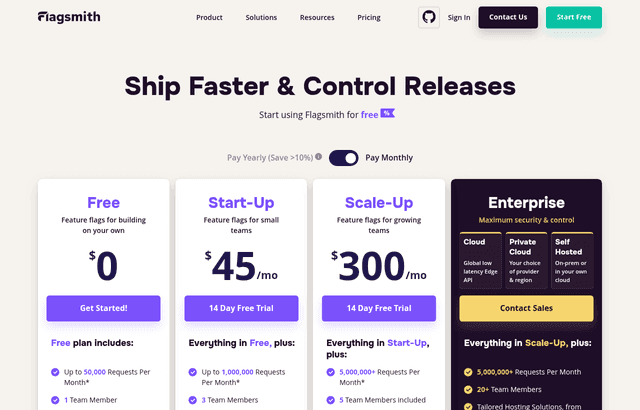
Flagsmith Coupon: Free Plan
Open-source feature flag and remote config service for managing releases.
Premium: $79/year for unlimited deals
Already have an account? Log in
Deal Highlights
What Flagsmith Gives a Startup
Flagsmith is an open-source feature flag and remote config service for managing releases, and the deal on this page is a free plan. For a startup, feature flags are one of those capabilities that quietly separate teams that ship confidently from teams that ship with their fingers crossed. A feature flag lets the team turn a piece of functionality on or off without deploying new code, which means a new feature can be released to some users, held back from others, or switched off instantly if something goes wrong. Flagsmith gives an early team that control, and the free plan lets them adopt it before it becomes urgent.
The free plan matters because feature flagging is a practice a startup wants in place before the moment it saves the company from a bad release, not after. Standing up a flag service costs nothing on the free plan, so the team can wire flags into the product while things are calm and low-stakes. By the time the company has real users and a release that could genuinely hurt if it broke, the safety mechanism is already there, already understood, and already part of how the team ships.
Because Flagsmith is open-source, a startup also gets an unusual amount of trust and flexibility for infrastructure this important. The team can inspect how it works, run it themselves if they ever need to, and avoid the fear of being locked into a black box that controls how their product behaves. For a small company making a long-term bet on a release-management tool, the openness is reassurance that the tool will not become a trap. The free plan lets the team start on the hosted service and keep the option to run their own later.
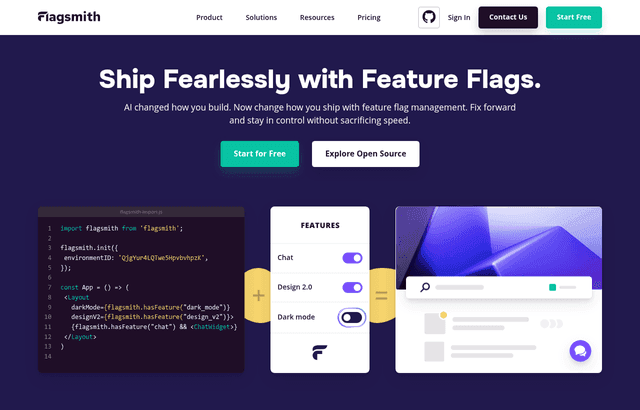
Feature Flags That Separate Deploy From Release
The core idea Flagsmith gives a startup is the separation of deploying code from releasing a feature. Normally these happen together, so shipping a new feature means pushing code live to everyone at once, and if the feature has a problem, the only fix is another deploy under pressure. Feature flags break that link. The team deploys code with the new feature switched off behind a flag, then turns the flag on when they are ready, to whoever they choose. Releasing becomes a decision, not a deployment.
For an early team, this is a profound reduction in risk. A new feature can be merged and deployed long before it is shown to users, which means the code is already live and tested in production before anyone sees it. When the team flips the flag, they are not deploying anything new; they are just revealing what was already there. If something is wrong, they flip the flag back off, and the problem disappears without an emergency deploy. The team ships more often because shipping is no longer the scary part.
This control changes the pace of a startup. Teams that fear releases batch their work into large, infrequent, high-stakes deploys, which are exactly the deploys most likely to break. Teams that can flag features ship small changes constantly and release them gradually, which is safer and faster at the same time. Flagsmith gives a small team the release discipline that larger, more mature engineering organizations rely on, without the tooling investment that discipline normally requires.
Gradual Rollouts and Targeted Releases
Flagsmith lets a startup do more than switch features fully on or off. The team can roll a feature out gradually, showing it to a small percentage of users first and increasing that share as confidence grows, and it can target specific segments of users, so a feature reaches particular customers, plans, or regions before everyone else. That targeting turns a risky big-bang launch into a controlled, observable process.
For an early company, gradual rollout is a form of insurance the team can hardly afford to skip. Showing a new feature to a small slice of users first means that if it misbehaves, only a few people are affected, and the team learns about the problem while it is still small and fixable. Increasing the rollout as the feature proves stable lets the team expand with evidence rather than hope. The worst case, a broken feature hitting the entire user base at once, simply stops being possible.
Targeted releases open up ways of working that a small team would otherwise struggle to manage. The startup can ship a feature to internal users first, then to a friendly group of beta customers, then to everyone, all controlled by flags rather than separate code paths. It can enable a capability for premium customers while holding it back from free ones. It can test a change in one market before rolling it worldwide. Flagsmith makes all of this a matter of configuration, which lets a small team run a sophisticated release strategy without building the machinery themselves.
Remote Config Without Redeploying
Beyond on-off flags, Flagsmith provides remote configuration, which lets a startup change values in the running application without shipping new code. Settings, limits, copy, and behavior can be adjusted from the Flagsmith dashboard and take effect in the live product. For a small team, this means many changes that would normally require a full deploy cycle become instant adjustments, which is both faster and safer.
This capability is more useful to a startup than it first sounds. Early products are full of values that the team wants to tune based on what they learn, from the size of a limit, to the wording of a message, to which of several behaviors is active. Without remote config, every such tweak is a code change and a deploy. With it, the team adjusts the value in the dashboard and sees the effect immediately. That tight loop lets a small team experiment and respond to what users do far more quickly than a deploy-per-change workflow allows.
Remote config also reduces the risk of routine changes. A deploy, however small, carries the chance that something breaks in the process, and pushing a code change just to update a value exposes the product to that risk unnecessarily. Moving those adjustments into remote config takes them out of the deploy pipeline entirely, so a copy fix or a limit change cannot accidentally take down the application. For a startup where every deploy is a small gamble, shrinking the number of deploys is a real safety gain.
A Kill Switch for When Things Go Wrong
One of the most valuable things Flagsmith gives a startup is a kill switch. When a feature starts causing problems in production, the team does not have to scramble to write a fix, test it, and rush a deploy while users are affected. They flip the flag off, the feature disappears, and the immediate crisis is over. The real fix can then happen calmly, without the pressure of a live incident getting worse by the minute.
For an early team, this changes the emotional and operational reality of shipping. Much of the fear around releasing new code comes from the knowledge that if something breaks, undoing it is slow and stressful. When every significant feature sits behind a flag, undoing it is instant. That safety net lets a small team ship boldly, knowing that the downside of a bad release is a quick flag toggle rather than a painful emergency. The confidence to ship is itself a competitive advantage for a startup that needs to move fast.
The kill switch also protects the company's relationship with its users. A broken feature that lingers because the team cannot quickly remove it erodes trust, while a problem that vanishes almost as soon as it appears barely registers. Being able to respond to production issues in seconds rather than in the length of a deploy cycle means users experience a stable product even while the team is moving quickly behind the scenes. That stability, delivered by a small team, is exactly what feature flags make possible.
Flagsmith Compared to Rolling Your Own Flags
Many startups start by building their own feature flags, usually a few configuration values or environment variables checked in the code. This works for the first flag or two, then quietly becomes a burden. There is no dashboard, so changing a flag means a code change and a deploy, which defeats much of the purpose. There is no targeting or gradual rollout, no clean way for non-engineers to flip a flag, and no record of what is flagged where. The homemade system grows into a mess exactly as the team comes to depend on it.
Flagsmith replaces that homemade approach with a real service. Flags live in a dashboard, changes take effect without a deploy, targeting and gradual rollout are built in, and the whole team can see and manage the flags in one place. The startup gets the capability it was trying to build by hand, without the ongoing cost of building and maintaining it. Because Flagsmith is open-source and offers a free plan, adopting it does not mean trading control or budget for that convenience.
Compared to closed commercial flag services, Flagsmith's open-source nature is the differentiator for a startup thinking long-term. The team can see how it works, avoid lock-in, and keep the option to self-host if their needs, their scale, or their compliance requirements ever demand it. For infrastructure that controls how the product behaves in production, that degree of control and transparency is reassuring in a way a closed service cannot match. The free plan lets the team get all of this without an upfront commitment.
How Flagsmith Fits a Growing Team
Feature flags become more valuable as a startup grows, not less, which makes adopting Flagsmith early a decision that keeps paying off. As the team adds engineers, flags let multiple people work on and merge features independently without stepping on each other or forcing coordinated releases. Work can be merged continuously, hidden behind flags, and released on its own schedule. The chaos that usually comes with more people shipping into the same product is tamed by the ability to control what is live.
As the user base grows, the targeting and gradual-rollout features matter more. A change that is trivial at a hundred users can be dangerous at a hundred thousand, and the ability to roll out carefully and switch off instantly becomes essential rather than nice to have. A startup that adopted Flagsmith early already has this machinery in place and already knows how to use it, so the growth in stakes does not require a scramble to add safety. The practice scales smoothly because it was there from the start.
The open-source foundation supports growth as well. If the company reaches a scale or a set of requirements where running its own flag infrastructure makes sense, Flagsmith can be self-hosted, so the tool the team learned on the free plan continues to serve them without a migration to something new. The startup is never forced to abandon its release-management approach because it outgrew the tool. That continuity, from a small team on the free plan to a larger organization with its own infrastructure, is exactly what a company wants from a foundational piece of tooling.
Making the Free Plan Count
To get real value from the free plan, a startup should put an actual feature behind a flag rather than testing flags in the abstract. Take a real change the team is working on, ship it behind a Flagsmith flag, and practice releasing it by flipping the flag rather than by deploying. Experiencing the separation of deploy from release on real work is the fastest way to understand why feature flags change how a team ships.
Use the evaluation to try the capabilities that make flags powerful, not just the basic on-off. Roll a feature out gradually to a percentage of users, target a specific segment, and adjust a value through remote config so the team feels how much faster it is than a deploy. Deliberately flip a flag off to simulate a kill switch, so the team knows the safety net works before the day they need it for real. Practicing these on the free plan builds the muscle memory that makes flags valuable under pressure.
Establish the habit of shipping behind flags as the default. The teams that get the most from feature flags are the ones that flag significant new work automatically, so that every risky change arrives with a rollback already built in. A startup that adopts this habit on the free plan will find its releases becoming calmer and more frequent at the same time, which is exactly the combination an early team needs to move fast without breaking the product.
Who Should Claim This Deal
This deal fits a startup that wants to ship quickly without the fear that a bad release will take the product down. If the team wants to separate deploying code from releasing features, roll changes out gradually, target specific users, and keep a kill switch ready for when something goes wrong, Flagsmith is built for exactly that. The free plan lets the team adopt the practice before it becomes urgent, and the open-source foundation means the choice does not lock them in.
It is an especially strong match for a developer-led team that wants mature release discipline without building the tooling themselves, a growing engineering group that needs to ship independently without coordinated big-bang releases, and any company that values open-source transparency and the option to self-host later. Claim the free plan, put a real feature behind a flag, and practice releasing by toggling rather than deploying. By the end, the team will ship with more confidence and less fear, and adopting the practice will have cost nothing.
Who Is This Deal For?
Early-Stage Startups
Seed and pre-seed companies looking to move fast without overspending on tools.
Growing SaaS Teams
Series A+ companies scaling their stack and optimizing software costs.
Solo Founders
Indie hackers and bootstrapped founders who need enterprise tools at startup prices.
Get Free Plan off Flagsmith
Premium deal. Upgrade once, unlock everything.
How to get the Flagsmith deal
- The offer: Free Plan.
- Create a free SaaSOffers account, then upgrade to Premium ($79 a year, or $250 once for lifetime access). Premium unlocks every Premium deal on the site.
- Open the Flagsmith claim page from this deal. It shows the partner link, any promo code and the exact steps Flagsmith asks for.
- Apply or sign up through that link before you pay Flagsmith directly, since most startup offers only apply to new accounts.
Frequently Asked Questions
Everything you need to know about this startup deal.
Get the weekly deals digest
New verified startup deals every week. No spam, ever. Unsubscribe anytime.
Related Offers

ZoomInfo
Used by 2,014 members
Free Trial
B2B data platform for sales and marketing intelligence with contact databases.
View offer
Chore
15% off your first month
Chore runs your startup's back office for you: payroll, HR, bookkeeping, compliance and equity, inside the tools you already use. 15% off your first month through SaaSOffers.
View offer
OmniSEO
Used by 1,361 members
Free Trial
All-in-one SEO platform for keyword research, rank tracking, and site optimization.
View offerDeal Summary
Looking for more startup deals?
Browse all offers