Cron Coupon: Free
Calendar app built for speed, keyboard shortcuts, multiple calendars, and scheduling links in a beautiful interface.
Premium: $79/year for unlimited deals
Already have an account? Log in
Deal Highlights
What Cron Gives a Startup
Cron is a calendar app built for speed. It leans on keyboard shortcuts, handles multiple calendars at once, and includes scheduling links, all wrapped in a clean interface. The offer is simple: it is free. For a startup where every founder and early hire lives inside their calendar, a fast, keyboard-driven calendar that costs nothing is an easy addition to the toolkit.
Calendars are one of those tools people barely think about until they slow them down. The default web calendar is fine for looking at a day, but it fights the user the moment they try to move quickly. Dragging events with a mouse, clicking through menus to change a time zone, opening a separate tool to send a scheduling link. Each action is small, and each one adds friction to a day that is already full of them. Cron is built around the idea that a person who lives in their calendar should be able to fly through it. For a team that runs on meetings, demos, and focused work blocks, that speed compounds.
This article covers what Cron does, why each part matters to a small team, how it compares to the calendar most people already use, and how to get the most out of a tool that happens to be free.
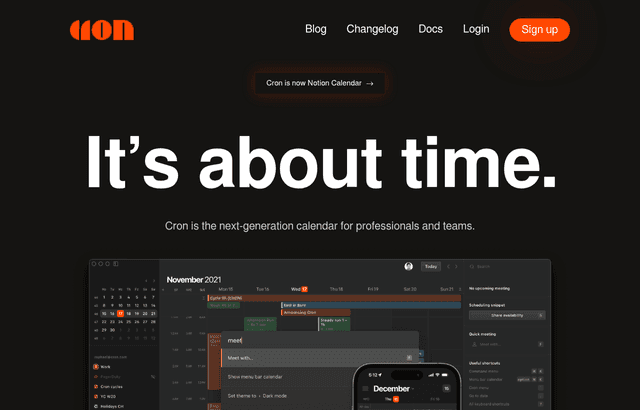
Cron, one of the tools included in this startup deal.
Speed as the Core Feature
The defining trait of Cron is that it is fast. The interface responds instantly, navigation is quick, and the whole app is designed so a person can move through their schedule without waiting on the tool. This sounds like a minor quality-of-life detail, but for someone who opens their calendar dozens of times a day, the difference between an app that lags and an app that snaps is the difference between a chore and a reflex.
For a startup, time spent wrestling with tools is time not spent building. A founder who checks availability twenty times a day, a salesperson booking demos, an engineer protecting focus blocks, all of them touch the calendar constantly. Shaving a few seconds off each interaction, many times a day, across a whole team, adds up to real recovered attention. Speed is not a luxury feature here. It is the point.
Keyboard Shortcuts for Everything
Cron is built for the keyboard. Creating an event, jumping to a date, switching views, editing a time, all of it can happen without reaching for the mouse. For people who prefer to keep their hands on the keys, this turns calendar management into something closer to using a code editor than clicking through a web app.
This matters most for the power users on a team, and early-stage startups are full of them. Founders and early engineers tend to be exactly the kind of people who learn shortcuts and resent tools that force them to click. Cron rewards that instinct. Once the shortcuts are in muscle memory, scheduling and rescheduling become nearly frictionless, which means the calendar stops being a place where time leaks away.
There is a learning curve, as there is with any keyboard-first tool. But the payoff is durable. The shortcuts a person learns in the first week keep paying dividends every day after, and the calendar becomes a tool that keeps up with how fast the user thinks rather than slowing them down to its own pace.
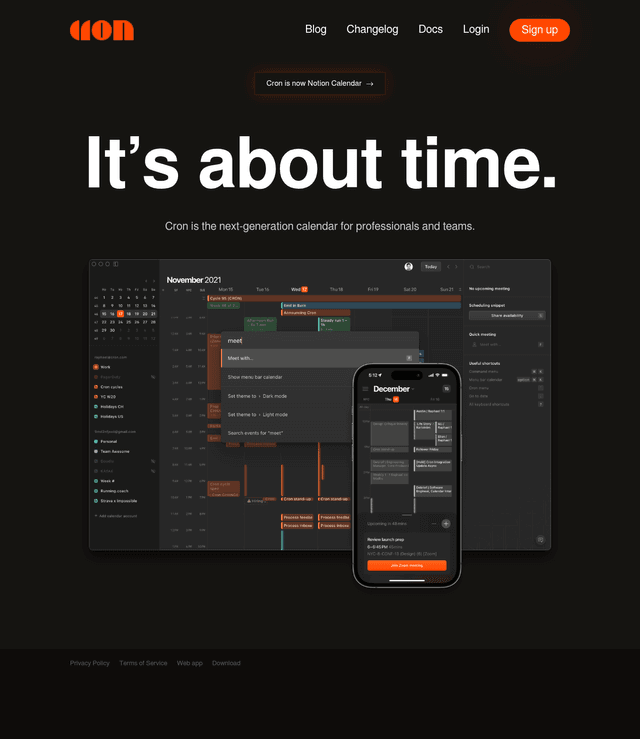
A look at Cron before the discount, so you can see what the deal saves you.
Multiple Calendars in One View
Most people at a startup juggle more than one calendar. A work calendar, a personal calendar, maybe a shared team calendar, sometimes a separate calendar for a side project or an advisory role. Keeping these straight across separate apps or separate browser tabs is a recipe for double-booking and missed events.
Cron brings multiple calendars into a single view. A person sees everything that competes for their time in one place, color-coded and clear. That single view is what makes it possible to actually protect time. A founder can see, at a glance, that a dinner conflicts with an investor call, or that a focus block is about to be eaten by back-to-back meetings, and adjust before the conflict becomes a problem.
For a team, this unified view also makes coordination easier. When everyone can see the calendars that matter, scheduling around each other stops being guesswork. The calendar becomes a shared source of truth about where time is going, which is exactly what a fast-moving team needs to stay aligned.
Scheduling Links Built In
Cron includes scheduling links, so a person can share their availability and let someone else pick a time without the usual back-and-forth. Instead of trading five emails to find a slot that works, the user sends a link, the other person picks, and the event lands on both calendars.
For a startup, scheduling links remove a surprising amount of friction from everyday work. Sales books demos faster. Founders schedule investor calls without the email tennis. Recruiters set up interviews in a single message. Every one of these interactions used to take multiple rounds of coordination, and scheduling links collapse them into one step. Having this built into the calendar, rather than in a separate paid tool, means the whole flow happens in one place.
The value here is not just saved time. It is a smoother experience for the person on the other end. A prospect who can book a demo in ten seconds is more likely to actually show up than one who has to wait for a reply, propose times, and wait again. For a young company trying to win customers, that small polish matters.
A Clean, Focused Interface
Cron is designed to look good and stay out of the way. The interface is clean, uncluttered, and focused on the schedule itself rather than on toolbars and menus. For a tool a person stares at all day, that visual calm is worth something. A cluttered calendar adds low-grade stress to every glance. A clean one makes it easier to see what actually matters: what is next, what is coming, and where the open time is.
This is not just aesthetics. A focused interface reduces the cognitive load of reading a schedule. When the design gets out of the way, the person can process their day faster and make decisions about their time with less effort. For a startup team already carrying a heavy mental load, a calendar that reduces friction rather than adding to it is a genuine help.
Cron Compared to a Default Calendar
Most people arrive at Cron from the calendar bundled with their email, usually Google Calendar. That default is capable, widely supported, and already connected to everything. So why switch?
The default calendar is built to be adequate for everyone. It is mouse-first, its interface is busy, and moving quickly through it takes effort. It works, but it does not feel fast, and it was never designed for someone who lives in their calendar all day. Cron is designed for exactly that person. It layers speed, keyboard control, a cleaner interface, and built-in scheduling links on top of the calendar accounts a person already has.
Importantly, Cron is generally not a replacement for the underlying calendar account. It connects to existing calendars and gives a better way to interact with them. A team keeps its Google or other calendar accounts, and Cron becomes the fast front end they use to work with those calendars. That means adopting Cron does not require migrating data or changing how the rest of the organization schedules. It is an upgrade to the experience, not a rip-and-replace.
Compared to standalone scheduling-link tools, Cron folds that capability into the calendar itself. Instead of running a separate app just to share availability, the user does it from the same place they manage their schedule. Fewer tools, less context switching, one interface for the whole job of managing time.
Making Free Count
Cron being free changes the calculus for a startup. There is no budget conversation, no per-seat cost to justify, no procurement step. Anyone on the team can adopt it today. The value lies in how the team puts that free tool to work.
Start by having the people who live in their calendars most adopt it first. Founders, sales, recruiting, anyone whose day is a wall of meetings. These are the users who feel the speed difference most, and their time is the most valuable to reclaim. Let them connect their existing calendars and spend a week getting the keyboard shortcuts into muscle memory.
Next, put the scheduling links to work in the places where coordination friction is highest. Sales demos, candidate interviews, investor calls, customer check-ins. Anywhere the team currently trades emails to find a time, a scheduling link replaces the whole exchange. Rolling this out across the customer-facing parts of the team turns a small tool into a noticeable reduction in busywork.
Finally, encourage everyone to bring all their calendars into Cron's single view. The tool is most useful when it shows the whole picture of a person's time, not just their work meetings. A team that can see and protect its focus blocks, spot conflicts early, and coordinate without guesswork gets real leverage out of a calendar that costs nothing.
How Cron Fits a Growing Team
The habits a team builds with Cron early scale naturally as it grows. Keyboard-driven scheduling, shared calendar visibility, and scheduling links do not become less useful as headcount rises. They become more useful, because coordination gets harder as a team gets bigger, and the tools that reduce coordination friction pay off more at scale.
Because Cron sits on top of existing calendar accounts, adding new team members is painless. A new hire connects their work calendar and gets the fast experience immediately, without any migration or setup beyond signing in. The calendar the rest of the company uses stays exactly as it was, so there is no organizational cost to individuals adopting Cron.
Getting Started
Getting going with Cron is quick. Download the app, connect an existing calendar account, and the schedule appears. Spend the first day just navigating and creating events to get a feel for the speed. Learn a handful of the most common keyboard shortcuts, the ones for creating an event, jumping to today, and switching views. Set up a scheduling link and use it for the next meeting that would otherwise take an email exchange to arrange.
Within a week, the shortcuts start to feel natural and the calendar stops being something to click through and becomes something to fly through. That transition, from a tool that slows the user down to one that keeps up with them, is the whole reason to make the switch.
A small tip helps the switch stick: keep a cheat sheet of the shortcuts open for the first few days. The temptation early on is to fall back on the mouse whenever a shortcut slips the mind, and that habit stops the muscle memory from forming. Pushing through the first few days on the keyboard is what turns Cron from just another calendar into a genuinely faster one. After that, the mouse becomes the exception rather than the default, and the speed the tool was built for finally shows up in everyday use.
Everyday Scenarios Where Cron Helps
Consider a normal week at a startup. Monday morning, a founder scans the week ahead in one view and spots that Thursday has no focus time left, so they block two hours before the meetings pile in. Tuesday, a salesperson sends a scheduling link to three prospects and has all three demos booked by lunch without a single back-and-forth email. Wednesday, an engineer jumps to next month with a keystroke to check a launch date, then hops back to today, never touching the mouse. Each of these is small on its own. Across a week and across a team, they add up to a schedule that gets managed in the margins of the day rather than eating into it.
Who Should Claim This Deal
Cron is for anyone, and the requirement says exactly that. But it delivers the most value to people who live in their calendars: founders juggling investor calls and team meetings, salespeople booking demos, recruiters scheduling interviews, and anyone whose day is shaped by a dense schedule. These are the users who feel the speed, the keyboard shortcuts, and the scheduling links most acutely.
For a startup, the appeal is that this is free, requires no migration, and works on top of the calendar accounts the team already uses. There is almost no cost to trying it and a real upside if it sticks: a team that spends less time managing time and more time doing the work. Any team that feels its calendar is slowing it down should claim this deal and see how much faster the day can move.
Who Is This Deal For?
Early-Stage Startups
Seed and pre-seed companies looking to move fast without overspending on tools.
Growing SaaS Teams
Series A+ companies scaling their stack and optimizing software costs.
Solo Founders
Indie hackers and bootstrapped founders who need enterprise tools at startup prices.
Get Free off Cron
Premium deal. Upgrade once, unlock everything.
!Eligibility Requirements
Anyone
Frequently Asked Questions
Everything you need to know about this startup deal.
Yes. Cron is completely free — no premium tier, no trial period. The app is free on macOS, Windows, iOS, and Android.
Get the weekly deals digest
New verified startup deals every week. No spam, ever. Unsubscribe anytime.
Related Offers

Slack
Used by 4,760 members
25% off first year
Get 25% off Slack Pro for your first year. The messaging platform that has replaced email for 750,000+ organizations worldwide.
View offer
Zapier
Used by 2,122 members
$500 in credits
Connect 6,000+ apps and automate workflows without code. The glue that holds your SaaS stack together.
View offer
Monday.com
Used by 3,110 members
6 months free Pro
Get 6 months free on Monday.com Pro, the visual Work OS that powers project management, CRM, dev sprints, and operations workflows for over 225,000 customers worldwide.
View offer
Make
Used by 990 members
10,000 ops free
Get 10,000 free operations on Make. The visual automation platform that connects 1,500+ apps to automate workflows without code.
View offer
Grammarly
Used by 1,637 members
6 months free Business
AI-powered writing assistant for your entire team, catch errors, improve clarity, and maintain brand voice across all communications.
View offer
Loom
Used by 848 members
6 months free Business
Record and share video messages to replace meetings, free Business plan for startup teams.
View offerDeal Summary
Looking for more startup deals?
Browse all offers