
Calendly Promo Code: 6 months free Teams
Automate scheduling for sales calls, customer meetings, and team coordination, free for startup teams.
Free · Opens in new tab
Already have an account? Log in
Deal Highlights
What Calendly Gives a Startup
Calendly automates scheduling. It handles the entire process of booking time with you and your team: sharing your availability, letting people pick an open slot, avoiding double bookings, sending confirmations and reminders, and putting the meeting on everyone's calendar. It is built for the scheduling that runs through a startup constantly, including sales calls, customer meetings, and internal team coordination. This deal gives a qualifying startup 6 months free on the Teams plan, so your whole team can run professional scheduling for half a year at no cost.
For an early-stage company, scheduling is a small friction that appears everywhere and quietly adds up. Every meeting requires finding a time, and coordinating that by trading messages is slow, tedious, and prone to mistakes. Calendly removes the friction entirely. You share a link, the other person sees your real availability and picks a slot, and the meeting is booked and confirmed automatically. What used to take a chain of messages and often a day of waiting becomes a single click for the person booking.
The 6 months free on the Teams plan matters because it covers your whole team, not just one person on a trial. That lets a startup roll scheduling out across sales, customer success, recruiting, and operations, and let it become part of how the team works, all without cost for half a year. Calendly is one of the most established and widely recognized scheduling tools, which also means the people booking with you likely already know how to use it, making adoption smooth on both sides.
Calendly, one of the tools included in this startup deal.
Scheduling That Ends the Back-and-Forth
The central benefit is eliminating the endless back-and-forth of finding a time. Instead of proposing times, waiting for a reply, and adjusting, you share your Calendly link and let the other person book directly against your real availability. The meeting is created, added to calendars, and confirmed without any further exchange. That simple change removes one of the most common small time-wasters in professional life.
For a startup, this saves more time than it might seem, because scheduling happens constantly and often involves the busiest, most valuable people in the company. Founders and early employees lose real hours each week to coordinating meetings, and every message avoided is time returned to work that actually moves the business. Beyond the raw time, removing the friction means meetings that should happen actually happen quickly. A prospect who can book a sales call in one click is far more likely to follow through than one who has to wait for a reply proposing times, so smoother scheduling directly supports conversion.
Automated confirmations and reminders add further value by reducing no-shows. When Calendly reminds people of their upcoming meeting, fewer of them forget, which means the calls you booked actually take place. For a startup where each sales conversation or customer meeting carries real weight, cutting no-shows protects the outcomes those meetings exist to produce, and it does so automatically without anyone on your team having to chase people.
A Polished, Professional Booking Experience
How you schedule shapes the impression you make, and Calendly gives a startup a smooth, professional booking experience that reflects well on the company. When a prospect or customer books time with you through a clean, easy scheduling flow, it signals that you are organized and that you respect their time. That impression matters especially for a young company still building credibility, because every interaction either reinforces trust or erodes it.
For a startup, this polish punches above its weight. A two-person company that lets prospects book instantly through a professional scheduling flow presents itself with the same smoothness as a much larger, more established business. There is no awkward exchange of availability, no dropped threads, no sense that the company is disorganized. The experience is seamless, which quietly builds confidence at the exact moment a prospect is deciding whether to take you seriously.
Because Calendly is so widely used and recognized, the people booking with you often already understand it, which removes any friction on their end. They see a familiar interface, pick a time, and they are done. That familiarity means adopting Calendly does not impose a learning curve on your customers or partners, which is a real advantage over less common tools. The booking experience is easy for everyone involved, which is exactly what you want when the goal is to make meetings happen.
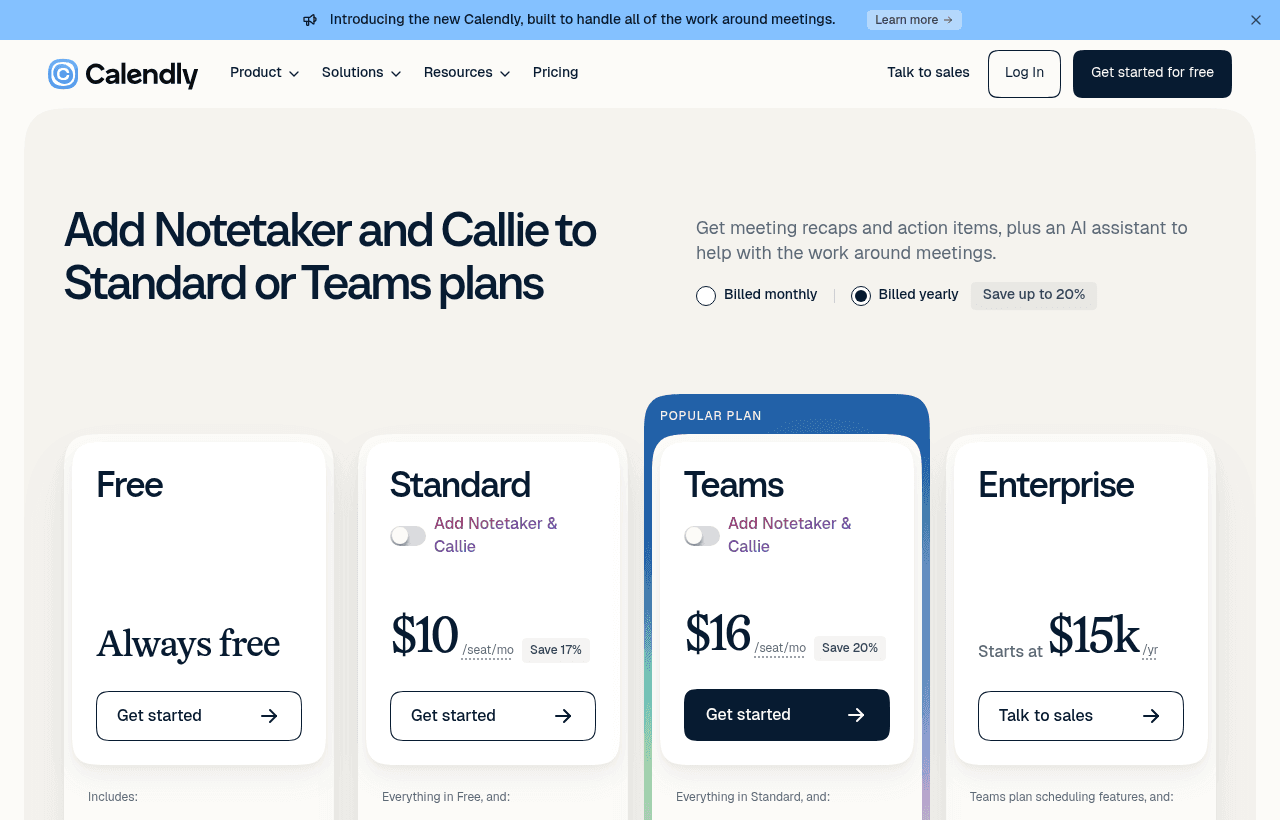
A look at Calendly before the discount, so you can see what the deal saves you.
Team Scheduling and Coordination
The Teams plan, which this deal makes free for six months, is built for scheduling across a group rather than a single person. That distinction is important for a startup, because much of your scheduling involves the whole team: routing incoming meetings to the right person, letting a prospect book with whoever is available, coordinating interviews across several people, or managing shared customer calls. Team scheduling handles these group scenarios that individual scheduling cannot.
For a startup, this means you can set up scheduling as shared infrastructure for the whole company rather than a personal tool each person configures alone. Incoming sales meetings can be distributed among your salespeople, customer calls routed to available team members, and interviews coordinated across interviewers, all through one consistent system. That coordination keeps your team's scheduling organized and ensures meetings reach the right people without manual juggling behind the scenes.
Running scheduling at the team level also creates consistency in how your company presents itself and makes growth smoother. Everyone uses the same professional booking experience, so a customer's interaction is coherent no matter who they meet. Adding a new team member to the scheduling setup is straightforward, which keeps things clean as you hire. For a growing startup, having scheduling work reliably across the whole team, free for six months, is a solid foundation to build on as headcount and meeting volume increase.
Integrating With the Tools You Already Use
Calendly is designed to fit into the rest of a startup's stack rather than stand alone. It connects with the calendars your team uses so availability is always accurate and bookings appear where you already look, and it integrates with many of the other tools involved in meetings, from video conferencing to the systems where you track customers and leads. These connections make scheduling a smooth part of your existing workflow instead of a separate island.
For a startup, this integration removes manual steps that would otherwise eat time and invite mistakes. When a booking automatically creates a video meeting link, updates your customer records, and lands on the right calendars, nobody has to do that work by hand. The meeting is set up end to end from a single booking, which is exactly the kind of automation a small team needs to operate efficiently without extra headcount.
Calendar integration in particular is what makes the whole system trustworthy. Because Calendly reads your real availability, it never offers a slot you cannot make, so double bookings simply do not happen. That reliability is essential, because a scheduling tool that let people book over existing commitments would create more problems than it solved. By staying in sync with your calendar and connecting to your other tools, Calendly ensures that automated scheduling is dependable, which is what allows a startup to hand off coordination to it with confidence.
Calendly Compared to the Alternatives
The most basic alternative is coordinating meetings manually, without any scheduling tool. That costs nothing in software but a great deal in time and lost opportunities, as the back-and-forth slows everything down and lets meetings stall or fall through. Any scheduling tool beats manual coordination, and Calendly does so with a particularly smooth, widely recognized experience that requires no learning on the part of the people booking with you.
Against other scheduling tools, Calendly's main strengths are its maturity, its polish, and its ubiquity. It is one of the most established scheduling products, which means it is refined, reliable, and familiar to the customers and partners who will book with you. That familiarity reduces friction on the other side of every booking, which is a genuine advantage when your goal is to make meetings happen as easily as possible. For many startups, the recognition and reliability of a well-known tool are worth a lot, because scheduling is something you want to simply work without anyone thinking about it.
The 6 months free on the Teams plan strengthens the case considerably. Against manual coordination, it is free professional scheduling for your whole team for half a year, with no reason not to adopt it. Against paying for a scheduling tool, it removes the cost during the exact period when a startup is watching every dollar. For a startup weighing convenience, professionalism, ease of adoption, and cost together, a free six months of a polished, widely trusted team scheduling tool is a straightforward win.
Making the 6 Months Free Count
To get full value from six months of free Teams scheduling, roll it out across your whole team and make it the default way meetings get booked. Start with the functions where scheduling saves the most: sales calls, customer meetings, interviews, and any recurring internal coordination. Connect everyone's calendars so availability is always accurate and double bookings are impossible, and set up the meeting types your team offers with the right durations and rules.
Use the free period to wire in the integrations that remove manual work, connecting Calendly to your video conferencing and to the systems where you track customers and leads, so a single booking sets up the whole meeting end to end. Put team scheduling to use for distributing incoming meetings and coordinating group scenarios like interviews, so the entire company benefits from organized, automatic scheduling rather than a few individuals. Turn on reminders to reduce no-shows and protect the value of every meeting you book.
Six months is enough time for scheduling to become a natural part of how your team works, embedded in your sales process, your customer interactions, and your hiring. By the end of the period, the back-and-forth of coordinating meetings will be a thing you no longer think about, and the value will be obvious enough that continuing on a paid plan is an easy decision. Using the full six months this way turns a free offer into a permanent improvement in how efficiently your startup operates.
How Calendly Grows With You
Adopting team scheduling early pays off because coordination needs multiply as a startup grows. A few founders can just about coordinate by messaging, but as you add salespeople, customer success staff, recruiters, and more, the volume and complexity of scheduling rises quickly. A startup that establishes organized team scheduling while small carries that smooth coordination into every later stage, onboarding new people into an existing system rather than sliding into scheduling chaos as it scales.
As your meeting volume and team grow, Calendly scales with you. You can add more team members, configure more meeting types and routing, and step up to higher tiers with more advanced features when you need them. The scheduling setup that serves a handful of founders serves a larger sales and customer team just as well, so you are not switching tools as your operation becomes more serious. The familiarity of the tool also means each new hire and each new customer already knows how it works.
Establishing smooth scheduling early also builds a habit of efficiency that compounds. A company that removes meeting friction from the start spends less of its collective time on coordination and more on the work that matters, and that discipline carries forward as the team grows. Calendly makes that efficiency easy to adopt, which is why claiming the free six months and building the practice while you are small is worth the effort well beyond the free period itself.
Who Should Claim This Deal
This deal is for startups with fewer than 50 employees, which is the stated requirement and captures exactly the early-stage companies that benefit most from removing scheduling friction. If you meet that size and your team books sales calls, customer meetings, interviews, or internal syncs, Calendly gives you a way to automate all of it, and 6 months free on the Teams plan means your whole team can adopt it at no cost.
It is a strong fit for sales-driven startups that want prospects to book calls instantly and follow through reliably, and for customer-facing teams that schedule many meetings and want them to run smoothly. It suits companies that are hiring and need to coordinate interviews across the team, and any founder who is tired of losing time to the back-and-forth of finding a time. Teams that value a polished, widely recognized tool their customers already know how to use will find Calendly especially appealing.
If you are early and coordinating meetings manually, this is the moment to adopt proper scheduling before the load grows with your team. If you already schedule but do it inconsistently or pay for a tool, the free six months on the Teams plan is a low-cost way to standardize scheduling across your whole company. As long as you are under 50 employees, claiming this deal gives your startup professional, automated scheduling for its entire team, free for half a year, which addresses a small but constant friction that every growing company feels.
Who Is This Deal For?
Early-Stage Startups
Seed and pre-seed companies looking to move fast without overspending on tools.
Growing SaaS Teams
Series A+ companies scaling their stack and optimizing software costs.
Solo Founders
Indie hackers and bootstrapped founders who need enterprise tools at startup prices.
Get 6 months free Teams off Calendly
Premium deal. Upgrade once, unlock everything.
!Eligibility Requirements
Startup with fewer than 50 employees
Frequently Asked Questions
Everything you need to know about this startup deal.
Calendly has a free plan with 1 event type and basic features. The startup deal provides 6 months of the Teams plan free — round-robin, collective scheduling, CRM integrations, routing forms, and unlimited event types. After 6 months, Teams costs $16/user/month.
Get the weekly deals digest
New verified startup deals every week. No spam, ever. Unsubscribe anytime.
Related Offers

Slack
Used by 4,760 members
25% off first year
Get 25% off Slack Pro for your first year. The messaging platform that has replaced email for 750,000+ organizations worldwide.
View offer
Zapier
Used by 2,122 members
$500 in credits
Connect 6,000+ apps and automate workflows without code. The glue that holds your SaaS stack together.
View offer
Monday.com
Used by 3,110 members
6 months free Pro
Get 6 months free on Monday.com Pro, the visual Work OS that powers project management, CRM, dev sprints, and operations workflows for over 225,000 customers worldwide.
View offer
Make
Used by 990 members
10,000 ops free
Get 10,000 free operations on Make. The visual automation platform that connects 1,500+ apps to automate workflows without code.
View offer
Grammarly
Used by 1,637 members
6 months free Business
AI-powered writing assistant for your entire team, catch errors, improve clarity, and maintain brand voice across all communications.
View offer
Loom
Used by 848 members
6 months free Business
Record and share video messages to replace meetings, free Business plan for startup teams.
View offerDeal Summary
Looking for more startup deals?
Browse all offers