
Bitwarden Coupon: Free Plan
Open-source password manager for teams and enterprises with self-hosting option.
Premium: $79/year for unlimited deals
Already have an account? Log in
Deal Highlights
Our Bitwarden listing: the Free Plan
Offer: Free Plan. Our listing sets no requirements and there is no promo code. We have no affiliate link for it, so you sign up at bitwarden.com.
The deal is Bitwarden's own free plan: $0 for one user, plus a free 2-user organization. Bitwarden has a public free tier that anyone can create at bitwarden.com for $0, a free individual account for one person. Treat this page as a guide to Bitwarden's own free and paid plans, not as a discount.
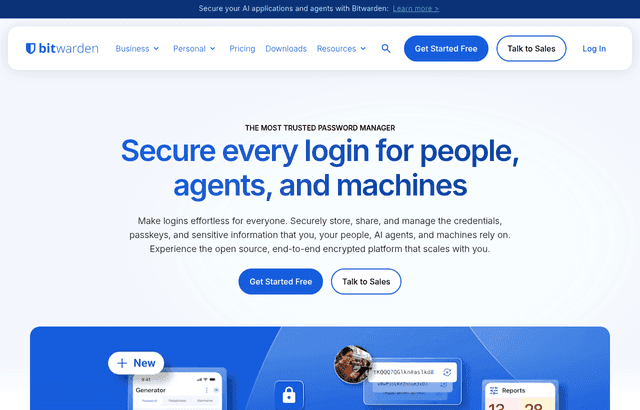
We checked these plans and prices against Bitwarden's official pricing and help pages in November 2026.
Bitwarden is an open source password manager. It runs as browser extensions, desktop and mobile apps, a web vault and a command line tool, and it can be hosted by Bitwarden or on your own server. For a startup, the useful question is where the free tier stops and which paid plan you should buy next.
Free covers one person, and the free organization covers two
Bitwarden's pricing page lists the free individual plan as $0 for 1 user. It includes unlimited passwords and devices, Bitwarden Send, passkey management, and sharing with one other user.
The help center adds the limits. Free individual accounts have unlimited storage for logins, notes, cards and identities, but no encrypted file attachments. A free organization allows 2 users and up to 2 collections. If you want to share credentials with a cofounder, that is enough. A third person means you must pay.
The free tier also has no integrated authenticator. Bitwarden's help center says storing keys and generating TOTP codes inside the vault needs Premium or membership in a paid organization. The separate Bitwarden Authenticator app needs no account and no payment.
What the free plan does not include
- Encrypted file attachments (Premium gives 5 GB)
- The integrated authenticator for TOTP codes inside the vault
- Emergency access for a trusted contact
- Vault health reports
- Advanced two-step login such as YubiKey and Duo
- More than 2 users or 2 collections in an organization
- Event logs, directory sync and SCIM, which start on Teams
- Single sign-on, enterprise policies and self-hosting, which start on Enterprise
The Premium list above comes from Bitwarden's plan guide. The business items come from the Teams and Enterprise pages.
Every Bitwarden price we could verify
Bitwarden's pricing pages show annual billing in USD, without tax. Teams and Enterprise can also be billed monthly, according to the help center, but neither page shows a monthly price. The monthly column below is therefore empty on purpose.
| Plan | Price billed yearly | Billed monthly | Key limits |
|---|---|---|---|
| Free | $0 | $0 | 1 user, unlimited passwords and devices, no attachments |
| Free organization | $0 | $0 | 2 users, 2 collections |
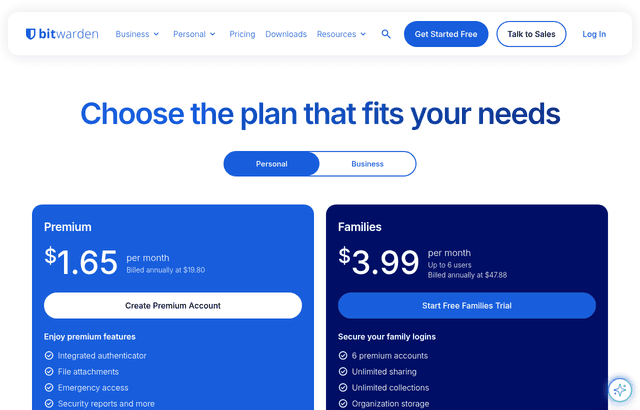
| Premium | $19.80/year ($1.65/month) | Not offered, annual only | 1 user, 5 GB attachments, authenticator, emergency access |
| Families | $47.88/year ($3.99/month) | Not offered, annual only | Up to 6 users, unlimited collections, 5 GB per user plus 5 GB shared |
| Teams | $4/user/month ($48/user/year) | Not listed | Unlimited users and collections, event logs, directory sync, SCIM |
| Enterprise | $6/user/month ($72/user/year) | Not listed | Everything in Teams plus SSO, policies, self-hosting, custom roles |
Premium and Families are annual only, per the help center. The Premium monthly figure is the yearly price divided by twelve. $19.80 divided by 12 is $1.65. $47.88 divided by 12 is $3.99.
Teams versus Enterprise in detail
Teams at $4 per user per month gives you unlimited users and collections, secure credential sharing, event logs, directory sync, SCIM provisioning, and up to 10 hardware security keys for two-step login. Attachments are 5 GB per user plus 5 GB for the organization.
Teams leaves out passwordless SSO, enterprise policies, Access Intelligence, custom roles, self-hosting, the account recovery workflow, and the free Families plan for members.
Enterprise at $6 per user per month adds all of that. The Teams and Enterprise pricing pages offer a free trial. The help center says new Families, Teams and Enterprise organizations get a 14-day trial.
Extra attachment storage costs $0.33 per GB per month, according to the help center. The pricing page says extra storage costs more but gives no figure, so confirm it at checkout.
Worked math for 5 and 15 people
All figures use yearly billing and the list prices above. Our free listing changes none of these numbers.
A team of 5
- Teams: 5 users x $4 x 12 months = $240 a year.
- Enterprise: 5 users x $6 x 12 months = $360 a year.
- Five individual Premium accounts: 5 x $19.80 = $99 a year, but nothing is shared in an organization.
- Free organization: $0, but it holds only 2 users. Three of your five people would not fit.
The cheapest way to get five people into a shared vault with real access control is Teams at $240. The free organization only works if two founders share everything.
A team of 15
- Teams: 15 x $4 x 12 = $720 a year.
- Enterprise: 15 x $6 x 12 = $1,080 a year.
- The gap between them: $1,080 minus $720 = $360 a year, which buys SSO, policies, self-hosting and custom roles.
Six people who want personal Premium features
- Six separate Premium accounts: 6 x $19.80 = $118.80 a year.
- One Families plan for up to 6 users: $47.88 a year.
- Saving: $118.80 minus $47.88 = $70.92 a year.
Families is meant for households. It does not give you the admin tools of Teams, so it is a stopgap for a tiny founding group, not a company policy. Bitwarden's Enterprise page also lists a free Families plan for all users, which Teams does not include.
Secrets Manager is a separate product with its own free plan
Bitwarden sells Secrets Manager for API keys, tokens and certificates used by software, not by people. It is priced separately from the password manager.
| Secrets Manager plan | Price | Machine accounts | Projects | Users sharing secrets |
|---|---|---|---|---|
| Free | $0 | 3 | 3 | 2 |
| Teams | $6/user/month | 20 | Unlimited | Unlimited |
| Enterprise | $12/user/month | 50 | Unlimited | Unlimited |
Secret storage is unlimited on every plan. Extra machine accounts on Teams and Enterprise cost $1 each, and the pages do not state the billing period for that charge. Pricing on the product page is based on annual billing.
The free Secrets Manager plan leaves out event and audit logs, user groups, Directory Connector, SSO, SCIM, enterprise policies, custom roles, priority support and self-hosting. Two-step login on it is limited to authenticator apps and email. YubiKey, FIDO2 and Duo are on Teams and Enterprise.
The product page names GitHub Actions, GitLab CI/CD, Jenkins, a Kubernetes Operator, the CLI, SDKs and Ansible. It does not say which are restricted by plan.
Adding Secrets Manager to a 15 person team
- Teams password manager: $720 a year.
- Teams Secrets Manager for the same 15 users: 15 x $6 x 12 = $1,080 a year.
- Combined: $1,800 a year.
- Enterprise for both: $1,080 + (15 x $12 x 12 = $2,160) = $3,240 a year.
Check whether the free Secrets Manager plan, with 3 machine accounts, covers your first pipeline.
Self-hosting needs Enterprise or Families
Bitwarden is open source and its code is on GitHub. Self-hosting an organization is available only on Families and Enterprise, according to the help center. Teams cannot be self-hosted.
The process is documented. You create the organization in the cloud web vault, retrieve the license, and upload it to your server. Bitwarden runs in Docker on Linux and Windows. Billing and license sync is optional.
The self-hosting help page does not state minimum RAM or CPU, so check the install guides before you plan hardware. For a startup, self-hosting means you take on updates and backups. Most small teams are better off on the cloud version until a customer or regulator asks for data control.
Security facts Bitwarden publishes
- Data is encrypted end to end with AES-CBC 256-bit encryption and HMAC authentication.
- Keys come from PBKDF2-SHA256 or Argon2id. New accounts use PBKDF2 with 600,000 iterations, and you can switch to Argon2id after signup.
- Bitwarden says it never stores or accesses your master password or keys.
- Third-party security assessments happen at least once a year. Bitwarden lists Cure53, ETH Zurich's Applied Cryptography Group, Unit 42 by Palo Alto Networks and Fracture Labs for 2025.
- It reports SOC 2 Type II, SOC 3 and ISO 27001, and says it complies with GDPR, CCPA, HIPAA and the Data Privacy Framework.
- A private bug bounty program runs on HackerOne.
The SOC 2 Type II report is restricted and available on request. The SOC 3 summary is public.
Emergency access and the authenticator come with Premium
Premium at $19.80 a year is a personal upgrade, so it rarely belongs on a company card. Two features matter to founders anyway.
Emergency access lets a trusted contact request your vault. You set the wait time, and you can approve or deny the request at any time. The contact can get View access or Takeover access. Premium users can have an unlimited number of trusted contacts. Invitations to a contact are valid for five days.
The integrated authenticator stores TOTP keys beside the password. That is convenient, and it also puts both factors in one vault. Founders who care about that tradeoff can keep using the free Bitwarden Authenticator app instead, which needs no account.
How Bitwarden compares with 1Password and Keeper
| Bitwarden | 1Password | Keeper | |
|---|---|---|---|
| Free plan | Yes, 1 user, plus 2 user free organization | None listed, 14 day trial | Not stated on the pricing page |
| Individual price | $19.80/year | $2.99/month promo, $3.99/month regular, billed yearly | Not shown |
| Family plan | $47.88/year, 6 users | $4.49/month promo, $5.99/month regular, 5 users | Not shown |
| Business price | Teams $4, Enterprise $6 per user/month | Not listed on the page we read | Not listed on the page we read |
1Password's own page says its trial runs 14 days with no card needed. Keeper's page names Business Starter for 5 to 10 users and says Enterprise is by quote.
On the numbers we could verify, Bitwarden's individual price is below the 1Password promo price: $19.80 a year versus 12 x $2.99 = $35.88.
Who it fits and who should skip it
Bitwarden fits:
- Two cofounders who need one shared vault for $0.
- Small engineering teams that want an open source tool they can audit.
- Companies that expect a customer to ask for self-hosting later.
- Teams that already use another manager and need to import. The help center has dedicated import guides for LastPass, 1Password, Dashlane and Chrome.
Skip it or look elsewhere if:
- You have three or more people and expect the free organization to cover them. It does not.
- You need self-hosting on the cheapest plan. Teams cannot do it.
- You want business pricing on a month-to-month basis before you buy. Bitwarden's pages do not show it.
Bitwarden setup tips
- Make a second Owner. Bitwarden's help page recommends this for a two person organization.
- Invite members early. Invitations expire after five days.
- Move browser saved passwords into the vault first, then delete the browser copies.
- Turn on two-step login for the vault itself before you import anything.
- Switch key derivation to Argon2id in account settings after signup if you want the stronger setting.
Claiming the Bitwarden offer, step by step
- Create a free account at bitwarden.com.
- Go to bitwarden.com and create an account. There is no promo code and no affiliate link in our listing.
- Create a free organization if you need to share with one other person.
- If you need more than 2 users, start a 14 day trial of Teams or Enterprise from the pricing page.
- Confirm the price shown at checkout against the tables above before you pay.
Who Is This Deal For?
Early-Stage Startups
Seed and pre-seed companies looking to move fast without overspending on tools.
Growing SaaS Teams
Series A+ companies scaling their stack and optimizing software costs.
Solo Founders
Indie hackers and bootstrapped founders who need enterprise tools at startup prices.
Get Free Plan off Bitwarden
Premium deal. Upgrade once, unlock everything.
How to get the Bitwarden deal
- The offer: Free Plan.
- Create a free SaaSOffers account, then upgrade to Premium ($79 a year, or $250 once for lifetime access). Premium unlocks every Premium deal on the site.
- Open the Bitwarden claim page from this deal. It shows the partner link, any promo code and the exact steps Bitwarden asks for.
- Apply or sign up through that link before you pay Bitwarden directly, since most startup offers only apply to new accounts.
Frequently Asked Questions
Everything you need to know about this startup deal.
Get the weekly deals digest
New verified startup deals every week. No spam, ever. Unsubscribe anytime.
Related Offers

Retool
Used by 1,559 members
1 year free, up to $60K
Build internal tools 10x faster with the low-code platform used by companies like Amazon, DoorDash, and Mercedes-Benz.
View offer
Replicate
Used by 1,772 members
$500 in credits
Run open-source ML models in the cloud, deploy Llama, Stable Diffusion, and custom models via API without GPU management.
View offer
ZoomInfo
Used by 2,014 members
Free Trial
B2B data platform for sales and marketing intelligence with contact databases.
View offer
Chore
15% off your first month
Chore runs your startup's back office for you: payroll, HR, bookkeeping, compliance and equity, inside the tools you already use. 15% off your first month through SaaSOffers.
View offerDeal Summary
Looking for more startup deals?
Browse all offers