
Bugsnag Coupon: Free Plan
Error monitoring and stability management for web and mobile applications.
Premium: $79/year for unlimited deals
Already have an account? Log in
Deal Highlights
Our BugSnag listing: the Free Plan
Offer: Free Plan. Our listing sets no extra requirements and there is no promo code. This is a Premium deal on SaaSOffers, so the claim link sits behind a Premium upgrade. BugSnag's own pricing page also shows a Free plan at $0 a month that you can start without us, and we say below what Premium does and does not add to that.
We checked these plans and prices against BugSnag's official pricing and help pages in November 2026.
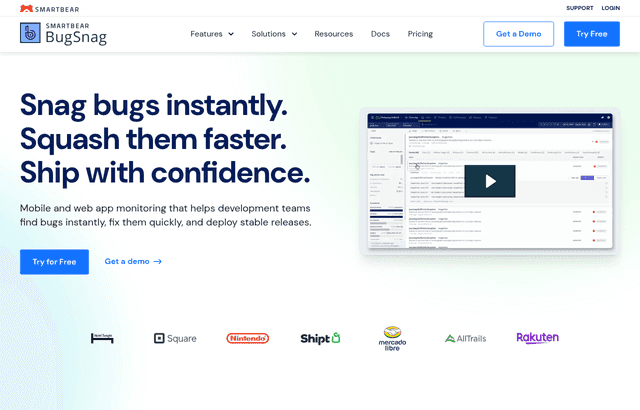
BugSnag is an error monitoring and application stability tool for web, mobile and server software. It is owned by SmartBear: the pricing page is branded "BugSnag", and its footer reads "© 2026 SmartBear Software. All Rights Reserved." The product name is still BugSnag, spelled with a capital S. You add an SDK to your app, and BugSnag records errors and crashes with a stack trace and the device and session context around them. It then groups repeated errors into one issue and tracks how stable each release is.
Free is 7,500 events, 1 user and 7 days
BugSnag's pricing page lists these limits for the Free plan:
- 7.5K error events a month
- 1M spans a month for performance monitoring
- 1 user
- 7 days of data retention
- Error and performance monitoring across 50+ platforms, plus 30+ third-party integrations
If 7,500 events were spread evenly over a 30-day month, that is 250 a day. That is our arithmetic, not a BugSnag figure. BugSnag's usage docs talk about a daily event quota, so a single bad deploy can use a large share of your month in an afternoon. Events that your own settings discard, such as ignored error classes or old app versions, do not count against the quota.
The listing is for the free tier, so the real question is whether 7,500 events and one seat are enough for your product. For a solo founder with a small app, they can be. For a team of three engineers sharing one login, they are a workaround.
What happens when you go over
BugSnag's docs describe two overage options. "Capture every event" saves all events during an overage at no extra cost, but you are moved to the next tier automatically if you exceed the daily quota more than 3 times in a 30-day rolling window. "Rate limiting" starts dropping events once your balance reaches zero, and BugSnag emails you each day it happens. If the organization quota is exceeded, events are rate-limited across all projects.
One detail matters for mobile teams. Minidump events (native crash dumps) count as 5 events each for billing. A crash-heavy native app burns the free quota five times as fast as a JavaScript app with the same number of errors.
The plans, as far as BugSnag publishes them
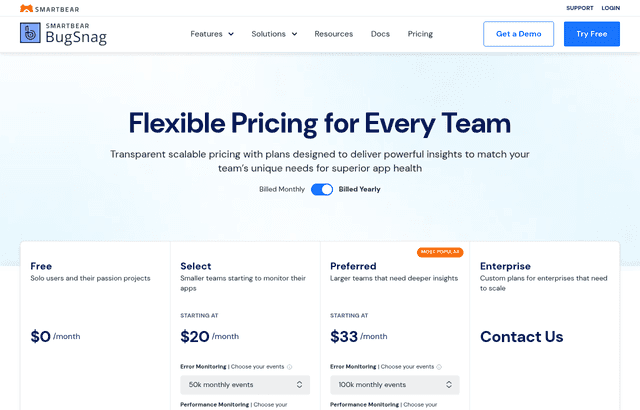
BugSnag has four plans. The pricing page is a slider, and the page text shows every paid plan as "starting at $0 a month" with a "Billed Yearly" toggle but no dollar amounts for real volumes. We could not read Select or Preferred prices from the page, so the table leaves them out. Check the slider on bugsnag.com/pricing for the number at your volume.
| Plan | Price | Events a month | Users | Retention | Notable additions |
|---|---|---|---|---|---|
| Free | $0 | 7.5K | 1 | 7 days | Error and performance monitoring, 1M spans |
| Select | See slider on bugsnag.com/pricing | 50k to 3M in 8 steps | Unlimited | 60 days | End-to-end diagnostics, basic notifications |
| Preferred | See slider on bugsnag.com/pricing | 100k to 3M in 7 steps | Unlimited | 60 days | Automatic error prioritization, stability benchmarks, advanced segmentation, custom notifications, SAML SSO, System Metrics |
| Enterprise | Contact sales | Custom | Unlimited | Custom | Automatic error assignment, premium support, a Customer Success Manager, SSO user provisioning, feature flags and experiments, on-premises or SaaS deployment, sensitive data management |
Span allowances on paid plans run from 1M up to 150M on Select and 300M on Preferred. Span packs are listed as "Packs of 150M spans", with no price on the page. Enterprise also lists "Error burst protection and event scaling" for seasonal spikes.
The docs say annual billing comes with a discounted subscription rate, and that every plan can be billed monthly with no long-term contract. They do not say how large the discount is, so we do not put a percentage on it. Payments run through Stripe, and US sales tax is collected in applicable states.
What the Free plan leaves out
Compared with the paid plans on the pricing page, Free does not have:
- More than 1 user. Select, Preferred and Enterprise list unlimited users.
- More than 7 days of retention. Select and Preferred keep data for 60 days.
- End-to-end diagnostics and basic notifications, which first appear on Select.
- Stability features. The docs say "Stability features are available on Preferred and Enterprise plans." That covers the stability score, targets and the release health view discussed below.
- Custom filters, which the docs also tie to Preferred and Enterprise.
- Automatic error prioritization, advanced segmentation and SAML SSO, which are Preferred features.
The stability point deserves attention, because it is the thing BugSnag is known for. On the Free plan you get the error list. You do not get the stability score that makes BugSnag different from a plain exception log.
How the stability score works
The docs define stability as "a measure of the proportion of user application sessions that are error free." There are two versions.
- Session stability is the percentage of sessions that were error free over the period.
- User stability is the percentage of users who were error free within a given day. Longer periods aggregate the daily figures. It is not available for server-side projects.
Any session with an unhandled error counts as a crashing session. A session with several unhandled errors counts as one crashed session in the score. You set two targets in project settings. Target stability is the score your team aims to beat. Critical stability is the floor, and below it the docs say you should focus on fixing bugs. The Releases dashboard shows green when a release beats the target, yellow between the two targets and red below the critical level.
A worked example shows why this matters. Say a release has 2,000 sessions and 60 of them include an unhandled error. Session stability is (2,000 minus 60) divided by 2,000, which is 97 percent. If your target is 99.5 percent and your critical level is 98 percent, the release shows red. A raw error count of 60 tells you much less than that.
Open source and non-profit: 15,000 events and 15 collaborators
BugSnag runs a separate program for open source projects and non-profits. The program page says it includes "Up to 15,000 events per month" and "Up to 15 collaborators", with access to the Releases Dashboard and Session Tracking. That is double the Free plan's event count and fifteen seats instead of one.
Eligibility is narrow. You need an open source license or a government-issued non-profit certificate, and the project must be "non-commercial, non-political, non-offensive, non-religious." You apply through a request form with a link to your license or certificate, a link to your README or About page, and the email on your BugSnag project. The program also asks for the BugSnag logo with a backlink on your README or site.
The 14-day trial runs on Enterprise
BugSnag's billing docs say the 14-day trial runs on the Enterprise plan with full feature access. You can pick a plan at any time during the trial and are not charged until it ends. If you cancel, you move to the limited Free plan and are not charged again unless you upgrade.
That makes the trial a useful way to test stability scoring and the other paid features on real traffic before you decide whether Select or Preferred is worth paying for. Our listing's Free Plan is the stage after the trial, not a replacement for it.
What the Premium requirement means here
Our listing carries the Free Plan with no code and no requirements. The claim link is held behind SaaSOffers Premium. We could not confirm anything on BugSnag's site that the link changes. The Free plan is $0 whether you arrive through us or not, and BugSnag does not mention a startup program on its pricing page.
So be clear about what you are buying. If all you want is the Free plan, you can go to bugsnag.com and sign up. Premium makes sense if you are already using it for other deals on the site.
Two worked examples
These use only prices we could verify. BugSnag's Select and Preferred prices are not readable from the page, so the paid side is compared with rivals whose prices are published.
Solo founder, one app
One engineer, one web app, a few hundred daily users. Free gives 7,500 events and 7 days of retention for $0 a month, which is $0 a year. If the app logs about 150 error events a day, that is 150 x 30 = 4,500 a month, inside the quota with 3,000 to spare. BugSnag meters events against a daily quota, so a bad release that throws 2,000 errors in one day can go over even though the month total fits. With rate limiting on, events are dropped that day.
Five-person team
Five engineers on the Free plan means one seat. Everyone else would share a login or go without access, so Free stops working as a team tool. You need a paid plan, and the cost depends on the slider at your volume, which we could not verify. For a sense of scale, Sentry's Team plan costs $26 a month on yearly billing or $29 monthly with unlimited users and 50,000 errors. For five engineers with 3,000 replays a month that works out to $34.85 a month yearly or $40.06 monthly, or $418.20 versus $480.75 a year. Rollbar's Essentials plan at 50,000 occurrences is $29 a month monthly or $24.17 a month on annual billing, which is $348 versus about $290 a year. Those are rivals' prices from their own pages. Get BugSnag's number at your volume from its slider before comparing.
Where BugSnag fits against alternatives
| BugSnag Free | Sentry Developer | Rollbar Free | |
|---|---|---|---|
| Price | $0 | $0 | $0 |
| Monthly volume | 7.5K events | 5,000 errors | 5,000 occurrences |
| Users | 1 | 1 | Unlimited users |
| Retention | 7 days | 30-day lookback | 30 days |
Facts for Sentry and Rollbar come from their own pages, as recorded in our Sentry and Rollbar pages. BugSnag's free event count is higher than both rivals' by the numbers above: 7,500 against 5,000 is 1.5 times as many. Its retention is the shortest of the three, at 7 days against 30. If you debug old incidents regularly, that gap will matter more than the extra 2,500 events. Rollbar's free plan allows more than one user, which makes it a better fit for a small team that wants to start at $0.
Sentry's Developer plan includes 50 replays and 5M spans. BugSnag's Free plan includes 1M spans. If session replay or tracing matters to you, check each product's current page, because we did not verify a BugSnag replay feature.
Who it is for
- A solo founder shipping a web or mobile app who wants error alerts without a card.
- A mobile team that wants crash reporting with stability metrics, once it moves to Preferred.
- An engineering lead who wants a release health view with target and critical levels.
Reasons to pass on Bugsnag
- A qualifying open source project, which should use the 15,000-event program instead.
- A buyer who needs a firm price before committing. BugSnag shows paid prices only on its pricing slider.
Integrations and setup tips
BugSnag's docs name Slack and Microsoft Teams for alerts, Jira for issue creation and sync, and PagerDuty for incident management. They also list data forwarding and feature management integrations without naming tools. The integrations page does not mention plan restrictions, but the pricing page lists only "basic notifications" for Select and "custom notifications" for Preferred, so expect richer routing on higher plans.
- Add the SDK to one project first and watch the daily event count for a week before you add the second app. Quotas are shared across projects in the organization.
- Discard noise early. Ignored error classes, old app versions and legacy browsers do not count against your quota.
- Turn on session tracking if you want stability numbers later. The score is built from sessions, so a project that does not send sessions has nothing to score.
- Choose your overage behavior deliberately. Capture every event keeps data but can move you up a tier after more than 3 overages in 30 days. Rate limiting protects your bill but drops data.
How to get the Bugsnag offer
- Upgrade to SaaSOffers Premium, then open this deal's claim link on SaaSOffers.
- Create a BugSnag account and start on the Free plan. No promo code is needed.
- Create a project, add the SDK for your platform and send a test error.
- Check the daily event count after a week, and decide whether to stay on Free, apply for the open source program if you qualify, or try the 14-day Enterprise trial.
Our listing says Free Plan and nothing more, so confirm the plan name and limits on screen when you sign up, since BugSnag can change them.
Who Is This Deal For?
Early-Stage Startups
Seed and pre-seed companies looking to move fast without overspending on tools.
Growing SaaS Teams
Series A+ companies scaling their stack and optimizing software costs.
Solo Founders
Indie hackers and bootstrapped founders who need enterprise tools at startup prices.
Get Free Plan off Bugsnag
Premium deal. Upgrade once, unlock everything.
Frequently Asked Questions
Everything you need to know about this startup deal.
Get the weekly deals digest
New verified startup deals every week. No spam, ever. Unsubscribe anytime.
Related Offers

Retool
Used by 1,559 members
1 year free, up to $60K
Build internal tools 10x faster with the low-code platform used by companies like Amazon, DoorDash, and Mercedes-Benz.
View offer
Replicate
Used by 1,772 members
$500 in credits
Run open-source ML models in the cloud, deploy Llama, Stable Diffusion, and custom models via API without GPU management.
View offer
ZoomInfo
Used by 2,014 members
Free Trial
B2B data platform for sales and marketing intelligence with contact databases.
View offer
Chore
15% off your first month
Chore runs your startup's back office for you: payroll, HR, bookkeeping, compliance and equity, inside the tools you already use. 15% off your first month through SaaSOffers.
View offerDeal Summary
Looking for more startup deals?
Browse all offers