
Codecov: Free and Open Source Tool
Code coverage reporting tool integrated with your CI/CD workflow.
Premium deal
Already have an account? Log in
Deal Highlights
Our Codecov listing: free for open source
Offer: Free for Open Source. Our listing sets no extra requirements and there is no promo code. The listing's link points to Codecov's own startups page, not to a SaaSOffers tracking link, so you sign up at Codecov directly.
Codecov is a code coverage service. In June 2026 Codecov announced it is joining Harness, and the brand stays Codecov. Your CI uploads a coverage report after each test run, and Codecov posts the result on the pull request and sets a pass or fail status check. This page covers what the free offer includes, what private repos cost, and where the limits sit.
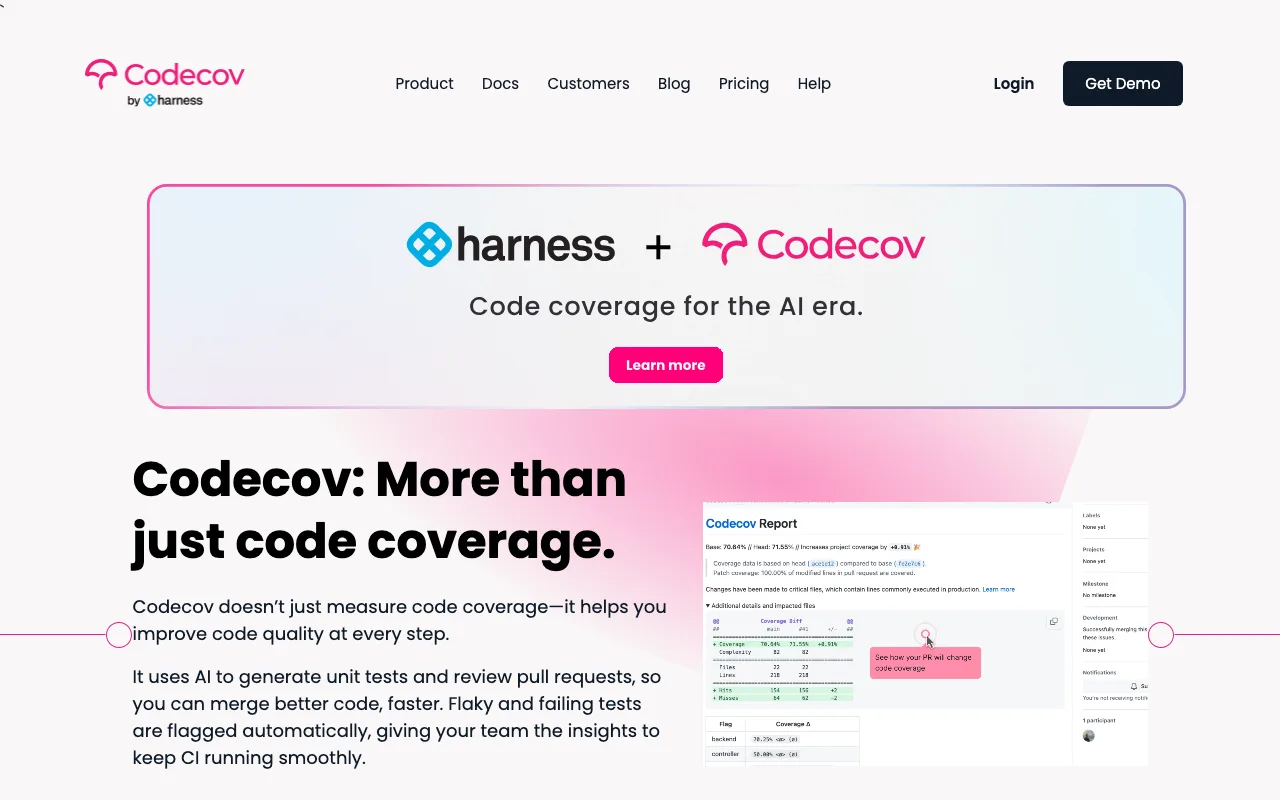
We checked these plans and prices against Codecov's official pricing and documentation pages in November 2026.
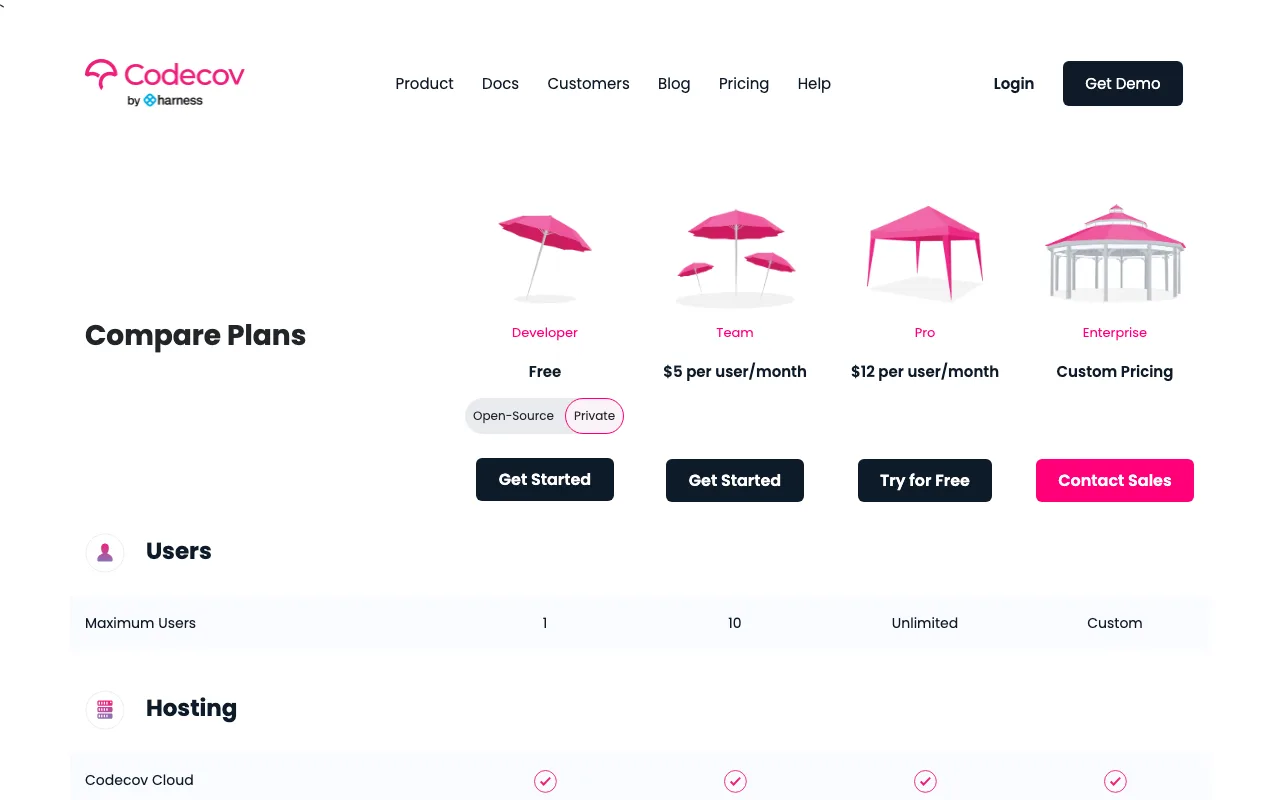
The free offer in our listing matches Codecov's public Developer plan. Codecov's pricing page describes that plan as "best for open-source projects" with unlimited uploads, and it gives anyone who signs up the same terms. Our listing does not add a discount on top. Codecov's startups page, which our listing links to, also shows no startup discount or credit. It talks about coverage gates, flags and onboarding, and its button leads to the normal sign-up.
That is still a real saving if your code is public. A team of 5 on public repos pays $0 for the Developer plan. The same 5 people on private repos would pay $25 a month on the Team plan, or $60 a month on Pro.
What the free Developer plan covers
The Developer plan costs $0 and has two different sides: public repositories and private ones.
- Public (open source) repos: unlimited coverage uploads and no user cap.
- Private repos: 1 user and 250 uploads per month.
- Included features: pull request comments, status checks, API access, patch coverage, bundle analysis, Slack notifications and failed test reporting.
- Hosting: Codecov Cloud.
Patch coverage is the coverage of only the lines a pull request changes. Project coverage, the number for the whole repo over time, is not on this plan. Neither are flags, components, carryforward flags or flaky test detection.
Codecov defines a "user" as anyone who authors a pull request or merge request on a private repo with Codecov coverage, or who opens advanced features on Codecov.io for a private repo. Someone who only contributes to public repos does not count toward a seat. That is why an open source project with 200 contributors still costs nothing.
An upload is one coverage report sent from CI to a closed source repo. The pricing page notes that parallel builds and flags can produce several uploads for one commit. Uploads on open source repos do not count against the monthly allotment of private uploads.
Team costs $5 a user, Pro $12
Codecov lists four plans. The pricing page does not label Pro's billing period, so treat the $12 as the figure shown, with no yearly discount stated.
| Plan | Price per user, billed yearly | Billed monthly | Key limits |
|---|---|---|---|
| Developer | $0 | $0 | 1 private user, 250 private uploads a month, unlimited public uploads |
| Team | $4 (annual toggle in the page code) | $5 | Up to 10 users, 2,500 private uploads a month, patch coverage only |
| Pro | Not listed | $12 shown, period not labeled | 2 or more users, unlimited private uploads, project coverage, flags |
| Enterprise | Custom | Custom | Custom users, faster processing, dedicated IP allowlisting |
The $4 Team price sits in a second copy of the pricing block that the page's code labels "Annual", next to a "Monthly" block at $5. The visible table shows only $5. We read the $4 as the yearly rate, but the page does not spell it out, so confirm it at checkout.
Plan by plan
- Team adds components and carryforward flags and email support. It is capped: Codecov states that anyone with more than 10 activated users will not see the Team plan. The plan table shows patch coverage only.
- Pro adds project coverage, flags, components, carryforward flags and flaky test detection. It includes email support 24 hours a day on weekdays (the FAQ says "24/5") and a Customer Success Manager. The FAQ says Pro can be bought by teams of 2 or more.
- Enterprise adds faster processing, Okta login, dedicated IP allowlisting, a Sr. Solutions Architect, dedicated onboarding, legal attention, a dedicated account team and multi-org billing. It also runs on Dedicated Cloud as well as Codecov Cloud.
- Trial: Codecov says you can try all Pro features free for 14 days.
SOC 2 is listed as available on Pro and Enterprise only. SAML is listed on all plans, but a footnote says direct SSO support is limited to dedicated enterprise cloud implementations. In practice SAML works through your SSO provider and GitHub, GitLab or Bitbucket.
What the free plan leaves out
- Project coverage (whole repo trends and the sunburst chart)
- Flags, to split coverage by service or test type
- Components, to group coverage by area of the code
- Carryforward flags, which reuse earlier results when CI skips some tests
- Flaky test detection
- More than 1 user on private repos
- More than 250 private uploads a month
- Email support, a Customer Success Manager and SOC 2 reports
We could not confirm what happens when a private repo passes 250 uploads in a month. The pricing page gives the allotment and no overage rate, and it does not say whether uploads are blocked. Treat that as unknown and check with Codecov before relying on a busy private repo.
Data retention is also not stated on the pricing page, so we cannot say how long history is kept on any plan.
Worked math for private repos
Prices below are Codecov's list prices per user. Our free-for-open-source offer applies only to public repos.
Example 1: a team of 5 with one private repo
Team plan, 5 users:
| Billing | Math | Per month | Per year |
|---|---|---|---|
| Monthly at $5 | 5 x $5 | $25 | $300 |
| Yearly at $4 | 5 x $4 | $20 | $240 |
Pro for the same 5 people costs 5 x $12 = $60 a month, or $720 a year. Team is $420 a year cheaper at $5, but it gives you patch coverage only and no flags.
Upload check: say each of the 5 pushes 4 commits a day over 22 working days, with one coverage upload per commit. That is 5 x 4 x 22 = 440 uploads a month. The Developer plan's 250 would not cover it, and Team's 2,500 would.
Example 2: a team of 10, then 11
| Plan | Math | Per month | Per year |
|---|---|---|---|
| Team, 10 users, monthly | 10 x $5 | $50 | $600 |
| Team, 10 users, yearly at $4 | 10 x $4 | $40 | $480 |
| Pro, 10 users | 10 x $12 | $120 | $1,440 |
| Pro, 11 users | 11 x $12 | $132 | $1,584 |
The 11th hire matters. Team stops at 10 users, so a team that grows from 10 to 11 moves from $50 a month to $132 a month. That is a jump of $82 a month, or $984 a year, for one extra person. Plan for it if you are close to the cap.
Example 3: open source plus one private repo
A 5-person startup keeps its library public and its product private. Only the people who author pull requests on the private repo count as users. If all 5 do, the bill is the Team figure above. If just 1 person touches the private repo and stays under 250 uploads a month, the Developer plan at $0 can cover everything.
Who it fits
- Maintainers of public libraries and tools who want coverage on every pull request at no cost.
- Teams that publish part of their code and keep the rest private, where only a few people touch the private repo.
- Solo developers with one small private repo, since Developer allows 1 private user and 250 uploads.
- Teams of 2 to 10 on private repos who only need patch coverage, where Team at $5 a user is the lowest-priced paid Codecov plan.
- Education users: Codecov partners with the GitHub Student Developer Pack and takes plan questions at education@codecov.io.
Reasons to pass on Codecov
- A private team over 10 people. Team is closed to you, and Pro starts the bill at $12 a user.
- Teams that need project-wide coverage trends or flags for a monorepo. Those start on Pro.
- Anyone expecting a startup discount from Codecov. The startups page shows none.
- Teams that need SSO built directly into the product on a non-enterprise plan. Codecov limits direct SSO to dedicated enterprise cloud.
- Projects that need a published retention period before they commit, since the pricing page gives none.
Codecov next to Sentry, SonarCloud and Coveralls
| Tool | What it does | Free tier | Paid entry price |
|---|---|---|---|
| Codecov | Coverage reporting on pull requests | Developer: open source unlimited, 1 private user, 250 private uploads | Team $5 per user per month |
| Sentry | Error and performance monitoring | Developer plan for 1 user | Team $26 a month billed yearly |
| SonarQube Cloud | Code quality and security analysis | Free for public OSI-licensed repos, and private projects up to 50k lines of code | Team from $34 a month for up to 100k lines of code |
| Coveralls | Coverage reporting | Always free for open source | Starter $10 a month with 1 private repo and unlimited users |
Sentry is a different job. It catches errors in production, while Codecov measures what your tests cover before you ship. Codecov's sign-in page still offers a Sentry login. Sentry's price is a flat monthly fee, Codecov's is per user, so they scale differently.
SonarQube Cloud checks code quality and security. We could not confirm from its pricing page whether it imports coverage reports, so check that before treating it as a replacement.
Coveralls does the same job as Codecov and prices by private repo, not by user. Starter is $10 a month for 1 private repo, Org is $50 for 10, and every plan has unlimited users. For a private team of 10 with a single repo, that is $10 against Codecov Team's $50 at monthly list prices. We link no Coveralls page because we have no listing for it.
Codecov setup tips
- Install the Codecov GitHub app and approve the organization. Codecov's sign-in notes that an admin must approve your org.
- Copy the repository upload token from the setup screen. For private repos, every upload needs a token.
- On public repos, a token is needed only for commits on protected branches, unless the owner disabled token authentication. Uploads from unprotected branches, including fork pull requests, do not need one. Existing organizations default to requiring tokens, and new ones start with tokens not required.
- An account owner can create a single global upload token that works for every repo in the organization.
- Add the Codecov CLI as a CI step after your tests. Codecov has built-in utilities for GitHub Actions, CircleCI and Bitrise. The CLI binary is available for Alpine, Linux, macOS and Windows.
- If coverage does not show up, check the default branch under Configuration, General.
Formats and languages
Codecov reads many report types. The docs list Cobertura XML for Python, JaCoCo for Java, Clover for PHP, scoverage for Scala, lcov, Gcov, Go text profiles, LuaCov and Xcode. For Ruby, the docs recommend exporting SimpleCov as Cobertura or LCOV, because its JSON output can cause processing errors.
The homepage lists 33 languages, from Python, JavaScript and Go to Rust, Kotlin, Swift and Fortran. It names 16 CI platforms, including GitHub Actions, GitLab CI, CircleCI, Jenkins and Azure Pipelines, and supports GitHub, GitLab, Bitbucket and their self-hosted editions.
For a monorepo, Codecov combines uploads from several languages into one report and uses flags to separate them. Flags are a Pro feature, so a monorepo on Developer or Team sees one blended number.
Security and data handling
Codecov states that it does not store source code. It retrieves code from your repository only on user request and for static analysis. It publishes a security page, a data processing addendum and a SOC 3 report link. SOC 2 reports are listed for Pro and Enterprise.
How to get the Codecov offer
- Go to codecov.io (Codecov's own site) and choose GitHub, GitLab, Bitbucket or Sentry to sign in. No SaaSOffers link is needed and no promo code exists.
- Approve the Codecov app for your organization. An admin must approve it.
- Pick the repos to track. Public repos are free on Developer with unlimited uploads.
- Add the upload step to your CI and store the upload token as a secret.
- Open a pull request and confirm the Codecov comment and status check appear.
- Before adding a private repo, count the people who author pull requests on it and your monthly uploads. Over 1 user or 250 uploads, move to Team at $5 a user.
Who Is This Deal For?
Early-Stage Startups
Seed and pre-seed companies looking to move fast without overspending on tools.
Growing SaaS Teams
Series A+ companies scaling their stack and optimizing software costs.
Solo Founders
Indie hackers and bootstrapped founders who need enterprise tools at startup prices.
Get Free for Open Source off Codecov
Premium deal. Upgrade once, unlock everything.
Frequently Asked Questions
Everything you need to know about this startup deal.
Get the weekly deals digest
New verified startup deals every week. No spam, ever. Unsubscribe anytime.
Related Offers

Retool
Used by 1,559 members
1 year free, up to $60K
Build internal tools 10x faster with the low-code platform used by companies like Amazon, DoorDash, and Mercedes-Benz.
View offer
Replicate
Used by 1,772 members
$500 in credits
Run open-source ML models in the cloud, deploy Llama, Stable Diffusion, and custom models via API without GPU management.
View offer
ZoomInfo
Used by 2,014 members
Free Trial
B2B data platform for sales and marketing intelligence with contact databases.
View offer
Chore
15% off your first month
Chore runs your startup's back office for you: payroll, HR, bookkeeping, compliance and equity, inside the tools you already use. 15% off your first month through SaaSOffers.
View offerDeal Summary
Looking for more startup deals?
Browse all offers