
Docusign Discount Code: 30% off Business Pro for 2 years
30% off DocuSign eSignature Business Pro (annual) for 2 years, up to 50 seats, via a DocuSign VC partner. The most-used e-signature platform.
Premium deal
Already have an account? Log in
Deal Highlights
The SaaSOffers Docusign deal
Offer: 30% off Business Pro for 2 years.
Who qualifies: startups applying through a DocuSign VC partner; annual Business Pro, up to 50 seats.
This offer is Docusign's own startup program. Docusign's startup page states it the same way: eligible startups get 30% off an annual eSignature Business Pro subscription for two years, on up to 50 seats. You are eligible if your startup is funded by a VC firm that has a partnership with Docusign. Docusign reviews each application with your VC firm, then emails a promo code you enter at checkout. SaaSOffers does not issue a code. You can apply on Docusign's startup page directly; going through SaaSOffers gives the same discount. The page also says "restrictions may apply" and does not list them.
We checked these plans and prices against Docusign's official pricing and help pages in November 2026.
Docusign eSignature lets you send a document, place fields for each signer, collect legally recorded signatures, and keep an audit trail of every step. Business Pro is the plan with bulk send, web forms, payment collection, signer attachments and API access.
Docusign eSignature plans and prices
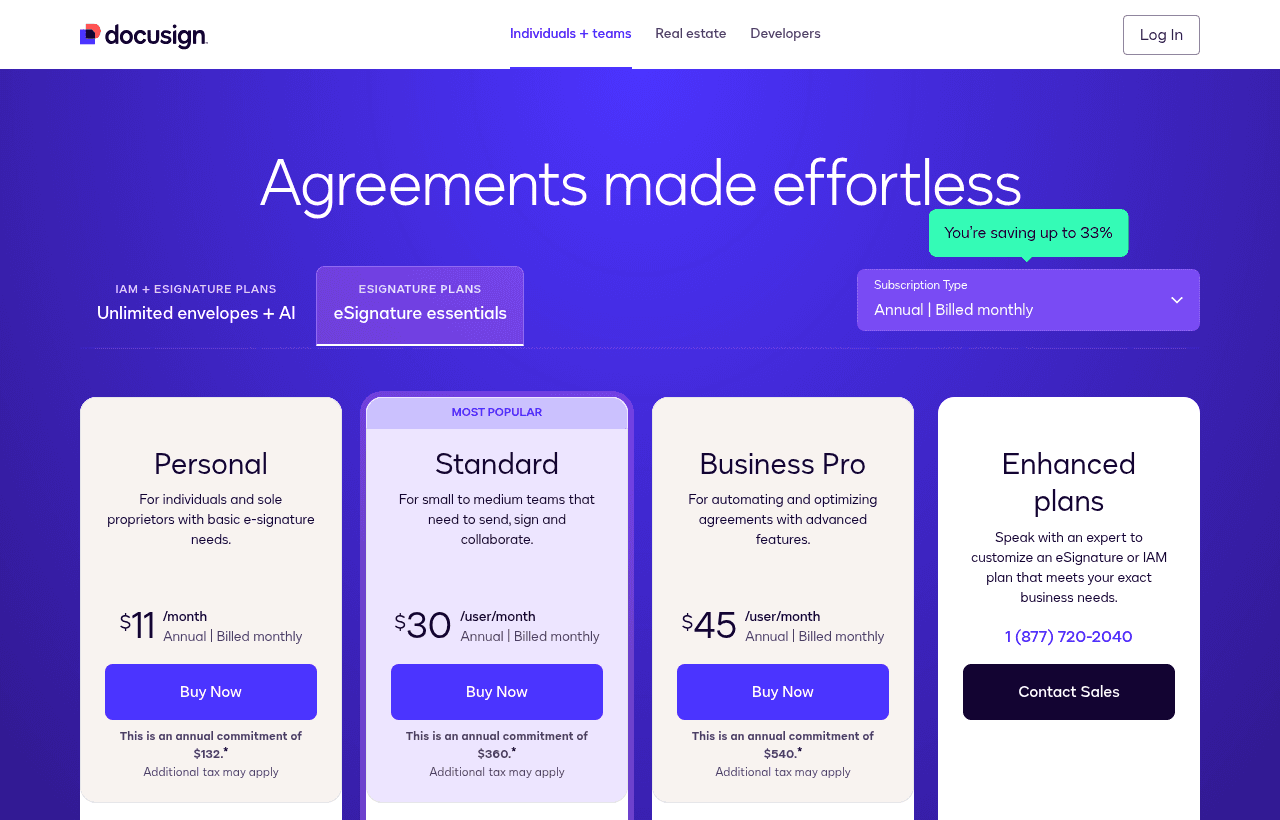
Docusign lists four eSignature plans. Standard and Business Pro are priced per user per month on an annual commitment, billed monthly. Personal is a flat $11 a month for one user. The pricing page shows the annual commitment next to each price.
| Plan | Price per user per month (annual commitment) | Annual commitment per user | Key limits |
|---|---|---|---|
| Personal | $11 | $132 | 1 user, 5 envelopes per month |
| Standard | $30 | $360 | Up to 50 users, 100 envelopes per user per year |
| Business Pro | $45 | $540 | Up to 50 users, 100 envelopes per user per year |
| Enhanced | Contact sales | Custom | 50+ users, custom envelope limit |
Docusign also sells month-to-month plans. Its FAQ says monthly Standard and Business Pro plans allow up to 10 envelopes per user per month. The pricing page we checked did not print a monthly price, so we do not quote one. The startup discount applies to the annual Business Pro plan only.
"Additional tax may apply" sits under every price. The page also notes that plans, pricing and packaging may be valid for new customers only. For more than 50 users, Docusign asks you to call sales at 1-877-720-2040.
What counts as an envelope
An envelope is one send: one or more documents going to one or more recipients. On Standard and Business Pro you get 100 envelope sends per user per year. A 5-seat team gets 500 sends a year, and a 10-seat team gets 1,000. If you go over, Docusign bills extra envelopes pay-as-you-go at a per-envelope rate the pricing page does not list. You can also pre-purchase envelopes.
Personal
Personal is for one person with basic signing needs. You get 5 envelopes per month, the signing workflow, basic fields, reusable templates, reminders, the mobile app and the real-time audit trail. There is no custom branding, no shared templates and no second user.
Standard
Standard adds teams. You can add up to 50 users and set user and group permissions. You also get shared templates and folders, custom branding, collaborative commenting, scheduled sending, in-person signing, pre-filled fields, a value calculator, delegated signing and team reports. Workplace integrations with Slack, Microsoft Teams, Zoom and Stripe start here.
Business Pro
Business Pro is the plan the startup offer covers. On top of Standard it adds:
- Bulk Send, to send one template to many recipients at once
- PowerForms and Web Forms, so people can start a signing flow from a link
- Payment collection inside the document (Docusign Payments, supported currencies and countries only)
- Signer attachments, so signers can upload supporting files
- Form fields such as drop-downs and radio buttons, drawing fields, and locked templates
- Envelope custom fields and agreement actions
- Managed stamps and eWitness
- A developer account and API access
- 1,000+ partner integrations
SMS and phone authentication shows as "contact sales" on Business Pro. Knowledge-based authentication is listed only on Enhanced.
Enhanced
Enhanced is the sales-led tier for 50+ users. Items listed only here include SSO and access management, organization management, conditional routing, signing groups, document retention policies, remote online notary, HIPAA support through a BAA, data residency, 21 CFR Part 11 and FedRAMP Moderate. Integrations with Salesforce, Microsoft Dynamics and NetSuite are also marked "contact sales" on Enhanced only. It is also the only tier with Advanced and Qualified electronic signatures under eIDAS. The self-serve plans list simple electronic signatures (SeS).
What the 30% saves: two worked examples
These examples use the Business Pro list price of $45 per user per month, or $540 per user per year. They assume Docusign approves your application through a partner VC. Tax is excluded.
Example 1: a 5-person team
- List price: 5 × $540 = $2,700 per year
- With 30% off: $2,700 × 0.70 = $1,890 per year
- Saved per year: $810
- Saved over the 2 discounted years: $1,620
- Envelope allowance: 5 × 100 = 500 sends per year
Compare that with Standard at list price: 5 × $360 = $1,800 per year. With the discount, Business Pro costs $90 more per year than undiscounted Standard. For that $90 you get bulk send, web forms, payment collection and API access.
Example 2: a 10-person team
- List price: 10 × $540 = $5,400 per year
- With 30% off: $5,400 × 0.70 = $3,780 per year
- Saved per year: $1,620
- Saved over 2 years: $3,240
- Envelope allowance: 10 × 100 = 1,000 sends per year
At the 50-seat cap, list price is 50 × $540 = $27,000 a year. The discount saves $8,100 a year, or $16,200 over two years.
Meters to budget for
The discount covers the plan seats. Pay-as-you-go items sit on top:
- Send with SMS: from $0.36 per delivery. 200 SMS deliveries cost from $72.
- Identity verification: from $2.40 per attempt. 50 ID checks cost from $120.
- Envelopes above 100 per user per year: per-envelope rate not published.
Standard and Business Pro include 5 SMS deliveries and 5 identity verifications as a one-time bonus. Add-ons need a Standard or Business Pro base plan.
Docusign does not say what you pay after the two discounted years. Annual plans auto-renew, so expect list price unless you renegotiate.
What Docusign does not include
The eSignature pricing page lists no free plan and does not advertise a free trial. Here is what you will not get on Business Pro, even with the discount:
- SSO and organization management (Enhanced only)
- Salesforce, Microsoft Dynamics and NetSuite integrations (Enhanced, contact sales)
- Knowledge-based authentication (Enhanced, contact sales)
- Conditional routing, signing groups and delayed routing (Enhanced)
- Advanced or Qualified electronic signatures under eIDAS (Enhanced)
- HIPAA BAA, data residency and FedRAMP (Enhanced)
- Unlimited envelopes: Business Pro stops at 100 per user per year before overage
- AI agreement management features such as Agreement Manager and Workflow Builder (Enhanced or IAM plans)
Refunds and cancellation
Docusign's pricing FAQ gives these terms. For annual plans bought on docusign.com, you can get a refund within 30 days of purchase. The 30-day refund can be used once per customer. On an "annual, billed monthly" plan, you can cancel within the first 30 days without paying the remaining balance. After 30 days you owe the rest of the term plus taxes and overages. Monthly plans can be cancelled at any time and you are not charged for the next month.
The startup discount needs an annual Business Pro plan, so after day 30 you are committed for 12 months.
The IAM alternative in the same program
The same startup page offers 40% off the annual IAM Starter plan for two years, also on up to 50 seats. IAM is Docusign's Intelligent Agreement Management product.
IAM Starter lists at $45 per user per month with an annual commitment, for 1 to 50 users. It includes 100 envelope sends per user per year, 1 workflow, AI search and analysis of agreements, and Agreement Manager processing for new documents. It includes eSignature Standard features, not Business Pro features. It lacks Web Forms, PowerForms and Bulk Send.
For 5 seats, IAM Starter at 40% off is 5 × $540 × 0.60 = $1,620 a year. Business Pro at 30% off is $1,890. Pick IAM Starter if you want AI search across signed contracts and do not need bulk send or web forms. Pick Business Pro if you send the same agreement to many people or collect payments.
IAM Standard costs $50 per user per month and IAM Professional $80, both with a 3-user minimum. Only IAM Professional includes Business Pro features. The startup offer we found covers IAM Starter only.
Who Docusign is for
- VC-backed startups with a sales motion. Sales teams sending order forms, MSAs and NDAs every week get the most from bulk send, templates and the audit trail.
- Teams that collect payment at signing. Business Pro puts a payment field in the document. Agencies and service firms can take a deposit when the client signs.
- HR and ops teams hiring in batches. Bulk Send pushes one offer letter or policy to many recipients. Signer attachments let new hires upload ID or tax forms in the same envelope.
- Products that need e-signature inside the app. Business Pro includes a developer account and API access.
- Founders selling to larger companies. Counterparties in procurement often already use Docusign. The certificate of completion and audit trail show who signed, when and from where.
Reasons to pass on Docusign
- Startups without a partner VC. The discount depends on your investor's partnership with Docusign. Bootstrapped or angel-funded teams usually will not qualify.
- Solo founders sending a few contracts a month. Personal at $11 per month covers 5 envelopes a month.
- High-volume senders. 100 envelopes per user per year is about 8 a month. A 3-person team sending 60 contracts a month sends 720 envelopes a year against an allowance of 300.
- Teams that need Salesforce integration or SSO now. Both sit on Enhanced, which is outside the discount.
- Teams building proposals, not just signing them. A document tool with a proposal editor may fit better.
Docusign vs alternatives
| Docusign Business Pro | PandaDoc | Dropbox Sign | |
|---|---|---|---|
| Entry paid price | $45 per user per month, annual | Starter $19 per seat per month, annual | Essentials $15 per month, 1 user ($10.05 a month with Dropbox's current discount) |
| Team plan | Business Pro, up to 50 users | Business $49 per seat per month, annual | Standard $17.50 per user per month yearly, $25 monthly, 2+ users |
| Free option | No free plan | Free eSign plan, 5 documents per month | Free plan for signing documents |
| Trial | None advertised; 30-day refund on annual | 14 days | 30-day trial on paid plans |
| Sending limit | 100 envelopes per user per year | Unlimited uploads and e-signatures on Starter | "Unlimited signature requests" listed |
| Strength | Bulk send, payments, API, wide signer recognition | Proposal and quote editor plus signing | Simple pricing, low entry cost |
PandaDoc fits sales teams that write proposals and quotes and want signing in the same tool. Dropbox Sign fits small teams that only need to send and sign, and its Standard plan costs less per user than discounted Business Pro ($17.50 yearly vs $31.50).
Integrations, security and compliance
Every Docusign plan includes signing in 44+ languages, mobile-responsive signing, the mobile app, a certificate of completion, email access codes and use in 180+ countries. Docusign lists ISO 27001, SOC 2 Type II, WCAG 2.0 Level AA and GDPR on every plan.
Cloud storage integrations with Google Drive, OneDrive, Dropbox and Box are on every plan. So are Google Workspace and Microsoft 365. Slack, Microsoft Teams, Zoom and Stripe start on Standard. The 1,000+ partner integrations and API access start on Business Pro.
Tips for your first weeks on Docusign
- Ask your VC first. Confirm your investor partners with Docusign before you apply, so you know the application will verify.
- Count envelopes per seat. Estimate sends per person per year. If someone sends more than 100, plan for pre-purchased envelopes or a bigger plan.
- Give seats to senders only. People who only sign do not need a seat. Buying fewer seats lowers both the list price and the discounted price.
- Build shared templates on day one. Put your NDA, MSA and offer letter in shared folders with locked fields so the team cannot change legal terms.
- Set up Web Forms for repeat agreements. A link on your site can start a signing flow for terms or onboarding forms.
- Use the 5 bonus SMS and ID checks to test. Try identity verification on a real flow before paying $2.40 per attempt.
- Mark the renewal date. The discount runs for two years. Put the date in your calendar and review seats before the third year bills at list price.
Claiming the Docusign offer, step by step
- Open the Docusign deal on SaaSOffers and follow the link to Docusign's startup offer page.
- Confirm your startup is funded by a VC firm that has a partnership with Docusign.
- Click "Apply Now for Startup Offers" and fill in the required fields.
- Wait while Docusign reviews your application and checks it with your VC firm.
- Once approved, Docusign emails you a promo code.
- Choose the annual Business Pro plan for up to 50 seats and enter the code at checkout.
- Check the discounted total and the two-year term on your order before you pay.
Who Is This Deal For?
Early-Stage Startups
Seed and pre-seed companies looking to move fast without overspending on tools.
Growing SaaS Teams
Series A+ companies scaling their stack and optimizing software costs.
Solo Founders
Indie hackers and bootstrapped founders who need enterprise tools at startup prices.
Get 30% off Business Pro for 2 years off Docusign
Premium deal. Upgrade once, unlock everything.
!Eligibility Requirements
Startups applying through a DocuSign VC partner; annual Business Pro, up to 50 seats
How to get the Docusign deal
- The offer: 30% off Business Pro for 2 years, for startups applying through a DocuSign VC partner; annual Business Pro, up to 50 seats.
- Create a free SaaSOffers account, then upgrade to Premium ($79 a year, or $250 once for lifetime access). Premium unlocks every Premium deal on the site.
- Open the Docusign claim page from this deal. It shows the partner link, any promo code and the exact steps Docusign asks for.
- Apply or sign up through that link before you pay Docusign directly, since most startup offers only apply to new accounts.
Frequently Asked Questions
Everything you need to know about this startup deal.
Get the weekly deals digest
New verified startup deals every week. No spam, ever. Unsubscribe anytime.
Docusign guides
- 17 Best Startup SaaS Deals to Claim Right Now (April 2026)A curated roundup of 17 hand-picked startup SaaS deals, spanning AI, sales, marketing, HR, finance, ops, and dev tools. Total potential year-one savings: $50,000+.
- HR and Operations Tools for Startups: The Stack From First Hire to Series AThe HR, payroll, global hiring, finance and operations tools early-stage startups use, grouped by job, with the startup deal for each and a stack for every stage.
Related Offers

Cookiebot
Free plan + 14-day trial
Cookie consent banner and CMP by Usercentrics with auto scanning and Google Consent Mode v2. Free for small sites, 14-day trial on paid plans.
View offer
Tide Business Banking
Used by 1,173 members
£200 cashback
Tide is UK business banking built for founders and small companies, with a business current account, invoicing, expense cards and accounting integrations. Open a current account and an Instant Saver through this link and get £200 cashback.
View offer
Stripe Atlas
Used by 6,540 members
$2,500 Stripe credits + $50K in perks
Stripe Atlas perks: $2,500 in Stripe credits and $50,000+ in partner discounts. Atlas costs $500 one-time to incorporate your startup as a Delaware C-Corp.
View offer
TinCheck
Used by 75 members
First real-time check free
Real-time IRS TIN and name verification from Sovos. Catch a wrong contractor or vendor TIN before it becomes a stacked IRS penalty and a backup-withholding headache.
View offer
Globalfy
20% off company formation (up to $1,000)
Form a US LLC or C Corp from abroad with EIN, registered agent, bank account help and the yearly federal tax return included.
View offer
Zoom
Used by 1,090 members
$20 off per user
Get $20 off per user on Zoom, the video conferencing platform used by hundreds of thousands of businesses for meetings, webinars, and team collaboration.
View offerDeal Summary
Looking for more startup deals?
Browse all offers