
folk Coupon: Free Trial
Modern CRM built for relationship-driven teams, lightweight, flexible, and collaborative.
Free · No account required
Free · No account required.
Deal Highlights
The folk Offer
Offer: Free Trial. Requirements: none listed. There is no promo code.
You start the trial by creating your workspace through the SaaSOffers link. folk gives the same trial to everyone who signs up: 2 weeks free with Premium features switched on and no credit card. Our link does not add days or a discount. It gets you the standard trial, and this page tells you what it costs once the trial ends.
We checked these plans and prices against folk's official pricing and help center pages in November 2026.
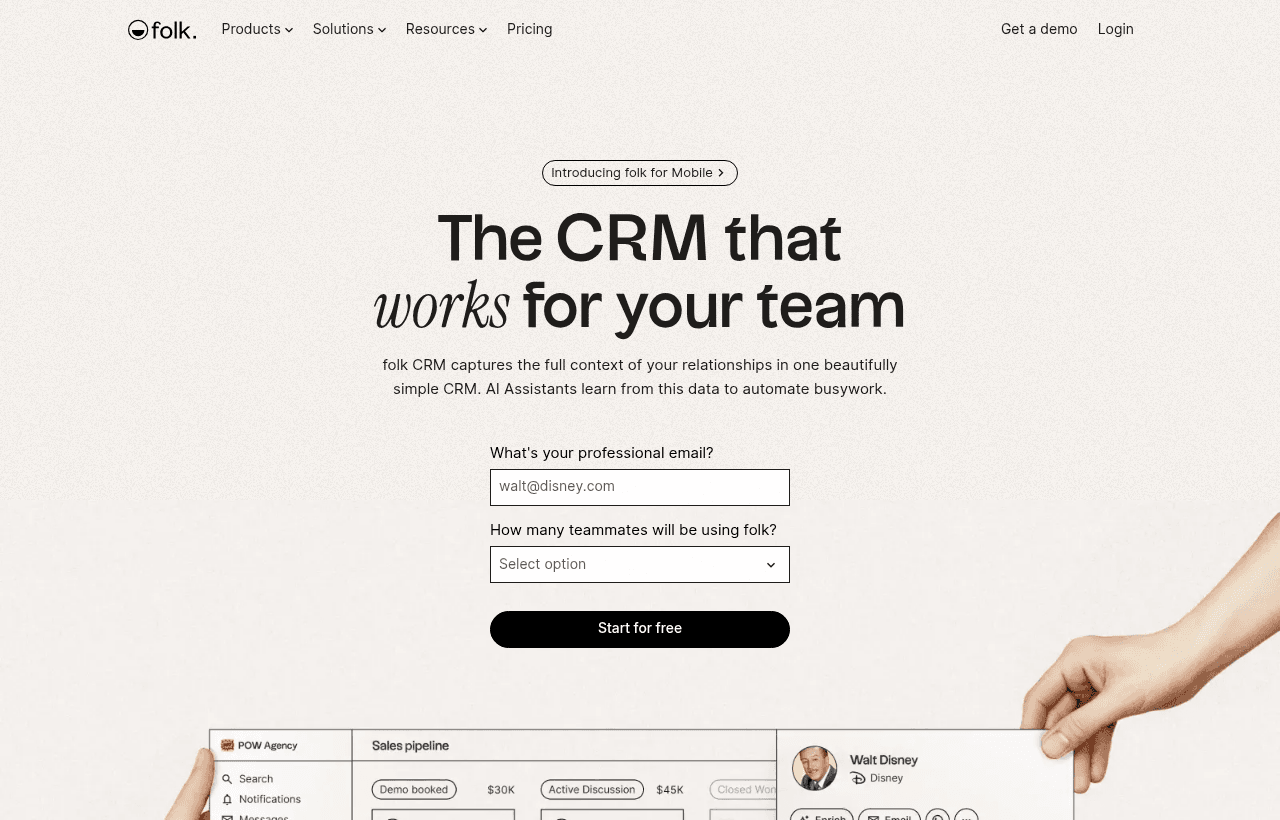
folk is a CRM for small teams that sell through relationships: founders, agencies, partnership teams and B2B sales teams. It looks like a spreadsheet of people and companies, then adds pipelines, email campaigns, contact enrichment, AI assistants and syncing with Gmail, Outlook, Google Calendar, WhatsApp and LinkedIn. The company says it is trusted by 5,000+ companies.
folk Pricing in November 2026
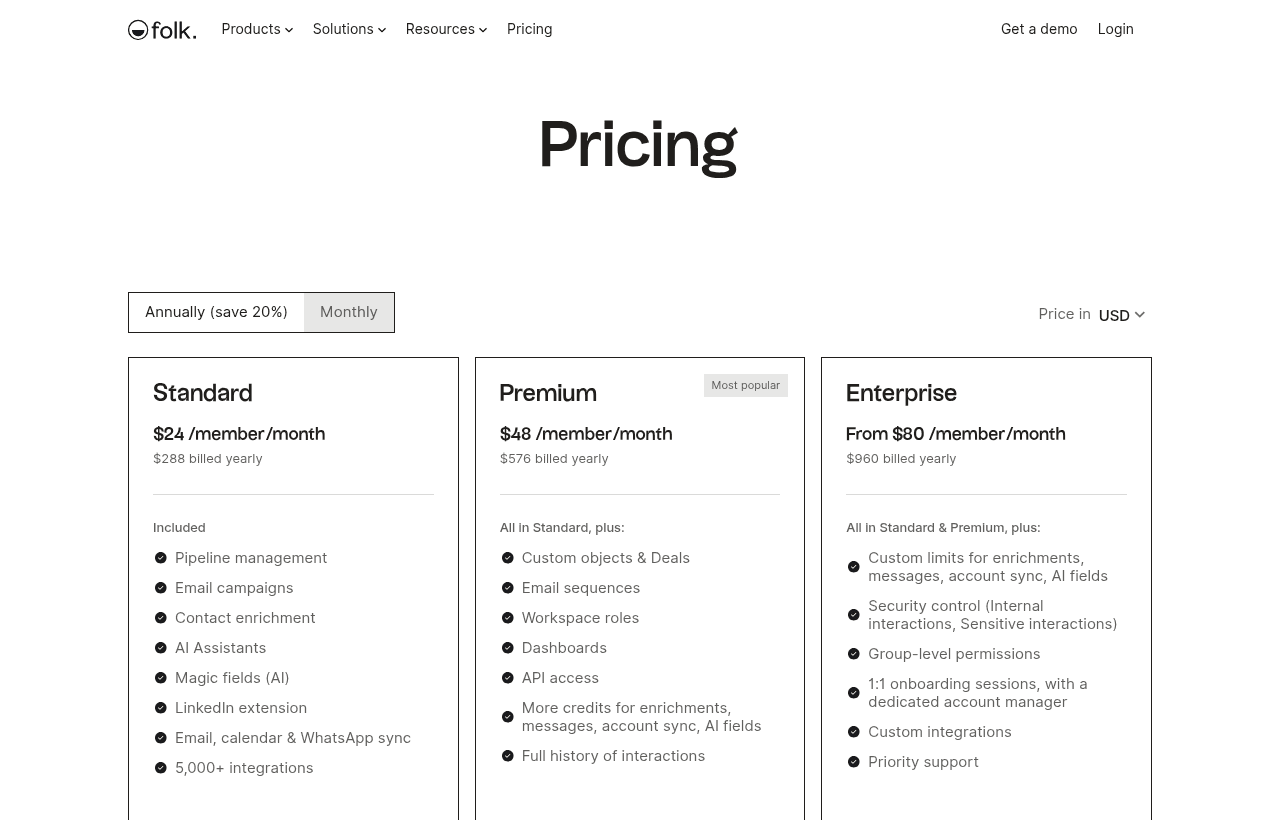
folk charges per member, per month, in USD. Every person in the workspace counts as a member. Annual billing saves 20%. Prices in EUR are also listed on the pricing page.
| Plan | Per member, billed yearly | Per member, billed monthly | Key limits |
|---|---|---|---|
| Standard | $24 ($288 a year) | $30 | 500 email finds a month per workspace, 2,000 AI magic fields a month, 2,000 messages per member a month, 1 synced account per member, 1 custom sending domain |
| Premium | $48 ($576 a year) | $60 | 1,000 email finds a month, 5,000 magic fields a month, 5,000 messages per member a month, 5 synced accounts per member, 3 custom domains, sequences, deals and custom objects, dashboards, full interaction history |
| Enterprise | From $80 ($960 a year) | From $100 | Custom limits for enrichment, messages, account sync and AI fields, group-level permissions, security controls for internal and sensitive interactions, dedicated account manager, custom integrations |
All plans include unlimited contacts, pipeline management, email campaigns, the LinkedIn Chrome extension, the mobile app, Zapier and Make apps, CSV import and export, auto-merge of duplicate contacts and Google SSO.
AI assistant limits
| Assistant | Standard | Premium | Enterprise |
|---|---|---|---|
| Research Assistant | 200 a month | 200 a month | Custom |
| Workflow Assistant | 1,500 a month | 10,000 a month | Custom |
| Follow-up and Recap assistants | Included | Included | Included |
Business card scanning and voice notes are part of the intelligence features on the plan comparison.
Billing rules
- Payment is by credit card only. folk's FAQ says it does not accept other payment methods.
- Members are prorated. Add or remove someone and folk recalculates the price on your next bill.
- Billing is per workspace. If you run two workspaces, you pay for each one.
- Failed payments get 7 days. After that, the account is blocked until you update your card.
- Invoice details can't be changed after payment. Add your company name in the first address line before the first invoice is issued.
What the Free Trial Doesn't Include
folk has no free plan. Its help center says that once the 2-week trial ends you need to upgrade to keep using folk, or the account is blocked. Your data is not deleted right away, and the pricing FAQ says you can ask for a one-week extension.
The trial runs with Premium features, which means a few things change when you pay for Standard instead:
- No email sequences. Standard has one-off email campaigns. Automated multi-step sequences are Premium only.
- No deals or custom objects. On Standard you track pipelines on contacts. A separate deals object is Premium.
- No dashboards.
- Shorter interaction history. Standard shows the last 30 interactions per contact. Premium shows the full history.
- Lower limits. Standard gets half of Premium's enrichment credits (500 against 1,000), 2,000 magic fields against 5,000 and 1 synced inbox per member against 5.
- No workspace roles. Those start on Premium.
If you test sequences or dashboards during the trial, you are testing the $48 plan, not the $24 one.
Worked Examples: What a Team Pays
Example 1: a 5-person founding team
| Plan | Billed yearly | Billed monthly for 12 months | Yearly saves |
|---|---|---|---|
| Standard | $24 x 5 x 12 = $1,440 | $30 x 5 x 12 = $1,800 | $360 |
| Premium | $48 x 5 x 12 = $2,880 | $60 x 5 x 12 = $3,600 | $720 |
The 2-week trial runs on Premium features. At the monthly Premium price, 5 members cost $60 x 5 = $300 a month. Two weeks of that is about $300 x 14 / 30 = $140 of use at no cost.
Example 2: a 10-person sales and partnerships team
| Plan | Billed yearly | Billed monthly for 12 months | Yearly saves |
|---|---|---|---|
| Standard | $24 x 10 x 12 = $2,880 | $30 x 10 x 12 = $3,600 | $720 |
| Premium | $48 x 10 x 12 = $5,760 | $60 x 10 x 12 = $7,200 | $1,440 |
Moving this team from Standard to Premium on yearly billing costs $5,760 minus $2,880 = $2,880 more a year. The question to answer during the trial is whether sequences and deals are worth $24 per person per month to you.
Who you should count as a member
folk bills every member of the workspace, and it prorates changes on the next bill. Invite people who work contacts every week. You can add a teammate later, mid-cycle, and pay only for the days they are on the plan.
Who gets the most from folk
- Founders running a fundraising pipeline. Import investors from LinkedIn with the Chrome extension, track stages in a pipeline view and send personalized updates as an email campaign.
- Agencies and consultancies. Client relationships come from intros, events and referrals. folk logs Gmail or Outlook threads, calendar events and WhatsApp messages against each contact.
- Partnership teams. Groups and views let you keep partners, resellers and affiliates in separate lists with their own fields.
- Small B2B sales teams doing LinkedIn outreach. The Chrome extension imports profiles in one click. Enrichment finds emails and phone numbers. Premium sequences send the follow-ups.
- Teams that sell on WhatsApp. folk supports both WhatsApp and WhatsApp Business sync.
- Field sales reps. The mobile app on the App Store and Play Store adds contacts from your phone and business cards and records voice notes with talk-to-text.
Reasons to pass on folk
- Solo founders who want a free CRM. folk has no free plan. Attio's free plan covers up to 3 seats.
- Teams above 100 people. folk's help center lists a hard limit of 100 members per workspace.
- Teams with large outbound volume on Standard. 500 email finds a month for the whole workspace is roughly 100 per person on a 5-person team. Heavy prospecting needs Premium or a separate enrichment tool.
- Companies that pay by bank transfer or invoice only. folk takes credit cards only.
- Teams that need complex objects on a budget. Custom objects and deals start at $48 per member a month yearly.
- Very large mailings. A single email campaign or sequence is capped at 5,000 recipients.
folk vs Alternatives
| folk | Attio | Pipedrive | |
|---|---|---|---|
| Free plan | None, 2-week trial | Free, up to 3 seats | Not verified |
| Seat or usage cap | 100 members per workspace | Plus up to 10 seats | Lite 2,500 leads and deals per seat, up to 300,000 per account |
Attio has a free plan for up to 3 seats with contact syncing and automatic enrichment, so it is the cheaper start for a tiny team. Its paid plans cost more per user than folk: $35 against $24 at entry level and $79 against $48 at the mid tier, both billed yearly. Attio's Plus plan stops at 10 seats.
Pipedrive is built around a deal pipeline for sales teams with a defined process. Its support center lists usage limits per seat: 2,500 leads and deals on Lite, 5,000 on Growth, 15,000 on Premium and 20,000 on Ultimate, up to 300,000 per account. Pipedrive's pricing page blocked our automated check, so check current prices on its site before comparing.
folk fits best when your contacts are people you know, not leads in a funnel, and when you want LinkedIn and WhatsApp in the same place as email.
What to Test During the Trial
Two weeks is enough for one real workflow. Pick the one you would pay for.
- Import your real contacts on day 1. Use the Google contacts import, a CSV or the WhatsApp import. CSV files can hold up to 100,000 rows and 200 columns, with up to 2,560 characters per row.
- Install the Chrome extension and add 20 LinkedIn profiles. Check how much data enrichment fills in and how many emails it finds. On Standard you would get 500 finds a month for the whole workspace, so count how many you use in a week.
- Connect every inbox you use. Standard syncs 1 account per member. If you have a personal and a work inbox, or a shared sales address, you need Premium's 5.
- Send one sequence. Sequences are the main Premium feature. If you don't send one during the trial, you probably don't need Premium.
- Build one dashboard. Also Premium only. If your weekly pipeline review runs from a spreadsheet anyway, Standard may be enough.
- Try the AI fields. Magic fields write a column for every contact, such as a one-line summary or an industry tag. Standard includes 2,000 a month across the workspace.
folk setup tips
- Plan your groups first. A workspace can hold up to 500 groups and each group up to 100,000 contacts and 500 columns. Make one group per pipeline, such as investors, customers and partners, instead of one giant list.
- Keep custom fields under control. Each group allows up to 100 custom fields and 500 columns, and holds up to 100,000 contacts. Select and multi-select fields hold up to 500 tags.
- Check attachments before campaigns. Email attachments are capped at 18 MB.
- Use the migration service. folk lists a migration service on the plan comparison and a "Migrate my CRM" page. Ask for it before the trial ends if you are moving from HubSpot or Pipedrive.
- Connect Zapier or Make for the rest. folk's integrations page lists Zapier and Make apps that each connect to 1,000+ apps, plus direct integrations with Allo and Reached for phone calls and Salesforge for email and LinkedIn sequences.
- Pay yearly only after the trial. The 20% saving is real: $360 a year on Standard for 5 people. folk's pricing FAQ lists no refund terms, so pay yearly only once the team uses it.
Security and Compliance
folk lists SOC 2 (AICPA) for independently audited security, availability and confidentiality controls, and says it is GDPR compliant. Google SSO is available on every plan. One account can run up to 5 sessions at the same time. Enterprise adds group-level permissions and controls that hide internal and sensitive interactions from other members.
Steps to get the folk deal
- Open the folk deal on SaaSOffers and click the claim button. It sends you to folk through our partner link.
- Sign up and create your workspace. folk does not ask for a credit card during the trial.
- Your 2-week trial starts right away with Premium features.
- Invite your team, import contacts and connect your inboxes and LinkedIn.
- Before the 2 weeks end, go to Settings, then Plans, and upgrade to Standard or Premium. Choose monthly or yearly billing. If you need more time, ask folk support for the one-week extension.
Who Is This Deal For?
Early-Stage Startups
Seed and pre-seed companies looking to move fast without overspending on tools.
Growing SaaS Teams
Series A+ companies scaling their stack and optimizing software costs.
Solo Founders
Indie hackers and bootstrapped founders who need enterprise tools at startup prices.
Get Free Trial off folk
Free for all startups. Claim instantly.
Frequently Asked Questions
Everything you need to know about this startup deal.
Get the weekly deals digest
New verified startup deals every week. No spam, ever. Unsubscribe anytime.
Related Offers

ZoomInfo
Used by 2,014 members
Free Trial
B2B data platform for sales and marketing intelligence with contact databases.
View offer
PartnerStack
Used by 1,303 members
Free Demo
Partner ecosystem platform, manage affiliate, referral, and reseller programs at scale.
View offer
Attio
Used by 1,730 members
$500 in credits
Next-generation CRM built on your data, flexible data model, real-time syncing, and powerful automations.
View offer
PandaDoc
Used by 1,337 members
Free eSign plan + 14-day trial
Free PandaDoc eSign plan plus a 14-day free trial of paid plans. Document automation to create, send, sign, and track proposals, contracts, and quotes.
View offer
Freshsales
Used by 333 members
21-day free trial
AI-powered CRM with built-in phone, email, chat, and lead scoring.
View offer
Emailchaser
Free 7-day trial
Cold email software that finds leads, checks every address with two providers and sends follow-ups from unlimited Google and Microsoft mailboxes.
View offerDeal Summary
Looking for more startup deals?
Browse all offers