
LogSnag Coupon: Free Plan
Event tracking and monitoring for developers, track product events in real-time.
Premium: $79/year for unlimited deals
Already have an account? Log in
Deal Highlights
Our LogSnag listing: the Free Plan
Offer: Free Plan. Our listing sets no extra requirements and there is no promo code. This is a Premium deal on SaaSOffers.
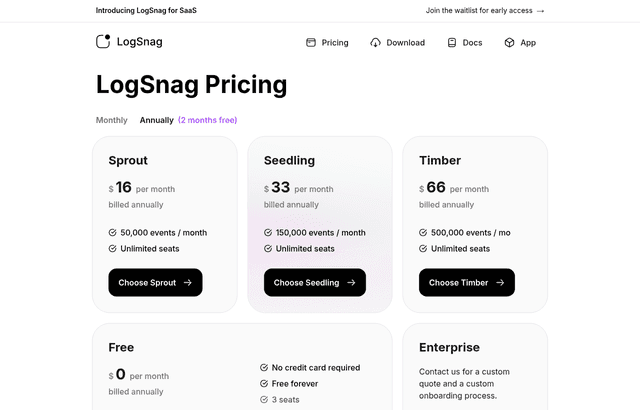
We checked these plans and prices against LogSnag's official pricing page and documentation in November 2026.
LogSnag is an event tracking tool for developers. You send an event from your code, such as a signup, a payment or a failed job, and it shows up in a live feed in the web app, the desktop app or the mobile app. You can turn on push notifications for the events you care about. The Free Plan in our listing matches LogSnag's own public "Free" tier: $0 a month, no credit card, 3 seats and 2,500 events a month. Anyone can start it at logsnag.com, so the listing adds no discount on top.
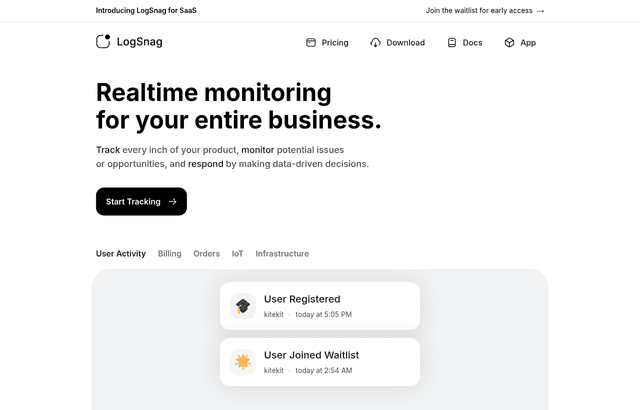
LogSnag's homepage currently carries a banner that says "Introducing LogSnag for SaaS" with a link to join a waitlist for early access. The classic product, with the plans below, is live and sells paid tiers. We found no shutdown or acquisition notice on the site.
Free means 2,500 events a month and three seats
LogSnag's pricing page lists the Free plan with four lines: "No credit card required", "Free forever", "3 seats" and "2,500 events / month". That is the whole list. The page does not mention a retention window, a project limit or a rate limit for Free.
Volume comes first. 2,500 events a month is about 83 a day if you spread them evenly. That is enough for signups, upgrades, payments and errors on a small product. It is not enough if you log every page view or every API call.
Seats come second. Free includes 3. Every paid plan on the page says "Unlimited seats". So a fourth person on your team is the first thing that pushes you to a paid plan, even if your event count is tiny.
The pricing page does not say what happens when you pass 2,500 events in a month. We could not confirm whether extra events are dropped, delayed or billed, so we list that as unverified. Test it in a staging project before you rely on it.
Paid plans: Sprout, Seedling and Timber
LogSnag names its paid tiers after plant stages. The pricing page has a Monthly and an Annually toggle, with "2 months free" on the annual side. The page shows yearly prices by default. The Monthly toggle shows $19, $39 and $79. The yearly figure is a per-month price billed once a year.
| Plan | Billed monthly | Billed yearly (per month) | Yearly total | Events a month | Seats |
|---|---|---|---|---|---|
| Free | $0 | $0 | $0 | 2,500 | 3 |
| Sprout | $19 | $16 | $192 | 50,000 | Unlimited |
| Seedling | $39 | $33 | $396 | 150,000 | Unlimited |
| Timber | $79 | $66 | $792 | 500,000 | Unlimited |
| Enterprise | Custom quote | Custom quote | Custom | Custom | Custom |
The yearly total is the per-month yearly price times 12. We worked that out ourselves, so treat it as arithmetic, not a quote from LogSnag. Enterprise has no public price. The page says to contact sales for a custom quote and a custom onboarding process.
What one event costs on each plan
Dividing the yearly total by the monthly event allowance gives a rough cost per event:
- Sprout: $192 / 12 months / 50,000 events = about $0.00032 per event
- Seedling: $396 / 12 / 150,000 = about $0.00022 per event
- Timber: $792 / 12 / 500,000 = about $0.00013 per event
The jump from Free to Sprout is 20 times the volume (50,000 / 2,500). The jump from Sprout to Timber is 10 times the volume for about 4.1 times the monthly price ($66 / $16, billed yearly).
What Free leaves out
Compared with the paid tiers, the Free plan gives you:
- 3 seats instead of unlimited seats
- 2,500 events a month instead of 50,000, 150,000 or 500,000
- No Enterprise onboarding or custom quote
The pricing page lists no other difference between tiers. That includes features, so we cannot say that charts, funnels or notifications are limited on Free. The homepage describes funnels, journey tracking, filtering, dashboards and push notifications without tying them to a plan. If a feature matters to you, create a Free account and check it before you pay.
Worked examples with real math
A 2-person team logging about 2,000 events a month
Two seats fit inside Free's three. 2,000 events is below 2,500. The cost is $0 a month and $0 a year. Typical events here are signups, trial starts, upgrades, support tickets and deploy results.
A 5-person team logging about 20,000 events a month
Five people need more than 3 seats, and 20,000 events is far above 2,500. Sprout covers both with 50,000 events and unlimited seats.
- Billed yearly: $16 a month, $192 a year
- Billed monthly: $19 a month, $228 a year
- Saving from yearly billing: $36 a year, or $3 a month
A 10-person team logging about 120,000 events a month
Seats are unlimited on every paid plan, so a bigger team costs nothing extra. The event count decides the tier. 120,000 is above Sprout's 50,000 and below Seedling's 150,000.
- Billed yearly: $33 a month, $396 a year
- Billed monthly: $39 a month, $468 a year
- Saving from yearly billing: $72 a year
Staying on Free is not possible here. That is 10 seats against a limit of 3.
How to estimate your own event count
Count the events per user per month, then multiply by active users. A product with 500 active users who each trigger 5 tracked events a month sends 2,500 events, which is exactly the Free limit. At 6 events each you are over. Server-side events such as cron jobs and webhooks add to the total, so include them.
How tracking works
LogSnag's docs describe a four-step setup:
- Create a project. The docs say you can make as many as you like, one for each app.
- Create a channel, which the docs call a box for your events. Examples are payments or logins.
- Create an API token in the API page under Settings.
- Send a POST request to
https://api.logsnag.com/v1/logwith a bearer token.
The /log endpoint requires project, channel and event. Optional fields are description, icon (a single emoji), notify (a boolean for push notifications), tags, parser ("markdown" or "text"), user_id and timestamp (a unix timestamp in seconds).
Project and channel names must be lowercase letters, numbers and dashes. Tag keys can only use lowercase letters, optionally separated by dashes. plan and plan-type are valid, Plan and plan_type are not.
Historical events and notifications
You can import old events by adding a timestamp. The docs warn that historical logs do not send push notifications. That matters if you backfill a database and expect your phone to stay quiet or to buzz.
Users, properties and insights
Add a user_id to a log and LogSnag builds a user profile. The docs say the profile shows first and last seen dates, session count, activity usage and the user's journey in your app.
The /identify endpoint adds key-value properties to a profile, such as email, plan or last payment date, and you can filter and search by them. Property keys override each other, so a second call with plan: "pro" replaces the earlier plan: "free".
The /insight endpoint publishes a live value, such as a user count or a service status. The title stays the same and you change the value or icon. A PATCH call on the same endpoint changes a numeric insight, and the Node SDK offers an insight.increment method for that.
SDKs, widgets and integrations
LogSnag's docs list official SDKs for Node, React, Next, Vue, Deno, Web (a script tag from its CDN) and Python. The Node package installs with npm install @logsnag/node, and the Python package with pip3 install logsnag. The Node SDK has track, identify, group and insight methods. It also has disableTracking and enableTracking, which you can call in development so test runs do not burn your 2,500 events.
The Use Cases page lists cURL, Go, Java, PHP, Ruby, Swift, C#, Dart, R, Shell and other languages. It says LogSnag is "use-case agnostic" and works with almost any language, because a single HTTP request is enough. For those languages you write the request yourself.
The docs also cover:
- A feedback widget: a button with
data-logsnag-feedbackattributes that sends user feedback into a channel. - A Zapier integration and a Bubble integration, both listed under Integrations in the docs.
- A page of community-built integrations, which the docs call "Unofficial".
The changelog says LogSnag added integrations for Remix and Astro in one release.
One security point from the docs: if you use LogSnag in a public website or app, set the token to "Public" and limit its roles to one project and channel. Never ship a full-access token in front-end code.
Who LogSnag is for
- Solo founders who want a phone buzz when someone pays. The Free plan covers this with room to spare.
- Small teams with a Slack channel full of bot messages. The homepage pitches LogSnag as a replacement for "clunky Slack channels".
- Developers who prefer one HTTP call to a tracking plan and a data model.
- No-code builders on Bubble or Zapier. Both integrations are in the docs.
Who should skip LogSnag
- Teams that need session replay, heatmaps or feature flags. LogSnag's pages describe events, funnels, journeys, insights and notifications only.
- Products that log high-volume events. At 2,500 events on Free, or 500,000 on Timber, a busy API can burn through the allowance. Check the numbers first.
- Anyone who needs a published SLA, SOC 2 report or data residency. We found none of these on the pricing page, and Enterprise terms are custom.
- Teams of four or more who want to stay free. The seat cap is 3.
LogSnag compared with two analytics tools
| LogSnag Free | PostHog Free | Amplitude Free | |
|---|---|---|---|
| Free monthly volume | 2,500 events | 1,000,000 product analytics events | 2M events |
| Seats on the free plan | 3 | See our page | See our page |
| Focus | Event feed, push alerts, funnels | Analytics, replay, flags and more in one product | Product analytics, replay, experiments |
| First paid price | $16 a month yearly, $19 monthly | Usage-based | Plus from $900/year (3M events) |
PostHog and Amplitude are broader products with far higher free volumes. See our pages on PostHog and Amplitude for their plans. LogSnag's pitch is narrower: a live feed and notifications for the events you pick, without a full analytics suite. If your goal is funnel and retention analysis across a large user base, the free volume in the table points to PostHog or Amplitude. If your goal is a live "something just happened" feed, LogSnag is built for that.
LogSnag setup tips
- Start with five events: signup, first key action, upgrade, payment, error. Add more after a week.
- Use one channel per topic, such as
paymentsanderrors, so you can mute one without losing the other. - Turn
notifyon only for events you would get out of bed for. Push notifications on every signup become noise at scale. - Always send a
user_id. Without it you get a feed but no user profile or journey. - Use
disableTrackingin local development and tests. - Keep a counter of monthly events in an insight so you see the free limit coming.
- Use a Public token with narrow roles for browser code, and a private token on the server.
How to claim the LogSnag deal
- Upgrade to SaaSOffers Premium, then open this deal's claim link on SaaSOffers.
- Create your LogSnag account and choose the Free plan. LogSnag says no credit card is required.
- Create a project and a channel, then generate an API token in Settings.
- Send your first event with the cURL example or an SDK, and check that it appears in the feed.
- Decide whether you need more than 3 seats or 2,500 events. If so, compare Sprout at $16 a month billed yearly with $19 billed monthly.
Our listing's Free Plan is the same public tier LogSnag shows on its pricing page, so if you have a LogSnag account already you may not need the deal at all. Check that your account is on Free before you pay for any plan.
Verdict
LogSnag Free is a fair way to try live event tracking: $0, no card, 3 seats and 2,500 events a month. It fits a small product with a handful of important events. It stops fitting when your team passes three people or your event count passes 2,500, and the first paid step is $16 a month billed yearly. Check the overage behavior in a test project first, because the pricing page does not say what happens at the limit.
Who Is This Deal For?
Early-Stage Startups
Seed and pre-seed companies looking to move fast without overspending on tools.
Growing SaaS Teams
Series A+ companies scaling their stack and optimizing software costs.
Solo Founders
Indie hackers and bootstrapped founders who need enterprise tools at startup prices.
Get Free Plan off LogSnag
Premium deal. Upgrade once, unlock everything.
Frequently Asked Questions
Everything you need to know about this startup deal.
Get the weekly deals digest
New verified startup deals every week. No spam, ever. Unsubscribe anytime.
Related Offers

Retool
Used by 1,559 members
1 year free, up to $60K
Build internal tools 10x faster with the low-code platform used by companies like Amazon, DoorDash, and Mercedes-Benz.
View offer
Replicate
Used by 1,772 members
$500 in credits
Run open-source ML models in the cloud, deploy Llama, Stable Diffusion, and custom models via API without GPU management.
View offer
ZoomInfo
Used by 2,014 members
Free Trial
B2B data platform for sales and marketing intelligence with contact databases.
View offer
Chore
15% off your first month
Chore runs your startup's back office for you: payroll, HR, bookkeeping, compliance and equity, inside the tools you already use. 15% off your first month through SaaSOffers.
View offerDeal Summary
Looking for more startup deals?
Browse all offers