
Mux Startup Credits: $500 in credits
Video infrastructure API for streaming, encoding, and analytics.
Premium deal
Already have an account? Log in
Deal Highlights
The Mux startup credit
Our listing: $500 in credits. The listing has no extra requirements on our side and no promo code. The credit comes from Mux's own Startup Program, which any eligible startup can apply to directly at mux.com/startups. SaaSOffers does not add anything on top of it.
We checked these plans and prices against Mux's official pricing and help pages in November 2026.
Mux's program page lists four conditions. The offer is only valid for startups. You must not be an existing Mux customer. You must be a first-time recipient of Mux credits. Credits must be used within 1 year of activation. Mux adds that, depending on your investors, you may be eligible for more than $500, and that qualifying startups may get a product consultation with one of the co-founders.
Mux charges by the minute of video
Mux is a video API. You upload a file or send a live stream, and Mux encodes it, stores it, delivers it over HLS and reports how it played. The bill has three core parts: input (encoding), storage and delivery. Each is priced per minute of video, not per gigabyte, and Mux says it does not round up to the nearest minute.
The per-minute rate depends on quality level, resolution and volume:
- Video quality level. Basic has free input and supports on-demand video only, up to 4K. Plus and premium cost money to encode and are required for live streams, which top out at 1080p.
- Resolution. Up to 720p is the base price. 1080p is 1.25×, 1440p (2K) is 2× and 2160p (4K) is 4×. 2K and 4K are on-demand only.
- Volume. Pay-as-you-go rates drop automatically in tiers. Custom contracts add more discounts above $3,000 a month.
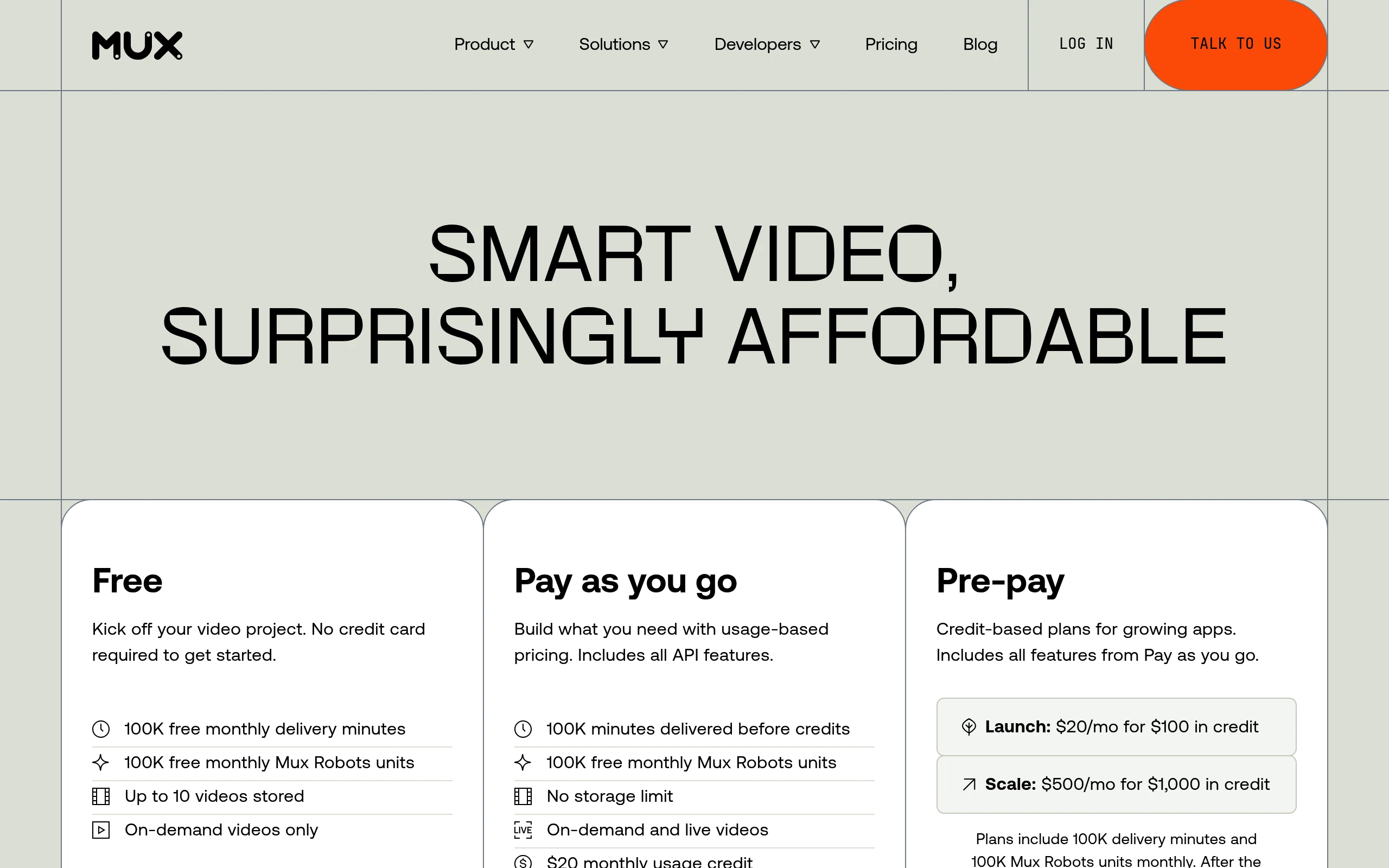
Mux plans and base rates
Mux has no seats and no yearly plan. The plans differ in how usage is paid for.
| Plan | Price billed yearly | Price billed monthly | Key limits |
|---|---|---|---|
| Free | Not offered | $0 | 100,000 delivery minutes and 100,000 Mux Robots units a month, up to 10 videos stored, on-demand only, no card needed |
| Pay as you go | Not offered | Usage only, with a $20 monthly usage credit | No storage limit, on-demand and live, all API features |
| Launch (pre-pay) | Not offered | $20 a month for $100 in credit | Everything in Pay as you go; usage above $100 billed at standard rates |
| Scale (pre-pay) | Not offered | $500 a month for $1,000 in credit | Same, with $1,000 of monthly credit |
| Enterprise | Custom | Custom | Steeper volume discounts over $3,000 a month, account security features, SLAs, 24/7 support |
Pre-pay credits reset at the start of each billing cycle. Mux's own guidance is to stay on pay as you go if you expect to spend less than $40 a month.
Base rates at up to 720p, first volume tier
| Meter | Basic | Plus | Premium |
|---|---|---|---|
| Input (per minute encoded) | Free | $0.025 | $0.0375 |
| Storage (per minute stored, per month) | $0.0024 | $0.0024 | $0.0036 |
| Delivery (per minute delivered) | $0.0008 after 100,000 free | $0.0008 after 100,000 free | $0.0012 after 100,000 free |
At 1080p the basic and plus rates become $0.003 for storage and $0.001 for delivery, and plus input becomes $0.03125. Basic assets carry a one-month minimum storage charge, then prorate. Plus has no minimum.
Automatic cold storage
Mux moves unwatched assets to cheaper storage by itself. An asset not played for 30 days drops to Infrequent at a 40% discount. After 90 days it drops to Cold at a 60% discount. New assets start in Cold until their first play, and one view resets the timer. For a back catalog that few people watch, this cuts the storage line well below list.
Add-ons and AI workflows
Several features are free with Mux Video. Mux Data analytics, Mux Player, on-demand captions, smart security (signed URLs, domain and referrer restriction) and low-latency live streaming carry no extra charge. Standard static rendition MP4s cost nothing to generate.
These cost extra:
- Media-grade DRM: $100 a month plus $0.003 per play.
- Custom domains: $100 a month to stream videos or serve images from your own domain.
- Live captions: 6,000 free minutes a month, then $0.024 per minute. Live captions cover 6 languages; on-demand AI captions cover 22.
- Live simulcasting: $0.020 per minute per simulcast target.
- Advanced MP4 and static renditions: from $0.0006 per minute.
- Shots (shot boundaries and images): $0.001 per minute.
- Extra audio tracks: billed at audio-only rates, which are a tenth of 720p basic video storage and delivery.
Mux Robots pricing
Mux Robots runs AI jobs on your on-demand assets. The first 100,000 units each month are free, then 1,000 units cost $0.01. Sample rates per workflow:
- Summarize: $0.005 per job plus $0.0003 per minute
- Generate chapters: $0.003 per job plus $0.0005 per minute
- Translate captions (into 50+ languages): $0.001 per job plus $0.005 per minute
- Find key moments: $0.02 per job plus $0.004 per minute
- Content moderation: $0.001 per sample
- Translate audio: $0.70 per minute
Cancelled and errored jobs are not charged. Usage credits, including the $20 pay-as-you-go credit and pre-pay credits, apply to Robots usage.
Player and SDKs
Mux Player is open source and free. Mux describes three forms: a native player for iOS and Android, a web player built on modern standards, and an iframe for low-code or no-code sites. The site lists integrations and SDK guides for Node, Ruby, PHP, TypeScript, Python, Elixir and Go, plus framework guides for Next.js, Astro, SvelteKit, Laravel, Flutter, React Native and WordPress. If you already use another AI vendor, Mux points you to its open-source @mux/ai package instead of Robots.
What the free plan does not include
- More than 10 stored videos. The cap is the main reason teams leave the free plan.
- Live streaming. Free is on-demand only.
- The $20 monthly usage credit. That arrives with pay as you go.
- Plus or premium quality without paying for input. Only basic quality encodes for free on any plan.
- SLAs and 24/7 support. Those sit on Enterprise.
Two worked examples at list rates
Both use the published pay-as-you-go rates at 1080p. We treat all stored minutes as frequently watched, so cold storage would only lower these totals. We assume the $20 pay-as-you-go credit and the startup credit both apply to the same invoice; Mux's program page does not say how they stack, so confirm when you redeem.
Example 1: a course platform with 200 lessons
A two-person edtech startup hosts 200 lessons of 10 minutes each at basic quality, and students watch 50,000 minutes a month.
- Input: basic quality, $0
- Storage: 2,000 minutes × $0.003 = $6.00 a month
- Delivery: 50,000 minutes is under the 100,000 free minutes, $0
- Usage total: $6.00 a month, fully covered by the $20 pay-as-you-go credit
This team pays nothing out of pocket even without the startup program. The $500 credit sits unused unless usage grows. For small libraries, Mux is already close to free.
Example 2: a creator app with 5,000 new minutes a month
A five-person team runs a creator app. Each month it encodes 5,000 new minutes at plus quality, stores a 20,000-minute library and delivers 400,000 minutes, all at 1080p.
- Input: 5,000 × $0.03125 = $156.25
- Storage: 20,000 × $0.003 = $60.00
- Delivery: 400,000 minus 100,000 free = 300,000 × $0.001 = $300.00
- Usage total: $516.25 a month
On pay as you go, the $20 credit brings that to $496.25 a month, or $5,955 a year. If our $500 listing applies, it covers all of month one ($496.25) and leaves $3.75 for later, a saving of $496.25. On the Launch plan, the bill would be $516.25 minus $100 in credit, plus the $20 fee, so $436.25 a month. Scale would cost $500 a month and leave $483.75 of its $1,000 credit unused. For this team, Launch beats both.
The startup credit runs for 1 year from activation, so a team with lower usage can stretch it across many months.
Where Mux fits best
- Developers adding video to their own app. Upload, playback, thumbnails and GIFs come through API calls, and thumbnails are a GET request.
- User-generated content products. Free basic input and cold storage keep costs low for big libraries of short clips that few people rewatch.
- Live features up to 1080p. Standard and low-latency live streams bill at the same rates.
- Teams that want playback analytics without another vendor. Mux Data is free for Mux Video users.
When Mux is the wrong pick
- Marketing sites that only need a few embedded videos. A hosted player with a flat plan may be simpler than an API.
- Products that need live streams in 2K or 4K. Mux live tops out at 1080p.
- Teams on a fixed storage budget with no engineers. Pricing is metered on several axes, and someone has to watch it.
- Existing Mux customers. The startup credit is for new customers only.
Mux compared with alternatives
| Mux | Cloudflare Stream | Bunny.net Stream | |
|---|---|---|---|
| Pricing model | Per minute: input, storage, delivery | Per minute: storage and delivery only | Per gigabyte: storage and CDN traffic |
| Encoding | Free on basic; from $0.025/min on plus | Always free | Free |
| Storage | From $0.0024 per minute a month | $5 a month per 1,000 minutes, prepaid | From $0.01 per GB |
| Delivery | 100,000 free minutes a month, then from $0.0008/min | $1 per 1,000 minutes delivered | From $0.005 per GB |
| Minimum spend | $0 on Free and pay as you go | Storage bought in $5 blocks of 1,000 minutes | $1 a month |
| Startup credit | $500, possibly more by investor | See our Cloudflare page | See our Bunny.net page |
Cloudflare Stream keeps billing to two dimensions and includes bandwidth in delivery. If you run out of prepaid storage, new uploads and live streams stop until you buy more. Bunny charges per gigabyte, so cost follows file size instead of duration. Mux's pricing page lists extras the other two pages do not price: free Mux Data analytics, free on-demand captions in 22 languages, DRM and the Robots AI workflows.
Mux setup tips
- Pick the quality level per asset. Basic is the default for new accounts. Use plus only where the content is professional or you need live.
- Cap playback resolution where it does not matter. A 1080p stream costs 1.25× the 720p rate on storage and delivery.
- Remember buffered seconds are billed. If the player preloads 20 seconds, Mux delivers and charges those seconds even if nobody watches them.
- Use the cost estimator before launch. The pricing page calculator models storage as 60% cold, 10% infrequent and 30% frequent by default; adjust it to your library.
- Check DRM need early. At $100 a month before any plays, it is the largest fixed fee on the price list.
- Ask Mux about migration. The pricing page offers free migration options for teams moving from another platform.
Claiming the Mux offer, step by step
- Open the Mux deal on SaaSOffers and follow the link on this page to Mux's Startup Program.
- Click Apply now and fill in the form with your company and investor details.
- Wait for approval. The credit is for startups that are new to Mux and have never received Mux credits.
- Create your account if you have not yet. Mux needs no credit card to start.
- Once credits are activated, use them within 1 year. Track spend in the Mux dashboard.
- No promo code is involved. If you are a non-profit rather than a startup, Mux offers separate one-time credits through its sales team.
Who Is This Deal For?
Early-Stage Startups
Seed and pre-seed companies looking to move fast without overspending on tools.
Growing SaaS Teams
Series A+ companies scaling their stack and optimizing software costs.
Solo Founders
Indie hackers and bootstrapped founders who need enterprise tools at startup prices.
Get $500 in credits off Mux
Premium deal. Upgrade once, unlock everything.
How to get the Mux deal
- The offer: $500 in credits.
- Create a free SaaSOffers account, then upgrade to Premium ($79 a year, or $250 once for lifetime access). Premium unlocks every Premium deal on the site.
- Open the Mux claim page from this deal. It shows the partner link, any promo code and the exact steps Mux asks for.
- Apply or sign up through that link before you pay Mux directly, since most startup offers only apply to new accounts.
Frequently Asked Questions
Everything you need to know about this startup deal.
Get the weekly deals digest
New verified startup deals every week. No spam, ever. Unsubscribe anytime.
Related Offers

Retool
Used by 1,559 members
1 year free, up to $60K
Build internal tools 10x faster with the low-code platform used by companies like Amazon, DoorDash, and Mercedes-Benz.
View offer
Zoom
Used by 1,090 members
$20 off per user
Get $20 off per user on Zoom, the video conferencing platform used by hundreds of thousands of businesses for meetings, webinars, and team collaboration.
View offer
ZoomInfo
Used by 2,014 members
14-day free trial
B2B data platform for sales and marketing intelligence with contact databases.
View offer
Chore
15% off your first month
Chore runs your startup's back office for you: payroll, HR, bookkeeping, compliance and equity, inside the tools you already use. 15% off your first month through SaaSOffers.
View offerDeal Summary
Looking for more startup deals?
Browse all offers