
Raycast Promo Code: 1 year free Pro
Productivity launcher for macOS, replace Spotlight with AI chat, snippets, window management, and 1000+ extensions.
Premium: $79/year for unlimited deals
Already have an account? Log in
Deal Highlights
What Raycast Gives a Startup
Raycast is a productivity launcher for macOS that replaces Spotlight with AI chat, snippets, window management, and over a thousand extensions. This deal gives a macOS startup team one year free on Raycast Pro. For a small team where everyone works on a Mac and every minute of focus counts, Raycast turns the keyboard into a command center for the whole computer, and a free year of Pro puts the upgraded version in everyone's hands during the stretch when the team most needs to move fast.
The value is that Raycast collapses a hundred small frictions that quietly drain a workday. Switching between apps, searching for a file, pasting the same text for the tenth time, arranging windows, looking something up, kicking off a routine task: each of these is tiny, but they happen constantly, and together they add up to a meaningful slice of every person's day. Raycast puts all of them a keystroke away. Instead of reaching for the mouse and clicking through interfaces, a person types a short command and the thing happens. The computer starts responding at the speed of thought rather than the speed of pointing and clicking.
For a startup, this per-person speedup multiplies across the team. When everyone works faster and stays in flow more, the whole company moves faster. The gains are not dramatic in any single moment, which is exactly why they are easy to overlook, but over a full year across a whole team they are substantial. The free year of Pro means the team gets the enhanced capabilities, including AI, without spending anything during the period when speed and focus matter most.
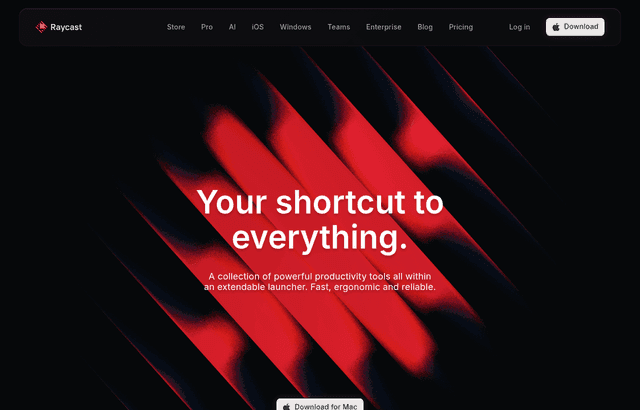
Raycast, one of the tools included in this startup deal.
One Launcher for the Whole Computer
The heart of Raycast is the launcher itself. A single keystroke brings up a command bar from which a person can do almost anything: open an app, find a file, run a command, search a service, or trigger a task. It replaces the default macOS launcher with something far more capable, so the one place a person already reaches to start things becomes the place they can do everything.
This centralization is what makes Raycast so effective. Instead of remembering where each capability lives, in which app or which menu, a person builds one habit: hit the keystroke, type what they want, and go. The mental overhead of navigating between tools drops, because the launcher is the front door to all of them. Work that used to require reaching for the mouse, finding the right window, and clicking through menus becomes a few typed characters.
For a startup team, adopting this shared habit means everyone gets faster at the mechanical parts of using their computer, which is a surprisingly large share of the day. The launcher keeps a person's hands on the keyboard and their attention on the task, rather than scattered across the interface. Multiplied across a team and across a year, staying on the keyboard and out of the menus adds up to real recovered time and, just as importantly, more sustained focus.
AI Chat Without Leaving the Keyboard
Raycast Pro brings AI chat directly into the launcher, which is where this deal's upgrade shows its worth. A person can invoke AI from the same command bar they use for everything else, ask a question, draft some text, or get help with a task, and get an answer without opening a browser tab, navigating to a separate site, and breaking their concentration. The AI is right there, one keystroke away, inside the flow of work.
This convenience matters more than it first appears. The friction of switching to a separate tool for AI, opening it, waiting, and switching back is exactly the kind of interruption that pulls a person out of focus. By putting AI in the launcher, Raycast removes that friction, so getting AI help becomes a natural, instant part of working rather than a detour. People use it more because it is easier to reach, and they stay in flow while doing so.
For a startup team, having AI this accessible means the team actually benefits from it throughout the day, on writing, on quick questions, on all the small tasks where a fast answer helps. Instead of AI being a thing people occasionally remember to go use, it becomes an always-available assistant built into how everyone already works. The free year of Pro puts that in reach for the whole macOS team at no cost, during the period when squeezing more out of each person's day is most valuable.
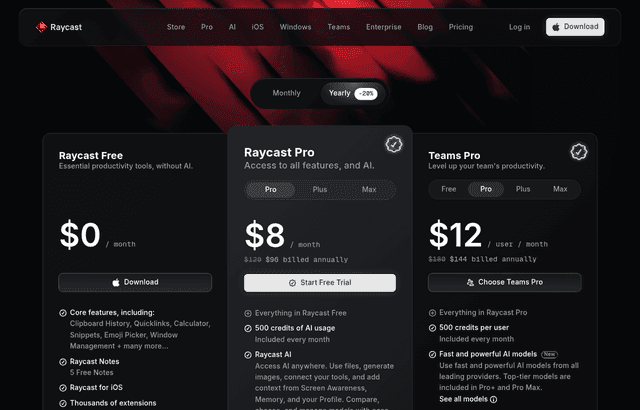
A look at Raycast before the discount, so you can see what the deal saves you.
Snippets That Kill Repetitive Typing
Everyone retypes the same things constantly: an email address, a standard reply, a block of boilerplate, a common response to a customer, a chunk of frequently used text. Each instance is small, but the repetition is endless, and it is both a waste of time and a source of inconsistency when people retype from memory and get it slightly different each time.
Raycast's snippets solve this. A person saves a piece of text once and then inserts it instantly with a short trigger, anywhere they type. The email signature, the standard reply, the common phrase, all of it becomes a couple of keystrokes instead of a full retype. The time saved on each one is small, but because these bits of text get typed so often, the cumulative saving across a day and across a team is significant.
For a startup, snippets also bring consistency, which matters as the team grows. When everyone uses the same saved snippets for common customer replies or standard messaging, the company communicates in a consistent voice without anyone having to think about it. New team members inherit the shared snippets and immediately sound aligned with the rest of the team. The feature saves time and quietly keeps the team's communication coherent, both of which help a young company punch above its size.
Window Management for a Focused Workspace
Anyone working on a Mac spends a surprising amount of effort arranging windows: dragging them to the right size, positioning them side by side, moving them between displays. It is fiddly, it interrupts the actual work, and it has to be redone constantly as people switch between tasks. The mouse-driven dance of window arrangement is a small but persistent tax on getting things done.
Raycast includes window management driven from the keyboard, so a person can snap windows into position, resize them, and arrange their workspace with quick commands instead of careful dragging. Setting up the right layout for a task, two windows side by side, one window filling the screen, becomes instant rather than a manual chore. The workspace bends to the person's intent quickly, so they can get into the right setup and get to work.
For a startup team, this keeps people in flow. The interruption of stopping to arrange windows is exactly the kind of small friction that breaks concentration, and breaking concentration is expensive because getting back into deep focus takes time. By making window arrangement fast and keyboard-driven, Raycast removes one more reason to reach for the mouse and lose the thread. Across a whole team working long days, keeping people focused and out of the fiddly mechanics of their screen is worth real productivity.
Extensions That Bring Every Tool Into One Place
Raycast's extensions, numbering over a thousand, connect it to the many tools a startup uses every day. Instead of opening each service separately, a person can interact with it directly from the Raycast launcher: search it, trigger actions in it, pull information from it, all without leaving the command bar. The launcher becomes a hub that reaches into the whole stack of tools the team relies on.
This is where Raycast goes from a faster launcher to a genuine command center. A startup uses a lot of different services, and constantly switching between them to do small things is a real drain. Extensions let those small interactions happen from one place, so a person can act across many tools without the overhead of opening and navigating each one. The tools the team already pays for become faster to use because Raycast puts a quick front end on all of them.
For a startup, this consolidation is valuable precisely because small teams juggle so many tools. The more of the daily tool-switching that can happen from the launcher, the less time is lost to context-switching and navigation. And because the extension library is so large, the team can tailor Raycast to its own specific set of tools, building a command center shaped around exactly how this particular company works. That customization turns Raycast into something more powerful the more the team leans into it.
Raycast Compared to the Default Launcher and Scattered Tools
A macOS startup that does not use Raycast is relying on the built-in launcher plus a scattering of separate approaches for everything else. Seeing the difference clarifies why Raycast is worth adopting across the team.
The default macOS launcher can find files and open apps, and that is roughly where it stops. It has no AI chat, no snippets, no window management, and no extensions connecting it to the team's tools. For everything beyond basic search, a person falls back to reaching for the mouse, opening apps directly, retyping text by hand, dragging windows around, and switching between services one at a time. Each of those is a small friction, and the default launcher does nothing to remove any of them. Raycast replaces that limited launcher with one that absorbs all of those tasks into a single keyboard-driven surface.
The alternative to Raycast is not one competitor but a pile of separate habits and utilities, each addressing one piece: a separate AI tool, a separate text expander, a separate window manager, and manual navigation for everything else. Stitching those together is more to manage and still leaves the seams between them. Raycast brings all of it into one coherent tool, so the team learns one launcher instead of maintaining a patchwork. With a free year of Pro, including the AI capabilities, the whole macOS team gets that unified, upgraded command center at no cost.
Making the Free Year of Pro Count
The offer is one year of Raycast Pro free for a macOS startup team, and the team gets the most from it by adopting Raycast across everyone and building the shared habits that make it pay off. The value comes from the whole team living in the launcher, not from one person using it occasionally.
Start by getting everyone on the team using Raycast as their launcher, replacing the default, so the core habit of doing everything from the command bar takes hold. Encourage people to build snippets for the text they retype most, and to share the common ones so the team communicates consistently. Get everyone using the keyboard-driven window management so arranging the workspace stops breaking focus. Add the extensions that connect Raycast to the specific tools your team uses, so the launcher becomes a real command center for your stack.
Because Pro is free for a full year, the team should lean fully into the AI chat as well, making it a normal part of the workday since it is right there in the launcher. The year is long enough for these habits to become second nature, so that by the time the free period ends, the team is genuinely faster and more focused than it was. The lasting payoff is a team that moves through its work with less friction, which is worth far more than the price of the Pro plan the deal covers.
Who Should Claim This Deal
This deal is for macOS startup teams, meaning any small company where the team works on Macs. The requirement is being a macOS startup team, and the reward is a full year of Raycast Pro free, including AI chat, snippets, window management, and the full extension library.
It is an especially strong fit for a team that feels the drag of constant tool-switching, repetitive typing, and mouse-driven fiddling, because Raycast collapses all of those into fast keyboard commands. It fits teams that want AI woven into their daily work rather than sitting in a separate tab, since Pro puts it right in the launcher. And it fits any startup that understands how much per-person speed and focus compound across a whole team over a year.
A macOS startup where people lose small pieces of every day to the mechanics of using their computers, and lose focus every time they reach for the mouse or switch tools, will feel Raycast's value quickly. It turns the keyboard into a command center for the whole machine, it saves time and protects focus across the team, and the free year of Pro means the upgraded version costs nothing during the period when momentum matters most. For a Mac-based team that wants to move faster, this deal is worth claiming today.
Who Is This Deal For?
Early-Stage Startups
Seed and pre-seed companies looking to move fast without overspending on tools.
Growing SaaS Teams
Series A+ companies scaling their stack and optimizing software costs.
Solo Founders
Indie hackers and bootstrapped founders who need enterprise tools at startup prices.
Get 1 year free Pro off Raycast
Premium deal. Upgrade once, unlock everything.
!Eligibility Requirements
macOS startup team
Frequently Asked Questions
Everything you need to know about this startup deal.
Yes, free plan includes launcher, extensions, clipboard history, and snippets.
Get the weekly deals digest
New verified startup deals every week. No spam, ever. Unsubscribe anytime.
Related Offers

Slack
Used by 4,760 members
25% off first year
Get 25% off Slack Pro for your first year. The messaging platform that has replaced email for 750,000+ organizations worldwide.
View offer
Zapier
Used by 2,122 members
$500 in credits
Connect 6,000+ apps and automate workflows without code. The glue that holds your SaaS stack together.
View offer
Monday.com
Used by 3,110 members
6 months free Pro
Get 6 months free on Monday.com Pro, the visual Work OS that powers project management, CRM, dev sprints, and operations workflows for over 225,000 customers worldwide.
View offer
Make
Used by 990 members
10,000 ops free
Get 10,000 free operations on Make. The visual automation platform that connects 1,500+ apps to automate workflows without code.
View offer
Grammarly
Used by 1,637 members
6 months free Business
AI-powered writing assistant for your entire team, catch errors, improve clarity, and maintain brand voice across all communications.
View offer
Loom
Used by 848 members
6 months free Business
Record and share video messages to replace meetings, free Business plan for startup teams.
View offerDeal Summary
Looking for more startup deals?
Browse all offers