Jitsu Coupon: Free Plan
Open-source data ingestion engine for event streaming and data warehousing.
Premium: $79/year for unlimited deals
Already have an account? Log in
Deal Highlights
Our Jitsu listing: the Free Plan
Offer: Free Plan. Our listing sets no extra requirements and there is no promo code. This is a Premium deal on SaaSOffers, so the claim step runs through Premium (see the steps at the end).
We checked these plans and prices against Jitsu's official pricing and help pages in November 2026.
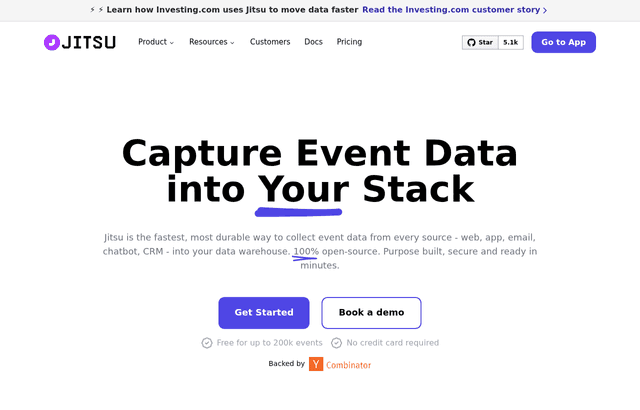
Jitsu is an open-source tool that collects event data from websites, apps and servers and delivers it to your data warehouse. Its homepage calls it an open-source customer data platform, and its GitHub page describes it as "an open-source Segment alternative". The product is live: jitsu.com has working sign-in and "Get Started" links, and the GitHub repository shows 4,114 commits and about 5.1k stars.
The Free Plan in our listing matches Jitsu's public Free tier. Jitsu's homepage says "Free for up to 200k events" and "No credit card required", and anyone can sign up for it without a SaaSOffers account. We do not know of any discount, credit or extended limit that our listing adds on top. If you only want the free tier, you can go straight to jitsu.com. Read the sections below for what the free tier covers, where it stops, and what the paid plans cost.
200,000 active events a month, and why "captured" does not count
Jitsu bills on a number it calls active events, and the difference from captured events matters.
- Captured event: any event sent to Jitsu. Jitsu's pricing FAQ says captured events are free and do not count toward billing.
- Active event: an event successfully sent to at least one destination. It counts once even if you send it to several destinations.
Two details change the count. Events that a Jitsu Function filters out do not count as active. But if the filtering function makes a fetch call, the event still counts. So a filter that drops bot traffic before it reaches a destination can keep you under the cap, as long as it makes no network call.
On Free, 200k active events a month are included. The pricing page says "Upgrade to paid plan to get extra events" and lists no overage rate for Free. We read that as a hard ceiling, but Jitsu does not spell out what happens past 200k, so confirm before you depend on it.
A rough sense of scale: 20,000 monthly visitors sending 10 events each produce 200,000 events, exactly the free limit. 5,000 visitors sending 15 events each produce 75,000.
What the Free tier includes
From the pricing page, the Free plan lists:
- Unlimited captured events
- 200k active events a month
- Unlimited connectors, with manual runs and up to 1 daily active sync
- Unlimited destinations
- ClickHouse with UI and API access
- Events debugger
- Custom domains
- Identity stitching
- Configuration API
- Deployment on Jitsu Cloud, Private Cloud or On Prem
Jitsu's homepage adds that the product comes with an included ClickHouse, described as a free warehouse option if you do not bring your own. That makes Free usable for a team with no warehouse yet: events land in ClickHouse and you can query them from the UI or API.
The custom domain line is worth noting. Jitsu says serving the tracking script from your own subdomain reduces the impact of ad blockers. Here it is listed on Free.
Four ways to buy or run Jitsu
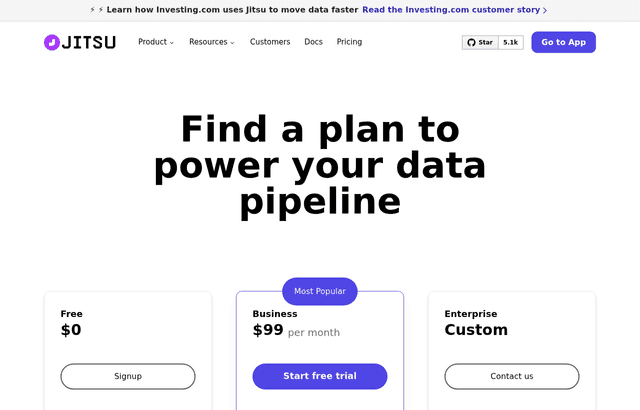
Jitsu's pricing page lists four options.
| Plan | Price | Active events included | Overage | Connector syncs |
|---|---|---|---|---|
| Free | $0 | 200k a month | None listed; upgrade for more | 1 daily active sync, manual runs |
| Business | $99 a month | 2M a month | $40 per additional 1M events | Up to hourly, 5 monthly active syncs, then $20 per extra sync |
| Enterprise | Custom, contact sales | Custom volume | Custom | Up to 1-minute syncs, unlimited monthly active syncs |
| Open Source | Free forever | No usage limits | None | Self-managed |
Business is labeled "Most Popular". The page shows $99 a month and does not show a yearly price, so we cannot say whether annual billing is cheaper. Business keeps the same destinations, ClickHouse and deployment options as Free. The page lists no retention period, support level or startup program for Free or Business.
Enterprise adds observability exports, a Profile Builder, custom event-backup retention, an expanded connector catalog, a dedicated ingest shard, invoice billing, annual commitment pricing, enterprise SSO via OIDC, priority support, an uptime SLA, onboarding and migration help, and a security and compliance review. Jitsu gives no figures for any of these.
Syncs are a separate meter
Jitsu also bills connectors, which pull data from other tools into your destination. The unit is the active sync: a successful transfer from a connector to a destination. Repeated syncs between the same pair inside a period count as one.
- Free allows 1 daily active sync and runs are manual.
- Business allows up to hourly syncs and 5 monthly active syncs, then $20 for every additional monthly active sync.
- Enterprise allows 1-minute syncs and unlimited monthly active syncs.
If you only collect events from your own site, you may never touch this meter. If you also pull data from a CRM and a billing tool into the same warehouse, you are already at 2 connections.
Worked math: what Business costs at three event volumes
All figures use the listed $99 a month for 2M active events and $40 per additional 1M. Jitsu does not say whether a partial million is billed pro rata or rounded up, so we round up to be safe.
3 million active events a month. The first 2M are in the base price. The extra 1M costs $40. Total: $99 + $40 = $139 a month.
5 million active events a month. The extra 3M cost 3 x $40 = $120. Total: $99 + $120 = $219 a month.
10 million active events a month. The extra 8M cost 8 x $40 = $320. Total: $99 + $320 = $419 a month.
Add syncs if you use connectors. A team running 8 monthly active syncs on Business pays for 3 extra at $20, which is $60. At 5M events that makes $219 + $60 = $279 a month.
The unit cost falls as you grow. At 10M events the blended rate is $419 / 10M = $0.0000419 per event.
Our listing is the Free Plan, so none of this is an offer saving. The math shows where the free tier ends and what the next step costs.
Self-hosting: free, but heavier than it used to be
Jitsu is MIT-licensed and, per its GitHub page, "fully self-hostable" with "no usage limits and no feature gating". The pricing page lists Open Source as free forever, with community support only.
Jitsu's quick start says a feature-complete Jitsu now requires Kubernetes, because Functions, profile builders and connector syncs run on Kubernetes components.
- Helm on Kubernetes: the recommended route. The local development chart deploys the whole stack to Minikube and needs Git, Minikube, Helm v3 or later, and at least 8 GB of memory for the Minikube VM.
- Docker Compose: marked deprecated, with a note that it will be removed later. It starts core services but Functions, profile builders and connector syncs are not available.
The stack has several parts. Jitsu services include the Console (UI), Ingest (events API), Bulker, Rotor, Syncctl, an operator and function servers. Dependencies are PostgreSQL, ClickHouse, MongoDB and Redpanda, a Kafka-compatible broker. The Helm chart runs them in the cluster, or you can point it at external instances.
Default Compose ports are 3000 for the Console, 3049 for Ingest, 3042 for Bulker and 3401 for Rotor. The default login is admin@jitsu.com, and Jitsu tells you to change the password after the first login.
Self-hosting saves the subscription and costs you operations time. Running Postgres, ClickHouse, MongoDB and a Kafka-compatible broker is real work for a team without an infrastructure person.
Sending data: snippet, SDKs and server APIs
Jitsu's docs list these ways to send events: an HTML snippet, an NPM package, React, React Native, iOS, Android, an HTTP API, a Pixel API, a Segment Proxy, consent management and server-to-server calls.
The web setup is one script tag in the page head:
<script async src="https://your-jitsu-domain.com/p.js"></script>
By default the script sends a page event. Settings go in data-* attributes such as data-write-key and data-user-id, or in window.jitsuConfig. Setting data-init-only to true loads the library without sending a page event. Google Tag Manager strips data- attributes, so the docs give a separate method for it.
The homepage says adding a script starts collection, as with Google Analytics or Segment. It also lists Segment API compatibility, which is meant to ease migration from an existing Segment setup. We did not test that claim.
Jitsu Functions
Functions are JavaScript snippets that run on events before they reach a destination. The docs say they can filter, transform and enrich events, and a function can route an event to a different table by setting JITSU_TABLE_NAME.
The runtime gives each function:
- Persistent storage through
ctx.store - Logging through
ctx.log - The Fetch API through
ctx.fetch - A warehouse API through
ctx.getWarehouse - Context such as
ctx.geo,ctx.ua,ctx.headers,ctx.destinationandctx.source
Returning nothing keeps the original event. Returning an object replaces it. Returning the string "drop" discards it. The editor includes a debugger that runs the function against sample data. The homepage adds that functions can use npm packages and key-value storage. The docs page does not list runtime limits.
Typical uses are dropping internal test traffic and stripping an email field before it reaches a third-party tool. Because dropped events are not billed as active events, a filter doubles as a cost control, with the fetch exception above.
Destinations: what we could and could not confirm
Jitsu's destination docs describe streaming and batching events "into warehouses, block storage, and downstream tools". The destination list we could read names Amplitude, Google Ads, Google Analytics 4, Hotjar, HubSpot, Microsoft Clarity, Mixpanel, PostHog, Resend, Salesforce, SendGrid, a tag destination and webhooks. Jitsu's homepage names Snowflake, BigQuery, Redshift, Postgres and MySQL as warehouses you can bring, plus the bundled ClickHouse. The quick start confirms ClickHouse, PostgreSQL and MongoDB as part of the stack, and the homepage confirms the bundled ClickHouse option.
Who Jitsu fits
- A product team that wants events in its own warehouse. The warehouse-first model keeps raw data in a system you control.
- A team with a small tracking plan. If you stay below 200k active events, Free costs nothing. 5,000 visitors at 15 events each is 75,000.
- Engineers who want to write their own transforms. Functions are plain JavaScript.
- Teams with a platform engineer who can run Kubernetes. That is the price of self-hosting.
Reasons to pass on Jitsu
- Teams that want marketing-ready dashboards. Jitsu collects and delivers data. It is not an analytics UI like PostHog or Amplitude.
- Teams above 200k events with no budget for $99 a month. The next step on the cloud is Business, and the jump from $0 is sharp.
- Teams without anyone to run infrastructure. Self-hosting needs Kubernetes for the full feature set.
- Anyone who needs more than a daily sync on Free. Hourly syncs start on Business.
Jitsu next to three alternatives
| Tool | Free tier | Next step | Notes |
|---|---|---|---|
| Jitsu | 200k active events a month | Business $99 a month for 2M events | MIT-licensed, self-hostable |
| Segment | 1,000 visitors a month (MTUs) | Team from $120 a month for 10,000 visitors | Priced on visitors, not events |
| RudderStack | 250K events a month | Paid tiers above | Self-hosted code under Elastic License 2.0 |
| PostHog | Free tier, per its pricing page | Usage-based after the first 1M | Full analytics product, not only a pipeline |
On raw numbers, Jitsu's 200k free events are fewer than RudderStack's 250K and PostHog's free tier. Segment's 1,000 visitors is a different meter, so the two do not compare directly. Jitsu's difference is the license: MIT, with no feature gating in the open-source build, while RudderStack's self-hosted code is under the Elastic License 2.0. PostHog is an analytics product, so it fills a different job from a pipeline.
Jitsu setup tips
- Decide your warehouse first. Use the bundled ClickHouse if you have none, or confirm your warehouse is supported before you build.
- Set up a custom domain early. Do it before you ship the snippet so you do not have to change it later.
- Write a short tracking plan. Count events per user per visit and multiply by monthly visitors to estimate active events against the 200k cap.
- Filter noise in a Function. Drop internal users, test traffic and bots. Avoid
fetchcalls in the filter so the dropped events stay unbilled. - Watch the sync meter if you add connectors. Free has 1 daily active sync.
How to get the Jitsu offer
- Upgrade to SaaSOffers Premium, then open this deal's claim link on SaaSOffers.
- Create your Jitsu account and pick the Free plan. No credit card is required.
- Add a site, copy the write key and place the script in your page head.
- Connect a destination, such as the bundled ClickHouse or your own warehouse.
- Check your active event count after the first week against the 200k limit.
What we could not confirm
We could not find a Jitsu startup program on any official page. The pricing page lists no retention period or support level for Free or Business, and no yearly price for Business. It does not say what happens when a Free account passes 200k active events. Jitsu's pages also give no throughput or production-scale figures.
Who Is This Deal For?
Early-Stage Startups
Seed and pre-seed companies looking to move fast without overspending on tools.
Growing SaaS Teams
Series A+ companies scaling their stack and optimizing software costs.
Solo Founders
Indie hackers and bootstrapped founders who need enterprise tools at startup prices.
Get Free Plan off Jitsu
Premium deal. Upgrade once, unlock everything.
Frequently Asked Questions
Everything you need to know about this startup deal.
Get the weekly deals digest
New verified startup deals every week. No spam, ever. Unsubscribe anytime.
Related Offers

Replicate
Used by 1,772 members
$500 in credits
Run open-source ML models in the cloud, deploy Llama, Stable Diffusion, and custom models via API without GPU management.
View offer
Consensus
Used by 1,544 members
Free Plan
AI-powered research platform that finds, summarizes, and synthesizes scientific papers.
View offer
Laxis
Used by 2,176 members
Free Plan
AI meeting assistant that records, transcribes, and generates actionable meeting notes.
View offer
ZoomInfo
Used by 2,014 members
Free Trial
B2B data platform for sales and marketing intelligence with contact databases.
View offerDeal Summary
Looking for more startup deals?
Browse all offers