Kapwing Coupon: Free Plan
Online video editor and content creation platform for teams.
Premium: $79/year for unlimited deals
Already have an account? Log in
Deal Highlights
What Kapwing Gives a Startup
Kapwing is an online video editor and content creation platform built for teams. This deal provides the free plan, which lets a startup produce video and other content without buying editing software, learning a heavy professional tool, or hiring a video specialist. For a small company that knows video matters for marketing and communication but has neither the budget nor the expertise for a traditional production setup, that lowers the barrier to actually making it.
Video has become one of the most effective ways to reach an audience, explain a product, and build a brand, and startups feel the pressure to produce it. But traditional video editing is a real obstacle. The professional software is expensive, has a steep learning curve, and often needs a capable machine to run, and hiring someone to do the editing is a cost an early team can rarely justify. Kapwing removes those obstacles by putting video editing in the browser with a tool designed to be approachable, so a non-specialist on the team can produce decent video without a production background.
Being online and built for teams fits how a startup actually works. There is nothing to install, the work is accessible from anywhere, and multiple people can be involved in creating content rather than everything routing through one person with the right software on the right computer. The free plan makes this available at zero cost, which is exactly right for a stage where the team wants to test whether video helps its marketing before investing in it. A startup can start making content immediately and see what it does for the business.
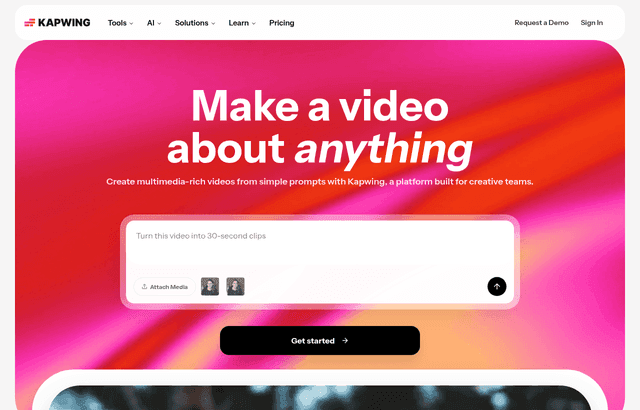
Kapwing, one of the tools included in this startup deal.
Video Without the Traditional Barriers
The core value of Kapwing is that it makes video editing accessible to people who are not video editors. Traditional editing tools are built for professionals and assume both expertise and expensive hardware, which puts video production out of reach for most small teams. Kapwing runs in the browser and is designed to be usable by ordinary team members, which means the marketer, the founder, or anyone else can create video content without a specialist's skills. That accessibility is what turns video from something a startup wishes it could do into something it actually does.
For a startup, this removal of barriers is decisive, because the barriers are usually why the video never gets made. When editing requires buying software, learning a complex tool, and having a powerful computer, video production stays on the wish list indefinitely. When it just requires opening a browser and using an approachable editor, the team can start today. Lowering the barrier from high to nearly zero is often the difference between a startup that uses video and one that keeps meaning to, and using it is what matters.
Running in the browser also means the tool works regardless of what devices the team has, which matters for a small company that has not standardized on expensive hardware. Nobody needs a high-end machine or a particular operating system; the editing happens online. That flexibility keeps video production available to the whole team rather than limited to whoever happens to have the right setup, which fits the practical reality of an early-stage company where resources are uneven and everyone pitches in.
Content for Every Channel a Startup Uses
A startup's content needs are varied, and Kapwing being a broader content creation platform, not only a video editor, suits that variety. Marketing today spans many channels, social media, ads, a website, email, and each has its own formats and requirements. A tool that helps produce content across these needs means the team can create what each channel calls for from one place, rather than piecing together a stack of separate tools for different formats. For a small team, that consolidation keeps content creation simple and fast.
The ability to produce for multiple channels matters because a startup usually cannot commit to just one. Testing where an audience responds means trying several channels, and each demands content in its own shape and style. A platform that handles the range lets the team experiment across channels without a new tool and a new learning curve for each, which keeps the cost of experimentation low. That low cost of trying things is exactly what a startup needs when it is still figuring out where its marketing works best.
Producing content quickly is part of this too. Marketing rewards consistency and volume, and a tool that lets the team turn ideas into finished content fast helps maintain the steady output that builds an audience. When creating a piece of content is quick and approachable, the team ships more of it, tests more ideas, and learns faster about what resonates. For a startup, that faster content loop is where the value compounds, because more attempts mean more chances to find the content that actually works.
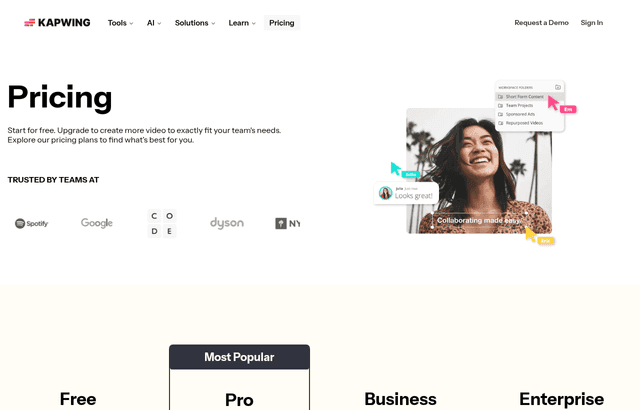
A look at Kapwing before the discount, so you can see what the deal saves you.
Building on the Team Foundation
Kapwing is built for teams, and that orientation matters more for a startup than it first appears. Content creation at a small company is rarely a solo activity: a founder has an idea, a marketer produces it, and others weigh in, and a tool designed for teams supports that shared process rather than forcing everything through one person. Being able to collaborate on content means the work is not bottlenecked on a single individual, which keeps production moving even when any one person is busy.
For a startup where roles are fluid and everyone contributes, that collaborative capability spreads the content work across whoever is available and able. Instead of all video and content depending on one person who knows the tool, multiple team members can participate, which both increases capacity and reduces the risk of content grinding to a halt when the one skilled person is occupied. That resilience matters for a small team that cannot afford to have its marketing output depend entirely on a single point of failure.
Working online as a team also keeps the content organized and accessible in one shared place rather than scattered across individual computers. For a startup, having the content work live in an accessible platform means anyone who needs to find, continue, or reuse a piece of content can do so, which prevents the common mess of finished and half-finished content trapped on various people's machines. That shared, organized foundation makes the whole content effort more sustainable as the team and its library of content grow.
Explaining the Product Through Video
One of the most valuable uses of video for a startup is explaining the product. Many products are easier to show than to describe, and a short video that demonstrates what the product does and why it matters can communicate in a minute what paragraphs of text struggle to convey. Kapwing gives a startup the means to produce those explanatory videos without a production team, which is exactly the kind of content that helps potential customers understand and want the product.
Product videos serve several purposes at once. They help with marketing by making the value clear to prospects, they help with onboarding by showing new users how to use the product, and they help with support by answering common questions in a format people find easy to follow. For a small team, being able to create this kind of content in-house means it can produce exactly the videos it needs, when it needs them, rather than going without because professional production is out of reach. That self-sufficiency in producing product content is a real practical advantage.
Because the product changes constantly at an early startup, being able to update these videos easily matters as much as making them in the first place. A product video that is outdated is worse than none, because it shows people something that no longer matches reality. A browser-based tool the team controls means the videos can be revised as the product evolves, so they stay accurate. That ongoing ability to keep video content current, without commissioning new production each time, is part of what makes owning the capability in-house worthwhile.
Keeping Content Production In-House
A broader benefit of Kapwing is that it lets a startup keep content production in-house rather than outsourcing it, and for an early team that independence has real value. Outsourcing video and content to agencies or freelancers costs money and adds turnaround time, and it means the team cannot move quickly or make small changes without going back to the vendor. Producing content internally with an accessible tool means the startup controls its own content, can move fast, and can iterate freely, all of which suit the pace of an early company.
The speed of in-house production is a genuine advantage. When the team can make content itself, it can respond to opportunities quickly, produce something for a launch or a moment while it is still relevant, and adjust content based on what is working without waiting on anyone else. That responsiveness is hard to achieve when every piece of content requires briefing and waiting on an external party. For a startup that needs to be nimble, owning the content capability keeps it in control of its own marketing tempo.
Keeping production in-house also keeps costs predictable and low, which matters for a cost-conscious startup. Instead of paying per project for outside production, the team produces what it needs on a free or low-cost platform, which means the volume of content it can make is not constrained by a production budget. That freedom to make as much content as the team has time for, without a per-piece cost, is exactly what lets a small startup sustain the consistent output that content marketing rewards.
Kapwing Compared to the Alternatives
The alternatives to Kapwing each carry costs that weigh against a startup. Professional editing software is powerful but expensive, hard to learn, and demanding of hardware, which makes it a poor fit for a small team without a dedicated editor. Hiring a video specialist or an agency delivers polished results but costs money and slows the team down, which is a lot to take on before video has proven its value for the business. Skipping video altogether means missing one of the most effective content formats, which is a real competitive cost in a landscape where video is everywhere.
Kapwing sits in the practical space between these: more accessible and affordable than professional software, faster and cheaper than outsourcing, and a way to actually do video rather than skip it. On the free plan it costs nothing, and being browser-based and approachable means the existing team can use it without special skills or hardware. For a startup that needs video and other content but cannot justify the traditional routes, that combination of accessibility and zero cost makes Kapwing a sensible way to get into content production.
The trade-off is that an accessible online tool will not match every capability of high-end professional software in the hands of an expert. But for the kind of content a startup actually needs, marketing videos, social content, product explainers, that ceiling rarely matters, because the goal is clear, effective content produced quickly, not cinema-grade production. Matching the tool to the real need, rather than to the most demanding possible use, is how a small team spends its resources wisely, and Kapwing fits the real need well.
Making the Free Plan Count
To get the most from the free plan, treat it as a low-risk way to find out whether video and content help your marketing, and start producing rather than planning. Make real content for your actual channels, product explainers, social posts, marketing videos, and see how your audience responds. The point is to learn what works while the cost is zero, so favor shipping and testing over perfecting. A startup that produces and publishes consistently will learn far more than one that waits for the ideal piece.
Spread the capability across the team rather than concentrating it in one person. Because Kapwing is built for teams and accessible to non-specialists, let multiple people contribute to content creation, which increases how much you can produce and keeps the effort from bottlenecking on a single individual. Building content creation into the team as a shared skill, rather than a specialist function, is what makes it sustainable for a small company where everyone wears many hats.
Use the speed and control that in-house production gives you. Respond to moments quickly, keep your product videos current as the product changes, and iterate on content based on what performs, all of which are possible because you own the capability rather than outsourcing it. Measure what your content actually does for the business, so that any later investment in more capable tools or dedicated help rests on evidence that video is working. That evidence-first approach lets a startup grow its content effort deliberately rather than on a guess.
Who Should Claim This Deal
This deal fits any startup that wants to use video and other content in its marketing but lacks the budget, expertise, or hardware for traditional production. There are no requirements attached, so any team can claim it, and it is valuable from the point where the company wants to build an audience and explain its product. If video keeps ending up on the wish list because the traditional routes feel out of reach, Kapwing offers a way to actually start producing it.
It fits best for teams that want to keep content creation in-house, move quickly, and let non-specialists contribute rather than routing everything through an expert or an agency. A founder who wants to make product explainer videos, a small marketing team trying to produce content across several channels, or a startup testing whether video helps its growth before investing in it will all find this worth claiming. A free, browser-based, team-oriented content creation platform is a low-cost way for a small company to add video to its marketing without the traditional barriers standing in the way.
Who Is This Deal For?
Early-Stage Startups
Seed and pre-seed companies looking to move fast without overspending on tools.
Growing SaaS Teams
Series A+ companies scaling their stack and optimizing software costs.
Solo Founders
Indie hackers and bootstrapped founders who need enterprise tools at startup prices.
Get Free Plan off Kapwing
Premium deal. Upgrade once, unlock everything.
Frequently Asked Questions
Everything you need to know about this startup deal.
Yes. Free plan includes core editing features with watermark. Pro at $16/month removes watermark and adds AI features.
Get the weekly deals digest
New verified startup deals every week. No spam, ever. Unsubscribe anytime.
Related Offers

Toggl Track
Used by 1,100 members
Free Plan
Simple and intuitive time tracking for teams with reporting and integrations.
View offer
Auth0
Used by 994 members
1 year of B2B Professional free
Get 1 year of the Auth0 B2B Professional plan free, with up to 100,000 monthly active users, SSO, enterprise MFA and SCIM.
View offer
Bugsnag
Used by 471 members
Free Plan
Error monitoring and stability management for web and mobile applications.
View offer
Turborepo
Used by 1,880 members
Free & Open Source
High-performance build system for JavaScript and TypeScript monorepos by Vercel.
View offer
Windmill
Used by 1,501 members
Free Plan
Open-source developer platform for building internal tools, workflows, and scripts.
View offer
Height
Used by 1,442 members
Free Plan
AI-powered project management tool with autonomous task management and workflows.
View offerDeal Summary
Looking for more startup deals?
Browse all offers