
SMTP2GO Coupon: Free Plan
Reliable email delivery service with SMTP relay, API sending, and detailed reporting.
Free · No account required
Free · No account required.
Deal Highlights
The SaaSOffers SMTP2GO deal
Offer: Free Plan.
Who qualifies: anyone. There are no extra requirements and no promo code.
You open your account through the SaaSOffers link. The free plan is SMTP2GO's standard free tier, and SMTP2GO gives the same plan to anyone who signs up directly. It does not expire and needs no credit card. This page explains exactly what the free plan covers, where its limits bite, and what you pay when you outgrow it.
We checked these plans and prices against SMTP2GO's official pricing and help pages in November 2026.
SMTP2GO is an email delivery service. Your app, website, CRM, printer or server hands it outgoing mail over SMTP or a REST API, and SMTP2GO delivers it and reports what happened. It is built for transactional mail: password resets, receipts, alerts, invoices and form notifications. SMTP2GO says more than 40,000 people and businesses use it.
SMTP2GO plans and prices
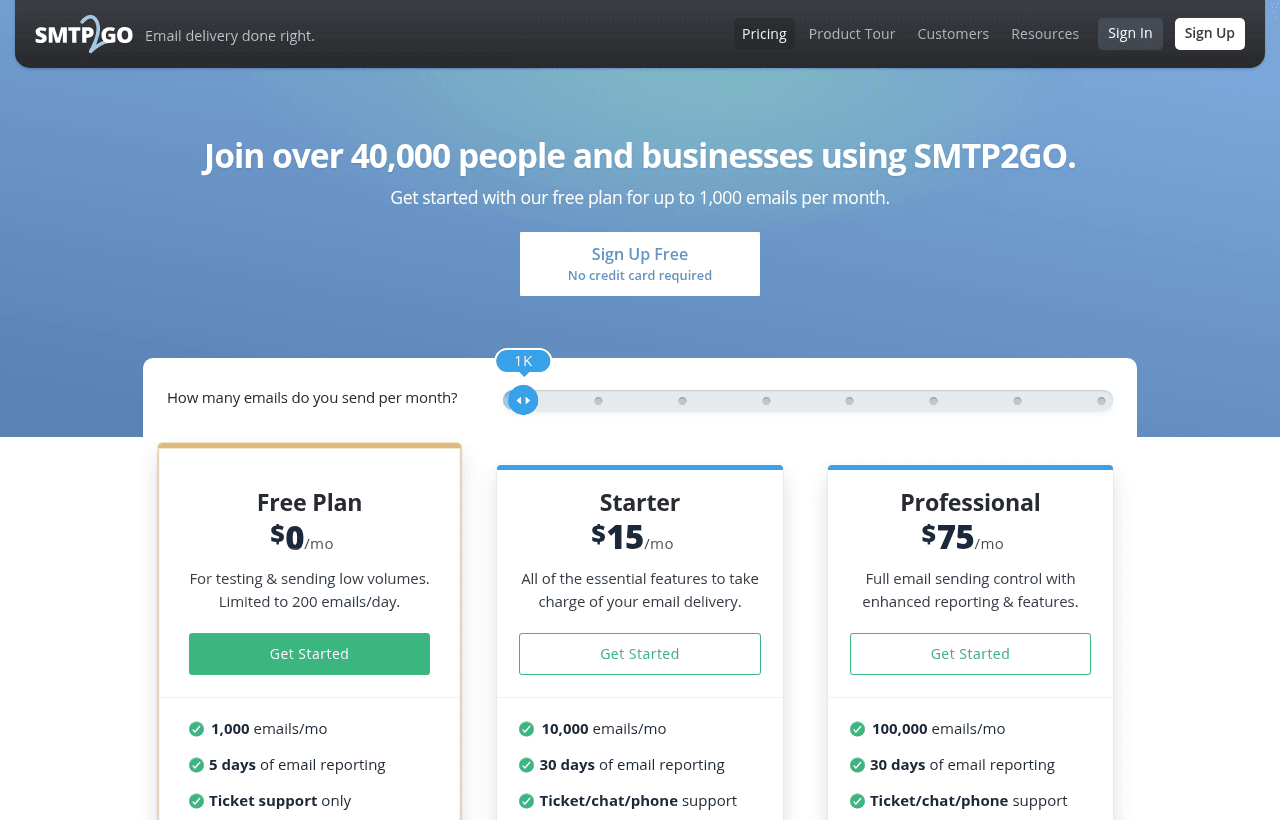
SMTP2GO prices by the number of emails you send each month. Contacts and lists do not matter. Paying yearly costs 10 times the monthly price, which SMTP2GO describes as 2 months free. All prices are in US dollars.
| Plan | Emails per month | Billed yearly | Billed monthly | Extra emails (per 1,000) | Key limits |
|---|---|---|---|---|---|
| Free | 1,000 | $0 | $0 | Not allowed | 200 per day, 5 days of reporting, ticket support after 14 days |
| Starter | 10,000 | $150/year ($12.50/month) | $15 | $1.20 | 30 days of reporting, subaccounts, SMS |
| Starter | 50,000 | $300/year ($25/month) | $30 | $1.00 | Same as above |
| Professional | 100,000 | $750/year ($62.50/month) | $75 | $0.85 | Adds dedicated IP and email testing tools |
| Professional | 250,000 | $1,700/year | $170 | $0.70 | Dedicated IP included |
| Professional | 500,000 | $2,800/year | $280 | $0.60 | Dedicated IP included |
| Professional | 1,000,000 | $5,200/year | $520 | $0.50 | Dedicated IP included |
| Premier | Over 3,000,000 | Custom | Custom | Custom | Personal setup and support |
Paid plans can send up to 3 times their monthly allowance. Each extra 1,000 emails is billed at your tier's rate. Once a paid account is fully activated, there is no hourly or hard daily cap.
Free
The free plan gives you 1,000 emails a month. It is meant for testing and for low-volume senders, such as a small SaaS sending signup confirmations or a website contact form. You get the same SMTP relay and API as paid users, plus automatic DKIM and SPF setup, feedback loops, blacklist monitoring and spamtrap detection.
Starter
Starter is the first paid plan, at 10,000 or 50,000 emails a month. It adds 30 days of reporting, subaccount management, scheduled reports, SMS messaging and email overage. Toll-free phone and live chat support stay on.
Professional
Professional covers 100,000 to 1 million emails a month. It adds a dedicated IP address and email testing tools. SMTP2GO assigns a dedicated IP automatically on allowances of 100,000 emails or more a month. Its FAQ recommends a pool of dedicated IPs once you pass 500,000 a month.
Premier
Premier is for senders above 3 million emails a month. SMTP2GO quotes it directly, with personal setup and support.
Cost per 1,000 emails at each tier
The bigger tiers cost less per email. On monthly billing, this is what each 1,000 included emails works out to:
| Tier | Monthly price | Cost per 1,000 included emails |
|---|---|---|
| Starter 10,000 | $15 | $1.50 |
| Starter 50,000 | $30 | $0.60 |
| Professional 100,000 | $75 | $0.75 |
| Professional 250,000 | $170 | $0.68 |
| Professional 500,000 | $280 | $0.56 |
| Professional 1,000,000 | $520 | $0.52 |
Starter at 50,000 ($0.60 per 1,000) costs less per email than Professional at 100,000 ($0.75) or 250,000 ($0.68). Only the 500,000 and 1 million tiers go lower. You move to Professional at 100,000 for the dedicated IP and testing tools, not for a lower unit price.
Add-ons and extra costs
Most features are in the plan price. A few cost extra on paid plans.
- Email archiving: $0.50 per GB per month on current subscriptions, billed at the end of the month. Not available on the free plan.
- SMS messaging: priced per SMS unit plus, where needed, a dedicated phone number. US and Canadian sending requires a dedicated number. SMTP2GO says rates depend on the destination, so check them in your account.
- Extended activity storage: a paid option for keeping activity longer than the standard 30 days.
- Email overage: billed per 1,000 extra emails at your tier's rate, up to 3 times your allowance.
- Subaccounts: no per-subaccount fee. You pay for the master account's plan plus any paid features a subaccount uses, such as SMS or archiving.
The API also has limits. The activity search endpoint allows 60 requests a minute. If you go over, your IP gets HTTP 429 responses for at least 1 minute. You can set a custom sending rate limit for each API key.
What the free plan doesn't include
The free plan has real limits. These come from SMTP2GO's pricing page, FAQ and help center.
- 200 emails a day. Mail above the daily cap is queued and sent as quota allows.
- 25 emails an hour until you verify your sender domain. Verifying removes the hourly cap.
- A hard monthly stop. At 1,000 emails, sending stops and further attempts are rejected. There is no overage on free.
- 5 days of reporting. Paid plans keep 30 days of activity.
- Ticket support only after 14 days. Phone and live chat are available for your first 14 days.
- Up to 5 sender domains or single sender addresses.
- 2 team members and 1 webhook.
- No subaccounts, SMS, scheduled reports, email testing tools, dedicated IP or email archiving.
- No IP authentication. You authenticate with SMTP users or API keys.
If your app sends a burst of 500 emails in one hour, the free plan will spread those over several days. Plan around the daily cap before you launch.
New paid accounts start on a cap
Every new paid account goes through a one-time review. During that probation, sending is capped at 1,000 emails a day. Upgrade a few days before a launch, not on launch day.
What the free plan saves: worked examples
Example 1: a seed-stage SaaS sending 900 emails a month
Say your product sends signup confirmations, password resets and weekly digest alerts. That adds up to about 900 emails a month, or 30 a day on average.
- The free plan covers it: 900 is under 1,000 a month, and 30 a day is far under the 200 daily cap.
- The cheapest paid tier would be Starter at $15 a month, or $15 × 12 = $180 a year on monthly billing.
- On yearly billing, Starter would cost $150 a year.
- Staying on the free plan saves $150 to $180 a year.
Watch the daily cap. If your weekly digest goes to 300 users at once, the last 100 wait until the next day.
Example 2: a growing product at 30,000 emails a month
Your user base grows and you now send 30,000 emails a month. You have three choices.
- Starter 10,000 plus overage: $15 + (20 × $1.20 for 20,000 extra emails) = $15 + $24 = $39 a month, or $468 a year
- Starter 50,000 on monthly billing: $30 a month, or $30 × 12 = $360 a year
- Starter 50,000 on yearly billing: $300 a year ($25 a month)
Moving from the 10,000 tier with overage to the 50,000 tier on yearly billing saves $468 − $300 = $168 a year. Paying yearly instead of monthly on the 50,000 tier saves $360 − $300 = $60 a year.
The free plan's value here is time. You build and test the integration on the free plan, then switch to a paid tier the month your volume needs it.
Who gets the most from SMTP2GO
- SaaS and web apps that need transactional email through an API or SMTP, without running their own mail server.
- WordPress and website owners whose contact forms or WooCommerce receipts land in spam when sent from the web host.
- IT teams and MSPs that need to route mail from printers, scanners, servers and line-of-business apps. SMTP2GO accepts SMTP on ports 25, 80, 587, 2525 and 8025, with SSL on 465 and 8465. Its FAQ recommends port 2525 when a network blocks the usual ports.
- Agencies running many clients. Subaccounts on paid plans keep each client's sending, reports and billing separate.
- Teams that want phone support. Paid plans include ticket, chat and phone support.
Who SMTP2GO is not for
- You need marketing newsletters with a list builder and templates. SMTP2GO is a delivery service, not a campaign tool. Use an email marketing platform.
- You send bursts of more than 200 emails a day on a $0 budget. The free plan's daily cap will queue your mail.
- You need more than 30 days of searchable logs without paying for an add-on. Postmark lists custom retention of up to 365 days on its Pro and Platform plans.
- You already have a working setup on Amazon SES and do not need phone support or a dashboard. Switching adds work without much gain.
SMTP2GO vs alternatives
| Tool | Free tier | First paid tier | Retention | Dedicated IP |
|---|---|---|---|---|
| SMTP2GO | 1,000 emails/month, 200/day | $15/month for 10,000 emails | 5 days free, 30 days paid | Included from 100,000 emails/month |
| Resend | 3,000 emails/month, 100/day, 3 domains | Pro $20/month for 50,000 emails | 30 days | $30/month add-on on Scale, for senders above 3,000 emails a day |
| Postmark | 100 emails/month, no overage | Basic $15/month for 10,000 emails | 45 days by default | From $50/month per IP on Pro and above, for 300,000+ emails a month |
Resend has the larger free tier: 3,000 emails a month against 1,000. Its free plan allows only 100 a day, though, and SMTP2GO allows 200. At 50,000 emails a month, Resend Pro costs $20 and SMTP2GO Starter costs $30 monthly or $25 on yearly billing.
Postmark's Basic plan matches SMTP2GO's $15 entry price at 10,000 emails. Postmark charges $1.80 per extra 1,000 on Basic, against $1.20 on SMTP2GO's 10,000 tier. Postmark Basic allows up to 4 users and Pro up to 6.
Security, deliverability and compliance
- SMTP2GO displays ISO 27001 and GDPR badges on its FAQ page.
- It sets up DKIM and SPF automatically when you verify a sender domain.
- Its platform includes feedback loops, blacklist monitoring and spamtrap detection on all plans.
- Attachments can be up to 50MB per email.
- TLS works on the standard SMTP ports, and SSL is available on 465 and 8465.
- The API can send email, fetch details of sent mail, and manage sender domains, SMTP users, subaccounts, suppressions and statistics.
- SMTP2GO offers a 30-day money-back guarantee on paid plans.
Getting set up on SMTP2GO
- Verify your sender domain first. It removes the 25-per-hour cap and turns on DKIM and SPF. Add the DNS records SMTP2GO gives you, then wait for them to verify.
- Create one SMTP user per app. If one app leaks its credentials, you can revoke that user without breaking the rest.
- Use port 2525 if 587 is blocked. Some hosts block the standard ports, and SMTP2GO recommends 2525.
- Use your 1 free webhook for bounces. Feed bounces and spam complaints back into your app so you stop mailing bad addresses.
- Check the Activity page within 5 days. Free reporting only goes back 5 days, so debug delivery issues quickly.
- Spread scheduled sends. If you send a daily digest, batch it under 200 a day on free.
- Upgrade before a launch. New paid accounts are capped at 1,000 emails a day during review.
Steps to get the SMTP2GO deal
- Click the deal button on this page to open SMTP2GO through the SaaSOffers link.
- Choose the free plan and sign up with your work email. No credit card is needed.
- Verify your email address and complete account activation.
- Add and verify your sender domain, then create an SMTP user or an API key.
- Point your app, CMS or device at SMTP2GO and send a test email.
- When you pass 1,000 emails a month, pick Starter or Professional from your account. There is no code to enter.
Who Is This Deal For?
Early-Stage Startups
Seed and pre-seed companies looking to move fast without overspending on tools.
Growing SaaS Teams
Series A+ companies scaling their stack and optimizing software costs.
Solo Founders
Indie hackers and bootstrapped founders who need enterprise tools at startup prices.
Get Free Plan off SMTP2GO
Free for all startups. Claim instantly.
Frequently Asked Questions
Everything you need to know about this startup deal.
Get the weekly deals digest
New verified startup deals every week. No spam, ever. Unsubscribe anytime.
Related Offers

Retool
Used by 1,559 members
1 year free, up to $60K
Build internal tools 10x faster with the low-code platform used by companies like Amazon, DoorDash, and Mercedes-Benz.
View offer
Replicate
Used by 1,772 members
$500 in credits
Run open-source ML models in the cloud, deploy Llama, Stable Diffusion, and custom models via API without GPU management.
View offer
ZoomInfo
Used by 2,014 members
Free Trial
B2B data platform for sales and marketing intelligence with contact databases.
View offer
Chore
15% off your first month
Chore runs your startup's back office for you: payroll, HR, bookkeeping, compliance and equity, inside the tools you already use. 15% off your first month through SaaSOffers.
View offerDeal Summary
Looking for more startup deals?
Browse all offers