
Storyblok Promo Code: 6 months free Business
Visual headless CMS with a real-time visual editor, build and preview content changes before publishing.
Premium: $79/year for unlimited deals
Already have an account? Log in
Deal Highlights
Headless CMS platforms give developers clean content APIs and give marketers a blank, confusing admin panel. Storyblok's whole pitch is fixing the second half: it pairs a proper headless architecture with a visual editor where a non-technical person can click any element on a live preview of the page and edit it in place. For a startup where the same small team writes the content and ships the code, that combination removes the recurring friction of a marketer filing a ticket to change a headline.
Whether you need the visual editing enough to choose Storyblok over a code-first CMS is the real question, and this covers what it does, how it prices, and where it fits against the alternatives.
What Is Storyblok?
Storyblok is a headless content management system. Content lives independently of any front end and is delivered through an API, so the same content can feed a website, a mobile app, and other channels, while developers build the presentation layer in whatever framework they prefer.
Its distinguishing feature is the visual editor. Content is structured as reusable components, or "bloks", and an editor sees a live preview of the actual page with those components on it. Clicking a component opens its fields for editing, and changes appear in the preview immediately. This is the thing most headless systems lack: they store content as abstract entries in forms, disconnected from how the page looks, which non-technical editors find disorienting. Storyblok keeps the editing experience anchored to the visible result.
Around that sit the expected capabilities: structured content modeling, asset management, multi-language support, workflows and versioning, and a content delivery API with SDKs for the major frameworks.
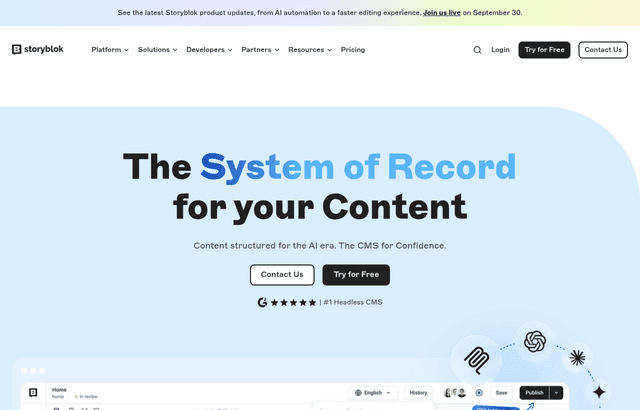
Storyblok, one of the tools included in this startup deal.
What's Included in This Deal
- Headless content API for delivering content anywhere
- The visual editor with component-based, live-preview editing
- Content modeling with reusable components
- Asset management for images and files
- Multi-language support for international content
- Framework SDKs for React, Next.js, Vue, and others
The trial or credit lets you model your real content and test the editing experience with the people who will actually use it, which is the right way to judge Storyblok, because its value is precisely in whether non-technical editors find the visual editor genuinely easier.
Storyblok Pricing
| Plan | Roughly | For |
|---|---|---|
| Starter | Free | Development and small production sites |
| Growth | around $99/month | Growing teams and production sites |
| Growth Plus / higher | more | Larger teams and needs |
| Enterprise | Custom | Scale, security, and support |
Storyblok's free Starter plan is genuinely usable for development and small sites, and the paid Growth tier around $99 a month is the common step up as a team and its content grow.
The comparison that matters is against the other managed headless platforms rather than in isolation. Contentful's first paid tier is substantially higher, in the region of a few hundred dollars a month, and it escalates aggressively for larger teams. Sanity prices per user at a low rate with a production-viable free tier. Self-hosted open-source options like Strapi have no license cost but shift the expense to the infrastructure and engineering time you spend running them. Storyblok sits as a managed platform with a strong free tier and mid-range paid pricing, positioned around the editing experience rather than the lowest cost.
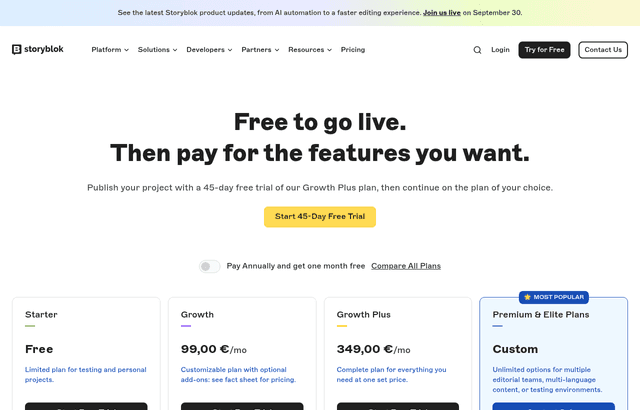
A look at Storyblok before the discount, so you can see what the deal saves you.
Storyblok vs Contentful vs Sanity vs Strapi
| Platform | Strength | Model | Best for |
|---|---|---|---|
| Storyblok | Best-in-class visual editor | Managed, free tier then ~$99/mo | Teams where non-technical people edit content |
| Contentful | Deepest enterprise feature set | Managed, paid tiers from a few hundred/mo | Large organizations wanting the safe managed bet |
| Sanity | Developer flexibility, code-defined models | Managed, per-user, strong free tier | Developer-led teams and complex multilingual content |
| Strapi | Full control, open source | Self-hosted, infrastructure cost only | Teams wanting to own their content infrastructure |
The decision comes down to who edits the content and how much control you want.
Storyblok wins when marketers edit. If non-technical people regularly create and change pages, the visual editor is a genuine productivity difference, and it is the clearest reason to choose Storyblok over a code-first CMS.
Sanity wins for developer-led teams. Content models are defined in code, and the platform is flexible and powerful for teams comfortable working that way. Its editing interface is capable but not built around visual page editing the way Storyblok's is.
Contentful is the enterprise default. It has the deepest feature set and the ecosystem large organizations want, at a price that reflects it. For a startup it is often more platform and more cost than needed.
Strapi wins when you want to own the infrastructure. Self-hosting means no license fee and full control, in exchange for running and maintaining the system yourself, which is a real ongoing cost in engineering time.
For a startup where the same lean team writes content and builds the site, Storyblok's visual editing is frequently the deciding advantage, because it removes the developer from the loop for routine content changes.
Structuring Content So It Lasts
A headless CMS is only as good as the content model you design in it, and this is where teams either set themselves up well or create a mess they live with for years.
Model reusable components, not pages. The power of a component-based system is that a "hero", a "feature grid", or a "testimonial" is defined once and reused across many pages. Modeling each page as a bespoke structure throws that away. Invest early in a small library of well-designed, reusable bloks.
Separate content from presentation genuinely. The temptation is to bake layout and styling decisions into the content, a font size here, a color there. Resist it. Content should describe what something is, and the front end should decide how it looks, so the same content can be restyled or reused on another channel without editing every entry.
Design for the editor, not just the developer. Field names, help text, and component organization are the interface your content team uses daily. A model that is logical to the developer but confusing to the marketer produces bad content and support requests. Name things the way editors think about them.
Plan for translation early if you need it. Retrofitting multi-language support onto a content model that assumed a single language is painful. If international content is on your roadmap, structure for it from the start.
Getting the model right is the difference between a CMS that stays pleasant to use as it grows and one that becomes an accumulation of one-off structures nobody wants to touch.
Why Teams Move to Headless in the First Place
If you are weighing Storyblok, it is worth being clear about why a headless CMS is the right architecture at all, because it is not automatically better than a traditional one.
A traditional CMS like WordPress couples the content, the editing interface, and the front end into one system. That is simple and fast to launch, and for a straightforward marketing site it is often the pragmatic choice. The coupling becomes a problem when you need the same content in more than one place, a website plus a mobile app, or several sites, or when you want to build the front end in a modern framework for performance and control. A monolithic CMS makes those harder.
Headless separates the content from its presentation. The content lives in one place and is delivered by API to any number of front ends, each built however you like. That unlocks multi-channel delivery, front-end freedom, and better performance, at the cost of more initial setup, because you build the presentation layer rather than getting a themed one out of the box.
The honest guidance: choose headless when you genuinely need multi-channel delivery, a custom front end, or the performance of a modern framework. If you need a single, simple website and nothing more, a traditional CMS may serve you faster and cheaper. Storyblok is an excellent headless CMS, but headless itself should be a deliberate architectural choice rather than a default.
The SEO Responsibility Headless Shifts to You
One consequence of headless architecture catches teams out, and it is worth stating plainly: when you own the front end, you own the SEO.
A traditional CMS handles page titles, meta descriptions, sitemaps, structured data, and rendering more or less automatically through its theme. Go headless and those become your responsibility, because you built the presentation layer. A beautifully modeled content structure delivered by a front end that renders poorly for search engines will rank worse than the simple WordPress site it replaced, which is the opposite of the intended outcome.
The things to get right are concrete. Server-side render or statically generate your pages so search engines see content, not an empty shell. Populate title tags and meta descriptions from your content model. Generate a sitemap. Add structured data where it helps. Ensure clean, stable URLs. Storyblok gives you the content and the fields to drive all of this, but the front end has to actually use them, and that work is on your team rather than the platform. Budget for it, because it is the difference between headless improving your SEO and quietly harming it.
Who Should Use Storyblok?
Use it if non-technical people, marketers, content writers, editors, regularly create and change content, and you want them to work independently without a developer for every headline change. The visual editor is the reason to choose it, and it earns its place exactly here.
Use it if you want a managed headless platform with a strong free tier and mid-range pricing, rather than the enterprise cost of the incumbent or the operational burden of self-hosting.
Look elsewhere if your team is developer-led and comfortable defining content in code, where Sanity's flexibility may suit better, or if you are a large enterprise wanting the deepest feature set and ecosystem, where Contentful is the established choice.
Look elsewhere if you want to own your infrastructure entirely and have the engineering capacity to run it, where a self-hosted open-source option removes the license cost.
Real Startup Use Cases
A startup with a marketing team chose Storyblok specifically so its marketers could build and edit landing pages in the visual editor without engineering involvement. Content changes that would have been developer tickets on a code-first CMS became self-serve, which freed the engineers and sped up the marketing team at the same time.
A multi-channel product used Storyblok's headless API to feed the same content to its website and mobile app, editing once and delivering everywhere, while the visual editor kept the web content easy for non-technical staff to maintain.
An international startup used the multi-language support to manage content across several markets from one platform, with local teams editing their own language visually rather than working through a central developer for every regional change.
How to Claim the Deal
- Follow the link on this page to Storyblok and create an account.
- Start on the free Starter plan and model your real content, not a demo.
- Design a small library of reusable components before building pages, since this shapes everything after.
- Test the visual editor with the actual non-technical people who will use it, because their experience is the whole point.
- Connect the delivery API to your framework using the appropriate SDK.
- Move to a paid tier when your team size or content volume requires it, having confirmed the editing experience works for your team.
Tips to Get Value
- Design reusable components first. A well-structured blok library is the foundation. Modeling each page bespoke discards the main advantage of the system.
- Test with real editors. The visual editor is the reason to choose Storyblok, so validate it with the people who will use it before committing.
- Keep content free of presentation. Describe what content is, not how it looks. That separation is what lets you restyle and reuse it later.
- Name fields for editors. The content model is your team's daily interface. Make it legible to the marketer, not just the developer.
- Plan languages early. Retrofitting translation is painful. If international content is coming, structure for it from the start.
- Use the free tier to validate the fit. It is production-viable for small sites, so prove the workflow works for your team before you pay.
Who Is This Deal For?
Early-Stage Startups
Seed and pre-seed companies looking to move fast without overspending on tools.
Growing SaaS Teams
Series A+ companies scaling their stack and optimizing software costs.
Solo Founders
Indie hackers and bootstrapped founders who need enterprise tools at startup prices.
Get 6 months free Business off Storyblok
Premium deal. Upgrade once, unlock everything.
!Eligibility Requirements
Startup building content-heavy sites
Frequently Asked Questions
Everything you need to know about this startup deal.
Yes, Community plan free for 1 user.
Get the weekly deals digest
New verified startup deals every week. No spam, ever. Unsubscribe anytime.
Related Offers

Toggl Track
Used by 1,100 members
Free Plan
Simple and intuitive time tracking for teams with reporting and integrations.
View offer
Auth0
Used by 994 members
1 year of B2B Professional free
Get 1 year of the Auth0 B2B Professional plan free, with up to 100,000 monthly active users, SSO, enterprise MFA and SCIM.
View offer
Bugsnag
Used by 471 members
Free Plan
Error monitoring and stability management for web and mobile applications.
View offer
Turborepo
Used by 1,880 members
Free & Open Source
High-performance build system for JavaScript and TypeScript monorepos by Vercel.
View offer
Windmill
Used by 1,501 members
Free Plan
Open-source developer platform for building internal tools, workflows, and scripts.
View offer
Height
Used by 1,442 members
Free Plan
AI-powered project management tool with autonomous task management and workflows.
View offerDeal Summary
Looking for more startup deals?
Browse all offers