
Typedream Coupon: Free Plan
No-code website builder with Notion-like editing and beautiful templates.
Premium: $79/year for unlimited deals
Already have an account? Log in
Deal Highlights
Typedream's Free plan: one page, no card, now owned by beehiiv
Offer: Free Plan. Our listing sets no requirements and there is no promo code. You sign up at typedream.com. The Free plan is the one Typedream shows to everyone on its public pricing page, so our listing adds nothing on top of it.
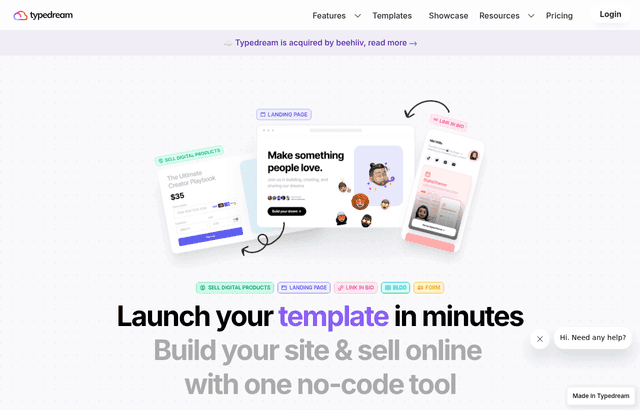
We checked these plans and prices against Typedream's official pricing and help pages in November 2026.
Typedream is a no-code website builder with a block editor that works like typing a document. It can host a landing page, a link-in-bio page, a small blog or a digital-products store. One fact matters before you build anything: beehiiv, the newsletter company, owns Typedream. beehiiv announced the deal on June 25, 2024. That is about two years and four months before this check, on November 8, 2026.
Typedream's homepage still carries a banner reading "Typedream is acquired by beehiiv, read more," and its footer reads "Copyright © 2025 beehiiv, Inc." The pricing page is live and sells plans. We found no sunset notice, no migration notice and no pause on signups on the homepage, pricing page or docs. beehiiv's announcement said Typedream's features would become "totally native within the beehiiv platform" over the following months. It did not set a date for Typedream as a separate product, and it did not say it would close.
What the Free plan gives you, line by line
Typedream's pricing page lists these items for Free, with "No credit card required":
- Publish 1 page
- Typedream.app domain
- A Typedream badge on your site
- 1 seat maximum
- A 5% transaction fee, plus credit card or PayPal fees, on sales
- Suggested uses: link in bio, selling digital products, a landing page
That is a single page, not a site. A founder who wants a home page, a pricing page and a contact page cannot publish all three for free. Free also keeps the Typedream badge and a subdomain, which most startups will want gone before they send traffic to it.
The 5% transaction fee is the detail people miss. It applies to what you sell through the page, on top of whatever the card processor charges. If you plan to sell a digital product from the free page, the platform takes five cents of each dollar before the card fees.
What the Free plan leaves out
Compared with the paid plans on the same page, Free does not include:
- A custom domain. Typedream's docs say the Launch plan is required to add one.
- Unlimited pages. Free is capped at 1.
- A blog. Launch has 1 blog (CMS collection) and Grow has unlimited.
- Forms. Launch lists 1,000 form submissions and Grow lists unlimited. Free lists none.
- Site analytics. Launch lists "complete site analytics". Free does not list it.
- SEO controls and code injection. Both are listed on Launch, not on Free.
- Email marketing subscribers. Launch lists 1,000 and Grow lists 5,000.
- Collaborators. Free has 1 seat. Launch has 2 collaborators and Grow has 5.
- The lower 2% transaction fee.
Free is built for a single page. That suits a waitlist page or a link hub. It does not suit a company site.
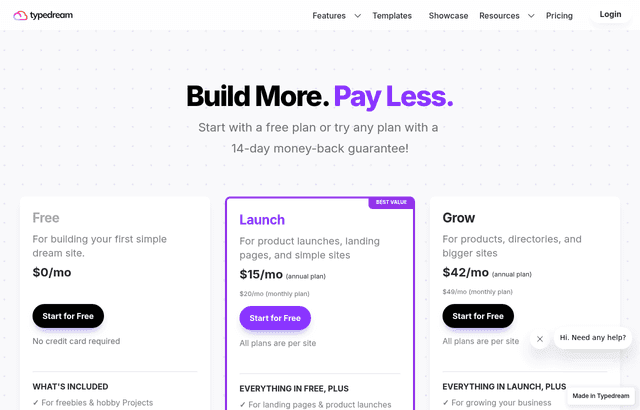
Pricing: Launch and Grow are billed per site
The page shows both billing views. Prices are per month, and the page says plans are billed per site.
| Plan | Billed yearly (per month) | Billed monthly | Key limits |
|---|---|---|---|
| Free | $0 | $0 | 1 page, 1 seat, typedream.app domain, Typedream badge, 5% transaction fee |
| Launch | $15 | $20 | Unlimited pages, custom domain, SEO, code injection, analytics, 1 blog, 1,000 form submissions, 1,000 email subscribers, 2 collaborators, 2% fee, free 1-year .xyz domain |
| Grow | $42 | $49 | Everything in Launch, plus unlimited blogs, unlimited form submissions, 5,000 email subscribers, password protection, 5 collaborators |
The page shows "$15/mo annual" and "$20/mo monthly" for Launch and "$42/mo annual" and "$49/mo monthly" for Grow, so the yearly total is the monthly figure times 12.
Both paid plans list the same 2% transaction fee and a free 1-year .xyz domain. Grow does not lower the fee below Launch, so the fee is not a reason to upgrade.
Worked math: what a year costs
All figures use the pricing page's per-month rates times 12.
One site on Launch. Billed yearly, $15 x 12 = $180. Billed monthly, $20 x 12 = $240. Yearly billing saves $60.
One site on Grow. Billed yearly, $42 x 12 = $504. Billed monthly, $49 x 12 = $588. Yearly billing saves $84.
Two sites. Because plans are billed per site, a company with a marketing site and a separate docs site on Launch pays $180 x 2 = $360 a year on yearly billing. A marketing site on Grow plus a small campaign site on Launch is $504 + $180 = $684 a year.
When the lower transaction fee pays for itself. Free charges 5% and Launch charges 2%, so Launch saves 3 points. On $2,000 of digital product sales in a year, Free costs $100 in platform fees and Launch costs $40, a $60 difference before card fees. Launch on yearly billing costs $180, so you need about $6,000 of sales a year ($180 divided by 0.03) before the fee savings alone cover the plan. Below that, you upgrade for the custom domain and extra pages, not for the fee.
Money-back guarantee and renewals
Typedream's refund policy offers "a 14-day, money-back guarantee when you purchase a paid plan." The terms:
- It covers a newly purchased paid plan paid by credit card within the last 14 days.
- Renewal charges and upgrades to existing plans are excluded, unless the original purchase was within the last 14 days.
- A site that was refunded and later re-upgraded on day 14 or after is not eligible.
- After 14 days you can file a support ticket, but a refund is not guaranteed.
- You request it through a support ticket with the site URL.
The refund policy page does not describe auto-renewal. Its pricing FAQ has a question titled "Does my subscription auto renew?" but the answer was not visible in what we could read. Check the Terms of Service before you pay, and set a reminder.
How the editor and templates work
The editor is block based. Typedream's docs cover Getting Started, Setting Up Your Website, Landing Page Builder, Publishing, SEO, Tracking and Analytics, Advanced Customization, Integration, and Templates and Sharing. The docs also include guides for forms and for selling digital products.
Templates come in categories, including a blog template category on the site. The pricing page does not state a template count, so we make no claim about how many exist.
The pricing page lists "code injection" on Launch and Grow, not on Free.
Custom domains: use www and a redirect
Typedream's custom domain guide says the Launch plan is required. The steps it gives:
- Buy a domain from a registrar such as GoDaddy, Google Domains or Namecheap.
- Select your site, then open Site Settings and the Custom Domain tab.
- Enter your domain. Typedream offers www and root versions.
- Add the DNS record Typedream shows you.
- Check the status.
Typedream recommends connecting the www subdomain and redirecting the root domain to it. Connecting a root domain triggers a warning that you need CNAME flattening, so check whether your DNS provider supports it. You must remove conflicting records (A, AAAA, CNAME, ALIAS or ANAME) with the same name.
If you remove the domain later, the site stays reachable at its typedream.app address. This guide was last edited on May 27, 2022, and its screenshots date from April 2022, so the dashboard may look different today.
Launch also lists a free 1-year .xyz domain. The pricing page does not say what the .xyz renewal costs after year one, so we left that out.
The CMS: Notion tables as your blog
Typedream's CMS connects to a Notion database and renders it on your site with a template. You add a collection block by typing /collection, pick a Blog, Directory or Knowledge Base template, click Connect Data, sign in to Notion, duplicate the template table, and add Typedream as a connection in Notion. The Refresh icon pulls in changes. The guide gives no sync schedule.
The pricing page lists 1 blog (CMS collection) on Launch and unlimited on Grow. The CMS guide was last edited on April 18, 2022, so check the current editor before you rely on its steps.
Who it fits
- A founder who needs a one-page waitlist or launch page today. Free covers it. You get a typedream.app address and a badge, and you can publish without a card.
- A creator who sells a small digital product. The page and the 5% fee on Free work for testing demand. Move to Launch if sales pass a few thousand dollars.
- A team that already writes in Notion. The CMS reads Notion tables, so a blog can live where the writers already work.
Who should skip Typedream
- Anyone who needs a multi-page site for free. Free is 1 page, so a multi-page site means paying for Launch.
- Teams that want a long-term bet on a standalone product. The ownership change and the "native within beehiiv" language are reasons to read the announcement first.
- Teams that need members, e-commerce depth or heavy design control. The pricing page lists digital products and form submissions, but it gives no details on members or on integrations.
- Developers who want a repository. This is a hosted visual builder.
Typedream against Framer and Super.so
We checked the rivals' own pricing pages. Prices are per month unless stated.
| Builder | Free option | Entry paid price | Custom domain | Notes |
|---|---|---|---|---|
| Typedream | Yes, 1 page, badge, typedream.app | Launch $15 yearly, $20 monthly, per site | Launch | Notion CMS, owned by beehiiv |
| Framer | Yes, Framer domain | Basic $10 a month (yearly billing view) | Paid plans | Framer lists a free custom domain on yearly billing; page and CMS limits vary by plan |
| Super.so | Yes, one free site, "Made with Super" badge | Personal $16 per site monthly, $144 per site yearly | Personal | Turns a Notion page into a site |
Framer shows Basic at $10 a month in its yearly-billing view. Super.so charges per site like Typedream, and its yearly Personal price works out to $12 a month. Typedream's Launch yearly rate of $15 is higher than that figure. Super.so is closest to Typedream if your content already lives in Notion. We did not verify bandwidth or page caps for any of the three, so compare those on each vendor's page before you commit.
Setup tips for the Free plan
- Build the one page you actually need first. A waitlist or launch page with one clear action beats a half-built site.
- Do not buy a domain until you have decided to pay for Launch. A custom domain needs the Launch plan, and the domain sits idle until then.
- If you sell something, test the 5% fee with a small sale before you plan around it.
- Keep a copy of your text outside the builder. Given the acquisition, you want your copy and images portable.
- Read the Terms of Service for auto-renewal before adding a card.
Claiming the Typedream offer, step by step
- Go to typedream.com and choose "Get started for free."
- Create an account. The pricing page says no credit card is required for Free.
- Pick a template and build your page. Remember Free publishes 1 page.
- Publish to a typedream.app address.
- If you outgrow Free, compare Launch and Grow on the pricing page and the 14-day money-back guarantee covers a new paid plan bought by credit card.
What we could not confirm
- What the long-term plan is for Typedream as a standalone product after the beehiiv acquisition.
- The pricing FAQ answers, including auto-renewal and what counts as a "site."
- Template counts, members, AI features and integration lists.
- Current screenshots of the dashboard. The docs we read date from 2022.
Who Is This Deal For?
Early-Stage Startups
Seed and pre-seed companies looking to move fast without overspending on tools.
Growing SaaS Teams
Series A+ companies scaling their stack and optimizing software costs.
Solo Founders
Indie hackers and bootstrapped founders who need enterprise tools at startup prices.
Get Free Plan off Typedream
Premium deal. Upgrade once, unlock everything.
How to get the Typedream deal
- The offer: Free Plan.
- Create a free SaaSOffers account, then upgrade to Premium ($79 a year, or $250 once for lifetime access). Premium unlocks every Premium deal on the site.
- Open the Typedream claim page from this deal. It shows the partner link, any promo code and the exact steps Typedream asks for.
- Apply or sign up through that link before you pay Typedream directly, since most startup offers only apply to new accounts.
Frequently Asked Questions
Everything you need to know about this startup deal.
Get the weekly deals digest
New verified startup deals every week. No spam, ever. Unsubscribe anytime.
Related Offers

Retool
Used by 1,559 members
1 year free, up to $60K
Build internal tools 10x faster with the low-code platform used by companies like Amazon, DoorDash, and Mercedes-Benz.
View offer
Replicate
Used by 1,772 members
$500 in credits
Run open-source ML models in the cloud, deploy Llama, Stable Diffusion, and custom models via API without GPU management.
View offer
ZoomInfo
Used by 2,014 members
Free Trial
B2B data platform for sales and marketing intelligence with contact databases.
View offer
Chore
15% off your first month
Chore runs your startup's back office for you: payroll, HR, bookkeeping, compliance and equity, inside the tools you already use. 15% off your first month through SaaSOffers.
View offerDeal Summary
Looking for more startup deals?
Browse all offers