
UserPilot Startup Credits: $1,000 in credits
Product adoption platform, build in-app onboarding flows, tooltips, and surveys without code.
Premium: $79/year for unlimited deals
Already have an account? Log in
Deal Highlights
Most SaaS products lose the majority of signups in the first session. Someone creates an account, lands on an empty dashboard, does not understand what to do next, and never returns. Userpilot exists to close that gap: it lets you build in-app onboarding, tooltips, checklists, and product tours without writing code, then measure whether they actually move users toward activation.
The distinguishing feature is that Userpilot combines the onboarding builder with product analytics in one tool. Most competitors do one or the other, leaving you to guess whether your onboarding works. Userpilot lets you build the flow and see, in the same platform, whether it improved activation.
What Is Userpilot?
Userpilot is a product adoption platform for SaaS teams. It sits on top of your web application through a small snippet, and from there a product manager can build and change in-app experiences without shipping code.
The building blocks are the ones every onboarding needs: modals and slideouts for announcements, tooltips and hotspots to explain features in context, onboarding checklists that guide new users through setup, and multi-step flows that walk someone through a task. All of it targets user segments, so a new user, a returning user, and an enterprise admin can each see something different.
Underneath sits the analytics layer. Userpilot tracks feature usage, builds funnels, measures activation, and reports on how the flows you built actually perform. That loop, build an experience then measure its effect, is the reason to choose it over a pure onboarding tool.
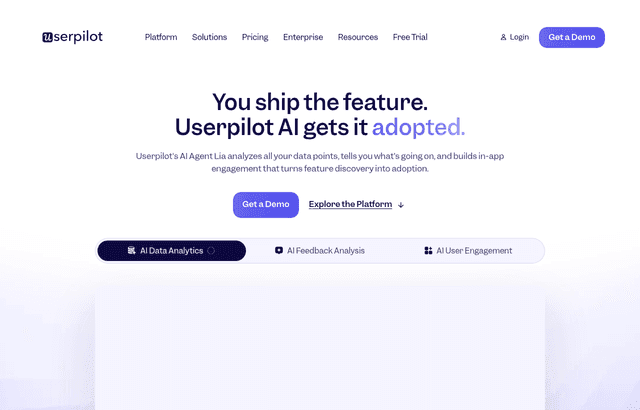
UserPilot, one of the tools included in this startup deal.
What's Included in This Deal
- The no-code builder for modals, tooltips, checklists, and flows
- User segmentation to target experiences by behavior and attributes
- Product analytics covering feature usage, funnels, and activation
- In-app surveys for NPS and feedback collected in context
- Resource center for self-service help inside the product
The credit or trial period is enough to instrument your activation funnel and build your first onboarding flow, which is the work that pays for the tool. A flow that lifts activation by a few points is worth many times the subscription for any product with real signup volume.
Userpilot Pricing: What Drives the Cost
Userpilot starts around $249 a month and scales with monthly active users. The MAU model is the thing to understand before committing, because it determines whether the tool stays affordable as you grow.
| Consideration | Detail |
|---|---|
| Entry | around $249/mo |
| Scaling factor | monthly active users |
| The trap | cost climbs with MAU, and MAU counts everyone, not just new users |
The MAU model means you pay based on how many people use your product each month, which is precisely the number that grows as you succeed. A product going from 2,000 to 20,000 monthly active users will see this bill climb accordingly, and the jump can be steep at tier boundaries.
Two implications follow. First, model your cost at the MAU level you expect in a year, not today, so the pricing does not surprise you mid-growth. Second, be deliberate about what you count: some tools let you scope MAU to the segments you actually target with flows, which can materially lower the bill if most of your active users never see an onboarding experience.
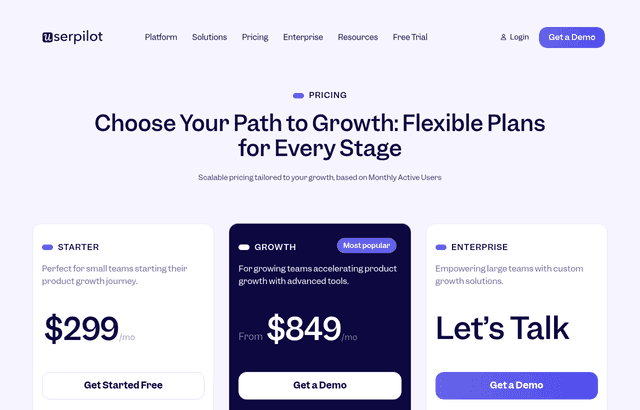
A look at UserPilot before the discount, so you can see what the deal saves you.
Userpilot vs Pendo vs Appcues vs Chameleon
| Tool | Roughly | Strength | Best for |
|---|---|---|---|
| Userpilot | from around $249/mo | Onboarding plus built-in analytics in one tool | PLG teams wanting build-and-measure in one place |
| Pendo | roughly $15,000 to $140,000+/yr | Deepest analytics in the category | Larger, data-driven product organizations |
| Appcues | from around $249/mo | Ease of use, fastest to set up | Non-technical teams wanting onboarding only |
| Chameleon | from around $279/mo | Deep customization, transparent pricing | Teams wanting design control and integrations |
The decision comes down to what you need alongside the onboarding.
If you want onboarding and analytics together, Userpilot is the natural fit. You build a flow and measure its effect without exporting to a separate analytics tool, which shortens the loop between changing something and knowing if it worked.
If analytics is the priority and budget is not the constraint, Pendo is the benchmark, with the deepest analysis in the category and pricing to match. It is heavier to set up and aimed at larger organizations.
If you want the simplest possible onboarding builder and already have analytics elsewhere, Appcues prioritizes ease of use and speed, at the cost of the built-in measurement Userpilot provides.
If design control matters most, Chameleon offers deep customization and unusually transparent pricing, and pairs well with an existing analytics stack.
The honest summary: Userpilot's edge is the combination. If you would otherwise buy an onboarding tool and an analytics tool, it does both. If you only need one half, a specialist may serve that half better.
What Actually Drives Activation
The tool builds the flows, but activation improves because of decisions the tool cannot make for you.
Define activation before building anything. Activation is the specific action that predicts a user sticking around, and it differs by product. For one it is inviting a teammate; for another it is connecting a data source; for another it is completing a first project. Everything you build should push toward that one event, and you cannot design toward a target you have not named.
Reduce steps rather than explaining them. The instinct is to add a tour explaining a complicated setup. The better move is often to make the setup simpler so it needs less explanation. Onboarding flows are a patch over friction, and sometimes removing the friction beats guiding users through it.
Trigger in context, not all at once. A tooltip that appears when a user reaches the relevant screen lands; a five-step tour thrown at someone the moment they log in gets dismissed. Tie each piece of guidance to the moment it is useful.
Let people skip. Forcing users through onboarding they do not want creates resentment and inflates your completion numbers without improving activation. A visible skip option and a resource center they can return to respects the users who already know what they are doing.
Measure the flow, then kill what does not work. The reason to have analytics in the same tool is to see which flows lift activation and which just add clicks. Build, measure, and remove the ones that do not earn their place.
Build It Yourself, or Buy the Tool?
Every engineering-led team asks whether to just build onboarding into the product. It is a fair question, and the answer usually favors buying, for reasons that are not obvious up front.
Building onboarding in code is genuinely easy for the first flow. A checklist and a couple of tooltips are an afternoon of work. The cost appears afterward. Every change to that onboarding now requires an engineer, a code review, and a deploy. When a product manager wants to test a different checklist order, that is a ticket in the backlog rather than a change they make in an afternoon.
The whole value of a tool like Userpilot is removing engineering from the loop. Onboarding is something you iterate on constantly, because the first version is never right and user behavior keeps shifting. A version that a PM can change and measure the same day gets improved; a version that needs an engineering ticket gets improved once and then abandoned.
There is also the analytics side. Building the flows is the visible half; instrumenting funnels, tracking activation, and measuring whether a change helped is the larger and less glamorous half. Rebuilding that in-house is a real project, and maintaining it competes with your actual product roadmap forever.
The honest calculation: build it yourself if onboarding is genuinely static and you will rarely touch it, which is rare for a growing product. Buy the tool if onboarding is something you will keep changing, which describes almost every SaaS company still figuring out activation. The subscription buys iteration speed, and iteration speed is the entire point.
Common Onboarding Mistakes
Explaining the interface instead of delivering value. A tour that points at every button teaches the UI without getting the user to their first win. Guide toward the outcome, not around the screen.
Front-loading everything. Showing all your guidance in the first session overwhelms people at the moment they know least. Spread it across sessions, triggered as each feature becomes relevant.
Never updating flows. Onboarding built once and left alone goes stale as the product changes, eventually pointing at buttons that moved. Flows need the same maintenance as any other part of the product.
Optimizing completion instead of activation. A high checklist-completion rate means nothing if those users still churn. The metric that matters is whether onboarding moved activation and retention, not whether people clicked through it.
Who Should Use Userpilot?
Use it if you run a self-serve SaaS product with real signup volume, activation is a problem you can name, and you want product managers to change onboarding without waiting on engineering. That combination is exactly Userpilot's home.
Use it if you want to stop guessing whether onboarding works. The built-in analytics turn onboarding from a thing you ship and hope about into a thing you measure and improve.
Look elsewhere if you are pre-launch or have very few active users, where the cost is not justified and the sample size is too small to learn anything. A simpler or free tool fits until you have volume.
Look elsewhere if you need enterprise-grade analytics as the primary job, where Pendo's depth may justify its price, or if you want the absolute cheapest onboarding builder and have analytics covered elsewhere.
Real Startup Use Cases
A B2B SaaS product was losing most signups before they connected their first integration, which was the activation event. Building a checklist that guided new users to that connection, and measuring completion in the same tool, lifted activation meaningfully because the team could see which checklist step users dropped at and fix it specifically.
A product-led growth startup used in-app surveys to find out why trial users were not converting, discovering that a single confusing screen was the common blocker. A contextual tooltip on that screen, targeted only at trial users, removed the friction without a code change or an engineering ticket.
A team launching a new feature used a targeted announcement and a short tour shown only to users in the relevant segment, then watched adoption of the feature in the analytics. When the tour underperformed, they replaced it with a single tooltip and adoption improved, a decision they could only make because build and measurement lived in one place.
How to Claim the Deal
- Follow the link on this page to Userpilot and create an account.
- Install the tracking snippet on your product, which is the one step that needs an engineer.
- Define your activation event before building any flows, so everything targets it.
- Instrument your activation funnel first, then build one onboarding flow against the biggest drop-off.
- Segment your users so new, trial, and returning users get appropriate experiences.
- Measure the flow's effect on activation, and iterate rather than building ten flows at once.
Tips to Get Value Fast
- Name activation first. Everything else is guesswork without it. Instrument the funnel to that event before building a single tooltip.
- Build one flow, measure it, then build the next. Ten untested flows are worse than one that demonstrably lifts activation.
- Target tightly. A flow shown to the wrong segment annoys more users than it helps. Precision beats coverage.
- Use surveys to find the blocker. Before designing onboarding, ask users where they got stuck. They will often tell you exactly what to fix.
- Watch the MAU meter. The bill scales with active users, so review your plan against expected growth rather than current numbers.
- Delete flows that do not perform. Onboarding clutter accumulates. If a flow is not moving activation, it is adding clicks, and removing it improves the experience.
Who Is This Deal For?
Early-Stage Startups
Seed and pre-seed companies looking to move fast without overspending on tools.
Growing SaaS Teams
Series A+ companies scaling their stack and optimizing software costs.
Solo Founders
Indie hackers and bootstrapped founders who need enterprise tools at startup prices.
Get $1,000 in credits off UserPilot
Premium deal. Upgrade once, unlock everything.
!Eligibility Requirements
SaaS startup improving activation
Frequently Asked Questions
Everything you need to know about this startup deal.
No, fully no-code visual builder.
Get the weekly deals digest
New verified startup deals every week. No spam, ever. Unsubscribe anytime.
Related Offers

Higgsfield
55% off annual Business plan
55% off an annual Higgsfield Business plan. Higgsfield is an AI video and image studio with Seedance, Kling, Veo and more in one account.
View offer
Seedance
55% off annual Business plan
55% off an annual Higgsfield Business plan with Seedance included. Seedance is ByteDance's AI video model for text, image and reference-driven clips.
View offerChromaDB
Used by 306 members
Free & Open Source
Open-source embedding database for building AI applications with semantic search.
View offer
Laxis
Used by 2,176 members
Free Plan
AI meeting assistant that records, transcribes, and generates actionable meeting notes.
View offer
Pictory
Used by 659 members
Free Trial
AI-powered video creation tool, turn text, scripts, and blogs into videos.
View offer
Segment
Used by 2,293 members
$25,000 in credits
Collect, clean, and route customer data to every tool in your stack with the leading customer data platform.
View offerDeal Summary
Looking for more startup deals?
Browse all offers