
Penpot: Free and Open Source Tool
Open-source design and prototyping platform, free alternative to Figma.
Premium: $79/year for unlimited deals
Already have an account? Log in
Deal Highlights
The SaaSOffers Penpot deal: Free & Open Source
Offer: Free & Open Source. Our listing sets no requirements and there is no promo code.
This is a Premium deal on SaaSOffers. Penpot itself is free to start, so the deal is mostly a pointer to a tool you can use without paying anyone. Be clear on that before you spend anything: the Penpot Professional cloud plan and the self-hosted Professional edition both cost $0 on Penpot's own site, and you can sign up there without us.
We checked these plans and prices against Penpot's official pricing and help pages in November 2026.
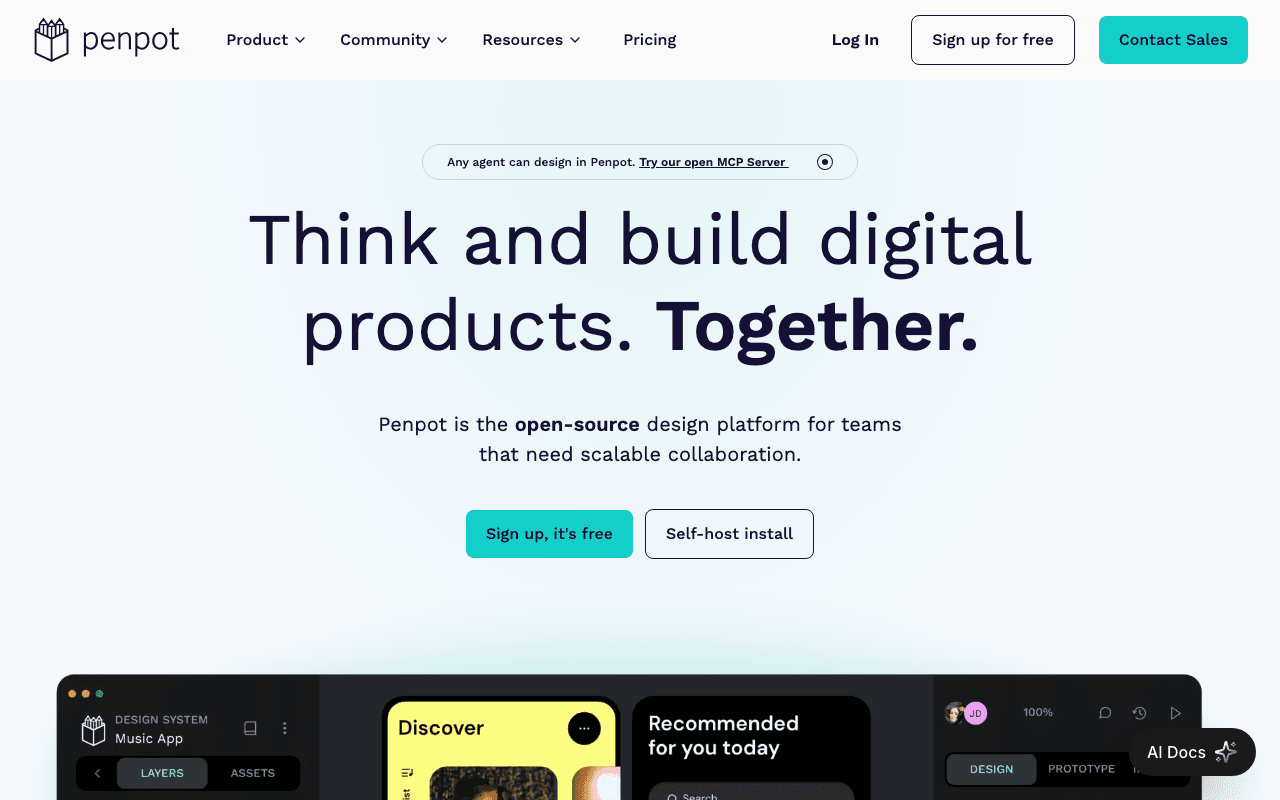
Penpot is an open-source design and prototyping tool made by Kaleidos. You draw interfaces on boards, turn them into clickable prototypes, and let developers read the result as SVG, CSS and HTML. It runs in a browser, and you can also run it on your own server.
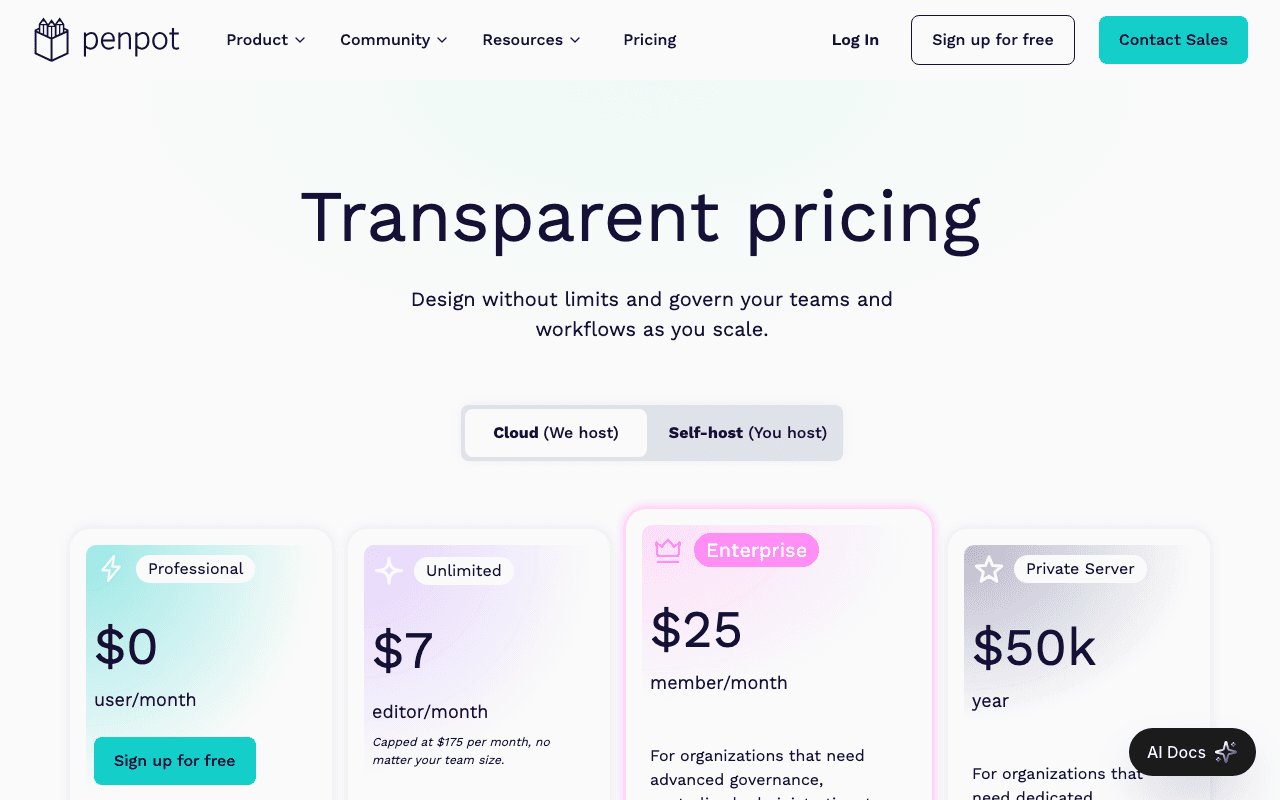
One correction to older descriptions of this tool, including ones we used to carry. Penpot is not "100% free with no paid tiers." Its pricing page lists four plans today: Professional at $0, Unlimited at $7 per editor per month, Enterprise at $25 per member per month and a Private Server plan at $50k per year. The free plan is real and fully featured, but it has a team cap and a storage cap, covered below.
Four cloud plans, and the free one has a cap
Penpot's pricing page shows these prices in USD. It labels the prices as per month, but it does not say whether Unlimited and Enterprise are billed monthly or yearly, so we do not label them either way.
| Plan | Price | Key limits on the page |
|---|---|---|
| Professional | $0 per user per month | Up to 8 team members, unlimited viewers, 10GB of storage |
| Unlimited | $7 per editor per month, capped at $175 per month | Pricing page describes it as extra space, extended history and early features; 14-day free trial |
| Enterprise | $25 per member per month | Advanced governance, centralized administration, team permissions; 14-day free trial |
| Private Server | $50k per year | Dedicated infrastructure, custom hosting, advanced security, enterprise-grade support |
The comparison table on the page lists storage values of unlimited, 10GB and 25GB, and version history values of 7, 30 and 90 days. The page text does not label which value belongs to which column. Going by the order of the cells, the 10GB and 7 days values sit with Professional and the 25GB and 30 days values with Unlimited. That is our reading, not a stated fact, so check the table before you plan around it.
The help center is more direct on one point. Its History panel says you can access previous versions for up to 7 days, and versions you pin by hand are kept indefinitely.
Every plan includes, per the page: no file limits (you create as many files as fit in your storage), unlimited teams, and open source. Non-profit, education and open-source discounts are available through an application form on the same page.
What the free plan leaves out
Professional is described as "free and fully featured. No limits, no missing tools." That wording is about features. The comparison table is where the differences show up:
- A cap of 8 team members. Viewers are unlimited, so stakeholders can look and comment without taking a seat.
- 10GB of storage. Penpot lists a typical file size of 10 to 100MB, so 10GB holds roughly 100 files at the 100MB end and 1,000 at the 10MB end. That is our arithmetic from the page's range.
- Short version history. Seven days is the figure the help center gives for the History panel.
- Early access to features is listed as a perk of the paid tiers, with the free plan not marked.
- Single sign-on, a choice of hosting region and IP whitelisting are rows in the table that the free plan does not appear to cover. The page does not map those marks to columns, so confirm with Penpot if you need them.
A community post says the 10GB limit is not hard-enforced and works as a fair-use threshold. That is a forum answer, not a term on the pricing page, so do not build a plan on it.
The cost of a 10-person team
Here is the math from the listed prices. We use monthly figures from the page and multiply by 12 for a year, because the page does not state billing periods.
A 5-person team. Everyone fits under the 8-member cap, so the bill is $0 a month and $0 a year. Add unlimited viewers and nobody else needs a seat.
A 10-person team where all 10 edit. That is over the 8-member cap on Professional. On Unlimited, 10 editors at $7 is $70 a month, or $840 over 12 months. On Enterprise, 10 members at $25 is $250 a month, or $3,000 over 12 months. If only 4 of the 10 edit and the rest only view, the Unlimited price is based on editors, so it would be 4 x $7 = $28 a month, or $336 a year. Whether viewers count toward the Professional 8-member cap is not spelled out, so ask Penpot if you are close.
Where the Unlimited cap kicks in. $175 divided by $7 is 25 editors. From the 26th editor onward, the cost stays at $175 a month, or $2,100 over 12 months. At 40 editors, per-seat pricing would be $280 a month, so the cap saves $105 a month, or $1,260 over 12 months.
Compared with Figma. Figma Professional lists $16 for a Full seat and $12 for a Dev seat on annual billing. Ten Full seats come to $160 a month, which is $1,920 over 12 months. The same ten editors on Penpot Unlimited are $70 a month. Figma's monthly-billed Professional price is not something we could read off its page, so we do not compare monthly to monthly.
Self-hosting is free, and it is real work
Penpot's self-host page offers two editions. Professional is free forever, with unlimited users, teams and files, all design and prototyping features, community support and 100% open-source code. It says you need a Linux server, Docker knowledge and a self-managed deployment.
Self-hosted Enterprise costs $25 per member per month, starting at $950 per month. $950 divided by $25 is 38 members, so the starting price covers about 38 seats, which is our math. Enterprise adds a centralized admin console, multiple organizations, advanced team and user permissions, SSO and identity governance, 180 days of autosaved versions and 180 days of deleted file recovery. The page shows a 14-day free trial button, which links to the cloud app.
The help center documents several ways to deploy:
- Docker Compose, listed first. You download the official docker-compose.yaml file, start it with one command, and Penpot listens on port 9001.
- Kubernetes, with an official Helm chart plus notes for OpenShift and Rancher.
- Elestio and TrueNAS as other official options, and unofficial community setups.
The Docker guide names these services: frontend, backend, an admin console (required from version 2.19) and Postgres. Data lives in two Docker volumes, one for Postgres and one for uploaded assets. The guide strongly recommends HTTPS in production and tells you to upgrade in small version steps. The getting-started guide also warns that Docker images arrive shortly after the hosted version updates, so a self-hosted install can lag behind the cloud.
The repository on GitHub lists the license as MPL-2.0, the Mozilla Public License 2.0, and showed about 62.2k stars when we checked. MPL-2.0 is a copyleft license, so changes you make to Penpot's own files have to stay under MPL.
What you get in the editor
The user guide lists the main building blocks: components and variants, flexible layouts, design tokens, prototyping, an inspect and code view for developer handoff, shared libraries, and plugins and integrations.
On the technical side, the GitHub page says Penpot is built on open standards such as SVG, CSS, HTML and JSON. It says the inspect tab gives access to SVG, CSS and HTML code, and that CSS Grid and Flex Layout are supported so a design behaves like the code that will build it. It calls its design tokens "native," meant as a single source of truth shared by designers and developers.
Files export as a .penpot archive, which is a ZIP with binary assets and a readable JSON structure. The import tool accepts .penpot and .zip files, with a 1GB limit on import size.
Figma migration is not as simple as a button
Our older listing said Penpot supports importing Figma files. We could not confirm that on Penpot's help pages. The import page covers only .penpot and .zip files. The user guide does list a "Migration Guide" described as moving a design system from Figma to Penpot, and the pricing FAQ asks whether Penpot offers migration services, but we could not read the answers. Treat Figma import as unverified and test it with one of your own files before you commit a team to the move.
Who Penpot is for
- A small product team of up to 8 people that wants a full design and prototyping tool at no cost.
- A team where developers read designs closely. The SVG, CSS and HTML inspect view and the Flex and Grid layouts suit people who think in code.
- A company with data rules that wants to run its design tool on its own servers, including air-gapped ones, which the self-host page mentions.
- A team that fears vendor lock-in. The code is open and the file format is a readable archive.
- A non-profit, school or open-source project, which Penpot offers discounts to.
Who should skip Penpot
- Teams that need a large plugin and template ecosystem right now. We could not verify plugin counts, so we make no claim either way.
- Anyone who needs a native desktop app for offline work. Penpot is a browser tool or a server you host.
- Teams of more than 8 editors that want to stay on a $0 plan. You will move to Unlimited at $7 per editor or use more than one team.
- Companies that need Penpot to hold SSO or IP whitelisting on a low-cost plan. The table shows those rows, and the plans that carry them appear to be higher tiers.
- Teams without anyone comfortable running Docker, if self-hosting is the plan.
Penpot compared with Figma and Sketch
| Penpot | Figma | Sketch | |
|---|---|---|---|
| Free option | Professional: $0, up to 8 team members, 10GB | Starter: 3 collaborative files, 3 pages per file | 30-day trial, no credit card |
| First paid tier | Unlimited: $7 per editor, capped at $175 | Professional: $16 Full, $12 Dev, $3 Collab (annual) | Standard: $12 per Editor per month billed yearly, $14 billed monthly |
| Higher tiers | Enterprise $25 per member, Private Server $50k a year | Organization $55 Full, Enterprise $90 Full | Professional $24, Enterprise $44 |
| Runs where | Browser, or your own server | Browser and desktop apps | Native Mac app plus web app |
| Open source | Yes, MPL-2.0 | No | No |
On price per editor, Penpot Unlimited at $7 is lower than the Figma Full seat at $16 and the Sketch Standard seat at $12 yearly. Those are different products with different feature sets, so price is one input and not a verdict. The only one of the three that you can self-host is Penpot, by the pages we read.
Tips for your first weeks on Penpot
- Pick cloud or self-host before you invite anyone. Moving later means exporting .penpot files and importing them, within the 1GB import limit.
- If you self-host, pin a version number in your .env file or command, and upgrade one small step at a time.
- Put the container behind HTTPS and proxy the websocket paths /ws/notifications and /mcp/ws, as the Docker guide describes.
- If Penpot confirms the 8-member cap is per team, a team per product keeps each one under it. Use viewers for everyone who only reviews.
- Pin versions of important files in the History panel. Unpinned history is short, and pinned versions are kept indefinitely.
- Build your colors, type and spacing as design tokens first, so developers can read the same names you use.
- Test one real file end to end, from board to prototype to inspect view, before you decide to replace your current tool.
How to claim the Penpot deal
- Upgrade to SaaSOffers Premium, then open this deal's claim link on SaaSOffers.
- Follow the link to Penpot and create your account.
- Choose the Professional plan, which is $0, or the self-host route.
- Invite your team, up to 8 members on the free cloud plan, plus any number of viewers.
- Keep an eye on storage against the 10GB figure on the pricing page.
You do not need a code, and our listing sets no requirements. Since Penpot's free plan is open to anyone, you lose nothing by trying it on a single project first.
The short version
Penpot's free plan is a working design tool for up to 8 people, and the code is open under MPL-2.0. Paid cloud plans start at $7 per editor per month with a $175 monthly cap. Self-hosting is free if you can run Docker. Do not rely on Figma import until you have tested it yourself.
Who Is This Deal For?
Early-Stage Startups
Seed and pre-seed companies looking to move fast without overspending on tools.
Growing SaaS Teams
Series A+ companies scaling their stack and optimizing software costs.
Solo Founders
Indie hackers and bootstrapped founders who need enterprise tools at startup prices.
Get Free & Open Source off Penpot
Premium deal. Upgrade once, unlock everything.
Frequently Asked Questions
Everything you need to know about this startup deal.
Get the weekly deals digest
New verified startup deals every week. No spam, ever. Unsubscribe anytime.
Related Offers

Retool
Used by 1,559 members
1 year free, up to $60K
Build internal tools 10x faster with the low-code platform used by companies like Amazon, DoorDash, and Mercedes-Benz.
View offer
Replicate
Used by 1,772 members
$500 in credits
Run open-source ML models in the cloud, deploy Llama, Stable Diffusion, and custom models via API without GPU management.
View offer
ZoomInfo
Used by 2,014 members
Free Trial
B2B data platform for sales and marketing intelligence with contact databases.
View offer
Chore
15% off your first month
Chore runs your startup's back office for you: payroll, HR, bookkeeping, compliance and equity, inside the tools you already use. 15% off your first month through SaaSOffers.
View offerDeal Summary
Looking for more startup deals?
Browse all offers