
Sketch Coupon: Free Trial
Professional design toolkit for Mac. UI design, prototyping, and collaboration.
Premium: $79/year for unlimited deals
Already have an account? Log in
Deal Highlights
Our Sketch listing: a 30-day free trial, no code
Offer: Free Trial. Our listing sets no requirements and there is no promo code. There is also no SaaSOffers tracking link for Sketch, so you start the trial at sketch.com.
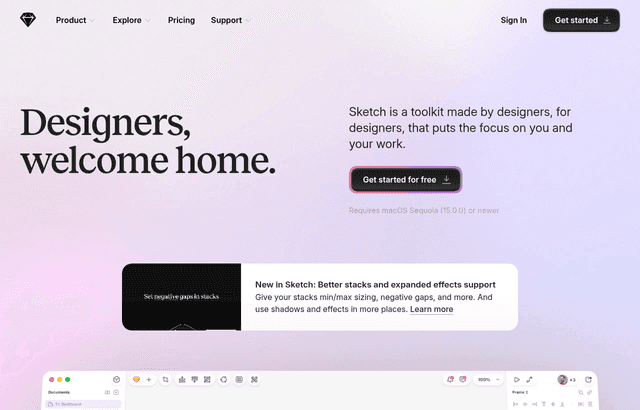
We checked these plans and prices against Sketch's official pricing, support and education pages in November 2026.
The trial in our listing is the same trial Sketch gives everyone. Sketch's pricing page says "30 days free, no credit card needed", and its support page says each person gets one trial of 30 consecutive days. We have not seen a startup-only discount on any Sketch page, and Sketch's education page lists start-ups as not eligible for the free Education workspace. So this deal saves you no money by itself. It points you to a tool and a trial you can start without us.
Sketch is a vector design tool for interfaces. You design in a native Mac app, share documents through a web Workspace, and hand them to developers in the browser. There is no free plan. Sketch's FAQ says so directly: beyond free Viewers and Education workspaces, it has "no plans to offer an entirely free plan".
The trial is 30 days, and the invite limit is the catch
Per Sketch's support page, the trial lets you explore everything the product offers. One thing is limited: invitations. Without payment details you can invite up to 3 Workspace members. If you add a card during the trial, the limit rises to 20. Sketch says you must add billing details at the end of the trial to activate a subscription, and that subscribing instead of trialing charges the card right away.
What happens at the end matters for a startup that tries the tool on real work:
- If you do not subscribe, the Workspace expires and your documents become read-only for 90 days.
- You can download documents during those 90 days.
- You can reactivate within 90 days by adding billing details.
- Sketch permanently deletes the Workspace and documents 90 days after expiry. Deleting the Workspace yourself earlier means the documents cannot be restored.
The trial does not apply to the Mac-only license. Sketch's pricing table lists the free trial as excluded for that option.
Plans and prices
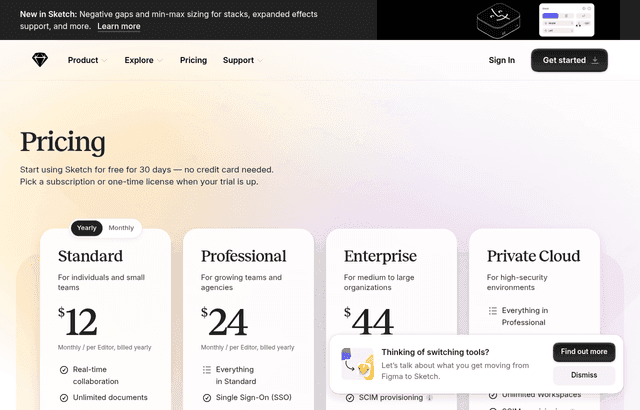
Sketch charges per Editor. The pricing page shows yearly prices in its text, and a data attribute on the Standard card gives a monthly-billed price of $14. We could not find a monthly-billed price for Professional or Enterprise, so the table says "not shown".
| Plan | Price billed yearly (per Editor per month) | Billed monthly | Key limits |
|---|---|---|---|
| Standard | $12 | $14 | 1 Workspace, 50GB storage per Editor, unlimited documents, unlimited free Viewers, version history, free developer handoff, free MCP server |
| Professional | $24 | Not shown | Standard plus SSO, project archiving, permissions groups; 1 Workspace, 50GB per Editor |
| Enterprise | $44 | Not shown | For medium to large organizations; adds SCIM provisioning, BYOK encryption, unlimited storage; dedicated support and custom reviews and terms for 15+ Editors |
| Private Cloud | Contact Sketch | Contact Sketch | Isolated AWS environment, US or EU hosting, unlimited Workspaces, one-time setup fee |
| Mac-only license | $120 per seat, one time | Not applicable | Mac app only, one year of updates, no collaboration |
Prices exclude VAT and other taxes. The middle tier is called Professional on Sketch's pricing page.
Sketch's FAQ says Standard subscriptions and Mac-only licenses are paid by card through Stripe, and that no other payment methods are planned for them. Enterprise offers more flexible payment and terms.
What the Mac-only license gives you, and what it drops
The $120 license is a one-time purchase per seat. Sketch's license page says renewing gives one year of Mac app updates. After that year you can renew again, or keep using the last version you updated to.
It is a different product from the subscription. Sketch's license page says license keys "are now Mac-only and no longer include uploads to a Personal Workspace or real-time collaboration". The comparison table also marks these as unavailable with a Mac-only license:
- Online sharing and viewing
- Online comments
- Guest editors
- Developer handoff features such as measuring and exporting design tokens or production assets
- Mobile viewing and mirroring
- Unlimited free Viewers
- Private folders
- Version history
- Automatic renewal
You save your work locally. The free MCP server is included in the license, along with the native Mac app and offline work.
If your license expires and you later want a subscription, Sketch says to unlink the device, sign in to the web app, go to Settings > Billing and choose a plan. New or upgraded Workspaces get a 30-day trial.
Worked math for a 5-person and a 10-person team
All numbers use Sketch's list prices above. Viewers are free, so only people who edit designs count as Editors.
A 5-person team: 2 designers, 1 engineer, 2 reviewers
Engineers using handoff and founders who only comment are Viewers, so they cost nothing. That leaves 2 Editors.
- Standard billed yearly: 2 x $12 x 12 = $288 a year.
- Standard billed monthly: 2 x $14 x 12 = $336 a year. Yearly saves $48.
- Professional billed yearly: 2 x $24 x 12 = $576 a year.
- Mac-only licenses: 2 x $120 = $240 once, with no sharing or comments in the product.
Now count five Editors, for a team where everyone designs:
- Standard yearly: 5 x $12 x 12 = $720 a year.
- Standard monthly: 5 x $14 x 12 = $840 a year.
- Mac-only licenses: 5 x $120 = $600 for the first year of updates.
A 10-person team: all Editors
- Standard yearly: 10 x $12 x 12 = $1,440 a year.
- Standard monthly: 10 x $14 x 12 = $1,680 a year.
- Professional yearly: 10 x $24 x 12 = $2,880 a year.
- Mac-only licenses: 10 x $120 = $1,200 once.
Enterprise adds SCIM and BYOK; dedicated support and custom terms need 15+ Editors. At $44, 15 Editors would cost 15 x $44 x 12 = $7,920 a year on yearly billing.
The license looks cheapest in year one, but a Standard seat costs $144 a year on yearly billing, only $24 more. You pay that extra for a Workspace, comments, handoff, version history and real-time collaboration. For a team that shares files, the license is a poor trade.
Free for students and teachers, not for startups
Sketch's education page offers a year of free access for students and teachers. The Workspace has 1 Editor seat, 50GB of storage, and includes the Mac app, web app and iPhone app. Students must be at least 16 and enrolled at a college, university, high school or an online course of at least 2 months. Teachers need proof of employment. Applications are reviewed in 2 to 3 business days, and you can use Sketch free for 30 days while it is verified.
Not eligible, per that page: self-education, non-profits, start-ups, and marketing departments at academic institutions. A founder who is also a student can apply for the student route, but a company Workspace does not qualify.
Qualifying non-profits get 50% off a yearly Standard subscription or a Mac-only license. The organization must be officially recognized by a government agency and submit its NPO certificate. Individuals, political groups, schools, private foundations and government bodies are excluded.
Where Sketch is strong
Sketch's comparison page with Figma lists its own claims, and a few matter for a small team.
- Offline work. You can choose to work offline, create new documents and use Libraries, and changes sync when you reconnect. You can also stay offline permanently with local files.
- Prototyping in the app. You build prototypes in the Mac app, share a playback link or test on the iOS app. Sketch lists multi-directional scrolling, overlays, and hover and press interactions.
- Free developer handoff. Developers use browser tools to inspect designs, measure between layers, copy CSS and values, download assets and export design tokens. They do not need a Mac, and you can invite unlimited developers.
- Open file format. Sketch says it has had one since day one, and it provides an open-source .fig importer. Dragging a .fig file onto the Dock icon imports it.
- MCP server. The MCP server is built into the Mac app. Every subscription and Mac-only license includes it at no extra cost, with no AI credits to buy. You connect an AI client such as Claude, Codex or Cursor, and your AI provider bills you for its own usage. It runs locally and works only with the version downloaded from Sketch's website.
These are Sketch's own descriptions, so test them on one real file during the trial.
Where it falls short for a startup
- Mac only for editing. The editor is a Mac app. Sketch's web app lets people view, comment, inspect and download assets, but design work happens on a Mac. A team with Windows or Linux designers cannot edit in Sketch. The education page also says the Mac app needs macOS Sequoia (15.0.0) or newer.
- No free plan. After 30 days, every Editor costs at least $12 a month on yearly billing.
- One Workspace. Standard and Professional include 1 Workspace. Unlimited Workspaces come only with Private Cloud.
- Strict data retention. Documents are deleted 90 days after a subscription ends.
- Hosting in one region. Data sits on AWS in us-east-1. Choosing between US and EU hosting requires Private Cloud.
- No startup program. The pricing page mentions none, and the education page excludes start-ups.
Sketch compared with Figma and Penpot
Figma and Penpot figures come from their official pricing pages, checked in November 2026.
| Sketch | Figma | Penpot | |
|---|---|---|---|
| Free option | 30-day trial, no card | Starter: 3 collaborative files, 3 pages each | Professional cloud plan: $0, up to 8 team members, unlimited viewers, 10GB storage |
| First paid tier | Standard: $12 per Editor, billed yearly | Professional: Full $16, Dev $12, Collab $3 | Unlimited: $7 per editor, capped at $175 a month |
| Higher tiers | Professional $24, Enterprise $44 | Organization $55 Full, Enterprise $90 Full | Enterprise $25 per member, Private Server $50k a year |
| Editing platform | Native Mac app | Browser and desktop apps | Browser, or self-host |
Figma's Professional Full seat at $16 costs $4 more per month than Sketch Standard, and Figma includes a free Starter tier that Sketch does not have. Figma's seat types differ, so a Dev seat at $12 matches Sketch Standard's price but gives a different set of tools.
If your team is all on Mac and works offline sometimes, Sketch is worth the trial. If anyone designs on Windows, pick Figma or Penpot.
Who it fits and who should skip it
Fits:
- A Mac-based startup with one or two designers and several developers and founders who only review. Free Viewers keep the Editor count small.
- Teams that want a one-time license for solo design work and do not need sharing. Example: a solo founder who designs on a Mac and exports assets by hand.
- Teams that want AI-assisted design through Claude or Cursor with the free MCP server.
- Designers moving from Figma who want to open .fig files and compare.
Skip it if:
- Any designer works on Windows or Linux.
- You need a permanent free plan. The Penpot free cloud plan or Figma Starter fit better.
- You are a funded startup hoping for a discount. We found none, so budget list price.
- Your team needs SSO. That starts at Professional, $24 per Editor.
How to get the Sketch offer
- Go to sketch.com and download the Mac app, or sign up for a Workspace in the web app.
- Start the 30-day trial. No credit card is needed.
- Invite up to 3 members. Add a card to raise the limit to 20.
- Pick one real project and build it during the 30 days.
- Before day 30, decide on a plan. Compare yearly billing ($12 per Editor) against monthly ($14 per Editor).
- If you do nothing, the Workspace expires and documents stay read-only for 90 days.
Setup tips for the trial
- Add your whole review group as Viewers. Viewers are free on every subscription plan, so you only count the people who design.
- Test the handoff with a real engineer. Ask them to inspect a screen, measure a gap and download an asset without a Mac.
- Try the offline mode on a laptop before a flight or a bad connection.
- If you come from Figma, import a real .fig file and check the text.
- Decide on yearly billing early. Sketch says monthly subscribers can switch to yearly at any time, but yearly subscribers can only move to monthly near the end of the cycle through support.
- Check that your Mac meets the macOS requirement before you buy seats.
- Cancel before the trial ends if you will not continue. Admins cancel under Settings > Billing in the web app.
Who Is This Deal For?
Early-Stage Startups
Seed and pre-seed companies looking to move fast without overspending on tools.
Growing SaaS Teams
Series A+ companies scaling their stack and optimizing software costs.
Solo Founders
Indie hackers and bootstrapped founders who need enterprise tools at startup prices.
Get Free Trial off Sketch
Premium deal. Upgrade once, unlock everything.
Frequently Asked Questions
Everything you need to know about this startup deal.
Get the weekly deals digest
New verified startup deals every week. No spam, ever. Unsubscribe anytime.
Related Offers

Retool
Used by 1,559 members
1 year free, up to $60K
Build internal tools 10x faster with the low-code platform used by companies like Amazon, DoorDash, and Mercedes-Benz.
View offer
Replicate
Used by 1,772 members
$500 in credits
Run open-source ML models in the cloud, deploy Llama, Stable Diffusion, and custom models via API without GPU management.
View offer
ZoomInfo
Used by 2,014 members
Free Trial
B2B data platform for sales and marketing intelligence with contact databases.
View offer
Chore
15% off your first month
Chore runs your startup's back office for you: payroll, HR, bookkeeping, compliance and equity, inside the tools you already use. 15% off your first month through SaaSOffers.
View offerDeal Summary
Looking for more startup deals?
Browse all offers