
Teamwork Promo Code: 1 year free on all products
Project management and client work platform with time tracking and resource management.
Premium deal
Already have an account? Log in
Deal Highlights
The Teamwork for Startups Offer
Offer: 1 year free on all products. Requirements: none listed on our side. Teamwork reviews every application itself.
There is no promo code. You apply through the SaaSOffers link, which opens Teamwork's own startup page, and Teamwork decides who gets in. We checked these plans and prices against Teamwork's official pricing and help pages in November 2026.
Teamwork.com is a project management tool for teams that sell their time: agencies, consultancies, IT services firms and in-house teams with internal clients. Projects sit under client companies. Time logs, budgets, invoices and client logins are part of the same product, so you do not need a separate time tracker to bill a retainer.
What Teamwork's own terms say
Teamwork's startup page headline is "Get all Teamwork.com products free for one year", which matches our listing. The terms on the same page add detail our listing does not carry:
- The program runs for 1 year, 365 days.
- "The Basics plan, or equivalent, is the plan available on each of our products." So the free year covers the entry paid tier of each product, not Accelerate, Optimize or Enterprise.
- Eligibility is "determined based on length of time in business, revenue and employee numbers." Teamwork publishes no thresholds and no funding requirement.
- Accounts that already have a monthly or annual subscription cannot join. Apply before you pay for anything.
- Continued use "is subject to a testimonial/case study during the course of the program."
- After 365 days you either start a paid subscription or get "downgraded to a limited free plan."
The form asks for 9 things: full name, email, company name, industry, company size (bands from 1-5 up to 501+), annual revenue and currency, country, website, and where you heard about the program.
Prices in November 2026: $9.99 to $24.99 per user
Teamwork sells two products with public prices: Teamwork.com (projects) and Teamwork Desk (helpdesk). Both are priced per user per month in USD. Annual billing is prepaid for the full term. Monthly billing has no long-term commitment and stays active until the end of the paid period when you cancel.
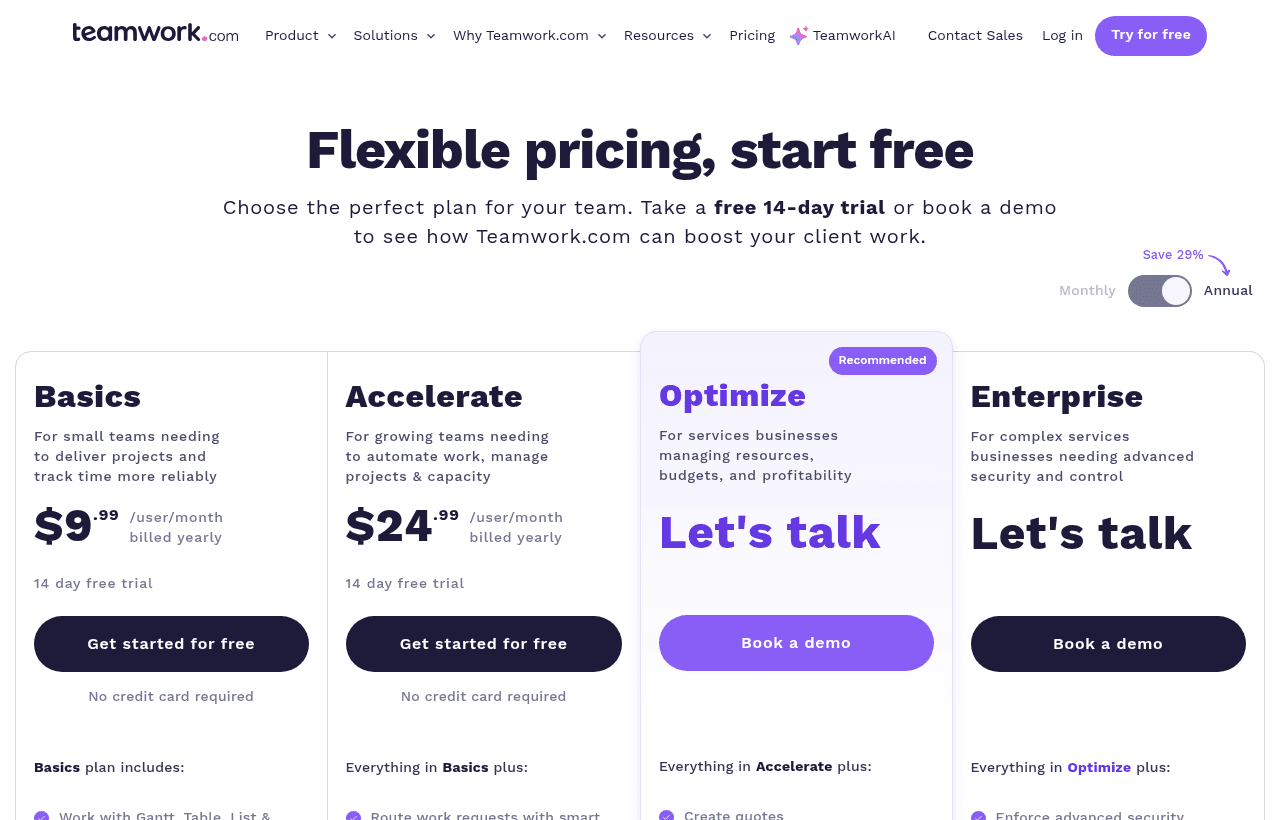
Teamwork.com plans
| Plan | Per user, billed yearly | Per user, billed monthly | Key limits |
|---|---|---|---|
| Free | $0 | $0 | Max 5 users, 5 active projects, 100 MB storage, 100 automation actions a month, 2 project templates, 5 proofs, no client users |
| Basics | $9.99 | $13.99 | Min 3 users, 300 active projects, 100 GB storage, 5,000 automations a month, 1 workflow, unlimited free client users, 20 proofs |
| Accelerate | $24.99 | $29.99 | Min 5 users, 600 active projects, 250 GB storage, 20,000 automations, 3 workflows, time budgets, basic invoices and quotes, timesheets, Workload Planner, HubSpot, Xero and QuickBooks |
| Optimize | Contact sales | Contact sales | Min 5 users, unlimited projects, 500 GB storage, 100,000 automations, financial and fixed fee budgets, project profitability, resource scheduling, Salesforce and NetSuite |
| Enterprise | Contact sales | Contact sales | 1,000 GB storage, SSO, advanced security, dedicated infrastructure, dedicated Customer Success, 10 hours of technical services |
The pricing page toggle says "Save 29%" on annual billing. That figure fits Basics: $13.99 to $9.99 is a $4.00 cut, or 28.6%. On Accelerate the cut is $5.00, from $29.99 to $24.99, which is 16.7%. Budget with the real per-plan gap, not the banner.
API limits are 150 requests a minute on Free, Basics and Accelerate, 300 on Optimize and 500 on Enterprise. All plans include two-factor authentication, desktop and mobile apps, and a choice of US or EU data hosting.
Teamwork Desk plans
| Desk plan | Per agent, billed yearly | Per agent, billed monthly | Key limits |
|---|---|---|---|
| Starter | $9.50 | $12.00 | Up to 10 agents, Teamwork.com integration, free Help Docs site, customer portal |
| Pro | $17.00 | $21.00 | Unlimited agents, time tracking on tickets, triggers, live chat |
| Premium | $33.00 | $41.00 | Happiness ratings, custom fields, full reporting, business hours, scheduled tickets, SLAs |
| Enterprise | Contact sales | Contact sales | HIPAA verified |
Dotty, the Desk AI add-on, costs $69 a month on any paid Desk plan. That covers AI analysis of 1,000 tickets and 100 AI-drafted replies. Teamwork.com has a 14-day free trial with no credit card. Desk's paid plans have a 30-day free trial.
What the Free plan doesn't include
- More than 5 standard users or 5 active projects
- Client users (Basics and up offer them free and unlimited)
- Gantt filtering, project status and burndown, health and planned vs actual reports
- Webhooks, Google Drive, Dropbox, Box and OneDrive Personal
- Integrated team chat and live chat or email support
- Custom branding, intake forms and portfolio view
- TeamworkAI features such as comment summaries and the AI project builder
Client users cost nothing on paid plans
This is the pricing detail that changes the bill most for agencies. Teamwork has 3 license types:
- Standard users take a paid seat and get full permissions.
- Client users are free and unlimited on Basics, Accelerate, Optimize and Enterprise. They can create and edit tasks and milestones, complete tasks, upload files, post messages and comment. Each client user can join up to 5 active projects of their own client company. They cannot be added to your owner company, cannot see project profitability and cannot be project admins.
- Collaborators are free on every plan, Free included. They can complete assigned tasks, comment and view files, but cannot add tasks, log time or set statuses.
A 5-person studio with 12 client contacts pays for 5 seats, not 17. Clients who only need to approve a design do not even need a client license. Teamwork's help center says they can review and approve proofs without one.
Worked example: a 5-person team
Five people meet the Accelerate minimum exactly and sit above the Basics minimum of 3.
| Plan | Billed yearly | Billed monthly for 12 months | Yearly saves |
|---|---|---|---|
| Basics | $9.99 x 5 x 12 = $599.40 | $13.99 x 5 x 12 = $839.40 | $240.00 |
| Accelerate | $24.99 x 5 x 12 = $1,499.40 | $29.99 x 5 x 12 = $1,799.40 | $300.00 |
| Desk Starter (5 agents) | $9.50 x 5 x 12 = $570.00 | $12.00 x 5 x 12 = $720.00 | $150.00 |
What the startup year is worth: Teamwork's terms say the free plan on each product is Basics or equivalent. For 5 people on Teamwork.com Basics that is $599.40 at the yearly rate. If Desk Starter is the equivalent tier for Desk, add $570.00 for 5 agents, so $1,169.40 in total at yearly rates, or $839.40 + $720.00 = $1,559.40 at monthly rates. Confirm which Desk plan you get when Teamwork approves you.
What it is not worth: a year of Accelerate. If your team needs time budgets, invoices or the QuickBooks sync, the step up from Basics costs $1,499.40 - $599.40 = $900.00 a year for 5 users on yearly billing. Ask Teamwork whether you can pay the difference during the program before you plan around those features.
Worked example: a 15-person agency
| Plan | Billed yearly | Billed monthly for 12 months | Yearly saves |
|---|---|---|---|
| Basics | $9.99 x 15 x 12 = $1,798.20 | $13.99 x 15 x 12 = $2,518.20 | $720.00 |
| Accelerate | $24.99 x 15 x 12 = $4,498.20 | $29.99 x 15 x 12 = $5,398.20 | $900.00 |
| Desk Pro (15 agents) | $17.00 x 15 x 12 = $3,060.00 | $21.00 x 15 x 12 = $3,780.00 | $720.00 |
At 15 users the free year of Basics covers $1,798.20 of Teamwork.com at yearly rates. Desk is the trap here. Starter stops at 10 agents, so 15 support agents need Pro at $3,060.00 a year. If the program only covers Starter, you could put 10 agents on it and keep the rest of the team on Teamwork.com, where tickets can still be turned into tasks.
Small teams pay for 3 seats
Basics has a 3-user minimum. A founder and one contractor still pay for 3 seats after the free year: $9.99 x 3 x 12 = $359.64 on yearly billing. The other option is the Free plan, which allows 5 users but only 5 active projects. Add as many free collaborators as you need on Free, since they never take a seat.
Day 366: what the downgrade looks like
Teamwork's help center describes what happens when a paid account drops to Free Forever, and the startup terms point to the same "limited free plan". Your data is kept. The limits bite in two places:
- Users. If you have more than 5 active standard users, the site owner and the 4 most recently active users keep standard seats. Everyone else becomes a collaborator. Downgrade people yourself first if you want to choose.
- Projects. The 5 most recently updated projects stay active. Every other project is archived and read-only. To edit an archived project you have to archive one of the active 5 first.
For a 15-person agency with 40 open client projects, that is a hard stop. Put a calendar reminder at month 10 and decide between paying and moving out while you still have time to export.
Paying later is flexible. You can add seats, change plans or switch billing frequency at any time from the Subscription screen, and you are charged a prorated amount for the rest of the billing period. Plan downgrades take effect at the next billing cycle. If you cut seats below the number in use, the extra users become collaborators at checkout. Monthly plans are paid by Visa, MasterCard or Maestro. Annual plans can also be paid by bank transfer. Non-profits and educational institutions can ask billing@teamwork.com about discounts.
Where Teamwork fits best
- Agencies and studios that bill hours. Billable vs non-billable time tracking is on every plan, Free included, and time reports start on Basics.
- Teams that want clients inside the project. Unlimited free client users on Basics let a client comment on tasks, upload files and sign off on work without adding to your bill.
- Teams moving from another tool. Teamwork says projects import with one click from Wrike, Asana, Basecamp, ClickUp, Trello and monday.com.
- IT and support teams that also run projects. Desk tickets can be turned into Teamwork.com tasks, so a bug report becomes scheduled work in the same account.
Reasons to pass on Teamwork
- Product teams with no clients. Client companies, retainers and invoices are the core of the product. A pure engineering team pays for structure it will not use.
- Teams that need budgets and invoicing in year one. Time budgets, retainers, invoices and timesheets start on Accelerate. Financial budgets and project profitability start on Optimize. The startup year covers Basics.
- Companies already paying Teamwork. An existing monthly or annual subscription makes you ineligible.
- Founders who will not give a testimonial. Teamwork makes a testimonial or case study a condition of staying in the program.
Teamwork vs Asana, ClickUp and monday.com
Prices below are per user per month for the entry and mid paid tiers. Rival figures come from our own checks of their pricing pages in November 2026.
| Tool | Free plan | Entry paid tier | Mid tier | Startup program on our listing |
|---|---|---|---|---|
| Teamwork.com | 5 users, 5 projects, 100 MB | Basics: $9.99 yearly, $13.99 monthly, min 3 users | Accelerate: $24.99 yearly, $29.99 monthly, min 5 users | 1 year free on all products (Basics or equivalent) |
| Asana | Personal: 2 users | Starter: $10.99 yearly, $13.49 monthly | Advanced: $24.99 yearly, $30.49 monthly | 6 months free Premium, fewer than 50 employees |
| ClickUp | Unlimited members, 60 MB storage | Core: $9 yearly, $12 regular | Business: $17 yearly, $25 regular | Up to $3,000 in credits via an approved funding partner |
| monday.com | 2 seats, 3 boards, 200 items | Basic: $9 yearly, $12 monthly, min 3 seats | Pro: $19 yearly, $24 monthly | 30 days free |
For 5 users on yearly billing, Teamwork Basics costs $599.40 a year, Asana Starter $659.40, ClickUp Core $540 and monday.com Basic $540. Teamwork is not the cheapest entry tier. The difference is where billable time sits. Teamwork tracks billable time from Free. Asana puts native time tracking on Advanced and monday.com puts it on Pro, both at higher prices than Teamwork Basics.
Setup tips for the free year
- Create client companies before projects. Client users can only be added to external companies, and their 5-project limit counts projects in their own company.
- Invite clients as client users, partners as collaborators. Both are free. Only standard users take a paid seat.
- Turn on billable time from day one. It works on Basics, so you will have a year of real hours per client when you price your next retainer.
- Use your 5,000 automation actions. Basics includes 1 workflow and 5,000 automation actions a month. Automate task assignment on intake before you add more seats.
- Keep an export plan. If you will not pay after 365 days, cut active projects to 5 yourself so the right ones stay editable.
- Check AI terms. The pricing page says TeamworkAI is included in paid plans for an introductory period. It gives two launch dates for usage-based AI credits, September 2026 in one place and November 2026 in another. Ask Teamwork which AI limits apply to your account now.
How to get the Teamwork offer
- Open the Teamwork deal through the SaaSOffers link. It goes to teamwork.com/startups.
- Do not start a paid subscription first. Accounts that already have one cannot join.
- Click "Apply now" and fill in the 9 fields: name, email, company, industry, company size, annual revenue and currency, country, website and referral source.
- Wait for Teamwork's review. It decides based on time in business, revenue and employee count.
- Once approved, confirm in writing which plan each product is on (Basics or equivalent) and the exact end date, 365 days from the start.
- Plan for the testimonial or case study Teamwork asks for during the program.
Who Is This Deal For?
Early-Stage Startups
Seed and pre-seed companies looking to move fast without overspending on tools.
Growing SaaS Teams
Series A+ companies scaling their stack and optimizing software costs.
Solo Founders
Indie hackers and bootstrapped founders who need enterprise tools at startup prices.
Get 1 year free on all products off Teamwork
Premium deal. Upgrade once, unlock everything.
Frequently Asked Questions
Everything you need to know about this startup deal.
Get the weekly deals digest
New verified startup deals every week. No spam, ever. Unsubscribe anytime.
Related Offers

Retool
Used by 1,559 members
1 year free, up to $60K
Build internal tools 10x faster with the low-code platform used by companies like Amazon, DoorDash, and Mercedes-Benz.
View offer
Zoom
Used by 1,090 members
$20 off per user
Get $20 off per user on Zoom, the video conferencing platform used by hundreds of thousands of businesses for meetings, webinars, and team collaboration.
View offer
ZoomInfo
Used by 2,014 members
Free Trial
B2B data platform for sales and marketing intelligence with contact databases.
View offer
Chore
15% off your first month
Chore runs your startup's back office for you: payroll, HR, bookkeeping, compliance and equity, inside the tools you already use. 15% off your first month through SaaSOffers.
View offerDeal Summary
Looking for more startup deals?
Browse all offers