
Wistia Promo Code: 6 months free Plus
Professional video hosting for businesses, host product demos, tutorials, and marketing videos with built-in analytics.
Free · No account required
Free · No account required.
Deal Highlights
Our Wistia listing: 6 months free Plus
Offer: 6 months free Plus. Requirements in our listing: early-stage startup, new Wistia account. There is no promo code. Step 1 is to go to Wistia through our partner link, which is how a new account gets tied to the listing.
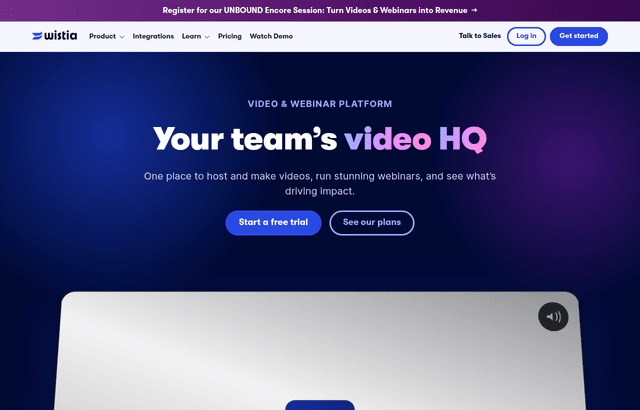
We checked these plans and prices against Wistia's official pricing and help pages in November 2026.
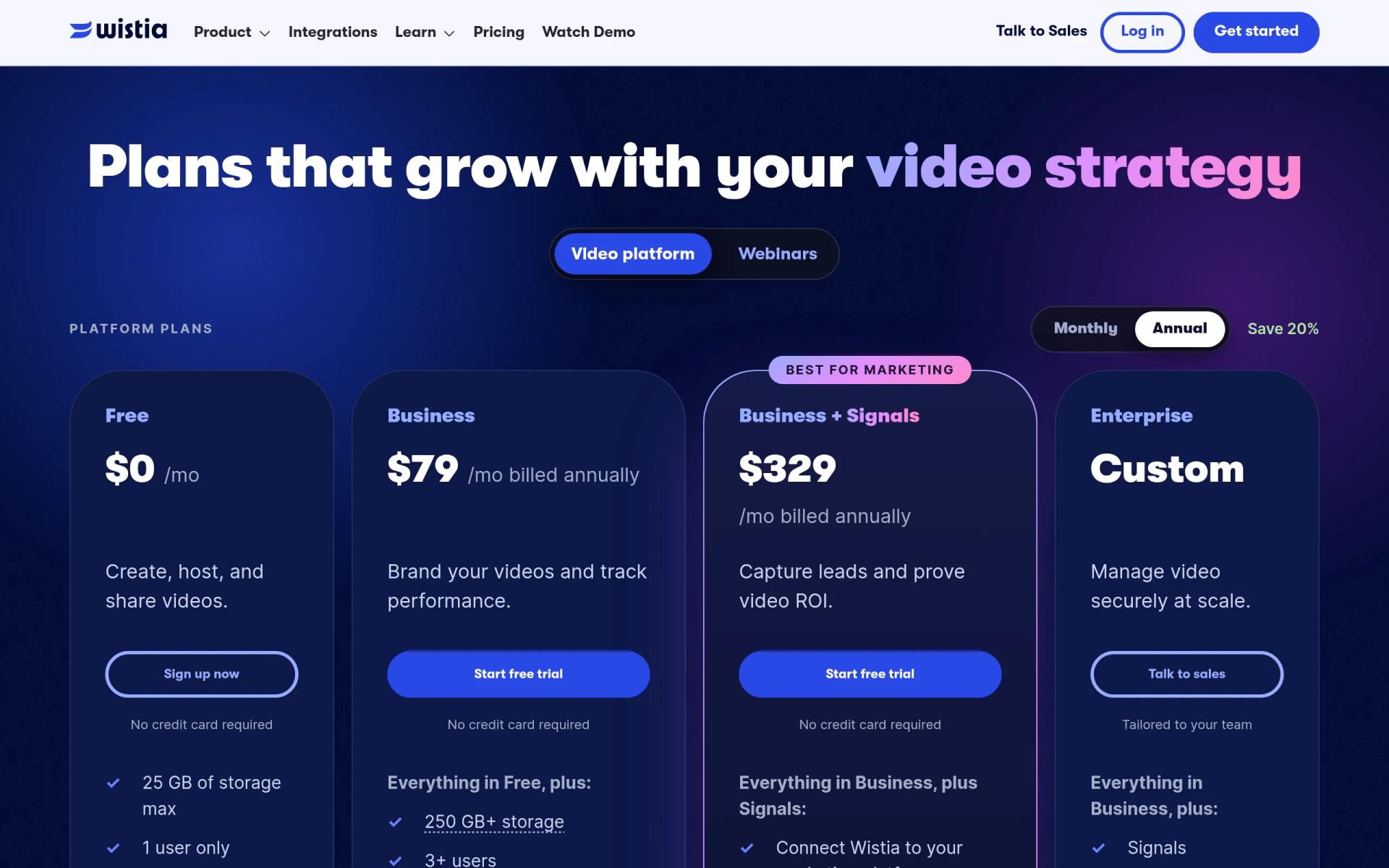
Wistia's pricing page today shows four plans: Free, Business, Business + Signals and Enterprise. There is no plan called Plus on it. Wistia's help center says it introduced new plans for new customers on 17 March 2026, and older plans are now legacy plans that new customers cannot buy. So the name in our listing is outdated, and we could not find a page on wistia.com that confirms a six-month free period for startups. Wistia's partner program page and its homepage mention no startup discount either. Treat the six months as our listing's term, confirm what you actually get on the redemption screen, and read every "if it applies" below with that in mind. We price Business here, the cheapest current paid plan.
Wistia is a video host first, and a credit meter second
Wistia stores your videos, serves them through an ad-free player you embed on your own pages, and measures who watched. It now also offers AI editing, dubbing, a motion-graphics tool called Mochine, webinars and an MCP Server that lets Claude, Cursor and ChatGPT run workflows. The homepage also names HubSpot, Marketo and Pardot as marketing integrations.
For a startup, the pricing logic now has three meters: seats, storage plus bandwidth, and credits. The plan fee is only the base.
What each plan costs
Wistia's pricing page has a Monthly and Annual toggle labelled "Save 20%". The page lists Business and Business + Signals only at annual rates. A monthly price was not shown in the text we could read. The 20% saving implies roughly $98.75 a month for Business on monthly billing, but that is our inference, not a Wistia figure.
| Plan | Price billed yearly (per month) | Billed monthly | Included storage | Included bandwidth | Included users | Credits |
|---|---|---|---|---|---|---|
| Free | $0 | $0 | 25 GB | 200 GB | 1 | 3,000, one time |
| Business | $79 | Not listed | 250 GB and up | 1 TB | 3 and up | 5,000 a month |
| Business + Signals | $329 | Not listed | 250 GB and up | 1 TB | 3 and up | 5,000 a month |
| Enterprise | Custom | Custom | From 1 TB | 2 TB | Custom | 12,500 and up a month |
The page does not state a cap on the number of videos. Limits are set by storage, bandwidth and users.
What Free includes and what it lacks
The pricing page lists basic video analytics, a customizable ad-free player, a virtual recording studio, agentic and transcript-based editing, AI highlights and social clips, one motion kit, and private sharing with password protection.
Free leaves out several things a marketing team would expect:
- Removal of Wistia branding from the player
- Collections, channels and playlists
- CTAs and forms inside the player
- Advanced analytics, heatmaps and engagement graphs
- A/B testing and CSV export
- Live chat support
- More than one motion kit (Business has three)
Free also has hard walls. A help article says Free accounts cannot buy extra storage and cannot go over 25 GB. They cannot buy extra bandwidth either. When a Free account passes 200 GB in a month, the owner gets an email, embeds keep playing for "a few days", then stop until the monthly reset. Viewers see a message with the date playback returns. For a landing-page video that is a real risk if a launch goes well.
What Business adds
Business removes those limits and moves you to 250 GB of storage, 1 TB of bandwidth and 5,000 credits a month.
Business + Signals adds the CRM side. Per the pricing page, it includes integrations with HubSpot, Marketo and Pardot, engagement data on contact records, automated lead scoring, audience segmentation, triggered email nurtures, sales alerts and pipeline and revenue attribution. The FAQ says Signals is an add-on for Business and is included with every webinar plan. The jump from $79 to $329 a month is $250 a month, or $3,000 a year, so Signals only pays off if you run a supported marketing tool (HubSpot, Marketo, Pardot, ActiveCampaign, Eloqua or Klaviyo) and will use the scoring.
Enterprise adds SSO, Video Playback Protection, a dedicated customer success manager, team accounts, and included dubbing and AI audio descriptions.
Seats: three included, then $25 each
Business includes 3 users. Extra users cost $25 a month each on an annual plan and $31.25 each on a monthly plan, according to the help center. Account Owners and Managers can add them on the Manage Team page without upgrading. Owner, Manager, Standard and Limited roles count against your seats. Viewer-role users are free and do not count.
The help article warns about one trap. If "Allow users to find & join account" is switched on, verified new users can find and join your account, which can add monthly charges. Switch it off if you want control over who gets billed.
Storage and bandwidth overage
Everything in the account counts toward storage: uploads of video, audio, documents and images, recordings, Editor exports, copies, and webinar recordings. Archived media still counts. Only items in Recently Deleted stop counting.
On paid plans, Wistia measures usage on your monthly billing date, even on annual plans. If you are over, it adds the smallest storage block that covers the excess. Fifty GB over adds a 100 GB block. Block prices:
| Block | Billed yearly (per month) | Billed monthly |
|---|---|---|
| 100 GB | $12 | $15 |
| 250 GB | $25 | $31.25 |
| 1 TB | $75 | $93.75 |
Bandwidth counts data sent to viewers, including player loads, thumbnails and downloads. Autoplay and looping thumbnails can use bandwidth before anyone presses play. Paid plans are billed per GB over the included amount, and the help article does not give that rate. The prepaid bandwidth add-on for Business is +1 TB for $150 a month, +2 TB for $280 and +3 TB for $390.
Credits pay for the AI work
Credits are a separate balance. Publishing, hosting, playback, standard editing and API or MCP reads and uploads cost none. These actions do:
| Action | Credits |
|---|---|
| Text translation, metadata writes, analytics reads | 1 |
| Social clip | 50 |
| Audio enhancement | 8 per minute |
| Mochine generation | 250 |
| Custom Motion Kit in Mochine | 2,500 |
| AI audio description | 400 per minute (600 extended) |
| Dubbing | 800 per minute |
| Human-written captions | 1,000 per minute (1,600 rushed) |
Per-minute charges round up to the next full minute. Business's 5,000 monthly credits do not roll over. Top-ups are 4,000 for $25, 8,000 for $50 or 50,000 for $250, and they expire after 12 months. Included credits are spent first, then subscription credits, then top-ups.
Free's 3,000 credits arrive once and do not expire, per the help center. The pricing page calls them "3,000+ lifetime credits", so there is a small wording difference between the two pages.
Two worked examples
Both use annual-billing prices. Neither includes the trial, bandwidth overage or tax.
A 5-person marketing team on Business
- Plan: $79 a month
- Extra users: 5 minus 3 included is 2, times $25 equals $50 a month
- Total: $129 a month, or $1,548 a year
If our six free months applied and covered only the plan fee, the plan portion would be 6 times $79, or $474. We cannot confirm that user fees are covered, so assume the $50 a month for extra seats is still yours to pay: that is $300 over six months.
Dub one 10-minute demo into Spanish in a month: 10 minutes at 800 credits is 8,000 credits. Business includes 5,000, so you need 3,000 more. The smallest top-up is 4,000 for $25. One dub costs $25 beyond the plan.
A 10-person team on Business + Signals
- Plan: $329 a month
- Extra users: 7 times $25 equals $175 a month
- Total: $504 a month, or $6,048 a year
Compare with Business alone for the same team: $79 plus $175 equals $254 a month, or $3,048 a year. Signals adds $3,000 a year. For a team without one of those marketing tools, that gap buys nothing.
Who it is for
- A B2B startup embedding product demos on pricing and landing pages, where branding removal and forms matter.
- A marketing team already on HubSpot, Marketo or Pardot that wants video watch data on the contact record. That needs Signals.
- A team making explainer or onboarding videos that need dubbing into other languages.
- A founder who wants to test the player and analytics on Free before paying, as long as 25 GB and 200 GB a month fit.
Who should skip Wistia
- Anyone whose videos exist to be discovered. YouTube serves an audience Wistia does not, and costs nothing to host on.
- Teams with a large back catalog. Archived media still counts as storage, and block fees stack up.
- Solo creators who need one quick screen recording to send. Loom fits that better.
- Developers building video into an app, who want a per-minute API. Mux bills that way.
Alternatives
| Tool | Where it fits | Facts we checked |
|---|---|---|
| Wistia | Branded marketing video with forms, analytics and CRM data | Free $0; Business $79 a month billed yearly |
| Loom | Quick async screen and camera messages | Starter free with 25 videos, 5 minutes each; Business $18 a month, less on yearly billing |
| Mux | Video API for apps | Free plan up to 10 stored videos; pay as you go priced by the minute |
| Bunny.net | Cheap storage and delivery you assemble yourself | Pay as you go, $1 monthly minimum, 14-day trial |
Loom, Mux and Bunny.net do not offer the same forms-and-CRM product. Wistia's value is the marketing layer on top of the player, not the hosting alone.
Setting up Wistia well
- Start with one page, such as your pricing page, and embed a single video there.
- Turn off "Allow users to find & join account" before you invite anyone.
- Check your Account Usage page weekly in the first month. It shows users, storage and bandwidth against your limits.
- Turn off autoplay and looping thumbnails on pages you do not need them, since they use bandwidth before a click.
- Delete old drafts permanently. Archived media still counts toward storage.
- Put the 5,000 monthly credits to use on clips and dubbing, because they do not roll over.
- Add Signals only after you have confirmed your CRM integration is a real need.
How to claim the Wistia deal
- Go to Wistia through our partner link on this page.
- Create a new Wistia account. Our listing says the offer is for new accounts only.
- Pick the plan the redemption screen offers. Our listing calls it Plus, but current Wistia plans are named Business and Business + Signals, so read what the screen says.
- Confirm the length of the free period and whether a card is needed before you enter payment details.
- Add your team and check the seat count against the three that Business includes.
- Set a calendar reminder a week before the free period ends, so billing does not surprise you.
Cancelling
Wistia says you can cancel any time unless you are on Enterprise or have a signed order form. You can cancel at the end of the billing cycle or right away, but it issues no refunds. Downgrading from a paid plan to Free requires you to delete enough content to fit under 25 GB first.
Who Is This Deal For?
Early-Stage Startups
Seed and pre-seed companies looking to move fast without overspending on tools.
Growing SaaS Teams
Series A+ companies scaling their stack and optimizing software costs.
Solo Founders
Indie hackers and bootstrapped founders who need enterprise tools at startup prices.
Get 6 months free Plus off Wistia
Free for all startups. Claim instantly.
!Eligibility Requirements
Early-stage startup, new Wistia account
Frequently Asked Questions
Everything you need to know about this startup deal.
Get the weekly deals digest
New verified startup deals every week. No spam, ever. Unsubscribe anytime.
Related Offers

OmniSEO
Used by 1,361 members
Free Trial
All-in-one SEO platform for keyword research, rank tracking, and site optimization.
View offer
Sprout Social
Used by 947 members
Free Trial
Enterprise social media management platform with analytics and engagement tools.
View offer
SurveyMonkey
20% off Team plans
20% off SurveyMonkey Team plans with code Saasoffers, plus the free Basic plan: unlimited surveys, AI survey building and 200+ integrations on paid plans.
View offer
Planable
Used by 747 members
Free Plan
Social media collaboration platform for planning, approving, and scheduling content.
View offer
ZoomInfo
Used by 2,014 members
Free Trial
B2B data platform for sales and marketing intelligence with contact databases.
View offerDeal Summary
Looking for more startup deals?
Browse all offers