
Crowdin: Free and Open Source Tool
Localization management platform for translating apps, games, and websites.
Premium: $79/year for unlimited deals
Already have an account? Log in
Deal Highlights
Crowdin's open-source license, and what it asks in return
Offer in our listing: Free for Open Source. Our listing sets no extra requirements and there is no promo code.
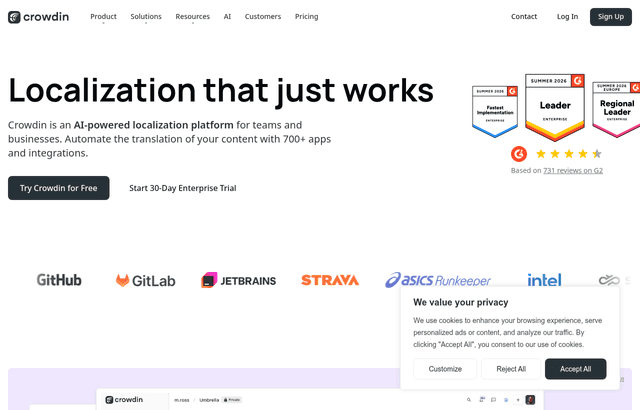
We checked these plans and prices against Crowdin's official pricing and help pages in November 2026.
Crowdin is a localization platform. You upload source files or connect a repository, translators work in a browser editor, and the finished translations go back to your code. The "Free for Open Source" label in our listing points at Crowdin's own open-source license. Crowdin's request page says the platform is "completely free of charge for open-source projects." Anyone can ask for it directly, and our listing does not change the terms.
The license is not automatic. Crowdin's request page lists nine criteria. The project must:
- Already have a translation project created in Crowdin.
- Use a license approved by an open-source initiative.
- Have publicly downloadable source code.
- Have no commercial products related to the project.
- Be led by the person applying.
- Have been worked on for at least three months.
- Have an active community of collaborators.
- Keep the website's "News" section up to date.
- Release updated builds regularly.
The page adds that these requirements do not apply to paid customers. Two conditions come with the license. You agree to join the Crowdin beta group and try its newest features, and you agree to contribute your project translations to Crowdin Global TM, which gives you access to Crowdin's neural machine translator. The form asks for the project name, license (MIT, Apache 2.0, GPL v2 or v3, BSD, LGPL v3, MPL 2.0, AGPL v3, ISC, Unlicense or Other), an optional website, a description, your email and name, and optionally your Crowdin username.
Crowdin's pricing FAQ says each granted license includes an unlimited number of projects, strings and members. Crowdin does not publish plan limits, Enterprise prices or license review times in readable text.
The Free Plan is open to anyone, open source or not
Crowdin also lists a Free Plan at $0 on its pricing page. Its description reads: "Start localizing your content for free, all essential features for translators included. Open-source projects are welcome to use our free plan!" So a small open-source repo can start on the Free Plan today without waiting for a license decision.
What the pricing page data does say about the ladder above Free:
| Plan | Listed price | What the description says |
|---|---|---|
| Free Plan | $0 | All essential features for translators included |
| Pro | $50 | Private projects, unlimited translator seats included |
| Team | $150 | Managers who can upload files, invite people and connect integrations |
| Team+ | $450 | Your own private organization, project groups, workflow automation |
The page does not say whether $50, $150 and $450 are monthly or yearly. A Crowdin help article puts Team at $1,800 billed annually, or $150 a month.
Hosted words: the meter that decides your bill
Crowdin charges by hosted words. Its FAQ defines them as the number of words to translate multiplied by the number of target languages. Upload a file with 500 words into a project with 10 target languages and you have 5,000 hosted words. The source language does not count. The limit covers all projects under one account, and deleting a file frees its words.
Worked examples of the counting rule:
- A 3,000-word app translated into 12 languages uses 3,000 x 12 = 36,000 hosted words.
- The same app in 5 languages uses 15,000.
- Add a 1,200-word docs site in the same 5 languages and you add 6,000, for 21,000 in total.
Every plan includes a set number of hosted words, and you can buy more as an add-on. Crowdin's pricing page does not publish the per-plan numbers in text, so we cannot tell you which tier fits 36,000. If you sit near the Free Plan ceiling, the test is simple: upload your real files and watch the usage counter before you commit.
Crowdin's own blog contrasts this with the processed-words model some rivals use, where a 500-word file in 10 languages is 5,500 processed words for one run. It also says Crowdin adds no markup on AI tokens. Treat that as Crowdin describing itself.
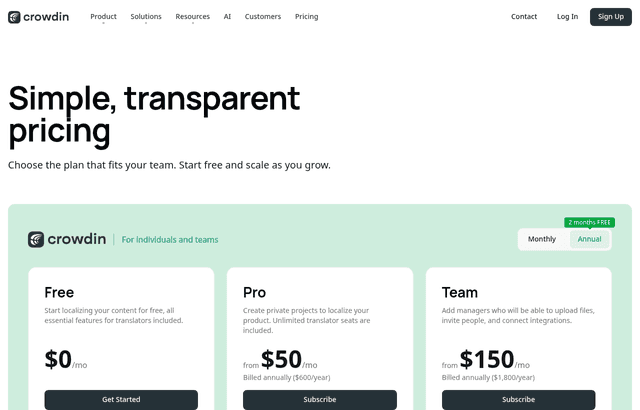
What paying for Crowdin would cost
Open-source projects do not pay, but a startup with a closed-source product, or with a commercial offering around an open-source core, falls outside the license. Crowdin's help center splits the product into two lines. Crowdin itself is for individuals, open-source projects, startups and small in-house teams. Crowdin Enterprise is for organizations that want a private organization, workflows, teams and tighter security.
Billing facts from the pricing page and help center:
- Plans for organizations are annual billing only.
- Plans for indie developers and crowdsourcing offer monthly and annual billing. The page advertises annual billing as "2 months FREE."
- Prices exclude VAT, GST and other taxes.
- Any paid plan allows unlimited translators and proofreaders.
- You can upgrade or downgrade any time. A mid-cycle change switches the account at once and the new plan is charged from the next month.
- Refunds are available on request if you cancel within 30 days of signup.
- International wire transfer works only for annual subscriptions.
- Crowdin is sold through AWS Marketplace, so you can pay with AWS credits.
A Crowdin help article gives two Team figures: $179 a month on a monthly plan, and $1,800 a year ($150 a month) on an annual plan. That article is a support page, not the pricing table, so check the checkout screen before you rely on it. On those figures, Team costs $150 x 12 = $1,800 billed yearly, or $179 x 12 = $2,148 billed monthly. Annual billing saves $348 a year, about 16 percent.
Worked math: what the open-source license saves
These examples use the Team figures above and assume the Team tier is the one you would otherwise buy. They are illustrations, because Crowdin does not publish which tier maps to which hosted-word allowance.
Example 1: a 5-person project. Three maintainers and two core contributors run the repo, and volunteers translate. Translator seats are unlimited on paid plans, so seats are not what costs money. Team billed yearly is $1,800. If the license is granted, the platform cost is $0, a saving of $1,800 a year. If you only get the Free Plan, you stay at $0 within its undisclosed limits.
Example 2: a 10-person team with two apps. Say it ships a CLI and a desktop app, 20,000 hosted words in total across 8 languages (2,500 words x 8). If a license is refused and you pick Team monthly, you pay $179 x 12 = $2,148 a year. Yearly billing would be $1,800. The license wipes out both.
If you add a paid marketplace app, the bill rises. Crowdin's help center says paid apps get a 14-day free trial and are billed with your primary plan. Its worked example: a $179 Team plan plus a $139 a month app is $318 a month, and on the annual plan a $150 a month Team plus the same app is $289 a month. The app store lists other apps from $39 a month (Webflow) to $159 a month (HubSpot Marketing Hub).
Trials, badges and the other free routes
Besides the open-source license, Crowdin lists these:
- 14-day Team trial. Register and create your first localization project. The trial covers the Team plan on Crowdin.
- 30-day Enterprise trial. It starts when you create the Crowdin Enterprise account and includes all Business plan features.
- Badge program. Put the Crowdin badge on your website and get a free add-on. Personal plans get double the limit on projects or source strings. Organization plans get 5,000 extra strings.
- Academic License. For educational projects. Each granted license includes unlimited projects, strings and members.
- CDN for translations. Free up to 1 million requests and 10 GB of data transfer.
The pricing page names no startup discount. Its free programs are open source and academic.
What the product does day to day
Crowdin's homepage lists 100+ supported file formats, a store with 700+ apps and integrations, 50+ built-in quality checks, 40+ machine translation engines and 10+ AI automation features. Providers it names include DeepL, Google Translate, OpenAI, Anthropic and Azure AI. It also lists translation memory, glossaries, in-context translation, AI proofreading, an API, a CLI, Git integrations (GitHub, GitLab, Bitbucket) with branching, and over-the-air delivery for mobile apps.
For an open-source project the useful parts are concrete:
- Repository sync. Source strings flow from your repo into Crowdin, and finished translations return as a pull request.
- Translation memory. A phrase translated once is suggested wherever it appears again.
- Machine pre-translation. Pre-fill with an MT engine, then have a human review it.
Crowdin vs Crowdin Enterprise
Crowdin's help center spells out the split. Crowdin is user-account-centric: projects belong to a user. Crowdin Enterprise is organization-centric: projects belong to the organization, and workflows are customizable and multi-step. Enterprise plans are billed annually and upfront. Enterprise adds SSO (SAML, OIDC), IP allowlisting, a choice of US or EU data residency, support for self-hosted GitHub Enterprise, GitLab Self-Managed and Bitbucket Server, priority support with SLAs, and Slack support on the Business plan. Crowdin stores data in the US by default.
If your open-source project grows into a company with compliance needs, expect to move from the license to Enterprise pricing.
Security and compliance Crowdin publishes
The security page lists an ISO/IEC 27001 certified information security management system and GDPR compliance. Customers subject to HIPAA must sign Crowdin's Business Associate Agreement before using it with protected health information. Billing runs through FastSpring, which Crowdin says is PCI compliant, and Crowdin itself does not store billing details.
Infrastructure runs on AWS. Controls include two-factor authentication, SAML 2.0 single sign-on, role-based permissions, API tokens with granular permissions, backups and versioning, annual third-party penetration testing, and a bug bounty on HackerOne launched July 17, 2024. Uptime history is at status.crowdin.com, and SLAs are a separate agreement. The page does not mention SOC 2 and does not describe encryption of customer data, so we do not claim either.
Crowdin next to two other localization tools
| Crowdin | Lokalise | Phrase | |
|---|---|---|---|
| Free plan | Free Plan at $0, plus free open-source license | None listed; 14-day trial | None listed; 14-day trial |
| Entry paid price | Pro at $50 (period not stated) | Explorer $149 a month billed yearly, $169 monthly | Software UI/UX $525 a month billed annually |
| Pricing meter | Hosted words (words x target languages) | Processed words | Managed words |
| Open-source terms | Free license on request, with criteria | Free for open-source non-profit, per its pricing FAQ | Not checked |
The Lokalise and Phrase figures come from our own notes on their pricing pages from earlier this month, and the open-source line for Lokalise is from its pricing FAQ. We did not recheck Phrase's open-source policy. If your project is open source and meets Crowdin's criteria, it is the one to apply to first because its license is documented on a dedicated request page. For a funded closed-source team with a large, frequently changing string library, compare meters before choosing: a hosted-word meter grows with languages, a processed-word meter grows with edits.
Who it suits and who should skip it
Crowdin suits:
- Open-source maintainers who want volunteers to translate through a browser and receive pull requests back.
- Projects with a real community. The license criteria ask for one.
Skip or look elsewhere if:
- Your product is closed source. The license excludes projects with related commercial products, so you would pay for Pro ($50, private projects) or higher.
- Your project is under three months old or has no public releases. You would fail the listed criteria.
- You cannot accept the beta-group and Global TM conditions. Translations you contribute go to a shared memory.
- You need published, written hosted-word caps before you sign up. Crowdin does not show them in text.
Getting set up on Crowdin
- Apply after you have a project. The form wants an existing Crowdin translation project, so create the free account and project first.
- Fix your license label. Pick the correct entry from the form's list. A mismatch with your repo's LICENSE file is an easy reason for a refusal.
- Keep the News section current. It is one of the nine listed criteria.
- Upload real files early. Watch hosted-word usage before you add languages.
- Wire up the CLI in CI. Upload sources on merge and download translations on a schedule.
Claiming the Crowdin offer, step by step
- Go to crowdin.com and create a free account. There is no promo code.
- Create a translation project and connect your repository or upload your source files.
- Open Crowdin's Open Source License request form and fill in the project name, license, description and your contact details.
- Agree to join the beta group and contribute translations to Global TM.
- Wait for Crowdin's decision. It decides eligibility, not SaaSOffers, and the page gives no review time.
- Meanwhile, use the Free Plan.
Who Is This Deal For?
Early-Stage Startups
Seed and pre-seed companies looking to move fast without overspending on tools.
Growing SaaS Teams
Series A+ companies scaling their stack and optimizing software costs.
Solo Founders
Indie hackers and bootstrapped founders who need enterprise tools at startup prices.
Get Free for Open Source off Crowdin
Premium deal. Upgrade once, unlock everything.
How to get the Crowdin deal
- The offer: Free for Open Source.
- Create a free SaaSOffers account, then upgrade to Premium ($79 a year, or $250 once for lifetime access). Premium unlocks every Premium deal on the site.
- Open the Crowdin claim page from this deal. It shows the partner link, any promo code and the exact steps Crowdin asks for.
- Apply or sign up through that link before you pay Crowdin directly, since most startup offers only apply to new accounts.
Frequently Asked Questions
Everything you need to know about this startup deal.
Get the weekly deals digest
New verified startup deals every week. No spam, ever. Unsubscribe anytime.
Related Offers

Retool
Used by 1,559 members
1 year free, up to $60K
Build internal tools 10x faster with the low-code platform used by companies like Amazon, DoorDash, and Mercedes-Benz.
View offer
Replicate
Used by 1,772 members
$500 in credits
Run open-source ML models in the cloud, deploy Llama, Stable Diffusion, and custom models via API without GPU management.
View offer
ZoomInfo
Used by 2,014 members
Free Trial
B2B data platform for sales and marketing intelligence with contact databases.
View offer
Chore
15% off your first month
Chore runs your startup's back office for you: payroll, HR, bookkeeping, compliance and equity, inside the tools you already use. 15% off your first month through SaaSOffers.
View offerDeal Summary
Looking for more startup deals?
Browse all offers