
Typesense Coupon: Free Cloud Plan
Open-source search engine that is fast, typo-tolerant, and easy to use.
Premium: $79/year for unlimited deals
Already have an account? Log in
Deal Highlights
Our Typesense listing: a "Free Cloud Plan" that is really a one-time allowance
Offer: Free Cloud Plan. Our listing sets no extra requirements and there is no promo code. This is a Premium deal on SaaSOffers.
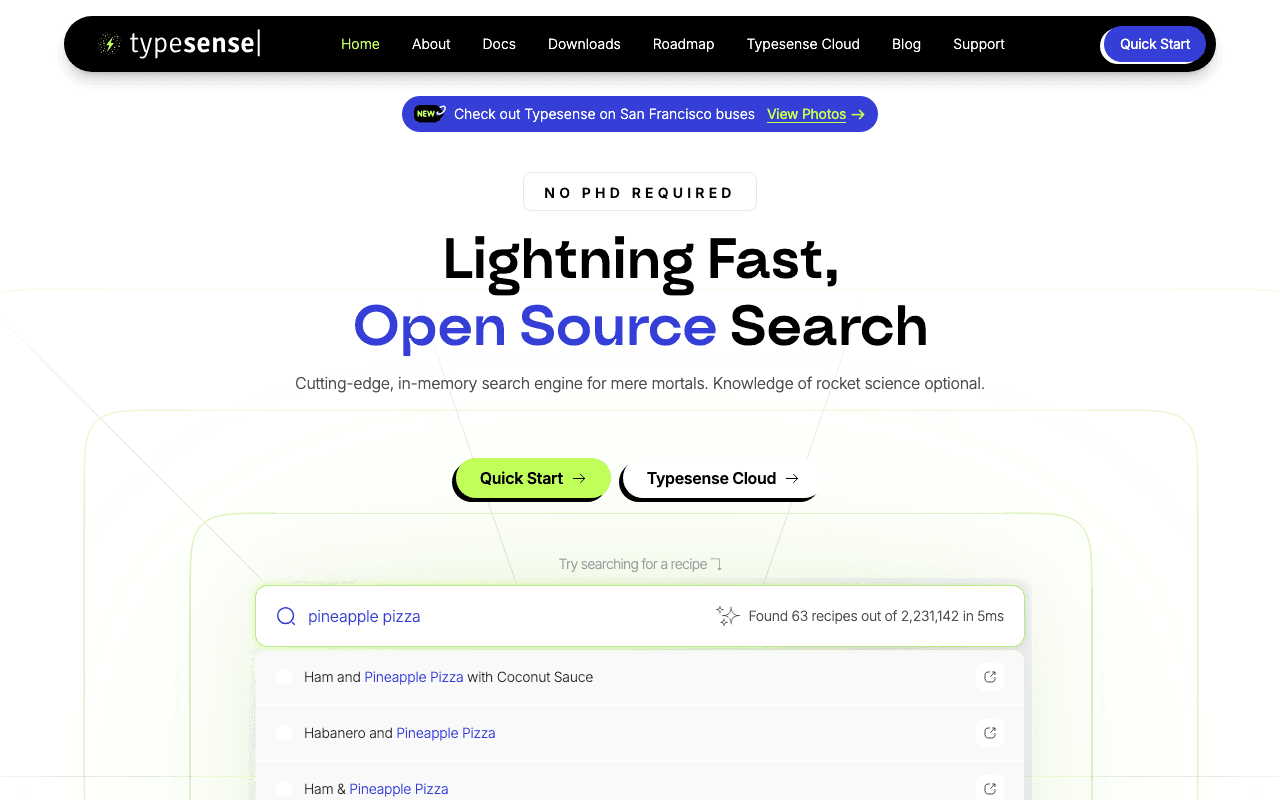
We checked these plans and prices against Typesense's official pricing and help pages in November 2026.
"Free Cloud Plan" is our listing's name for what Typesense calls its free tier. Typesense's billing help page describes it as your first 720 hours and 10 GB of bandwidth, free, once for the lifetime of your account. It does not refill each month. The page says so itself: Typesense would like to offer an unlimited free tier, but it starts a dedicated node for every cluster, even free ones, and as a bootstrapped company it cannot subsidize that for long. Read this offer as a 30-day trial of a real cluster, not as a permanent free plan. The other free route is the open-source server, which you run yourself.
Typesense is an open-source, typo-tolerant search engine built for search-as-you-type in a website or app. Its docs say it is tuned for results in typically under 50 ms. You push your own data in; it does not crawl the web.
Cloud is billed by the hour, per node
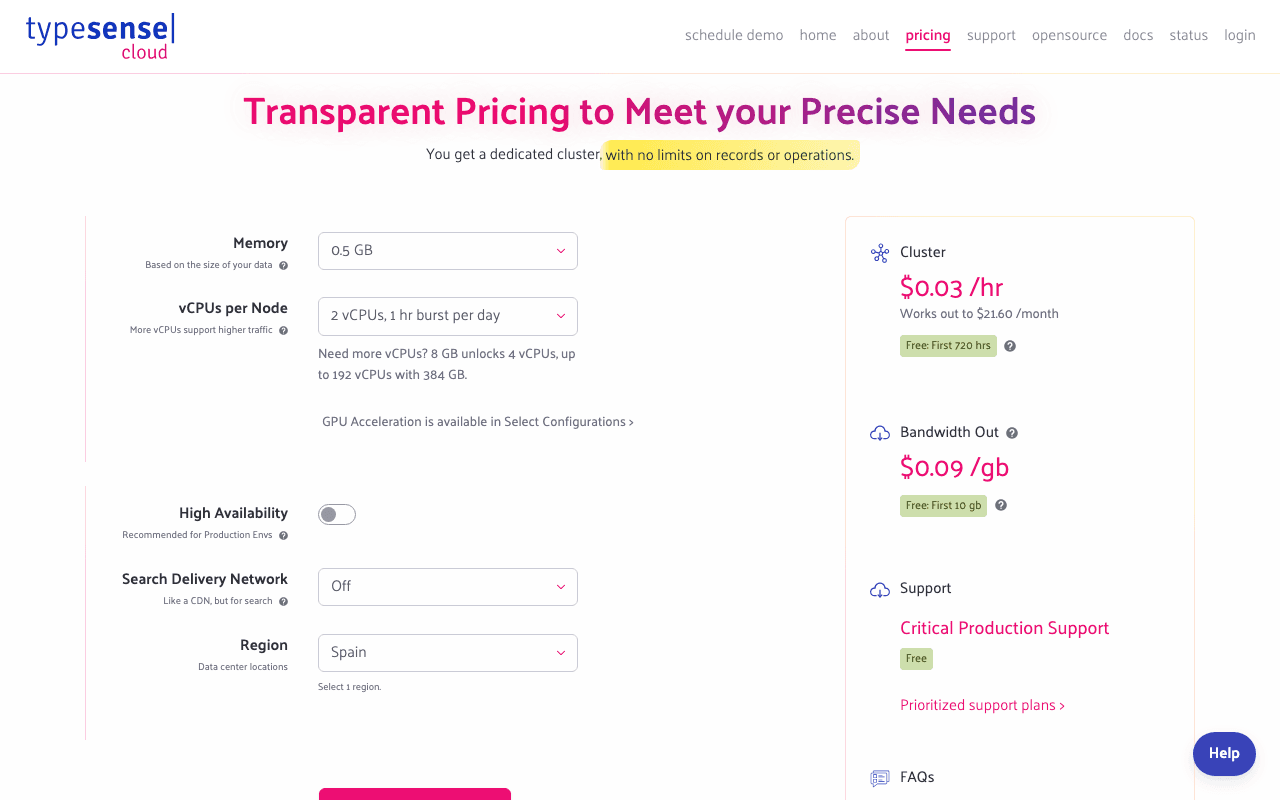
Typesense Cloud's pricing page opens with one promise: "a dedicated cluster, with no limits on records or operations." You pick a cluster size and pay for the hours it runs. Billing help lists five pricing components:
- A fixed per-hour cluster fee for the configuration you picked (RAM, vCPUs and so on), charged for every hour the cluster is running and not terminated.
- Per-GB bandwidth for data sent out of the cluster.
- Optional per-GB-month storage for backups, if you turn backups on.
- Optional extra disk beyond what is included, charged per extra GB per month on each node.
- Optional monthly prioritized support plans. Critical Production Support is included in the base price.
There are no contracts, and you can resize. Because Typesense provisions dedicated hardware, the hourly fee applies whether the cluster gets traffic or not. An idle cluster still costs money.
The configurator offers RAM from 0.5 GB up to 1,024 GB, and the vCPU options depend on the RAM you choose. Smaller sizes include "burst" options, for example 2 vCPUs with 1 hour of burst per day on the 0.5 GB size. The pricing page also offers High Performance Disk, High Availability with 3 to 7 nodes, a Search Delivery Network (3 regions, 5 regions or multiple nodes per region) and over two dozen data center regions, from N. California to Sydney.
The price list is a calculator, not a table
The pricing page does not print a plain price table. The numbers load into a calculator after you pick RAM, vCPU, nodes and region. We could not read live hourly rates for each size, so the table below uses only figures Typesense publishes in text. Rows marked "example" come from Typesense's own comparison page, which says they are rounded estimates from anonymized real clusters.
| Configuration | Monthly cost | Source note |
|---|---|---|
| Free tier (select configurations) | $0 for the first 720 hours and 10 GB | Billing help |
| 2 GB RAM, burst 2 vCPU, single node | About $51 | Example from Typesense's Algolia comparison |
| 2 GB RAM, burst 2 vCPU, 3-node HA | About $153 | Same page |
| 8 GB RAM, burst 2 vCPU, single node | About $139 | Same page, an observed cluster |
| 16 GB RAM, 4 vCPU, 3-node HA | About $1,073 | Same page, an observed cluster |
The $153 figure is exactly three times the $51 figure, which fits the rule in Typesense's Prices API docs: node-hour prices are per node, so a highly available cluster multiplies by its node count. A 3-node HA cluster costs three nodes' worth of hours.
Bandwidth is the second meter
Typesense charges for outgoing bandwidth on each node. Billing help says it is usually about 9 to 12 cents per GB depending on region, and not the largest cost compared with the cluster fee. Outgoing bandwidth includes:
- Search and API responses. Fetching 100 results per page costs more bandwidth than fetching 5.
- On HA clusters, data you index reaches one node and is then copied to the others. That copy counts as outgoing from the first node.
- When you change a cluster's configuration, each new node pulls the dataset from the leader, which counts as outgoing from the leader.
There is also a constant overhead. The bandwidth help page says a running cluster uses about 0.5 MB a minute per node for monitoring, heartbeats, metrics and logs. It states this "typically consumes at least ~900MB per day of bandwidth per node."
Using the page's own figure of 900 MB a day, a single node would burn through the 10 GB free bandwidth in about 11 days (10 GB divided by 0.9 GB), before any user searches anything. This is our arithmetic on Typesense's figure, not a Typesense claim. Over the 30 days that 720 hours covers, overhead alone would be about 27 GB. At the low end of the 9 cent rate, the 17 GB beyond the free 10 GB would add roughly $1.53. That is small, but it shows the free tier is not "zero dollars for 30 days of traffic." Add a payment method before you rely on it.
Billing mechanics worth knowing
Charges accrue across all clusters and are billed weekly by default. After two months of successful payments with no failures, you can switch to monthly billing from your account page. A monthly cycle is 28 days, and you can switch back to weekly. If charges in a cycle reach $500, Typesense issues that invoice early.
Typesense also publishes a Prices API that lists what a node-hour and a GB cost for each region and configuration. Its docs show the 0.5 GB, 2 vCPU burst configuration in Oregon as an example with the first 720 node-hours at 0 cents and then 2 cents per node-hour, with bandwidth at 0 cents for 10 GB and then 9 cents per GB. The docs call that response illustrative, so do not budget from it.
What the free tier leaves out
Compared with a paid cluster, the free allowance is limited in these ways:
- It covers select configurations only, shown on the pricing page. You do not get every size free.
- The 720 free node-hours and the 10 GB of free bandwidth are separate allowances. Each starts billing once used up, and neither renews.
- Once exhausted, any running cluster starts to incur charges. Typesense recommends adding a payment method early to prevent service interruptions on production.
- The 720 hours is per account, not per cluster. Prices API docs say tier bounds count your account's lifetime usage of that configuration, so a free allowance is used once.
- HA needs 3 to 7 nodes, so a high availability cluster uses up free node-hours three times faster than a single node. Whether HA clusters qualify for the free tier is not stated on the pages we read, so check the configurator.
Self-hosting is the permanent free option
The server is open source under GPL-3.0, according to Typesense's comparison page, and free to self-host forever. Typesense publishes DEB and RPM packages and binaries for Linux and macOS, official Docker images and Docker Compose files. The install docs list Kubernetes operators as community contributions, not official ones.
Typesense is an in-memory engine, so RAM is the sizing question. The system requirements page says the process takes about 20 MB when empty. For keyword search, if the fields you search on total X MB, expect to need 2X to 3X MB of RAM. The docs' example: 1 million records averaging 204 bytes of indexed fields is 204 MB of data, so 408 MB to 612 MB of RAM. Fields you store but do not search stay on disk and do not count toward RAM. For vector search, each vector needs 7 bytes per dimension per record.
Self-hosting means you handle provisioning, monitoring, upgrades and scaling. Typesense says self-hosted support is community-based, while Cloud has 24/7 critical production support with response SLAs starting at 30 minutes. The software costs $0. The server and your time do not.
Two worked examples
These use only prices Typesense publishes. They are sizing examples, not quotes.
A product with 214,000 searches a month. On Typesense Cloud, the 2 GB burst single-node example is about $51 a month, or $613 a year. There is no per-search fee. Algolia's Grow plan, per the pricing recorded on 8 November 2026, includes 10,000 searches and then charges $0.50 per 1,000. So 214,000 searches is 204 x $0.50 = $102 a month, or $1,224 a year, before record charges. The difference is about $51 a month, roughly $612 a year.
The same product at 848,000 searches, with HA. Typesense Cloud 2 GB burst, 3-node HA is about $153 a month. Algolia Grow at that volume is 838 x $0.50 = $419 a month. Typesense's page shows $168 a month for a similar workload with a 3-region Search Delivery Network, so adding regions raises the Typesense side too. Run the calculator with your regions before comparing.
If the free allowance applies to your account, the first 720 hours of a free-tier cluster come off the front. If your size is on the free tier, that is about a month of node-hours you do not pay for. These examples do not subtract it, because we could not confirm which sizes are free.
Who this suits
Typesense fits a team that wants fast instant search, can describe its dataset in terms of RAM, and prefers a predictable cluster bill to per-search metering. It also fits engineers who want the option to move between Cloud and self-hosting without changing engines. Typesense lists these as reasons to choose it:
- Search traffic that peaks seasonally. You can resize for the busy month, scale back, and pay for the hours each size ran.
- Several sort orders on one collection through query-time sort_by, where Algolia uses replicas.
- Vector, hybrid and semantic search from the same engine, plus joins between collections.
- An existing InstantSearch front end. The Typesense InstantSearch adapter keeps most widgets, with some documented adjustments.
Typesense also has a migration offer for heavy Algolia spenders. Over $1,000 a month on Algolia gets a free 30-minute consulting call. Over $2,000 a month gets one year of prioritized Business support and migration consulting, valued at $5,200. Over $3,000 gets a year of Enterprise support valued at $9,100.
Reasons to pass on Typesense
- You need a free search box that stays free. The Cloud allowance is one-time. Algolia's free plan (10,000 searches and 50,000 records a month, no card, per its pricing page) renews monthly.
- You have very low traffic. A dedicated node bills every hour, used or not. A tiny site can pay more than per-search pricing would charge.
- You want packaged personalization, a built-in A/B dashboard or a no-code merchandising suite. Typesense's own comparison lists these as reasons to prefer Algolia.
- You cannot run servers and also cannot pay for Cloud. Self-hosting needs someone to own uptime.
We did not find a startup program, credit program or startup discount on Typesense's pricing or billing pages. We list this as unverified, not absent. Ask Typesense directly if you are a funded company.
Typesense next to Meilisearch and Algolia
| Typesense | Meilisearch | Algolia | |
|---|---|---|---|
| Free hosted option | First 720 hours and 10 GB, once per account | 14-day Cloud trial, no card | Free plan: 10K searches, 50K records a month |
| Pricing model | Hourly dedicated cluster plus bandwidth | Usage-based Build from a $30 example, or resource-based | Per search and per record |
| Per-search fee | None | $0.40 per 1,000 beyond 50K on Build | $0.50 per 1,000 beyond 10K on Grow |
| Self-host | Yes, GPL-3.0 | Yes, MIT | No |
Meilisearch and Algolia figures are from their pricing pages as recorded on 8 November 2026. Meilisearch's single-node Community Edition is MIT licensed.
Tips for your first weeks on Typesense
- Calculate your indexed-field size first, then use the 2X to 3X RAM rule. The pricing page also has a configuration assistant: enter record count and average record size in KB, and it recommends a starting size.
- Start with the lowest vCPU option for your RAM, as Typesense advises. Over 20 requests per second, it recommends at least 4 vCPUs.
- Burst vCPUs let a node use 100% of its CPU for the stated burst time per 24 hours, then throttle to about 15%. Avoid them if your baseline traffic or indexing is steady and high. The cluster overview warns you when burst time runs low.
- Turn on High Availability for production. Turn on Search Delivery Network only if your users are spread across cities.
- Add a payment method before the free tier runs out, and set a reminder at day 25.
Steps to get the Typesense deal
- Upgrade to SaaSOffers Premium, then open this deal's claim link on SaaSOffers.
- Sign in to Typesense Cloud with GitHub or email and password.
- Pick a configuration marked as part of the free tier on the pricing page, choose a region near your users, and launch.
- Generate an API key. Typesense then gives you the hostnames and keys for your code.
- Load a sample of your data, check the RAM use on the cluster overview, and resize if needed.
- Add a payment method before the 720 hours or 10 GB run out.
Our listing's "Free Cloud Plan" is our term. If you can start the same one-time free tier directly on Typesense's site, the SaaSOffers listing adds no extra amount on top of it. Confirm what your account shows when you redeem through the Premium claim link.
Who Is This Deal For?
Early-Stage Startups
Seed and pre-seed companies looking to move fast without overspending on tools.
Growing SaaS Teams
Series A+ companies scaling their stack and optimizing software costs.
Solo Founders
Indie hackers and bootstrapped founders who need enterprise tools at startup prices.
Get Free Cloud Plan off Typesense
Premium deal. Upgrade once, unlock everything.
How to get the Typesense deal
- The offer: Free Cloud Plan.
- Create a free SaaSOffers account, then upgrade to Premium ($79 a year, or $250 once for lifetime access). Premium unlocks every Premium deal on the site.
- Open the Typesense claim page from this deal. It shows the partner link, any promo code and the exact steps Typesense asks for.
- Apply or sign up through that link before you pay Typesense directly, since most startup offers only apply to new accounts.
Frequently Asked Questions
Everything you need to know about this startup deal.
Get the weekly deals digest
New verified startup deals every week. No spam, ever. Unsubscribe anytime.
Related Offers

Retool
Used by 1,559 members
1 year free, up to $60K
Build internal tools 10x faster with the low-code platform used by companies like Amazon, DoorDash, and Mercedes-Benz.
View offer
Replicate
Used by 1,772 members
$500 in credits
Run open-source ML models in the cloud, deploy Llama, Stable Diffusion, and custom models via API without GPU management.
View offer
ZoomInfo
Used by 2,014 members
Free Trial
B2B data platform for sales and marketing intelligence with contact databases.
View offer
Chore
15% off your first month
Chore runs your startup's back office for you: payroll, HR, bookkeeping, compliance and equity, inside the tools you already use. 15% off your first month through SaaSOffers.
View offerDeal Summary
Looking for more startup deals?
Browse all offers